
AdaptlyPost vs BlitzCut

AdaptlyPost
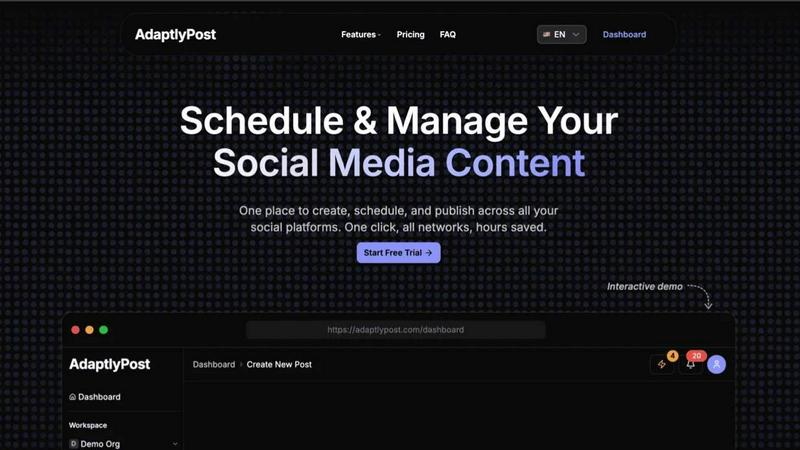
Streamline your social media strategy with AdaptlyPost, the all-in-one platform to create, schedule, and publish content effortlessly.
Last updated: March 11, 2026

BlitzCut
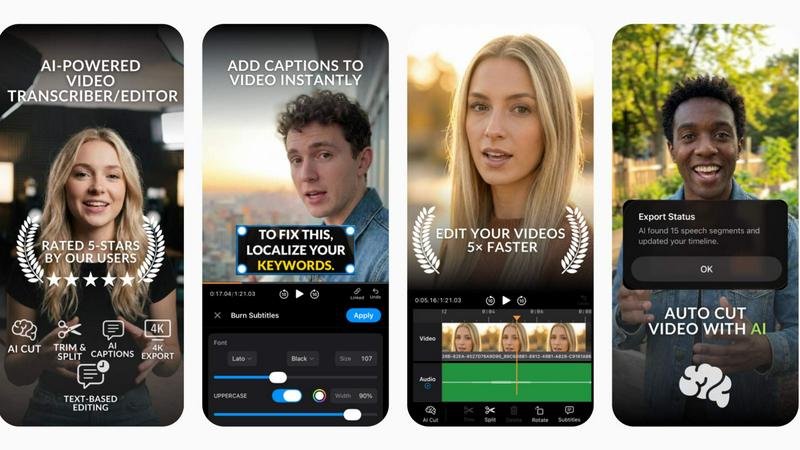
BlitzCut transforms raw video into polished posts in minutes by auto-removing silence and adding stylish captions.
Last updated: February 28, 2026
Visual Comparison
AdaptlyPost
BlitzCut
Feature Comparison
AdaptlyPost
Smart Scheduling
AdaptlyPost allows users to schedule and manage social media content efficiently. With a smart scheduling feature, users can plan their posts for optimal times across various platforms, ensuring maximum visibility and engagement.
Multi-Platform Posting
With just one click, users can publish content to multiple social media platforms simultaneously. Each post is automatically optimized for the specific requirements and tone of each platform, allowing for a seamless cross-channel experience.
AI Caption Copilot
The AI Caption Copilot is a game changer for content creators. It generates captivating captions tailored to different platforms, provides rewriting suggestions, and even incorporates trending hashtags, making it easier to engage with audiences.
AI Image Studio
The AI Image Studio empowers users to create stunning visuals in seconds. By simply describing their vision, users can generate eye-catching images that capture attention and enhance their social media posts, making content creation a breeze.
BlitzCut
Automatic Silence Removal
BlitzCut's Automatic Silence Removal feature uses advanced AI algorithms to instantly detect and remove all silent pauses in your video. This means you no longer have to spend 15-20 minutes manually cutting out dead air. With just one tap, your raw footage becomes a concise, engaging video ready for posting.
AI Captions
With BlitzCut's AI Captions, you can generate text overlays with over 95% accuracy in popular viral styles. This feature not only enhances the accessibility of your videos but also makes them more engaging for viewers. Say goodbye to the tedious task of manually adding captions; BlitzCut does it all for you in seconds.
Text-Based Editing
Text-Based Editing allows you to edit your video by simply deleting sentences from the transcription. This innovative feature eliminates the need for complex timelines and cuts, enabling you to make quick, precise edits that reflect your creative vision effortlessly.
2-Minute Workflow
BlitzCut's 2-Minute Workflow is a game changer for creators on the go. From importing your raw clip to exporting the polished video, the entire process takes less than two minutes. This efficiency is crucial for creators who need to post daily and keep their audience engaged.
Use Cases
AdaptlyPost
Social Media Management for Influencers
Influencers can leverage AdaptlyPost to manage their content across various platforms effortlessly. By scheduling posts in advance and utilizing the AI tools, they can maintain consistent engagement with their audience without the hassle.
Content Strategy for Businesses
Businesses can utilize AdaptlyPost to execute their social media strategies more effectively. By analyzing post performance and scheduling content based on insights, they can boost their brand visibility and reach a larger audience.
Creative Campaigns for Agencies
Marketing agencies can benefit from AdaptlyPost by managing multiple client accounts from one dashboard. The AI-driven tools help agencies create engaging content quickly, meeting client demands while maintaining high-quality output.
Personal Branding for Solopreneurs
Solopreneurs can enhance their personal brand using AdaptlyPost by creating, scheduling, and publishing content that resonates with their target audience. The platform’s automation features free up time for them to focus on other aspects of their business.
BlitzCut
Social Media Content Creation
BlitzCut is perfect for social media influencers who need to produce high-quality videos quickly. With its AI-driven features, creators can effortlessly turn raw footage into polished content for platforms like TikTok and Instagram Reels in no time.
Educational Video Production
Educators can leverage BlitzCut to create engaging instructional videos. The automatic silence removal and caption features make it easy to produce clear, concise educational content that captures students' attention.
Marketing and Promotions
Businesses can use BlitzCut to create promotional videos that stand out. The ability to quickly edit and caption videos allows marketing teams to respond promptly to trends and engage customers effectively.
Vlog Editing
Vloggers can benefit from BlitzCut by streamlining their editing process. With the AI-powered features, they can focus on storytelling while BlitzCut manages the technical aspects, ensuring their vlogs are both captivating and professional.
Overview
About AdaptlyPost
AdaptlyPost is an innovative all-in-one social media management dashboard designed to streamline the content creation, scheduling, and publishing processes across multiple platforms like X, Instagram, TikTok, and YouTube. Ideal for individuals, solopreneurs, and growing teams, AdaptlyPost helps users stop the chaos of juggling various applications by providing a single, powerful solution. With its AI Co-pilot, users can generate tailored captions that adapt to each platform's unique tone and style. The AI Image Studio empowers users to create eye-catching visuals effortlessly, saving valuable time and enhancing engagement. By consolidating drafts and scheduled posts in one unified pipeline, AdaptlyPost enables users to create once and post everywhere, effectively saving hours each week while maximizing social media reach and impact.
About BlitzCut
BlitzCut is a revolutionary AI-powered video editing tool designed specifically for content creators eager to streamline their editing process. By leveraging advanced AI technology, BlitzCut transforms the traditional, time-consuming video editing workflow into a lightning-fast experience. Whether you are a TikTok influencer, Instagram Reels creator, or YouTube Shorts producer, BlitzCut makes it possible to generate high-quality, engaging videos in just minutes. The app is built with a mobile-first approach, ensuring that creators can edit their videos directly from their iPhone, iPad, or Mac without the hassle of uploading large files. By automating tedious tasks such as silence removal and caption generation, BlitzCut empowers creators to focus on what truly matters: crafting compelling content. This dedication to efficiency and creativity makes BlitzCut the go-to solution for anyone serious about growing their online presence.
Frequently Asked Questions
AdaptlyPost FAQ
Which social media platforms do you support?
AdaptlyPost supports a variety of platforms including X, Instagram, TikTok, YouTube, and more, allowing users to manage their presence across all major social networks seamlessly.
Will my posts get less reach than posting manually?
No, posts made through AdaptlyPost are designed to maintain or even enhance reach. Each post is optimized for the specific platform, ensuring that the content is effective and engaging.
Can I schedule posts in advance?
Absolutely! AdaptlyPost allows users to schedule posts in advance, enabling them to plan their content strategy effectively and ensure consistent posting without the need for manual intervention.
How does the AI caption writer work?
The AI caption writer generates tailored captions based on user prompts. It can rewrite captions for different platforms and suggest trending hashtags, making it an essential tool for engaging content creation.
BlitzCut FAQ
How does BlitzCut handle silence removal?
BlitzCut utilizes sophisticated AI algorithms to automatically detect and remove silent gaps in your videos, allowing for a smoother and more engaging viewing experience without manual intervention.
Can I export my videos directly to social media platforms?
Yes, BlitzCut enables you to export your edited videos directly to platforms like TikTok, Instagram, and YouTube, making the posting process seamless and efficient.
Is BlitzCut available for free?
BlitzCut is free to download and use, allowing creators to start editing without any upfront costs or the need for an account.
What devices are compatible with BlitzCut?
BlitzCut is designed with a mobile-first approach and is compatible with iPhone, iPad, and Mac, ensuring that you can edit videos anywhere, anytime.
Alternatives
AdaptlyPost Alternatives
AdaptlyPost is a powerful content creation platform designed to streamline the process of publishing across multiple social media channels like X, Instagram, TikTok, and YouTube. With its innovative features, including an AI Co-pilot for generating platform-specific captions and an AI Image Studio for creating eye-catching visuals, it positions itself as an all-in-one solution for marketers and content creators. However, users often seek alternatives due to various reasons such as pricing structures, specific feature sets, or compatibility with different social media platforms. When choosing an alternative, it's crucial to consider aspects like user-friendliness, the range of supported platforms, the effectiveness of automation tools, and the quality of customer support. Ultimately, the right choice should enhance your content strategy without complicating it.
BlitzCut Alternatives
BlitzCut is an innovative AI video editing tool designed specifically for content creators, streamlining the editing process by automatically cutting silence and adding captions. It addresses the needs of social media video production, where speed and efficiency are crucial. As creators seek faster, more effective solutions, they often look for alternatives that may offer different pricing structures, additional features, or compatibility with various platforms. When searching for an alternative to BlitzCut, it's essential to evaluate several factors such as the speed of the editing process, ease of use, and whether the tool can handle specific content formats. Consideration should also be given to customer support, user community, and any unique features that can enhance your creative workflow. Ultimately, the right choice will depend on individual needs and preferences in video editing.