
BlitzCut vs Seedance 2.0

BlitzCut
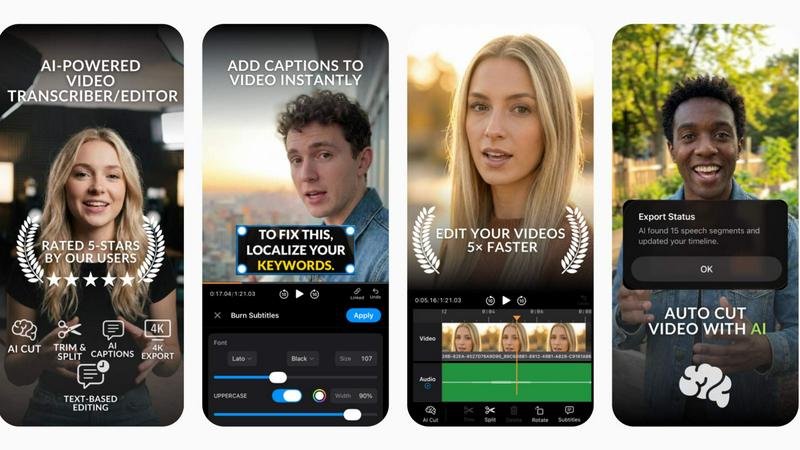
BlitzCut transforms raw video into polished posts in minutes by auto-removing silence and adding stylish captions.
Last updated: February 28, 2026

Seedance 2.0
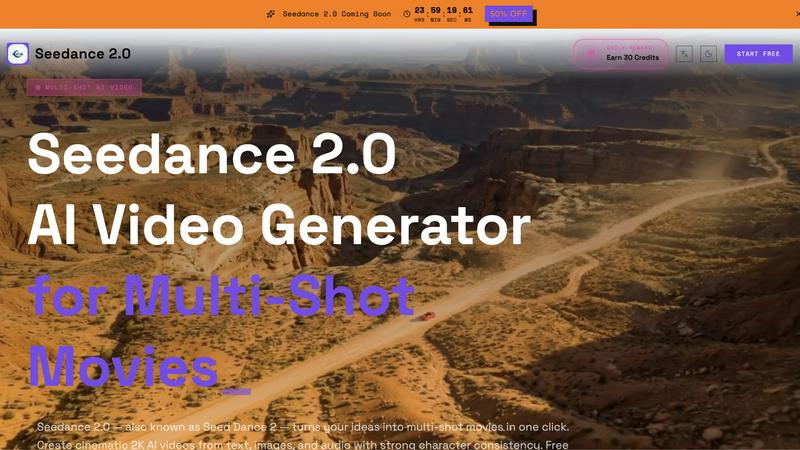
Seedance 2.0 is the free AI video generator that creates multi-shot cinematic movies from your text or images.
Last updated: February 28, 2026
Visual Comparison
BlitzCut
Seedance 2.0
Feature Comparison
BlitzCut
Automatic Silence Removal
BlitzCut's Automatic Silence Removal feature uses advanced AI algorithms to instantly detect and remove all silent pauses in your video. This means you no longer have to spend 15-20 minutes manually cutting out dead air. With just one tap, your raw footage becomes a concise, engaging video ready for posting.
AI Captions
With BlitzCut's AI Captions, you can generate text overlays with over 95% accuracy in popular viral styles. This feature not only enhances the accessibility of your videos but also makes them more engaging for viewers. Say goodbye to the tedious task of manually adding captions; BlitzCut does it all for you in seconds.
Text-Based Editing
Text-Based Editing allows you to edit your video by simply deleting sentences from the transcription. This innovative feature eliminates the need for complex timelines and cuts, enabling you to make quick, precise edits that reflect your creative vision effortlessly.
2-Minute Workflow
BlitzCut's 2-Minute Workflow is a game changer for creators on the go. From importing your raw clip to exporting the polished video, the entire process takes less than two minutes. This efficiency is crucial for creators who need to post daily and keep their audience engaged.
Seedance 2.0
Multi-Shot Director
Go beyond a single clip and script entire scenes. Seedance 2.0's Multi-Shot Director allows you to craft narratives with up to 6 distinct shots in one generation pass. Define individual prompts, durations, and settings for each shot, enabling you to create complex sequences—like a wide establishing shot cutting to a close-up—without manual editing or stitching. This feature is a direct challenge to generators that force you to create one disjointed clip at a time.
Reference-Driven Consistency
Lock in your creative vision with pixel-perfect precision. Upload up to 3 reference images to dictate character appearance, artistic style, and color palette across your entire generated video. This ensures your protagonist looks identical from scene to scene and your visual theme remains cohesive, solving the biggest pain point in AI video: character and style drift. It’s the key to building believable worlds and recognizable brand assets.
First & Last Frame Control
Take command of your transitions and motion arcs. This advanced feature lets you define the exact opening and closing keyframes of your video, either by uploading images or describing them. Seedance 2.0's AI then intelligently generates the natural motion in between. This is indispensable for filmmakers and creators who need specific starting and ending compositions for pre-visualization, seamless scene transitions, or demonstrating transformations.
Unified Multimodal Workflow
Why switch between different tools? Seedance 2.0 consolidates every major AI video workflow into a single, powerful interface. Seamlessly switch between text-to-video, image-to-video, reference-driven generation, and voice-synced audio inputs without compromising on power or control. This all-in-one approach streamlines production, making it faster and more efficient than juggling multiple specialized platforms.
Use Cases
BlitzCut
Social Media Content Creation
BlitzCut is perfect for social media influencers who need to produce high-quality videos quickly. With its AI-driven features, creators can effortlessly turn raw footage into polished content for platforms like TikTok and Instagram Reels in no time.
Educational Video Production
Educators can leverage BlitzCut to create engaging instructional videos. The automatic silence removal and caption features make it easy to produce clear, concise educational content that captures students' attention.
Marketing and Promotions
Businesses can use BlitzCut to create promotional videos that stand out. The ability to quickly edit and caption videos allows marketing teams to respond promptly to trends and engage customers effectively.
Vlog Editing
Vloggers can benefit from BlitzCut by streamlining their editing process. With the AI-powered features, they can focus on storytelling while BlitzCut manages the technical aspects, ensuring their vlogs are both captivating and professional.
Seedance 2.0
Indie Filmmakers & Short Film Creators
For directors working with limited crews and budgets, Seedance 2.0 is a revolutionary pre-visualization and production tool. Use the Multi-Shot Director to block out entire scenes, experiment with pacing, and generate compelling visual proofs of concept. The reference consistency ensures characters remain stable across shots, allowing for the creation of professional-grade short film sequences and trailers that tell a coherent visual story.
Social Media Content Creators
Dominate platforms like TikTok, Instagram Reels, and YouTube Shorts with a consistent, high-quality aesthetic. Quickly produce engaging, multi-shot narrative clips for tutorials, skits, or visual stories. The ability to lock style and character with references means you can build a recognizable personal or brand identity across all your content, making your channel look polished and professional without a video editing suite.
Marketing & Advertising Teams
Accelerate campaign production and ensure brand consistency at scale. Generate multiple ad variants featuring the same brand spokesperson or animated character using the reference-driven elements. The API allows for batch rendering of personalized video content, while the 2K quality ensures assets are ready for prime-time social and digital advertising, drastically cutting down production time and cost.
Game Developers & Concept Artists
Breathe life into static artwork and create dynamic promotional material. Transform concept art, character designs, and environment paintings into cinematic teaser trailers or in-game cutscene mockups using the image-to-video and frame control features. This allows for rapid prototyping of game narratives and the creation of stunning, motion-filled content to engage communities and stakeholders.
Overview
About BlitzCut
BlitzCut is a revolutionary AI-powered video editing tool designed specifically for content creators eager to streamline their editing process. By leveraging advanced AI technology, BlitzCut transforms the traditional, time-consuming video editing workflow into a lightning-fast experience. Whether you are a TikTok influencer, Instagram Reels creator, or YouTube Shorts producer, BlitzCut makes it possible to generate high-quality, engaging videos in just minutes. The app is built with a mobile-first approach, ensuring that creators can edit their videos directly from their iPhone, iPad, or Mac without the hassle of uploading large files. By automating tedious tasks such as silence removal and caption generation, BlitzCut empowers creators to focus on what truly matters: crafting compelling content. This dedication to efficiency and creativity makes BlitzCut the go-to solution for anyone serious about growing their online presence.
About Seedance 2.0
Forget single-shot AI video toys. Seedance 2.0 is the battle-hardened, multimodal video generator engineered for creators who demand cinematic quality and professional control. It transforms your text, images, and audio into cohesive, multi-shot 2K movies with a single click, shattering the limitations of basic generators. Built on powerful Bytedance AI, it unifies advanced directing tools like multi-shot scripting, reference-driven consistency, and frame-level precision into one intuitive platform. This isn't just about making a video; it's about directing it. Seedance 2.0 is built for indie filmmakers, social media power creators, marketing teams, and agencies who need to produce high-fidelity, stylistically consistent content at speed. With a free-to-start model requiring no sign-up and robust API access for batch operations, it delivers professional-grade results without the traditional barriers to entry, positioning itself as the definitive tool for the next generation of visual storytelling.
Frequently Asked Questions
BlitzCut FAQ
How does BlitzCut handle silence removal?
BlitzCut utilizes sophisticated AI algorithms to automatically detect and remove silent gaps in your videos, allowing for a smoother and more engaging viewing experience without manual intervention.
Can I export my videos directly to social media platforms?
Yes, BlitzCut enables you to export your edited videos directly to platforms like TikTok, Instagram, and YouTube, making the posting process seamless and efficient.
Is BlitzCut available for free?
BlitzCut is free to download and use, allowing creators to start editing without any upfront costs or the need for an account.
What devices are compatible with BlitzCut?
BlitzCut is designed with a mobile-first approach and is compatible with iPhone, iPad, and Mac, ensuring that you can edit videos anywhere, anytime.
Seedance 2.0 FAQ
Is Seedance 2.0 really free to use?
Yes, you can start using Seedance 2.0 immediately for free without any sign-up required. The platform offers a daily reward of credits to get you started. For extended, high-volume use, there is a Pro credit system and API access available for purchase, allowing you to scale your video generation to meet professional production needs.
How does Seedance 2.0 ensure character consistency?
Seedance 2.0 tackles the character consistency challenge head-on with its Reference-Driven Consistency feature. By allowing you to upload up to 3 reference images, the AI model locks onto the visual details of your character—their face, clothing, and style—and maintains it across different shots and scenes within a single generation, a capability most basic generators lack.
What video quality and format does it output?
Seedance 2.0 generates videos in cinematic 2K resolution, providing high-definition clarity suitable for social media, professional presentations, and more. The final output is delivered as a high-quality, watermark-free MP4 file, ready for download, sharing, or further editing in your preferred video software suite.
Can I control the length and aspect ratio of my videos?
Absolutely. Seedance 2.0 provides flexible settings that put you in control. You can set the duration of your video or individual shots, and choose from standard aspect ratios like 16:9 (widescreen) or 9:16 (vertical for mobile). This ensures your content is perfectly formatted for its intended platform, from YouTube to TikTok.
Alternatives
BlitzCut Alternatives
BlitzCut is an innovative AI video editing tool designed specifically for content creators, streamlining the editing process by automatically cutting silence and adding captions. It addresses the needs of social media video production, where speed and efficiency are crucial. As creators seek faster, more effective solutions, they often look for alternatives that may offer different pricing structures, additional features, or compatibility with various platforms. When searching for an alternative to BlitzCut, it's essential to evaluate several factors such as the speed of the editing process, ease of use, and whether the tool can handle specific content formats. Consideration should also be given to customer support, user community, and any unique features that can enhance your creative workflow. Ultimately, the right choice will depend on individual needs and preferences in video editing.
Seedance 2.0 Alternatives
Seedance 2.0 is a powerful AI video generator that dominates the multi-shot movie creation category. It transforms text, images, and audio into cinematic 2K sequences with unmatched character consistency, all within a unified platform. This positions it as a comprehensive tool for creators who think in scenes, not just single clips. Users often explore alternatives for various reasons. Budget constraints, specific feature needs like different aspect ratios or longer video lengths, and platform compatibility can drive the search. Some may seek simpler, single-shot tools, while others require deeper integration with existing editing software or different pricing models. When evaluating an alternative, focus on your core needs. Can it maintain character consistency across multiple shots? Does it offer precise control over transitions and composition? Is the workflow unified or fragmented across different apps? The right tool should match your ambition, whether it's for rapid social content or polished narrative filmmaking.