
Browsilla vs Proofapp

Browsilla
Ditch Chrome's empty tab for a focused dashboard with tasks, bookmarks, and weather.
Last updated: February 28, 2026

Proofapp
Stop wasting time on miscommunication and endless email chains; get instant visual feedback directly on your website.
Last updated: March 3, 2026
Visual Comparison
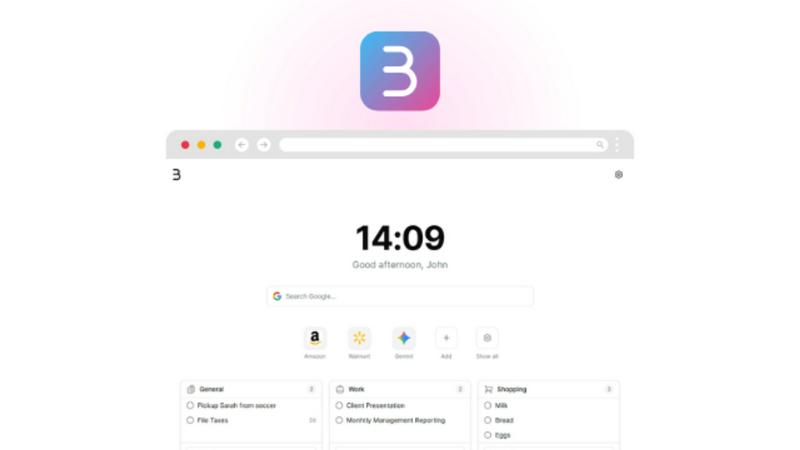
Browsilla
Proofapp

Feature Comparison
Browsilla
Integrated Task Manager
Stop the app-switching madness. Browsilla embeds a powerful task manager directly into your new tab, allowing you to add, organize into folders, and check off to-dos without ever leaving your browser. Your most critical action items are front and center every time you open a tab, ensuring nothing slips through the cracks and your workflow remains uninterrupted from the very first click.
Instant Quick Bookmarks
Forget digging through chaotic bookmark folders. Pin your most essential websites directly onto your Browsilla dashboard for one-click access. This feature eliminates unnecessary navigation, letting you launch your go-to tools, dashboards, and resources instantly. It's about reducing friction and saving precious seconds that add up to regained hours over time.
At-a-Glance Local Weather
Check your local weather conditions and temperature without opening a distracting new tab or a separate app. Browsilla provides automatic, updated weather information right on your dashboard, allowing you to plan your day effectively before you dive into your work. It's a utility that respects your time, delivering need-to-know information without the fluff.
Distraction-Free Instant Search
A powerful, streamlined search bar sits prominently on your dashboard, putting the entire web at your fingertips without extra clicks or redirects. Type and search directly with Google, bypassing the clutter of a traditional search engine homepage. This feature is about speed and directness, ensuring your research and lookups don't derail your focus.
Proofapp
Visual Commenting
With Proofapp's visual commenting feature, users can click anywhere on a screenshot to leave contextual feedback. This eliminates the confusion common with traditional feedback methods, allowing for clear communication about specific design elements.
Multi-Breakpoint Testing
Proofapp automatically captures screenshots at both desktop and mobile breakpoints, facilitating a comprehensive review process. This feature ensures that clients can see how their website appears across devices, leading to more informed feedback.
Real-time Collaboration
Proofapp enables real-time collaboration among team members. As comments are made, everyone involved can see updates instantly, allowing for swift replies and resolutions, which keeps projects moving forward without unnecessary delays.
Secure Share Links
Users can share projects with clients via secure, expirable links. This feature ensures that feedback is gathered securely, giving clients access to only the necessary elements of the project for commenting, without requiring account creation.
Use Cases
Browsilla
The Focused Creator
For writers, designers, and developers, a cluttered digital environment kills creativity. Browsilla provides a serene, task-oriented launchpad. They start their session with a clear to-do list, quick links to research or design tools, and a dose of daily inspiration—all without the temptation of news feeds or social media prompts, enabling deep work from the first new tab.
The Strategic Entrepreneur
Entrepreneurs juggle countless tabs and apps. Browsilla consolidates their operational hub into one place. They track critical tasks, instantly access analytics dashboards, CRM tools, and financial platforms via quick bookmarks, and get a quick weather check for travel planning—all from a single, unified view that accelerates decision-making and daily execution.
The Efficiency-Driven Executive
Executives need information fast, without noise. Browsilla serves as a clean, executive dashboard for the browser. They review priority actions, jump straight to key performance reports or communication platforms, and use the instant search for quick fact-checks during preparation, all while maintaining a privacy-first stance that corporate security demands.
The Student Managing Projects
Students overwhelmed by research tabs and assignment deadlines use Browsilla to stay organized. They keep project tasks visible, bookmark essential academic portals and libraries, and use the clean search to avoid distracting "recommended" content. It turns their browser into a study station, promoting focus and reducing digital clutter during intensive work sessions.
Proofapp
Freelancers
Freelancers can leverage Proofapp to streamline client feedback, allowing for quick and effective revisions. By pinning comments directly on designs, they can present a professional image while saving hours on project management.
Small Development Teams
Small development teams benefit from Proofapp's ability to enhance client approvals without the burden of enterprise pricing. This tool simplifies the feedback process, enabling teams to focus on delivering high-quality work efficiently.
Design Teams
Design teams utilize Proofapp to receive precise visual feedback from clients and stakeholders. By having comments pinned exactly where they matter, designers can make targeted changes that align with client expectations.
Marketing Teams
Marketing teams can employ Proofapp to review landing pages and campaigns visually. The ability to gather feedback in a straightforward manner helps these teams remain agile and responsive to changes, ultimately enhancing campaign effectiveness.
Overview
About Browsilla
Browsilla is a battle-tested Chrome extension that declares war on the default new tab page, transforming it from a blank void or a distracting news feed into a purpose-built command center for productivity. It surgically removes the clutter, clickbait, and chaos of typical start pages, replacing them with a clean, minimal dashboard designed for one thing: getting things done. This tool is engineered specifically for creators, entrepreneurs, and executives who refuse to let their browser dictate their focus. Its core value proposition is razor-sharp: deliver everything you need for a productive session—tasks, bookmarks, weather, search—and eliminate everything you don't. Operating with a privacy-first, no-account-required philosophy, Browsilla loads instantly, respects your data, and integrates seamlessly. A single installation reclaims every new tab, turning a mundane action into a strategic advantage for maintaining concentration and momentum throughout your workday.
About Proofapp
Proofapp is a revolutionary visual feedback and website review platform designed to enhance collaboration among designers, developers, and clients. By allowing users to upload any website URL, Proofapp automatically captures screenshots for both desktop and mobile views, streamlining the feedback process. This tool is perfect for freelancers, small development teams, and agencies managing multiple projects, as it eliminates the chaos that often accompanies scattered emails and vague revision requests. With features like real-time notifications, Slack integration, and customizable settings, Proofapp transforms the way feedback is gathered and managed. Users can pin comments directly on the designs, reply in threaded conversations, and attach files for clarity—all without needing an account. This not only improves productivity but also ensures that feedback is organized, visual, and actionable, making it an ideal solution for anyone looking to enhance their project workflow.
Frequently Asked Questions
Browsilla FAQ
Is Browsilla really free?
Yes, Browsilla is completely free, now and forever. There are no hidden fees, premium tiers, or feature paywalls. We believe powerful, privacy-focused productivity tools should be accessible to everyone without requiring a subscription or account commitment.
Do I need to create an account?
Absolutely not. Browsilla requires zero personal information. You install it and it works immediately. Your data, like tasks and bookmarks, is synced across your devices using an anonymous identifier, not an email or password, upholding our core privacy-first principle.
Is my data private and secure?
Your privacy is our battle standard. Browsilla performs no tracking, sells no data, and uses no third-party analytics. We employ self-hosted, anonymous analytics to improve the extension only. Your tasks and bookmarks are yours alone; they stay on your device and are synced anonymously.
Does Browsilla slow down my browser?
Not at all. Browsilla is engineered to be lightweight and fast. It loads instantly, with no bloat or background processes that drain resources. Your new tab will open just as quickly as the default Chrome page, but now it's packed with utility instead of being empty or distracting.
Proofapp FAQ
How does Proofapp improve feedback collection?
Proofapp improves feedback collection by providing a visual platform where comments can be pinned directly on designs. This visual approach significantly reduces miscommunication and speeds up the revision process.
Can clients leave feedback without creating an account?
Yes, clients can leave feedback without needing to create an account. Proofapp allows users to generate secure links that clients can use to access the project and provide comments directly on the visuals.
Is Proofapp suitable for larger teams?
Absolutely, Proofapp is designed to scale with your needs. While it's perfect for smaller teams, its robust features make it suitable for larger teams and agencies as well, ensuring efficient collaboration at any scale.
What kind of security measures does Proofapp implement?
Proofapp implements enterprise-level security measures, including role-based permissions, audit logs, and secure data handling practices. These features ensure that all project data is protected and only accessible to authorized users.
Alternatives
Browsilla Alternatives
Browsilla is a productivity-focused new tab extension for Chrome that transforms your browser's blank page into a clean, purpose-built hub for tasks, links, and search. It belongs squarely in the productivity and management category, designed to eliminate distractions and accelerate workflow. Users often seek alternatives for various reasons, including specific feature needs, different aesthetic preferences, or compatibility with other browsers and platforms. When evaluating other options, it's crucial to scrutinize their core philosophy. Does the tool add to your cognitive load with news feeds and ads, or does it subtract clutter to promote deep work? Consider the implementation of privacy, data collection policies, and whether the extension requires an account. The best alternative will align with your need for either minimalist utility or a more feature-rich dashboard. Ultimately, the right choice boils down to a battle for your focus. You must decide if you want a new tab that serves as a serene command center for execution or a bustling portal of information. Prioritize extensions that respect your time, your data, and your primary objective: getting things done without unnecessary friction.
Proofapp Alternatives
Proofapp is a powerful visual feedback and website review platform designed to streamline collaboration among designers, developers, and their clients. With its ability to capture screenshots of any website on both desktop and mobile, it falls into the Productivity & Management category, making it an essential tool for efficient project management and client communication. Users often seek alternatives to Proofapp due to various reasons, such as budget constraints, specific feature requirements, or compatibility with different platforms. When choosing an alternative, it's crucial to evaluate the range of features offered, user interface, ease of integration with existing workflows, and the overall cost. A good alternative should enhance your ability to collect and manage feedback without adding unnecessary complexity to your projects.