
BudgetSheet vs LeapCount

BudgetSheet
Stop manual data entry; BudgetSheet automates live bank feeds directly into your Google Sheets.
Last updated: February 28, 2026

LeapCount
LeapCount is your all-in-one business platform for managing finances, projects, and inventory—all for free for up to 5.
Last updated: February 28, 2026
Visual Comparison
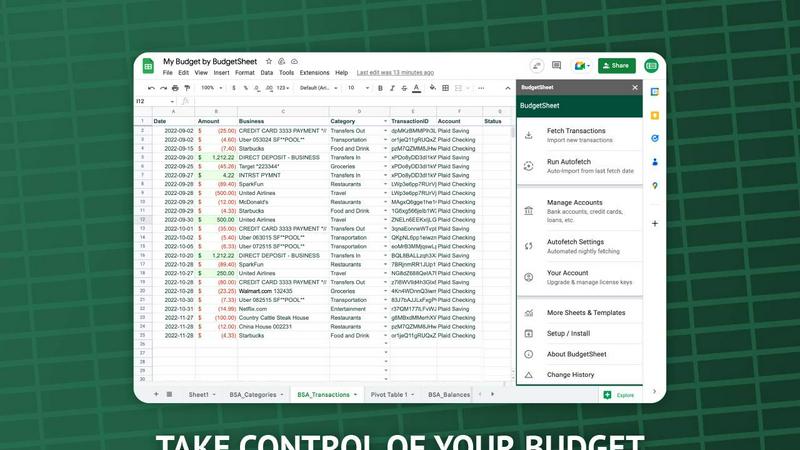
BudgetSheet
LeapCount

Feature Comparison
BudgetSheet
Direct Bank-to-Sheet Automation
Forget manual downloads. BudgetSheet eliminates the tedious process of logging into each bank, exporting CSV files, and reformatting data. With a single click, you can fetch the latest transactions from all your linked accounts directly into your Google Sheet. This feature provides a seamless, automated pipeline that ensures your financial data is always current without any manual intervention, saving you hours each month.
Support for 10,000+ Financial Institutions
BudgetSheet connects to virtually any bank or financial service in the U.S. and Canada through its integration with Plaid. Whether you're tracking a checking account, savings, credit cards, mortgages, or investment portfolios, chances are your institution is supported. This universal compatibility ensures you can consolidate all your financial data in one place, no matter how fragmented your accounts are across different providers.
Full Customization & Advanced Control
Unlike closed-platform apps, BudgetSheet delivers raw transaction data into your own spreadsheet. This gives you complete freedom to create custom budgets, build dynamic dashboards, run complex analyses, and set up automated workflows using Google Apps Script, Zapier, or other tools. You define the categories, rules, and visualizations that matter for your unique financial picture.
Secure, Read-Only Connections
Security is paramount. BudgetSheet uses Plaid for all bank connections, meaning your login credentials are never handled or stored by BudgetSheet. The add-on only stores an encrypted, read-only access token. Furthermore, BudgetSheet itself does not store your transaction data; it acts as a secure conduit, passing data directly from your bank to your spreadsheet, which you fully own and control.
LeapCount
Professional Accounting
LeapCount's Professional Accounting feature serves as a robust alternative to industry leaders like Xero and QuickBooks. Users can create stunning invoices, track Accounts Receivable and Payable, and automate journal entries. This module empowers businesses to maintain a well-organized Chart of Accounts, enabling them to manage finances like a pro and potentially saving hundreds of dollars annually.
Project Management
The Project Management module includes dynamic drag-and-drop Kanban boards that rival those of Trello and ClickUp. Teams have the ability to organize tasks and collaborate in real-time, complete with comments and updates. This module not only tracks timelines and priorities but also maintains detailed audit trails, ensuring full accountability and transparency throughout project lifecycles.
Inventory Control
LeapCount's Inventory Control feature is a sophisticated multi-location system that simplifies warehouse management. It effectively handles stock in and out workflows, as well as inter-warehouse transfers, guaranteeing that businesses always have a clear view of their inventory balances. This ensures optimized stock levels and reduces the risk of overstocking or stockouts.
Cloud Storage
With 1GB of free storage, LeapCount offers a powerful cloud storage solution that facilitates team collaboration and file sharing. Users can organize their files into designated workspaces, share documents through public links, and even download files as ZIP archives. This feature enhances productivity, allowing teams to work together efficiently, regardless of their physical location.
Use Cases
BudgetSheet
For Power Users Building Custom Financial Dashboards
Financial analysts, small business owners, and savvy individuals use BudgetSheet to feed live transaction data into complex, custom-built Google Sheet dashboards. They can create real-time profit & loss statements, cash flow forecasts, and custom spending analyses that off-the-shelf software cannot match, maintaining complete control over formulas, charts, and data structure.
For Individuals Escaping Restrictive Budgeting Apps
Users frustrated with the one-size-fits-all approach of apps like Mint or YNAB turn to BudgetSheet for liberation. It allows them to import all their transactions into a familiar spreadsheet environment where they can design a budgeting system that perfectly fits their lifestyle, categories, and financial goals without being forced into a rigid template.
For Streamlining Business Expense Tracking
Freelancers and small business owners connect their business accounts to automatically pull transactions into a dedicated Google Sheet. This automates the foundational step of bookkeeping, making it easy to categorize expenses, prepare for tax season, and generate reports without manually compiling statements from multiple sources.
For Advanced Automation and Integration
Tech-oriented users leverage BudgetSheet as a reliable data source for advanced automation. By having clean, updated transaction data in Sheets, they can trigger workflows in Zapier, use Google Apps Script to send custom alerts, or integrate with other APIs to build a fully automated personal finance ecosystem tailored to their specific needs.
LeapCount
Freelance Management
Freelancers can leverage LeapCount to streamline their operations. With Professional Accounting, they can manage invoices and track payments effortlessly, while the Project Management module helps keep client projects organized. This comprehensive approach allows freelancers to focus on delivering quality work without getting bogged down by administrative tasks.
Startup Operations
Startups often face tight budgets and resource constraints. LeapCount provides an affordable solution by offering essential tools without the hefty price tag. The integrated modules ensure that all business functions, from finance to project management, are efficiently managed in one place, allowing startups to scale without overburdening their financial resources.
Inventory Management for SMEs
Small to Medium Enterprises can utilize LeapCount's Inventory Control feature to manage their stock effectively. By having a real-time view of inventory across multiple locations, businesses can optimize their supply chains, reduce waste, and enhance their customer service by ensuring product availability.
Team Collaboration
LeapCount enhances team collaboration through its Project Management and Cloud Storage features. Teams can communicate in real-time, share files easily, and track project progress collectively. This unified platform fosters a collaborative environment where teams can work more effectively, leading to increased productivity and faster project completions.
Overview
About BudgetSheet
Tired of clunky, restrictive budgeting apps that lock your data away? BudgetSheet is the battle-tested solution that puts you back in the driver's seat. This powerful Google Sheets add-on delivers live, automated bank transactions directly into your spreadsheet, ending the manual nightmare of CSV exports and copy-pasting forever. It's built for financial power users, savvy analysts, and anyone who demands full control over their financial data. While other platforms like Mint force you into their pre-defined categories and dashboards, BudgetSheet gives you the raw data to build custom budgets, forecasts, and reports exactly your way. By leveraging Plaid's secure infrastructure, it connects to over 10,000 financial institutions—including checking, savings, credit cards, loans, and investment accounts—and automates the data flow. Your spreadsheet becomes the single source of truth, ready for advanced automation with tools like Google Apps Script or Zapier. If you've outgrown basic apps and need a flexible, powerful system that adapts to you, not the other way around, BudgetSheet is your definitive tool.
About LeapCount
LeapCount is a comprehensive business management platform tailored for freelancers, startups, and Small to Medium Enterprises (SMEs) seeking to combat escalating software costs without sacrificing essential functionality. By consolidating crucial business tools into a unified, intuitive interface, LeapCount eradicates the hassle of managing fragmented subscriptions. This all-in-one solution allows teams to seamlessly track finances, manage projects, share files, and control inventory, all from one centralized location. LeapCount is engineered to replace costly and disjointed software stacks, offering five powerful, integrated modules. These include Professional Accounting, Project Management, Inventory Control, Cloud Storage, and Transportation, each designed to enhance productivity and efficiency. With LeapCount, businesses can expect to save significantly while accessing top-tier functionalities, transforming the way they operate and grow.
Frequently Asked Questions
BudgetSheet FAQ
Is my bank login information secure with BudgetSheet?
Absolutely. BudgetSheet never sees or stores your bank login credentials. It uses Plaid, a industry-leading financial data network, to establish secure, read-only connections. Your credentials are entered directly into Plaid's secure interface. BudgetSheet only receives and stores an encrypted token that allows it to retrieve transaction data, ensuring the highest level of security.
How does BudgetSheet compare to Mint or Personal Capital?
BudgetSheet is for those who want control, while others offer a closed system. Mint provides pre-built charts and categories but locks your data in. BudgetSheet gives you the raw data in your spreadsheet, allowing for unlimited customization, complex analysis, and integration with other tools. It's the choice for users who have outgrown generic templates and want to build their own financial command center.
Can I automate the transaction import process?
Yes. After your initial setup, you can enable the "Autofetch" feature within the add-on. This tells BudgetSheet to automatically fetch new transactions from all your linked accounts every night, fully automating the data pipeline so your spreadsheet is always up-to-date without any manual clicks required.
What happens after the 15-day free trial?
After the free trial, you can choose to upgrade to a paid annual plan starting at $59 USD per year. The upgrade is managed directly from within the BudgetSheet add-on menu in Google Sheets. If you do not upgrade, the add-on will cease to fetch new transactions, but all your historical data and setup will remain intact in your spreadsheet.
LeapCount FAQ
How does LeapCount's pricing work? Is it really free?
LeapCount offers a free tier for up to five users, providing access to all essential features without any cost. This allows small teams to manage their operations without the burden of expensive software subscriptions.
What payment options are available for additional features?
While LeapCount is free for the basic version, users can choose to pay for additional features, such as increased storage or advanced functionalities. The platform is designed to scale with your business needs, ensuring you only pay for what you require.
Are there limits on the number of users or companies I can add?
LeapCount allows you to add up to five users for free. If your team grows beyond that, you can explore paid options to accommodate more users and access enhanced capabilities.
What security measures does LeapCount implement to protect my data?
LeapCount prioritizes the security of its users' data. The platform employs robust security protocols and encryption measures to safeguard sensitive information, ensuring that your business data remains confidential and secure at all times.
Alternatives
BudgetSheet Alternatives
BudgetSheet is the live, automated bridge between your bank accounts and Google Sheets. It belongs to the personal finance automation category, eliminating the tedious manual work of exporting and pasting CSV files. Users get real-time transaction data flowing directly into their custom spreadsheets. People often seek alternatives for a few key reasons. Pricing structures can be a primary driver, as needs evolve from simple tracking to complex budgeting. Others might require integrations beyond Google Sheets or seek a platform with a different set of automated features or reporting tools built directly into an app. When evaluating other options, focus on core needs. Consider the automation depth—does it truly eliminate manual steps? Assess platform compatibility and whether it supports your specific financial institutions. Finally, scrutinize the value: does the cost justify the time saved and the level of financial clarity provided?
LeapCount Alternatives
LeapCount is an all-in-one business management platform tailored for freelancers, startups, and small to medium enterprises (SMEs). This comprehensive tool integrates essential functions like professional accounting, project management, and inventory control, enabling users to streamline operations and reduce software costs. Despite its robust features, users may seek alternatives due to various reasons such as budget constraints, specific feature requirements, or the need for a platform that better aligns with their unique business processes. When exploring alternatives, it's crucial to evaluate pricing structures, the breadth of functionalities offered, and the user interface's intuitiveness. Look for platforms that not only meet your immediate needs but can also scale as your business grows, offering seamless integrations with other tools and services you may already be using. A solution that provides exceptional customer support and community resources will also be invaluable in ensuring a smooth transition and ongoing success.