
BudgetSheet vs Pipeline

BudgetSheet
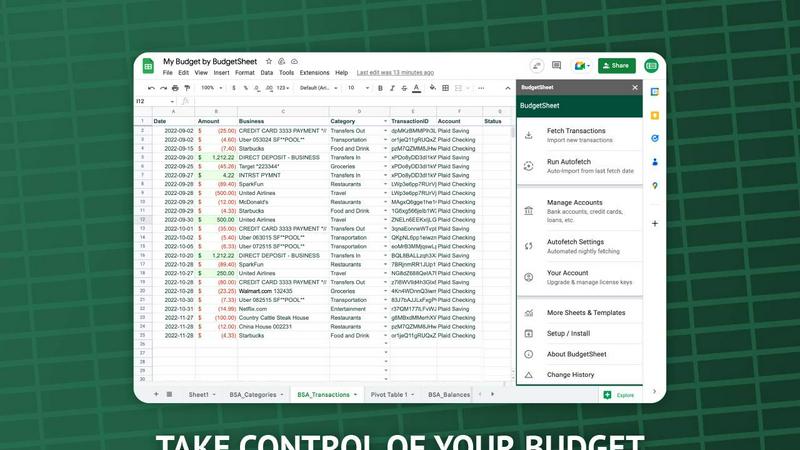
Stop manual data entry; BudgetSheet automates live bank feeds directly into your Google Sheets.
Last updated: February 28, 2026

Last updated: February 28, 2026
Visual Comparison
BudgetSheet
Pipeline
Feature Comparison
BudgetSheet
Direct Bank-to-Sheet Automation
Forget manual downloads. BudgetSheet eliminates the tedious process of logging into each bank, exporting CSV files, and reformatting data. With a single click, you can fetch the latest transactions from all your linked accounts directly into your Google Sheet. This feature provides a seamless, automated pipeline that ensures your financial data is always current without any manual intervention, saving you hours each month.
Support for 10,000+ Financial Institutions
BudgetSheet connects to virtually any bank or financial service in the U.S. and Canada through its integration with Plaid. Whether you're tracking a checking account, savings, credit cards, mortgages, or investment portfolios, chances are your institution is supported. This universal compatibility ensures you can consolidate all your financial data in one place, no matter how fragmented your accounts are across different providers.
Full Customization & Advanced Control
Unlike closed-platform apps, BudgetSheet delivers raw transaction data into your own spreadsheet. This gives you complete freedom to create custom budgets, build dynamic dashboards, run complex analyses, and set up automated workflows using Google Apps Script, Zapier, or other tools. You define the categories, rules, and visualizations that matter for your unique financial picture.
Secure, Read-Only Connections
Security is paramount. BudgetSheet uses Plaid for all bank connections, meaning your login credentials are never handled or stored by BudgetSheet. The add-on only stores an encrypted, read-only access token. Furthermore, BudgetSheet itself does not store your transaction data; it acts as a secure conduit, passing data directly from your bank to your spreadsheet, which you fully own and control.
Pipeline
Matched Visitor Identification
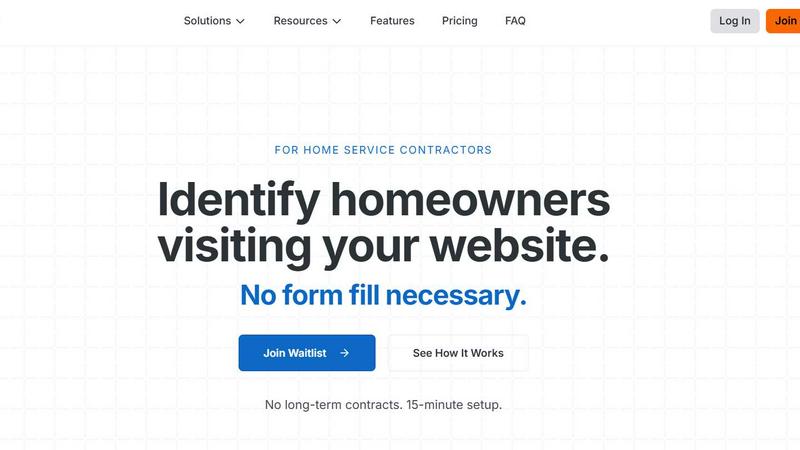
Pipeline's unique technology identifies the names, addresses, and emails of homeowners browsing your website without requiring them to fill out a form. This feature allows you to capture leads effortlessly, significantly increasing your outreach potential.
Automated CRM Integration
Once leads are captured, Pipeline syncs them directly with your existing CRM. This means you can automatically trigger follow-up actions such as emails or physical postcards, streamlining your communication process and ensuring timely engagement with potential customers.
Real-Time Visitor Tracking
With Pipeline, you can monitor live traffic on your website and see who is currently browsing. This real-time data allows you to act quickly and engage visitors while they are still on your site, improving your chances of converting them into customers.
Comprehensive Reporting
Pipeline provides in-depth analytics and reports that help you understand your website traffic better. Track how many leads you’ve captured, the effectiveness of your outreach, and which pages are generating the most interest, enabling you to refine your marketing strategies.
Use Cases
BudgetSheet
For Power Users Building Custom Financial Dashboards
Financial analysts, small business owners, and savvy individuals use BudgetSheet to feed live transaction data into complex, custom-built Google Sheet dashboards. They can create real-time profit & loss statements, cash flow forecasts, and custom spending analyses that off-the-shelf software cannot match, maintaining complete control over formulas, charts, and data structure.
For Individuals Escaping Restrictive Budgeting Apps
Users frustrated with the one-size-fits-all approach of apps like Mint or YNAB turn to BudgetSheet for liberation. It allows them to import all their transactions into a familiar spreadsheet environment where they can design a budgeting system that perfectly fits their lifestyle, categories, and financial goals without being forced into a rigid template.
For Streamlining Business Expense Tracking
Freelancers and small business owners connect their business accounts to automatically pull transactions into a dedicated Google Sheet. This automates the foundational step of bookkeeping, making it easy to categorize expenses, prepare for tax season, and generate reports without manually compiling statements from multiple sources.
For Advanced Automation and Integration
Tech-oriented users leverage BudgetSheet as a reliable data source for advanced automation. By having clean, updated transaction data in Sheets, they can trigger workflows in Zapier, use Google Apps Script to send custom alerts, or integrate with other APIs to build a fully automated personal finance ecosystem tailored to their specific needs.
Pipeline
Increase Lead Generation
Home service contractors can use Pipeline to turn anonymous website visitors into qualified leads. By identifying potential customers who did not fill out a form, contractors can significantly increase their lead generation without additional ad spend.
Enhance Customer Engagement
Pipeline enables contractors to reach out to identified visitors with personalized emails, texts, or postcards. This targeted approach fosters engagement and keeps your business top-of-mind for homeowners considering home services.
Optimize Marketing Strategies
With comprehensive reporting and analytics, contractors can analyze which pages on their website are attracting the most visitors and which types of services generate the most interest. This data allows for more informed marketing decisions and optimized service offerings.
Reduce Wasted Ad Spend
Many contractors spend substantial amounts on online ads but only capture a small percentage of website visitors. Pipeline allows these businesses to recover lost opportunities by providing valuable contact information for the majority of visitors who leave without engaging.
Overview
About BudgetSheet
Tired of clunky, restrictive budgeting apps that lock your data away? BudgetSheet is the battle-tested solution that puts you back in the driver's seat. This powerful Google Sheets add-on delivers live, automated bank transactions directly into your spreadsheet, ending the manual nightmare of CSV exports and copy-pasting forever. It's built for financial power users, savvy analysts, and anyone who demands full control over their financial data. While other platforms like Mint force you into their pre-defined categories and dashboards, BudgetSheet gives you the raw data to build custom budgets, forecasts, and reports exactly your way. By leveraging Plaid's secure infrastructure, it connects to over 10,000 financial institutions—including checking, savings, credit cards, loans, and investment accounts—and automates the data flow. Your spreadsheet becomes the single source of truth, ready for advanced automation with tools like Google Apps Script or Zapier. If you've outgrown basic apps and need a flexible, powerful system that adapts to you, not the other way around, BudgetSheet is your definitive tool.
About Pipeline
Pipeline is a powerful tool designed specifically for home service contractors, revolutionizing the way businesses identify and engage with their website visitors. Unlike traditional methods that rely on form fills, Pipeline can identify up to 40% of anonymous website traffic, turning previously lost visitors into valuable leads. This means that while the industry average conversion rate hovers around 4%, Pipeline can exponentially increase the number of names, emails, and addresses flowing into your sales pipeline, making it an indispensable asset for contractors looking to maximize their marketing ROI. With a simple 15-minute setup, Pipeline seamlessly integrates with existing CRMs, enabling automated follow-ups via email, calls, texts, postcards, and even door knocking, ensuring that no potential customer is left behind.
Frequently Asked Questions
BudgetSheet FAQ
Is my bank login information secure with BudgetSheet?
Absolutely. BudgetSheet never sees or stores your bank login credentials. It uses Plaid, a industry-leading financial data network, to establish secure, read-only connections. Your credentials are entered directly into Plaid's secure interface. BudgetSheet only receives and stores an encrypted token that allows it to retrieve transaction data, ensuring the highest level of security.
How does BudgetSheet compare to Mint or Personal Capital?
BudgetSheet is for those who want control, while others offer a closed system. Mint provides pre-built charts and categories but locks your data in. BudgetSheet gives you the raw data in your spreadsheet, allowing for unlimited customization, complex analysis, and integration with other tools. It's the choice for users who have outgrown generic templates and want to build their own financial command center.
Can I automate the transaction import process?
Yes. After your initial setup, you can enable the "Autofetch" feature within the add-on. This tells BudgetSheet to automatically fetch new transactions from all your linked accounts every night, fully automating the data pipeline so your spreadsheet is always up-to-date without any manual clicks required.
What happens after the 15-day free trial?
After the free trial, you can choose to upgrade to a paid annual plan starting at $59 USD per year. The upgrade is managed directly from within the BudgetSheet add-on menu in Google Sheets. If you do not upgrade, the add-on will cease to fetch new transactions, but all your historical data and setup will remain intact in your spreadsheet.
Pipeline FAQ
How does Pipeline identify anonymous visitors?
Pipeline uses a unique script that you install on your website, which allows it to match browsing data with public records, revealing the names and contact details of homeowners visiting your site.
Is there a long-term contract required?
No, Pipeline does not require long-term contracts. You can try it out without commitment, making it a low-risk investment for your business.
How quickly can I set up Pipeline?
The setup process takes only about 15 minutes. You just need to add a simple line of code to your website's header, and Pipeline can also assist you with this step if needed.
What CRMs does Pipeline integrate with?
Pipeline offers integrations with several popular CRMs, including ServiceTitan, HubSpot, Jobber, and Pipedrive, allowing you to keep your existing workflows intact while enhancing your lead capture capabilities.
Alternatives
BudgetSheet Alternatives
BudgetSheet is the live, automated bridge between your bank accounts and Google Sheets. It belongs to the personal finance automation category, eliminating the tedious manual work of exporting and pasting CSV files. Users get real-time transaction data flowing directly into their custom spreadsheets. People often seek alternatives for a few key reasons. Pricing structures can be a primary driver, as needs evolve from simple tracking to complex budgeting. Others might require integrations beyond Google Sheets or seek a platform with a different set of automated features or reporting tools built directly into an app. When evaluating other options, focus on core needs. Consider the automation depth—does it truly eliminate manual steps? Assess platform compatibility and whether it supports your specific financial institutions. Finally, scrutinize the value: does the cost justify the time saved and the level of financial clarity provided?
Pipeline Alternatives
Pipeline is a cutting-edge tool designed specifically for home service companies, enabling businesses to reveal anonymous traffic on their websites. By identifying visitors who do not engage through forms, Pipeline empowers companies to significantly increase their lead generation efforts. As part of the marketing category, it stands out by integrating seamlessly with CRMs for a comprehensive approach to customer outreach. Users often seek alternatives to Pipeline for various reasons, including pricing structures, specific feature sets, or unique platform requirements that better align with their operational needs. When exploring alternatives, it’s crucial to consider factors such as integration capabilities, the volume of traffic identified, and the overall ease of use. A solution that effectively fills your pipeline with high-quality leads while fitting your budget and workflow will be key to maximizing your marketing efforts.