
BudgetSheet vs Redbark

BudgetSheet
Stop manual data entry; BudgetSheet automates live bank feeds directly into your Google Sheets.
Last updated: February 28, 2026

Redbark
Redbark connects all your Australian bank accounts and brokerages for seamless, real-time financial tracking in one.
Last updated: February 28, 2026
Visual Comparison
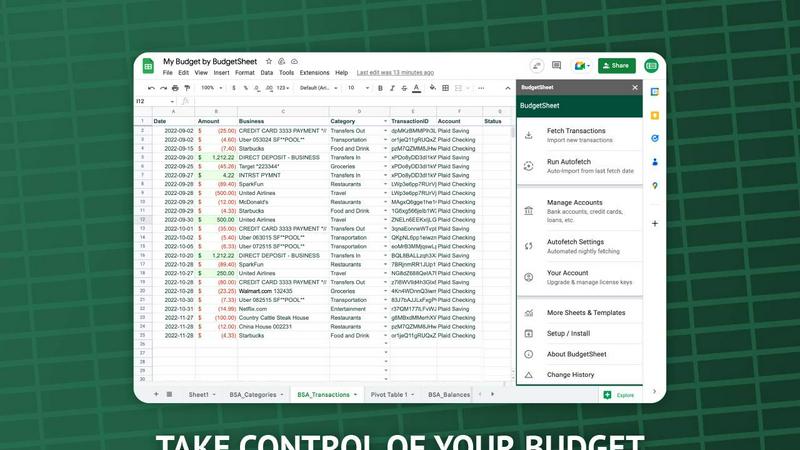
BudgetSheet
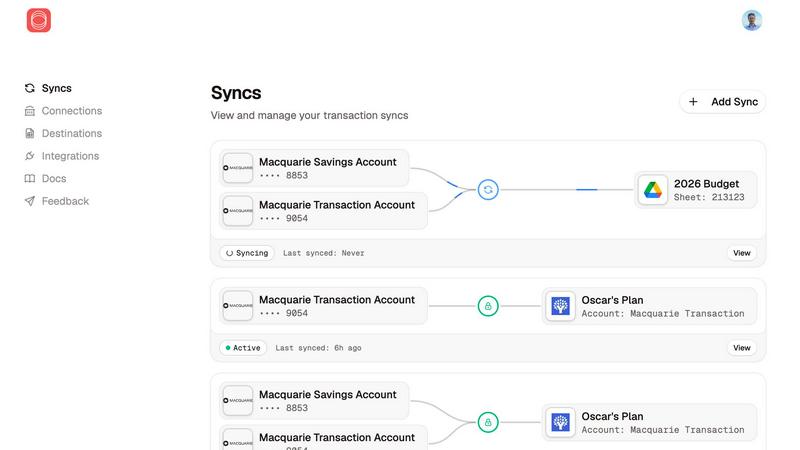
Redbark
Feature Comparison
BudgetSheet
Direct Bank-to-Sheet Automation
Forget manual downloads. BudgetSheet eliminates the tedious process of logging into each bank, exporting CSV files, and reformatting data. With a single click, you can fetch the latest transactions from all your linked accounts directly into your Google Sheet. This feature provides a seamless, automated pipeline that ensures your financial data is always current without any manual intervention, saving you hours each month.
Support for 10,000+ Financial Institutions
BudgetSheet connects to virtually any bank or financial service in the U.S. and Canada through its integration with Plaid. Whether you're tracking a checking account, savings, credit cards, mortgages, or investment portfolios, chances are your institution is supported. This universal compatibility ensures you can consolidate all your financial data in one place, no matter how fragmented your accounts are across different providers.
Full Customization & Advanced Control
Unlike closed-platform apps, BudgetSheet delivers raw transaction data into your own spreadsheet. This gives you complete freedom to create custom budgets, build dynamic dashboards, run complex analyses, and set up automated workflows using Google Apps Script, Zapier, or other tools. You define the categories, rules, and visualizations that matter for your unique financial picture.
Secure, Read-Only Connections
Security is paramount. BudgetSheet uses Plaid for all bank connections, meaning your login credentials are never handled or stored by BudgetSheet. The add-on only stores an encrypted, read-only access token. Furthermore, BudgetSheet itself does not store your transaction data; it acts as a secure conduit, passing data directly from your bank to your spreadsheet, which you fully own and control.
Redbark
Secure Data Access
Redbark utilizes Australia's Consumer Data Right framework for a bank-approved, secure connection to your financial data. This means you can trust that your transactions and balances are accessed safely without any screen scraping.
Real-Time Synchronization
Your financial information is synced automatically in real-time, eliminating manual entry and ensuring that you always have the most up-to-date figures in your favorite productivity tools.
Multi-Destination Support
Redbark allows you to sync the same accounts to multiple destinations like Google Sheets, YNAB, and Actual Budget simultaneously. Each destination can have its own formatting, giving you flexibility in how you manage your finances.
Zero Data Storage
With Redbark's pass-through architecture, your financial data flows directly from your bank to your chosen platform without any storage. This ensures complete privacy and security, as your transactions and balances are never stored on Redbark's servers.
Use Cases
BudgetSheet
For Power Users Building Custom Financial Dashboards
Financial analysts, small business owners, and savvy individuals use BudgetSheet to feed live transaction data into complex, custom-built Google Sheet dashboards. They can create real-time profit & loss statements, cash flow forecasts, and custom spending analyses that off-the-shelf software cannot match, maintaining complete control over formulas, charts, and data structure.
For Individuals Escaping Restrictive Budgeting Apps
Users frustrated with the one-size-fits-all approach of apps like Mint or YNAB turn to BudgetSheet for liberation. It allows them to import all their transactions into a familiar spreadsheet environment where they can design a budgeting system that perfectly fits their lifestyle, categories, and financial goals without being forced into a rigid template.
For Streamlining Business Expense Tracking
Freelancers and small business owners connect their business accounts to automatically pull transactions into a dedicated Google Sheet. This automates the foundational step of bookkeeping, making it easy to categorize expenses, prepare for tax season, and generate reports without manually compiling statements from multiple sources.
For Advanced Automation and Integration
Tech-oriented users leverage BudgetSheet as a reliable data source for advanced automation. By having clean, updated transaction data in Sheets, they can trigger workflows in Zapier, use Google Apps Script to send custom alerts, or integrate with other APIs to build a fully automated personal finance ecosystem tailored to their specific needs.
Redbark
Freelance Financial Management
Freelancers can use Redbark to automatically sync their bank transactions and investment holdings into Google Sheets or Notion. This streamlines budgeting and allows for accurate tracking of income and expenses without manual entry.
Investment Tracking
Investors can connect their brokerage accounts and sync their portfolio holdings and trades directly into their preferred tools. Real-time updates help investors monitor their P&L and make informed decisions without delays.
Small Business Accounting
Small business owners can benefit from Redbark by automating the flow of transactions into accounting software like YNAB or Actual Budget. This ensures accurate financial reporting and reduces the time spent on manual data entry.
Personal Finance Oversight
Individuals looking to manage their personal finances can connect their bank accounts and savings portfolios. They can effortlessly track their spending, savings goals, and investment progress in a streamlined fashion.
Overview
About BudgetSheet
Tired of clunky, restrictive budgeting apps that lock your data away? BudgetSheet is the battle-tested solution that puts you back in the driver's seat. This powerful Google Sheets add-on delivers live, automated bank transactions directly into your spreadsheet, ending the manual nightmare of CSV exports and copy-pasting forever. It's built for financial power users, savvy analysts, and anyone who demands full control over their financial data. While other platforms like Mint force you into their pre-defined categories and dashboards, BudgetSheet gives you the raw data to build custom budgets, forecasts, and reports exactly your way. By leveraging Plaid's secure infrastructure, it connects to over 10,000 financial institutions—including checking, savings, credit cards, loans, and investment accounts—and automates the data flow. Your spreadsheet becomes the single source of truth, ready for advanced automation with tools like Google Apps Script or Zapier. If you've outgrown basic apps and need a flexible, powerful system that adapts to you, not the other way around, BudgetSheet is your definitive tool.
About Redbark
Redbark is a game-changing financial management tool that seamlessly connects your Australian bank accounts and global brokerage portfolios to popular productivity platforms like Google Sheets, Notion, and Airtable. Designed specifically for freelancers, investors, small business owners, and anyone looking to streamline their financial tracking, Redbark offers a secure and efficient way to manage your finances. Unlike traditional screen-scraping methods, Redbark leverages Australia's Consumer Data Right (CDR) framework, ensuring bank-approved access to your financial data without the risk of data exposure. Your transactions, balances, and investment holdings are synced in real-time, allowing you to maintain complete control over your financial information. Best of all, Redbark never stores your data, keeping your financial details private and secure while providing automatic updates according to your set schedule. With no coding required for setup, you can get started in minutes and automate your financial tracking effortlessly.
Frequently Asked Questions
BudgetSheet FAQ
Is my bank login information secure with BudgetSheet?
Absolutely. BudgetSheet never sees or stores your bank login credentials. It uses Plaid, a industry-leading financial data network, to establish secure, read-only connections. Your credentials are entered directly into Plaid's secure interface. BudgetSheet only receives and stores an encrypted token that allows it to retrieve transaction data, ensuring the highest level of security.
How does BudgetSheet compare to Mint or Personal Capital?
BudgetSheet is for those who want control, while others offer a closed system. Mint provides pre-built charts and categories but locks your data in. BudgetSheet gives you the raw data in your spreadsheet, allowing for unlimited customization, complex analysis, and integration with other tools. It's the choice for users who have outgrown generic templates and want to build their own financial command center.
Can I automate the transaction import process?
Yes. After your initial setup, you can enable the "Autofetch" feature within the add-on. This tells BudgetSheet to automatically fetch new transactions from all your linked accounts every night, fully automating the data pipeline so your spreadsheet is always up-to-date without any manual clicks required.
What happens after the 15-day free trial?
After the free trial, you can choose to upgrade to a paid annual plan starting at $59 USD per year. The upgrade is managed directly from within the BudgetSheet add-on menu in Google Sheets. If you do not upgrade, the add-on will cease to fetch new transactions, but all your historical data and setup will remain intact in your spreadsheet.
Redbark FAQ
How does Redbark ensure the security of my financial data?
Redbark employs a pass-through architecture, meaning your financial data flows directly from your bank to your chosen platform without storage. It is also compliant with the Consumer Data Right framework, ensuring secure access and AES-256 encryption for all sensitive information.
What types of accounts can I connect with Redbark?
Redbark supports connections with over 100 Australian banks through the CDR framework, as well as global brokerages and crypto exchanges via SnapTrade. This includes everyday bank accounts, savings accounts, and investment portfolios.
Do I need coding skills to set up Redbark?
No, setting up Redbark is straightforward and requires no coding skills. You can connect your accounts and choose your destinations in just a few minutes.
Can I sync the same account to multiple platforms?
Yes, Redbark allows you to sync the same bank account or brokerage to multiple destinations, including Google Sheets, YNAB, and Actual Budget. Each platform can have its own formatting preferences, ensuring flexibility in how you view your financial data.
Alternatives
BudgetSheet Alternatives
BudgetSheet is the live, automated bridge between your bank accounts and Google Sheets. It belongs to the personal finance automation category, eliminating the tedious manual work of exporting and pasting CSV files. Users get real-time transaction data flowing directly into their custom spreadsheets. People often seek alternatives for a few key reasons. Pricing structures can be a primary driver, as needs evolve from simple tracking to complex budgeting. Others might require integrations beyond Google Sheets or seek a platform with a different set of automated features or reporting tools built directly into an app. When evaluating other options, focus on core needs. Consider the automation depth—does it truly eliminate manual steps? Assess platform compatibility and whether it supports your specific financial institutions. Finally, scrutinize the value: does the cost justify the time saved and the level of financial clarity provided?
Redbark Alternatives
Redbark is an innovative financial management tool that consolidates your Australian bank accounts and global brokerage portfolios, allowing users to connect seamlessly with productivity platforms like Google Sheets, Notion, and Airtable. As a solution designed for freelancers, investors, and small business owners, it leverages Australia's Consumer Data Right (CDR) framework for secure, real-time access to financial data without storing sensitive information. Users often seek alternatives to Redbark due to diverse needs such as pricing considerations, specific feature requirements, or compatibility with different platforms. When evaluating alternatives, it's crucial to consider factors like security, ease of use, integration capabilities, and the comprehensiveness of features offered. Ensuring that the alternative aligns with your financial management goals will enhance your overall experience.