
CloudBurn vs Playwriter

CloudBurn
CloudBurn reveals AWS cost impacts during code reviews, preventing costly misconfigurations before deployment.
Last updated: February 28, 2026

Last updated: March 18, 2026
Visual Comparison
CloudBurn
Playwriter

Feature Comparison
CloudBurn
Automatic Cost Analysis
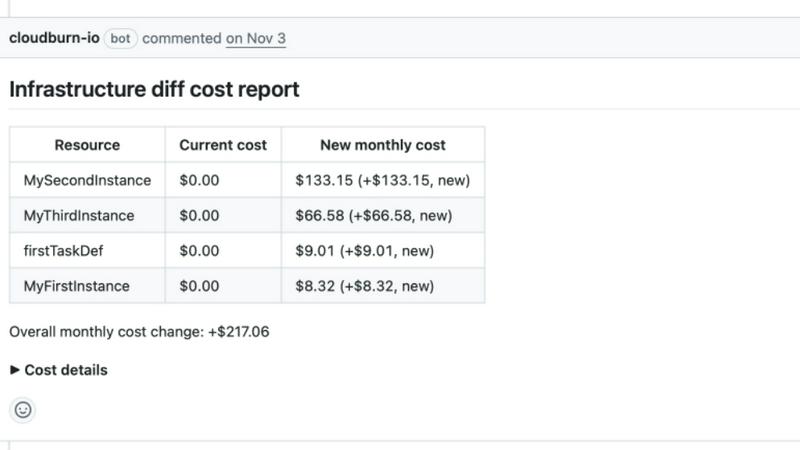
Every time a developer opens a pull request with infrastructure changes, CloudBurn automatically analyzes the modifications using real-time AWS pricing. This ensures that teams are aware of the financial implications of their changes before they are deployed, reducing the risk of expensive surprises.
Real-Time AWS Pricing
CloudBurn provides real-time AWS pricing tailored to your specific region, allowing for precise cost estimates that reflect the current market. This feature ensures that teams have the most accurate financial information at their fingertips, enhancing decision-making during the development process.
Resource-Level Cost Breakdown
With CloudBurn, teams receive a resource-level breakdown of costs, illustrating the old versus new monthly costs for each change. This transparency helps developers understand exactly how their modifications impact overall expenses, enabling them to make necessary adjustments before deployment.
Integrated Code Review Process
CloudBurn integrates cost awareness into the code review process, just like unit testing and traditional code reviews. This change fosters a culture of financial responsibility among developers, ensuring that cost considerations are part of the development lifecycle from the very beginning.
Playwriter
Real Browser Access
With Playwriter, agents operate within your actual Chrome browser, complete with all your extensions, logins, and cookies. This eliminates the typical issues of bot detection and session management that plague other AI tools, allowing for a smoother and more efficient browsing experience.
Full Playwright API
Playwriter provides agents with access to the entire Playwright API through a single execute tool. This means no wrappers or schema bloat, allowing for low context usage and enabling agents to run any Playwright code effortlessly, making automation tasks simpler and more powerful.
Collaboration Features
Playwriter allows for real-time collaboration between the agent and the user. You can see everything the agent does, solve captchas, and manually intervene when necessary. This level of interaction ensures that the agent can handle repetitive tasks while you maintain control when it matters most.
Advanced Debugging Tools
The tool features a comprehensive debugger with breakpoints and live code editing capabilities. With network interception and accessibility snapshots, developers can easily monitor performance, troubleshoot issues, and optimize automation scripts efficiently without complex setups.
Use Cases
CloudBurn
Cost Management During Development
With CloudBurn, teams can manage costs effectively during the development phase. By analyzing infrastructure changes in real-time, developers can identify and rectify potential financial pitfalls before they escalate.
Enhanced Collaboration in Code Reviews
CloudBurn transforms the code review process by incorporating cost discussions into team meetings. This leads to collaborative decision-making, where developers can discuss financial implications alongside technical considerations, resulting in better overall project outcomes.
Streamlined CI/CD Workflows
Integrating CloudBurn into CI/CD workflows automates the cost analysis process, allowing teams to focus on delivering quality code without the worry of unexpected costs. This streamlining enhances efficiency and promotes continuous delivery without financial surprises.
Prevention of Costly Misconfigurations
By catching mistakes early in the development cycle, CloudBurn significantly reduces the chances of deploying misconfigured resources that can lead to substantial financial losses. This proactive approach ensures that teams can deploy with confidence.
Playwriter
Quality Assurance Testing
Playwriter is perfect for QA teams looking to automate their testing processes. By utilizing the full browser capabilities, agents can perform extensive tests on web applications, ensuring every feature works under real-world conditions.
Web Scraping and Data Collection
Marketers and data analysts can leverage Playwriter to gather valuable insights from websites without running into bot detection problems. The real browser access allows for accurate data scraping, making it easier to collect and analyze information.
Collaborative Workflows
In dynamic team environments, Playwriter facilitates seamless collaboration between AI agents and human users. Teams can supervise the agent's actions in real time, allowing for effective intervention and adjustments on-the-fly, which is critical for projects requiring human oversight.
Automated Browsing Tasks
From filling out forms to navigating complex websites, Playwriter enables agents to handle repetitive browsing tasks efficiently. This automation can save countless hours for businesses, freeing up human resources for more strategic initiatives.
Overview
About CloudBurn
CloudBurn is an innovative solution designed specifically for teams using Terraform or AWS CDK, focusing on preventing costly infrastructure mistakes before they are deployed to production. Many organizations face the challenge of discovering AWS cost overruns weeks after changes are implemented, leading to significant financial implications. With CloudBurn, this issue is addressed head-on by providing real-time cost analysis during the code review phase, allowing teams to make informed decisions about their infrastructure changes. This proactive approach not only helps in avoiding unexpected bills but also integrates seamlessly into existing workflows. By catching potential cost issues early, CloudBurn empowers teams to optimize their cloud infrastructure without the fear of incurring unnecessary expenses.
About Playwriter
Playwriter is a groundbreaking tool designed to empower AI agents with full access to your actual browser session, revolutionizing how they interact with web content. Unlike traditional AI agents that are limited by headless browser instances or fixed-tool environments, Playwriter integrates directly with your existing Chrome setup. This means that agents can leverage your logins, extensions, and cookies, significantly enhancing their capability to perform complex tasks without triggering bot detection. The main value proposition of Playwriter lies in its ability to provide a seamless browsing experience, where agents can execute any Playwright code via a simple API, all while you retain real-time control and oversight. Ideal for developers, QA testers, and digital marketers, Playwriter not only streamlines workflows but also enhances collaboration between humans and AI, making it an essential tool for modern web automation.
Frequently Asked Questions
CloudBurn FAQ
How does CloudBurn integrate with GitHub?
CloudBurn integrates seamlessly with GitHub by allowing teams to install it from the GitHub Marketplace. Once installed, it automatically analyzes pull requests for infrastructure changes, providing real-time cost estimates.
What types of infrastructure changes can CloudBurn analyze?
CloudBurn can analyze infrastructure changes made through Terraform and AWS CDK. It automatically detects changes made in pull requests and evaluates their potential cost implications.
Is there a trial period for CloudBurn?
Yes, CloudBurn offers a 14-day Pro Trial that allows users to experience its advanced features for free. Users can cancel at any time or continue using the Community plan indefinitely.
How does CloudBurn help prevent unexpected AWS bills?
CloudBurn provides immediate visibility into the costs associated with infrastructure changes before they are deployed. By generating detailed cost reports during code reviews, it enables teams to make informed decisions and prevent costly misconfigurations.
Playwriter FAQ
How does Playwriter ensure security while using my browser session?
Playwriter operates entirely on your local machine, connecting through a WebSocket relay without involving any remote servers. This means your data never leaves your device, minimizing security risks and ensuring privacy.
Can multiple agents use Playwriter simultaneously?
Yes, Playwriter supports multiplexing sessions, allowing multiple agents or CLI instances to interact with the same browser session at the same time, optimizing workflow efficiency and collaboration.
What platforms does Playwriter support?
Playwriter is designed to work seamlessly with various MCP clients, including Cursor, Claude, and VS Code, ensuring compatibility with the tools you already use for development and automation tasks.
Is Playwriter suitable for beginners?
While Playwriter offers powerful features for advanced users, it also provides comprehensive skills training to help beginners understand how to use the tool effectively. The learning curve is manageable, especially with the guidance provided during setup.
Alternatives
CloudBurn Alternatives
CloudBurn is a cutting-edge tool designed for teams utilizing Terraform or AWS CDK, allowing them to visualize infrastructure costs within code reviews rather than discovering them post-deployment on their bills. As a part of the Dev Tools category, CloudBurn empowers developers to catch costly infrastructure decisions before they reach production, enhancing both financial and operational efficiency. Many users seek alternatives to CloudBurn due to varying needs such as pricing structures, feature sets, or compatibility with different platforms. When evaluating alternatives, consider factors like real-time cost analysis capabilities, regional pricing accuracy, and the ability to provide detailed breakdowns of cost implications for proposed infrastructure changes. The right choice should align with your team’s workflow and financial oversight requirements.
Playwriter Alternatives
Playwriter is a revolutionary tool that bridges the gap between AI agents and web browsing, belonging to the Dev Tools category. It empowers AI by providing a seamless browser experience, enabling agents to utilize your actual browser session with all your existing logins and extensions. Users often seek alternatives to Playwriter due to factors such as pricing models, specific feature sets, or unique platform requirements that may not be fully addressed by Playwriter's offerings. When evaluating alternatives, it's crucial to consider aspects like automation capabilities, ease of integration with existing workflows, and the overall user experience. Look for solutions that provide robust debugging tools, flexibility in API usage, and support for various development environments to ensure you find a product that meets your needs effectively.