
AI Song Generator - Vocal Music Maker vs CutMP3

AI Song Generator - Vocal Music Maker
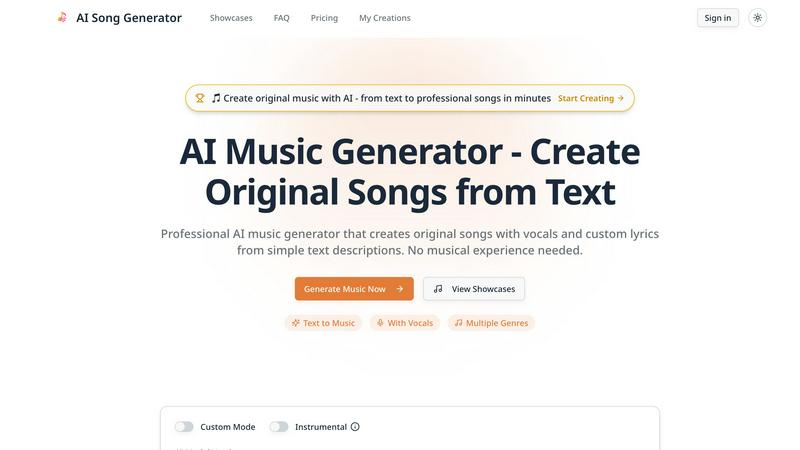
Create professional songs with vocals from text using our powerful AI music generator.
Last updated: February 28, 2026

CutMP3
CutMP3 is a free, user-friendly online tool for effortlessly trimming and editing audio files in various formats.
Last updated: February 28, 2026
Visual Comparison
AI Song Generator - Vocal Music Maker
CutMP3
Feature Comparison
AI Song Generator - Vocal Music Maker
Professional AI Vocals with Synchronized Lyrics
This feature delivers the critical edge over instrumental-only AI music tools. It generates expressive, realistic male or female vocals that naturally sync with your provided or AI-generated lyrics. The output features authentic phrasing, emotional tone, and professional clarity, creating songs that sound crafted by human singers rather than robotic text-to-speech, making your tracks instantly more engaging and commercially ready.
Text-to-Music with Multi-Genre Mastery
Go from a simple idea to a finished song in any style. Input a description like "upbeat pop rock with electric guitars and powerful female vocals" or "melancholic jazz ballad with piano and smooth male vocals," and the AI engine composes the complete instrumental arrangement. It masters a vast spectrum from Pop, Rock, and Hip-Hop to Country, Electronic, and Classical, allowing for limitless genre experimentation and combination.
Commercial Use Licensing
Every song you generate comes with clear commercial rights, a non-negotiable for professional creators. This license allows you to confidently monetize your AI-generated music in YouTube videos, podcasts, advertisements, video games, and other projects without worrying about copyright strikes or royalty claims. This feature provides peace of mind and direct monetization potential that free or unclear-license tools cannot match.
Rapid Customization & Regeneration
The platform is built for iterative, fast-paced creation. Generate a complete track in 1-3 minutes, then instantly adjust your description, change the vocal style, modify the genre, or tweak the mood and regenerate. This "create-preview-refine" loop allows for unparalleled creative control and rapid prototyping, enabling you to battle-test dozens of variations to find the perfect sound for your project without wasting hours.
CutMP3
Visual Waveform Editing
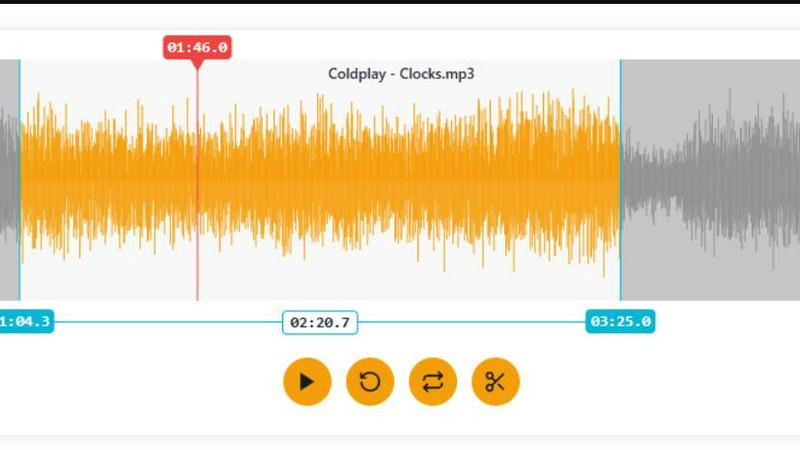
CutMP3 features a robust visual waveform editing tool that allows users to easily navigate their audio tracks. By simply moving markers along the waveform, you can precisely select the portions of the audio you wish to cut. This feature is not only intuitive but also enhances accuracy, enabling users to make fine adjustments and perfect their audio edits based on a clear visual representation.
Privacy Focused
Privacy is a key concern for many users, and CutMP3 addresses this by ensuring that no uploads are required. All audio processing is done directly in your browser, meaning your files remain secure and confidential. This focus on user privacy sets CutMP3 apart from many other online tools that often require file uploads, making it a trustworthy choice for audio editing.
Format Support
CutMP3 supports a wide array of audio formats, including MP3, WAV, OGG, AAC, FLAC, and M4A. This extensive compatibility allows you to work with virtually any audio file you have, eliminating the need for conversion before editing. Users can seamlessly edit their favorite tracks regardless of the format, making it a one-stop solution for audio editing.
High-Quality Export
After you have completed your audio edits, CutMP3 allows for instant downloading of your final product in either MP3 or WAV format. This ensures that you receive high-quality audio files ready for use, whether for ringtones, social media, or personal projects. The quick export feature enhances user experience by providing immediate access to your edited audio.
Use Cases
AI Song Generator - Vocal Music Maker
Content Creators & Video Producers
Generate unique, royalty-free background music and full theme songs for videos, podcasts, and social media content. Perfectly score the mood of your content—from energetic vlog intros to cinematic documentary backgrounds—eliminating copyright hassles and subscription fees to stock music libraries, giving your channel a distinct and owned audio identity.
Game Development Studios & Indie Developers
Produce original, adaptive soundtracks and ambient soundscapes for games of all genres. Quickly create level-specific music, intense boss battle themes, serene menu music, and dynamic environmental audio. This use case slashes audio production costs and timelines, allowing small teams to compete with the sonic quality of major studio releases.
Marketing & Advertising Agencies
Craft custom commercial jingles, brand anthems, and targeted promotional music in minutes. Align audio branding perfectly with campaign visuals and messaging for product launches, social media ads, and radio spots. This enables hyper-relevant, cost-effective audio marketing that resonates with specific target demographics faster than traditional composition.
Musicians & Songwriters for Creative Acceleration
Use the generator as a powerful brainstorming and demo-creation tool. Overcome writer's block by generating song starters in new genres, creating quick vocal melodies to accompany chord progressions, or producing high-quality reference tracks. It accelerates the creative workflow, providing a battle-tested sparring partner for musical ideas.
CutMP3
Creating Ringtones
One of the most popular uses for CutMP3 is creating custom ringtones. Users can easily select their favorite song sections and export them as ringtones, allowing for a personalized touch to their mobile devices. This feature is perfect for anyone looking to stand out with unique sounds.
Editing Podcasts
Podcasters can utilize CutMP3 to trim their recordings, removing unwanted sections or enhancing overall quality. With its simple interface and high-quality export options, it provides a straightforward way to polish audio content before publishing.
Social Media Clips
Content creators can cut audio clips for use in Instagram Reels or Stories. By quickly trimming audio to fit the desired length, users can enhance their social media posts with engaging audio that captures attention and complements their visuals.
Voice Recording Cleanup
Whether for voice notes, reminders, or podcasts, CutMP3 can help clean up audio recordings. Users can remove unnecessary segments or background noise, ensuring that the final audio is clear and professional, ready for sharing or personal use.
Overview
About AI Song Generator - Vocal Music Maker
The AI Song Generator - Vocal Music Maker is a professional-grade, battle-tested platform that transforms simple text descriptions into complete, original songs featuring studio-quality AI vocals. This tool is engineered for creators who demand professional results without the complexity, cost, or time of traditional music production. It directly challenges and outperforms basic instrumental generators by delivering the full package: synchronized, realistic singing across diverse vocal styles, custom lyrics, and polished musical arrangements in minutes. Whether you're a content creator needing a unique soundtrack, a marketer crafting a brand anthem, or a musician seeking rapid inspiration, this platform eliminates the need for musical expertise, expensive software, or vocalists. Its core value proposition is unmatched: generating commercially viable, vocal-led music from a text prompt faster than any competitor, giving you a decisive creative and operational advantage.
About CutMP3
CutMP3.online is an innovative and powerful online audio editor designed for users seeking a quick and efficient way to cut songs and create personalized ringtones. It stands out in the crowded field of audio editing tools by emphasizing security and privacy; all processing occurs locally within your browser, ensuring that your audio files never leave your device. Whether you're a casual user looking to create a ringtone from your favorite track or a professional seeking quick edits on audio files, CutMP3 provides a user-friendly interface that simplifies the process. Its support for multiple audio formats, including MP3, WAV, OGG, AAC, FLAC, and M4A, makes it versatile for various audio editing needs. The main value proposition lies in its ability to deliver high-quality audio cuts quickly and without any installation, making it accessible to anyone with an internet connection.
Frequently Asked Questions
AI Song Generator - Vocal Music Maker FAQ
Do I own the music I generate?
Yes, you own the music you generate. The platform grants you a commercial use license for all created tracks, meaning you can use them in monetized videos, podcasts, games, and other commercial projects without any copyright restrictions or the need to pay royalties.
What genres of music can it create?
The AI Song Generator is engineered to master a wide array of genres including Pop, Rock, Hip-Hop, Electronic, Jazz, Classical, Country, R&B, and more. You can also create hybrid genres by describing combinations, such as "synthwave rock" or "orchestral hip-hop," for truly unique sounds.
How long does it take to generate a song?
The platform generates a complete, professional-quality song with vocals in approximately 1 to 3 minutes. This rapid generation speed allows for immediate previewing and iterative customization, making your workflow significantly faster than traditional music production or slower AI tools.
Do I need any musical skill or experience to use it?
No musical experience is required. The tool is designed for creators of all skill levels. You simply describe the song you want in natural language (genre, mood, instruments, vocal style), and the AI handles all the complexity of composition, arrangement, and vocal synthesis for you.
CutMP3 FAQ
How do I cut an MP3 file online?
To cut an MP3 file online using CutMP3, simply click the "Choose Audio File" button, select the desired MP3 file from your computer, and use the visual waveform to mark the sections you wish to cut. After making your adjustments, export the file in your preferred format.
Is this audio cutter free to use?
Yes, CutMP3 is completely free to use. You can access all features without any hidden fees or charges, making it an ideal option for anyone looking to edit audio without financial commitment.
What audio formats are supported?
CutMP3 supports a variety of audio formats, including MP3, WAV, OGG, AAC, FLAC, and M4A. This broad compatibility ensures that users can work with their preferred audio files without trouble.
Can I create ringtones with this tool?
Absolutely! CutMP3 is designed for users to create custom ringtones easily. You can select any part of a song to cut and export it as a ringtone, perfect for personalizing your phone's sound.
Alternatives
AI Song Generator - Vocal Music Maker Alternatives
AI Song Generator - Vocal Music Maker is a leading tool in the audio and music AI category, designed to create professional, vocal-driven music tracks. It specializes in generating complete songs with realistic, synchronized singing across a diverse range of vocal styles, making it a powerful asset for content creators and musicians. Users often explore alternatives for several key reasons. These can include budget constraints, seeking different pricing models, or needing specific features not covered by one platform. Others may require compatibility with different operating systems or workflows, driving the search for a tool that fits their unique creative or technical environment. When evaluating other options, focus on core capabilities. The battle-tested choice should deliver high-quality, lifelike vocal synthesis, precise lyric synchronization, and a versatile style library. Ultimately, the best alternative is one that matches your need for professional output without compromising on vocal authenticity and creative control.
CutMP3 Alternatives
CutMP3 is a free online MP3 cutter and audio trimmer designed for users looking to edit audio files with ease. This tool falls into the audio & music category, offering a straightforward way to cut songs and create ringtones without the hassle of complex software installations. However, some users seek alternatives due to various reasons, such as the need for additional features, specific platform compatibility, or varying pricing models. When choosing an alternative to CutMP3, consider key factors such as ease of use, feature set, and privacy measures. Look for a tool that supports a variety of audio formats and offers high-quality exports. Additionally, assess whether the alternative processes files locally or requires uploads, as this can impact both security and convenience.