
ClubDJ Pro vs CutMP3

ClubDJ Pro
ClubDJ Pro empowers you to mix audio and video like a pro with innovative features and no subscription fees, all on your preferred platform.
Last updated: March 19, 2026

CutMP3
CutMP3 is a free, user-friendly online tool for effortlessly trimming and editing audio files in various formats.
Last updated: February 28, 2026
Visual Comparison
ClubDJ Pro
CutMP3
Feature Comparison
ClubDJ Pro
Built-in Dual Deck Video Mixing
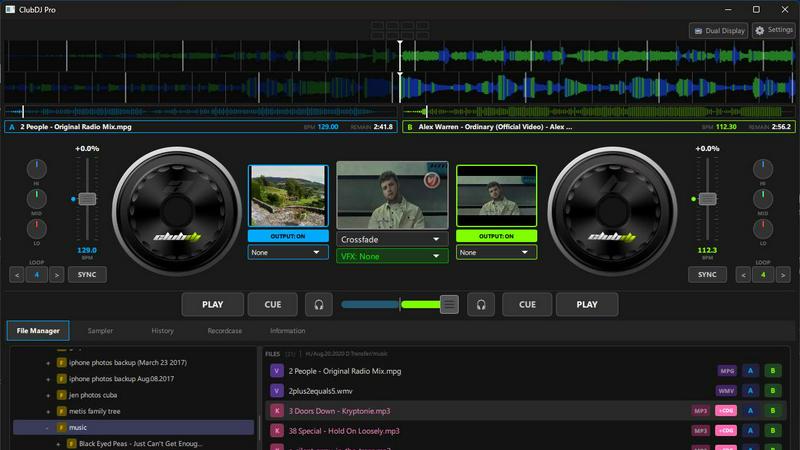
ClubDJ Pro uniquely offers built-in dual-deck video mixing, allowing DJs to blend audio and video seamlessly. With no need for additional plugins or add-ons, video is treated as a primary feature, making it easy to create engaging visual performances.
Advanced Beat Detection and Sync
The software features advanced beat detection technology with 2-decimal precision, ensuring tracks are perfectly aligned. Continuous phase-locked sync helps maintain a consistent tempo, creating a seamless mixing experience that captivates audiences.
Professional 3-Band EQ and GPU Effects
Each deck is equipped with a professional-grade 3-band EQ, offering DJs the ability to fine-tune their sound. Additionally, ClubDJ Pro includes over 25 GPU-accelerated video effects per deck, enhancing visual performances with stunning graphics and transitions.
Live Waveforms and Beat-Matched Loops
With live waveform displays featuring a beat grid overlay, DJs can easily visualize beat positions, drops, and breaks. The beat-matched loops feature enables the creation of loops from 1/32 to 64 beats, perfect for extending breaks or building energy in a set.
CutMP3
Visual Waveform Editing
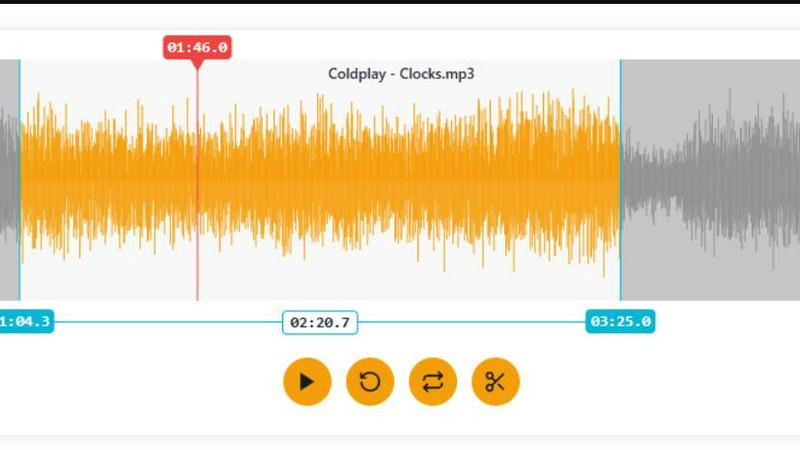
CutMP3 features a robust visual waveform editing tool that allows users to easily navigate their audio tracks. By simply moving markers along the waveform, you can precisely select the portions of the audio you wish to cut. This feature is not only intuitive but also enhances accuracy, enabling users to make fine adjustments and perfect their audio edits based on a clear visual representation.
Privacy Focused
Privacy is a key concern for many users, and CutMP3 addresses this by ensuring that no uploads are required. All audio processing is done directly in your browser, meaning your files remain secure and confidential. This focus on user privacy sets CutMP3 apart from many other online tools that often require file uploads, making it a trustworthy choice for audio editing.
Format Support
CutMP3 supports a wide array of audio formats, including MP3, WAV, OGG, AAC, FLAC, and M4A. This extensive compatibility allows you to work with virtually any audio file you have, eliminating the need for conversion before editing. Users can seamlessly edit their favorite tracks regardless of the format, making it a one-stop solution for audio editing.
High-Quality Export
After you have completed your audio edits, CutMP3 allows for instant downloading of your final product in either MP3 or WAV format. This ensures that you receive high-quality audio files ready for use, whether for ringtones, social media, or personal projects. The quick export feature enhances user experience by providing immediate access to your edited audio.
Use Cases
ClubDJ Pro
Live Performances
ClubDJ Pro is ideal for live performances, equipping DJs with essential tools to mix tracks and videos in real time. Its responsive interface and professional features ensure a high-quality, engaging experience for live audiences.
Practice Sessions
For DJs honing their craft, ClubDJ Pro provides a robust environment for practice sessions. With features like looping and beat sync, users can refine their skills and experiment with new mixes without the pressure of a live audience.
Video DJing
The built-in dual-deck video mixing capabilities make ClubDJ Pro the go-to choice for video DJs. Users can effortlessly blend audio and visuals, using over 41 shader transitions and 13 animated VFX overlays to create captivating shows.
Mobile DJing
With its compatibility across various platforms, including iOS, ClubDJ Pro caters to mobile DJs who need flexibility. DJs can mix on-the-go, utilizing touch-optimized controls and MIDI controller support for a versatile mixing experience.
CutMP3
Creating Ringtones
One of the most popular uses for CutMP3 is creating custom ringtones. Users can easily select their favorite song sections and export them as ringtones, allowing for a personalized touch to their mobile devices. This feature is perfect for anyone looking to stand out with unique sounds.
Editing Podcasts
Podcasters can utilize CutMP3 to trim their recordings, removing unwanted sections or enhancing overall quality. With its simple interface and high-quality export options, it provides a straightforward way to polish audio content before publishing.
Social Media Clips
Content creators can cut audio clips for use in Instagram Reels or Stories. By quickly trimming audio to fit the desired length, users can enhance their social media posts with engaging audio that captures attention and complements their visuals.
Voice Recording Cleanup
Whether for voice notes, reminders, or podcasts, CutMP3 can help clean up audio recordings. Users can remove unnecessary segments or background noise, ensuring that the final audio is clear and professional, ready for sharing or personal use.
Overview
About ClubDJ Pro
ClubDJ Pro is a cutting-edge professional DJ software designed for both novice and experienced DJs. Launched in 2004 and refined with modern technology, this versatile application operates seamlessly across iOS, macOS, and Windows platforms, allowing DJs to mix music from virtually any device. The software boasts a user-friendly interface that emphasizes performance, enabling DJs to mix tracks in real time effortlessly. ClubDJ Pro stands out with its built-in dual-deck video mixing capabilities, offering a comprehensive suite of features including waveform visualization, cue points, looping, beat matching, pitch control, and real-time effects. Unlike other complex DJ platforms that are often bloated with unnecessary features, ClubDJ Pro maintains a focus on speed, simplicity, and performance, ensuring that DJs have a reliable and efficient mixing environment. Developed by an independent team, ClubDJ Pro continually evolves, making powerful DJ tools accessible to anyone eager to explore the art of mixing music.
About CutMP3
CutMP3.online is an innovative and powerful online audio editor designed for users seeking a quick and efficient way to cut songs and create personalized ringtones. It stands out in the crowded field of audio editing tools by emphasizing security and privacy; all processing occurs locally within your browser, ensuring that your audio files never leave your device. Whether you're a casual user looking to create a ringtone from your favorite track or a professional seeking quick edits on audio files, CutMP3 provides a user-friendly interface that simplifies the process. Its support for multiple audio formats, including MP3, WAV, OGG, AAC, FLAC, and M4A, makes it versatile for various audio editing needs. The main value proposition lies in its ability to deliver high-quality audio cuts quickly and without any installation, making it accessible to anyone with an internet connection.
Frequently Asked Questions
ClubDJ Pro FAQ
What platforms is ClubDJ Pro available on?
ClubDJ Pro is available on desktop (Windows and macOS), as well as iOS devices like iPhone and iPad. This multi-platform support makes it accessible for DJs on various devices.
Is there a subscription fee for ClubDJ Pro?
No, ClubDJ Pro operates on a one-time purchase model. Users pay a one-time fee for the software, allowing unlimited access to its features without ongoing subscription costs.
Can I try ClubDJ Pro before purchasing?
Yes, ClubDJ Pro offers a free online mixer that allows users to experience the software's functionality without downloading anything. This is a great way to assess the software's capabilities before committing to a purchase.
What makes ClubDJ Pro different from other DJ software?
ClubDJ Pro stands out with its built-in video mixing capabilities, extensive GPU effects, and a user-friendly interface focused on performance. Unlike competitors with high subscription fees, ClubDJ Pro is a one-time purchase, providing excellent value for both casual and professional DJs.
CutMP3 FAQ
How do I cut an MP3 file online?
To cut an MP3 file online using CutMP3, simply click the "Choose Audio File" button, select the desired MP3 file from your computer, and use the visual waveform to mark the sections you wish to cut. After making your adjustments, export the file in your preferred format.
Is this audio cutter free to use?
Yes, CutMP3 is completely free to use. You can access all features without any hidden fees or charges, making it an ideal option for anyone looking to edit audio without financial commitment.
What audio formats are supported?
CutMP3 supports a variety of audio formats, including MP3, WAV, OGG, AAC, FLAC, and M4A. This broad compatibility ensures that users can work with their preferred audio files without trouble.
Can I create ringtones with this tool?
Absolutely! CutMP3 is designed for users to create custom ringtones easily. You can select any part of a song to cut and export it as a ringtone, perfect for personalizing your phone's sound.
Alternatives
ClubDJ Pro Alternatives
ClubDJ Pro is a professional DJ software application designed for seamless real-time mixing across multiple platforms, including iOS, macOS, and Windows. With its performance-focused interface, it caters to both novice and experienced DJs, offering essential features like dual decks, waveform visualization, and real-time effects. Despite its powerful capabilities, users often seek alternatives due to factors such as pricing, specific feature requirements, or compatibility with different operating systems. When looking for an alternative to ClubDJ Pro, consider what aspects are most important to your DJing style. Evaluate the software’s user interface, available features, and how well it integrates with your existing equipment. Additionally, think about your budget and whether you need a solution that offers advanced capabilities or a simpler setup for casual use.
CutMP3 Alternatives
CutMP3 is a free online MP3 cutter and audio trimmer designed for users looking to edit audio files with ease. This tool falls into the audio & music category, offering a straightforward way to cut songs and create ringtones without the hassle of complex software installations. However, some users seek alternatives due to various reasons, such as the need for additional features, specific platform compatibility, or varying pricing models. When choosing an alternative to CutMP3, consider key factors such as ease of use, feature set, and privacy measures. Look for a tool that supports a variety of audio formats and offers high-quality exports. Additionally, assess whether the alternative processes files locally or requires uploads, as this can impact both security and convenience.