
CV Engineer vs Joonote

CV Engineer
Create a professional resume in just 10 minutes with CV Engineer's AI-powered, user-friendly app.
Last updated: February 28, 2026

Joonote
Joonote lets you view and edit notes directly on your lock screen for instant access to reminders and to-do lists.
Last updated: February 28, 2026
Visual Comparison
CV Engineer
Joonote
Feature Comparison
CV Engineer
AI Assistant
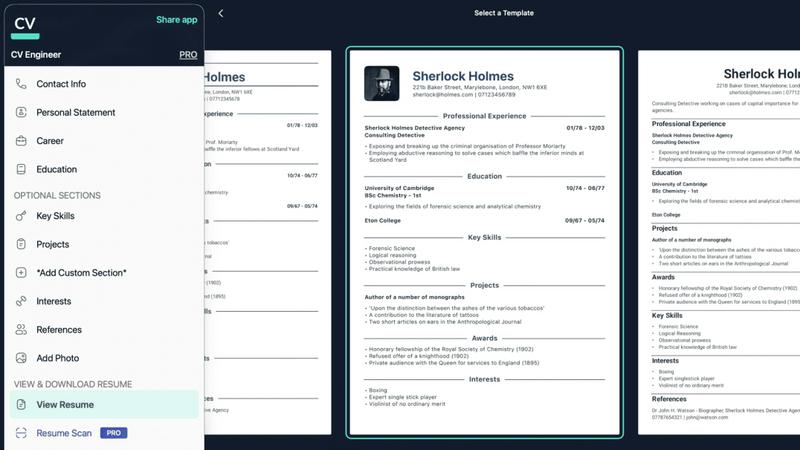
The AI Assistant is your personal guide in resume creation, helping you rewrite sections to enhance professionalism. It also checks for spelling and grammar mistakes, ensuring your resume is error-free and polished.
Professional Templates
CV Engineer offers a selection of professionally designed templates crafted by an executive recruiter. These templates are tailored to capture the attention of hiring managers, ensuring your resume makes a strong first impression.
Resume Scan
The Resume Scan feature reviews your resume for common mistakes and provides actionable feedback on how to improve it. This tool is essential for ensuring that your resume meets industry standards and avoids pitfalls that could hinder your job search.
Easy Editing
With CV Engineer's intuitive interface, adding details to each section of your resume is quick and hassle-free. You can edit font sizes and margins to maximize the use of each page, allowing you to present your information clearly and attractively.
Joonote
Works on Lock Screen
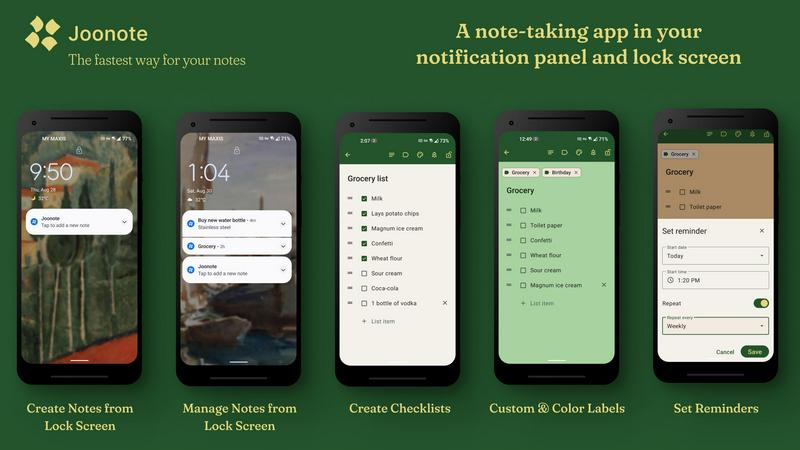
Access your notes directly from your lock screen without the hassle of unlocking your device. This feature saves you time and keeps you in the flow, allowing you to manage your tasks and ideas instantly.
Private Notes
Protect your sensitive information by setting notes to private. Joonote ensures that your confidential notes remain hidden behind your lock screen, offering an extra layer of security for your personal thoughts.
Create Lists
Effortlessly create checklists for various purposes such as shopping, meal planning, or project management. With Joonote's list-making feature, you can organize tasks step-by-step, ensuring you never forget anything important.
Set Reminders
Never miss an important date or task again by utilizing Joonote's reminder feature. You can set one-time or recurring reminders for your notes, ensuring that critical tasks are always top of mind.
Use Cases
CV Engineer
Recent Graduates
For recent graduates entering the job market, CV Engineer provides the perfect platform to build a professional resume from scratch. With guidance on what to include and expert advice, new graduates can confidently present their skills and experiences.
Career Changers
Individuals looking to transition into new fields can benefit from CV Engineer's tailored resume templates and expert suggestions. The app helps users highlight transferable skills and relevant experience, making it easier to pivot careers.
Job Seekers
Active job seekers can utilize CV Engineer to quickly create and edit resumes for various applications. The AI Assistant ensures that each resume is tailored to specific job postings, increasing the chances of landing interviews.
Professionals Seeking Advancement
Experienced professionals aiming for promotions or new roles within their industry can leverage CV Engineer's advanced editing tools and professional templates to showcase their accomplishments effectively, positioning themselves for career advancement.
Joonote
Quick Note Capture
Imagine you are in a meeting or on the go, and a brilliant idea strikes you. With Joonote, you can quickly capture that thought without having to unlock your phone or navigate through multiple apps, making it an ideal tool for busy professionals.
Grocery Shopping
Create a shopping list directly in Joonote and access it from your lock screen while at the store. This feature allows for quick edits and updates, ensuring you have everything you need without the hassle of searching for a dedicated app.
Meal Planning
Plan your meals for the week by creating detailed checklists in Joonote. You can easily add or remove items from your list, making meal preparation more organized and efficient.
Daily Reminders
Set daily reminders for tasks such as taking medication or completing essential chores. Joonote's reminder functionality allows you to receive notifications at specific times, keeping your daily routine on track.
Overview
About CV Engineer
CV Engineer is a cutting-edge AI-powered resume builder that simplifies the job application process for individuals across various career stages. Whether you're a fresh graduate eager to land your first job or an experienced professional seeking new opportunities, CV Engineer equips you with the tools to create a polished and professional resume in minutes. Developed by a former executive recruiter, this app leverages industry insights to help you craft resumes that stand out to hiring managers. With comprehensive advice and examples for each resume section, along with an intuitive AI Assistant, CV Engineer ensures that your resume is not only visually appealing but also concise and impactful. Available on Android, iOS, and macOS, this free tool has been embraced by over 6 million users, making it a leading choice for job seekers looking to enhance their career prospects.
About Joonote
Joonote is a revolutionary note-taking app designed to empower users by providing the fastest and most efficient way to create, view, edit, and manage notes, tasks, reminders, and checklists directly from the lock screen and notification panel of their devices. Unlike traditional note-taking apps that require navigating through multiple screens, Joonote allows users to maintain their workflow seamlessly without ever unlocking their phones. It is particularly beneficial for busy professionals, students, and anyone who needs to capture thoughts and tasks quickly. With a user-friendly interface and powerful features such as speech-to-text, custom labels, and reminders, Joonote ensures that your notes are always at your fingertips. Plus, with a 30-day free trial—no credit card required—users can experience the app's full potential before committing to a subscription. Joonote is not just a note-taking tool; it's a productivity enhancer that keeps you organized and focused wherever you go.
Frequently Asked Questions
CV Engineer FAQ
What is CV Engineer and how does it work?
CV Engineer is an AI-powered resume builder designed to help users create professional resumes quickly and easily. It provides templates, expert advice, and an AI Assistant to enhance the quality of your resume.
What platforms is CV Engineer available on?
CV Engineer is available on multiple platforms, including Android, iOS, and macOS. Users can download the app for free from the Mac App Store, App Store, or Google Play.
Do I need an existing resume to use CV Engineer?
No, you do not need an existing resume to use CV Engineer. The app provides step-by-step guidance and templates, making it easy for users to create their first resume from scratch.
Are CV Engineer's resume templates ATS friendly?
Yes, CV Engineer's resume templates are designed to be ATS (Applicant Tracking System) friendly. This ensures that your resume will be properly parsed by automated systems used by many employers during the hiring process.
Joonote FAQ
How does Joonote keep my notes secure?
Joonote provides a private notes feature that allows you to hide sensitive information behind your lock screen. Additionally, your notes are stored locally on your device, ensuring they remain private and secure.
Can I use Joonote offline?
Yes, Joonote allows you to access your notes even when you are offline. This feature is perfect for users who need to jot down ideas or tasks without worrying about an internet connection.
Is there a free trial available?
Absolutely! Joonote offers a 30-day free trial with no credit card or sign-up required. This allows you to explore all features and functionalities before deciding on a subscription.
What platforms is Joonote available on?
Currently, Joonote is available exclusively on Android devices. However, there are plans for future expansions to other platforms, so stay tuned for updates!
Alternatives
CV Engineer Alternatives
CV Engineer is a powerful tool designed to help users create their resumes in just 10 minutes. Falling under the category of mobile apps, it offers a straightforward and free way to generate a professional PDF resume, making it an appealing option for job seekers. However, users often seek alternatives due to various reasons such as pricing, the specific features they require, or their preferred platforms. Some may find that certain apps cater better to their unique needs, whether it’s integration with other software or additional customization options. When searching for an alternative, it's essential to consider factors like user-friendliness, the availability of templates and examples, and the presence of features like AI assistance for resume optimization. Additionally, compatibility with different operating systems is crucial, especially for users who may want to access their resumes on multiple devices. Ultimately, the right alternative should align with your particular job search goals and enhance your resume-building experience.
Joonote Alternatives
Joonote is a cutting-edge note-taking application designed to streamline how users create, view, edit, and manage notes directly from their lock screen. Positioned in the productivity and management category, Joonote allows for quick access to notes, tasks, reminders, and checklists without the hassle of unlocking your device. This innovative approach helps users maintain their focus and productivity without the distractions of switching between multiple apps. Despite its impressive features, users often seek alternatives to Joonote due to various reasons, including pricing, specific feature requirements, or compatibility with different platforms. When searching for a suitable alternative, it is essential to consider aspects like user interface, ease of access, synchronization capabilities across devices, and overall functionality. Finding an app that aligns with your personal workflow can significantly enhance your productivity.