
Decode This Text vs Hush Touch | Voice-to-Text for MacOS

Decode This Text
Get instant, anonymous clarity on any text conversation in 30 seconds.
Last updated: February 28, 2026

Hush Touch | Voice-to-Text for MacOS
Hush Touch transforms your voice into text on Mac, learning your vocabulary for smarter, seamless dictation.
Last updated: February 28, 2026
Visual Comparison
Decode This Text
Hush Touch | Voice-to-Text for MacOS
Feature Comparison
Decode This Text
Instant AI-Powered Analysis
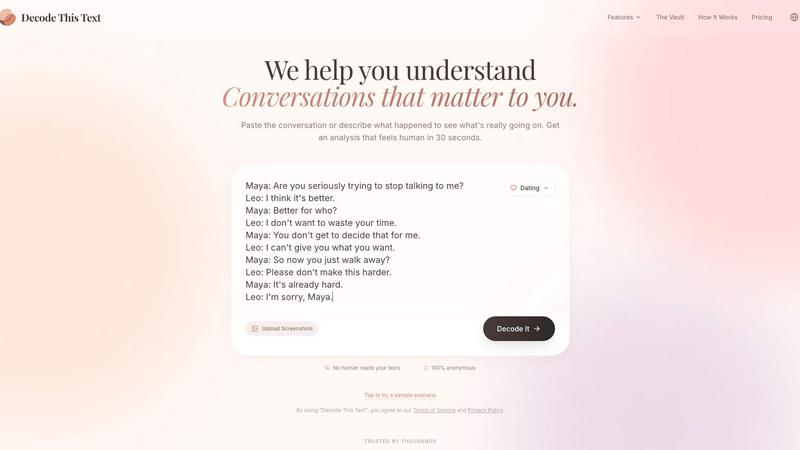
Forget hours of overthinking. Our proprietary AI engine delivers a comprehensive, human-feeling breakdown of any conversation in under 30 seconds. Simply paste the text, describe the situation, or upload a screenshot. The system analyzes word choice, timing, and tonal cues to provide a clear read on true intentions, emotional temperature, and the level of effort from the other person, giving you an immediate strategic edge.
The Confidentiality Vault: 100% Anonymous
Your private conversations stay private. We enforce a strict, battle-tested privacy protocol where no human ever reads your texts. Every analysis is performed by secure AI, ensuring complete anonymity. This allows for total honesty when pasting sensitive messages, from complicated dating chats to delicate work emails, without any risk of exposure or judgment.
Multi-Format Input & Pattern Detection
We meet you where your confusion lives. Don't waste time transcribing; just upload a screenshot of your chat and let our AI read it for you. Beyond the surface, our system is engineered to detect critical behavioral patterns you might miss—like someone only messaging late at night, consistently avoiding direct questions, or their responses getting progressively shorter—revealing the true narrative.
Strategic Response Builder
Clarity is useless without a game plan. After decoding their message, we arm you with actionable next steps. The tool provides multiple tailored response options—whether you need to be calm, direct, or firm—crafted to fit the specific context of your analyzed conversation. This turns insight into confident action, stopping the cycle of doubt before you hit 'send'.
Hush Touch | Voice-to-Text for MacOS
Dual-Engine Recognition
Hush Touch leverages two advanced Apple dictation engines: DictationTranscriber for managing natural flow and punctuation, and SFSpeechRecognizer for enhancing custom vocabulary. This combination ensures accurate transcription that adapts to your unique speech patterns and terminologies.
Custom Vocabulary
This feature allows users to input up to 500 specialized terms, from technical jargon to specific brand names. Hush Touch learns from corrections made during dictation, ensuring that it recognizes your language preferences over time, enhancing the overall dictation experience.
Smart Text Processing
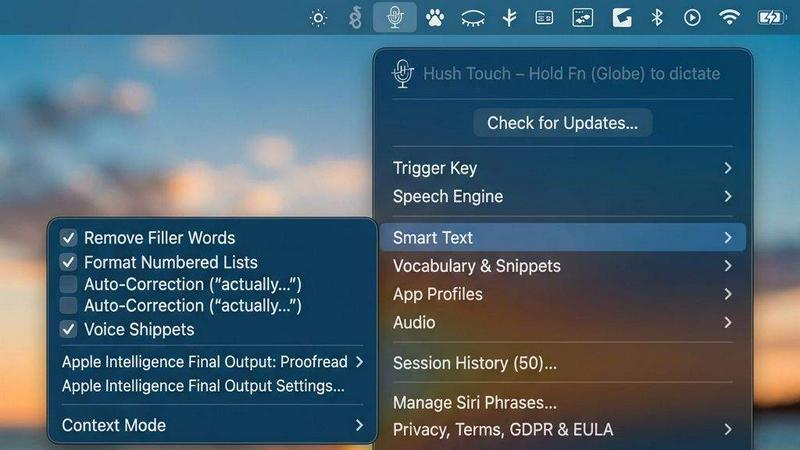
Hush Touch excels in real-time text processing. It automatically removes filler words, corrects common mispronunciations, and formats lists, all while dictating. This intelligent feature ensures your output is polished and professional without the need for extensive editing.
Context Modes & Hands-Free Operation
Switch effortlessly between different dictation contexts such as General, Email, Code, and Notes. Hush Touch also supports hands-free operation via Siri, allowing you to start dictation simply by voice command and automatically inserting text after a brief pause.
Use Cases
Decode This Text
Decoding Modern Dating & Relationships
Navigate the murky waters of dating apps and situationships with tactical precision. Stop wondering if "I'll let you know" means they're busy or losing interest. Analyze why someone vanished after months of talking or if their "fun last night" text has genuine follow-up potential. Get the reality check you need to manage your expectations and communicate from a position of strength, not desperate hope.
Mastering Workplace Communication
Gain the upper hand in professional dynamics. Decipher if your boss's one-word email is anger or just efficiency. Understand the true meaning behind phrases like "we'll keep your resume on file" or "let's circle back." Craft the perfect way to say "no" to a colleague without sounding rude. Transform ambiguous feedback into clear direction, protecting your reputation and advancing your career with confidence.
Navigating Friends & Family Dynamics
Repair and strengthen personal relationships with clarity. Understand why the family group chat went silent after your message or if a friend's short reply is a sign of annoyance or just distraction. Decode passive-aggressive comments or sudden distance, allowing you to address real issues directly and empathetically, rather than letting misunderstandings fester and damage your closest bonds.
Analyzing Client & Business Interactions
Secure your business interests by understanding client subtext. Read between the lines of a tricky client email to discern real concerns from simple hesitation. Gauge genuine interest versus polite dismissal in sales conversations. This allows for perfectly pitched responses that address real objections, build trust, and close deals, ensuring you never miss a cue or waste time on a dead-end lead.
Hush Touch | Voice-to-Text for MacOS
Professional Email Drafting
With Hush Touch, professionals can dictate emails on-the-go, ensuring that their thoughts are captured accurately without the hassle of typing. This feature is particularly useful for busy executives and remote workers who need to communicate efficiently.
Medical Documentation
Healthcare professionals can leverage Hush Touch to dictate patient notes and medical records accurately. The custom vocabulary feature ensures that complex medical terminology is recognized, making it a valuable tool for physicians and nurses alike.
Creative Writing
Writers can use Hush Touch to brainstorm and draft their projects without being hindered by the mechanics of typing. This allows for a more fluid creative process, encouraging spontaneous ideas to flow without interruption.
Coding and Technical Documentation
Developers can dictate code snippets and technical documentation using Hush Touch. The dual-engine recognition ensures that programming languages and specific commands are accurately captured, facilitating a smoother coding experience.
Overview
About Decode This Text
Stop playing the guessing game with every ambiguous text, email, or chat. Decode This Text is your battle-tested AI co-pilot for human communication, designed to cut through the noise and deliver the raw, unfiltered truth behind the words. While others leave you to overanalyze and stress, we deliver a definitive analysis in 30 seconds flat. This tool is for anyone who's ever stared at a screen, paralyzed by a message from a coworker, a date, a friend, or a client, wondering, "What do they really mean?" We go beyond simple sentiment to analyze tone, effort, intent, and behavioral patterns, giving you the strategic clarity needed to respond with confidence, not anxiety. In a world of vague texts and professional jargon, Decode This Text is your ultimate advantage, transforming confusing subtext into actionable insight. We empower you to connect better by making understanding simple, direct, and brutally effective.
About Hush Touch | Voice-to-Text for MacOS
Hush Touch is an innovative voice-to-text application specifically designed for macOS, allowing users to dictate their thoughts seamlessly and privately. This tool is perfect for professionals, students, and anyone who prefers hands-free writing. Hush Touch operates entirely on-device, ensuring that your dictation remains private and secure without relying on cloud services. By utilizing two powerful Apple transcription engines, complemented by an Apple Intelligence final pass, Hush Touch delivers exceptional accuracy and efficiency in transcription. Its lightweight design, at just 5.5 MB, ensures quick launches and minimal impact on system resources. With a one-time purchase of just $20 for a lifetime license, Hush Touch is a cost-effective solution for those who want dependable dictation without ongoing subscription fees. Experience a new level of productivity by drafting emails, notes, and documents with your voice while enjoying a clean and intuitive interface.
Frequently Asked Questions
Decode This Text FAQ
How accurate is the analysis from Decode This Text?
Our AI is trained on vast datasets of human communication patterns and continuously refined. While no tool can guarantee 100% mind-reading accuracy, we provide a highly sophisticated, battle-tested analysis of tone, intent, and behavioral cues that is consistently praised by users for its insightful, human-like clarity. It's designed to highlight probabilities and patterns you may have missed, giving you a far more objective perspective than your own anxious overanalysis.
Is my data and conversation history really private?
Absolutely. This is a core, non-negotiable feature. We operate on a strict "no human eyes" policy. Your pasted texts and uploaded screenshots are processed entirely by secure AI algorithms and are never stored, shared, or reviewed by any person. Your anonymity and confidentiality are the foundation of our service, allowing for truly honest decoding.
What's the difference between this and asking a friend for advice?
Friends are biased and you often hear what you want to hear. Decode This Text provides an instant, objective, and strategic analysis free of personal drama or emotional investment. It's available 24/7, won't get tired of your stories, and focuses on the textual evidence and patterns rather than gossip. It's like having a tactically brilliant, completely unbiased consultant on demand.
Can I use it for languages other than English?
Currently, Decode This Text is optimized and battle-tested primarily for English-language communication. The nuances of tone, slang, and idiom are deeply language-specific. For the most accurate and reliable analysis, we recommend using it for conversations conducted in English to ensure the AI can deliver its full, powerful insight.
Hush Touch | Voice-to-Text for MacOS FAQ
How does Hush Touch ensure privacy?
Hush Touch processes all voice data entirely on your device, meaning there is no reliance on cloud storage or internet connectivity. This guarantees that your dictation remains confidential and secure.
Is there a free trial available?
Yes, Hush Touch offers a 7-day free trial with no credit card required. Users can test the app’s features and functionality before committing to a purchase.
Can I customize the vocabulary for specific needs?
Absolutely! Hush Touch allows users to add up to 500 custom terms, and it learns from your corrections, ensuring that it captures your specific vocabulary over time.
What is the pricing structure for Hush Touch?
Hush Touch is available for a one-time payment of $20. This grants users a lifetime license with no recurring fees or subscriptions, making it an economical choice for long-term use.
Alternatives
Decode This Text Alternatives
Decode This Text is a specialized productivity tool designed to cut through the ambiguity in digital communication. It operates in the communication clarity and text analysis category, helping users decipher the true intent behind emails, chats, and texts to respond with confidence. Users often seek alternatives for a variety of reasons. Some need a solution that fits a specific budget, while others require more advanced features, different platform compatibility, or a tool integrated into a larger suite of productivity software. The search is driven by the need to find the perfect balance of insight, convenience, and value. When evaluating other options, focus on core capabilities. You need a tool that delivers genuine clarity, not just generic advice. Look for precision in analysis, ease of use, and a clear understanding of context across both professional and personal conversations. The right alternative should make you feel equipped, not overwhelmed.
Hush Touch | Voice-to-Text for MacOS Alternatives
Hush Touch | Voice-to-Text for MacOS is a cutting-edge dictation app designed to transform spoken words into text effortlessly. As a productivity and management tool, it caters to users seeking a more efficient way to create emails, messages, and documents while maintaining a natural flow in their speech. However, many users often find themselves exploring alternatives due to factors such as pricing, feature sets, or compatibility with different platforms. When searching for an alternative, it's essential to consider key aspects like on-device processing for privacy, ease of use, and the ability to integrate seamlessly into your existing workflow. Users should also evaluate the accuracy of transcription, customization options for commands, and overall performance to ensure they select a solution that meets their unique dictation needs.