
Dividend Data vs Tailride
Dividend Data
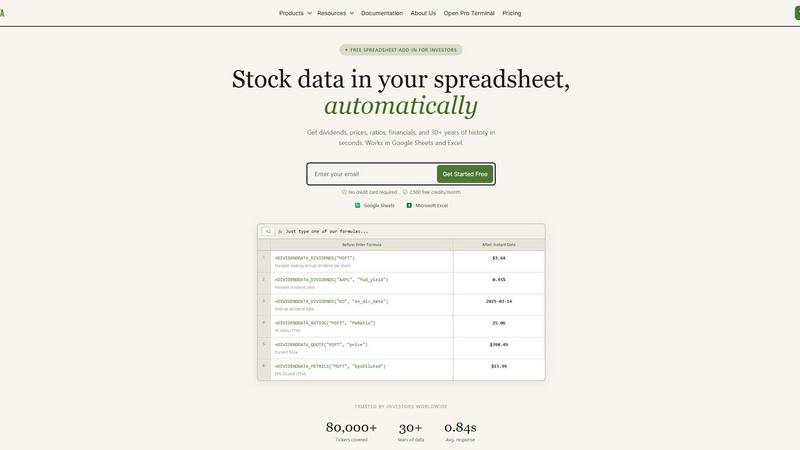
Stop manually updating spreadsheets; our battle-tested formulas instantly deliver dividends, prices, and financials directly into Excel and Google.
Last updated: March 11, 2026
Tailride
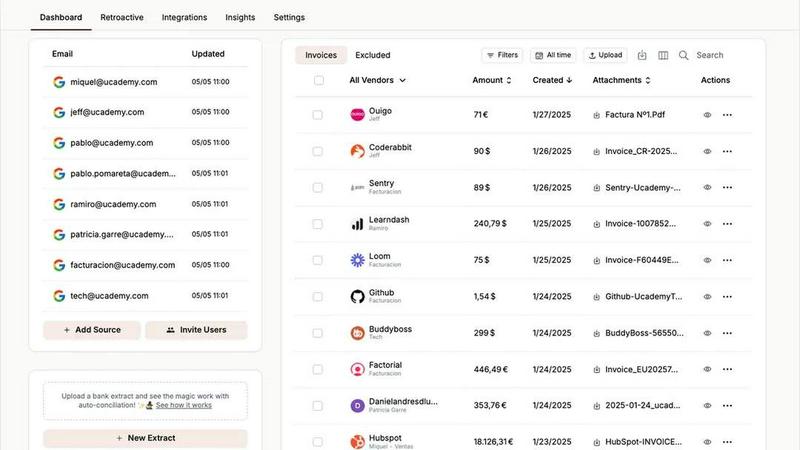
Stop hunting for invoices; Tailride's AI finds and organizes them all automatically.
Last updated: February 28, 2026
Visual Comparison
Dividend Data
Tailride
Feature Comparison
Dividend Data
Comprehensive Dividend Intelligence Engine
Go beyond basic yield. This feature delivers the deep, forward-looking data dividend investors crave. Access forward annual dividend amounts, yields, payout ratios, growth rates, and critical dates like ex-dividend and payment dates for any stock instantly. It's built specifically to analyze the sustainability and growth trajectory of income streams, putting professional-grade dividend analytics at your fingertips with a single formula.
Deep Historical Financials & Ratios
Conduct thorough fundamental analysis without leaving your spreadsheet. Pull in 30+ years of historical data from income statements, balance sheets, and cash flow statements. Instantly calculate and retrieve essential valuation and health metrics like P/E Ratio, Price-to-Book, Debt-to-Equity, and Return on Equity. This turns your sheet into a dynamic financial modeling platform, allowing for robust back-testing and trend analysis.
Live Price & Market Data Integration
Keep your portfolio tracking and valuation models perpetually up-to-date. With simple functions, pull real-time or delayed closing prices, market capitalization, and daily price history. This seamless integration ensures your net worth calculations, performance charts, and alert systems are always reflecting the live market, eliminating manual data entry errors and outdated information.
Universal Spreadsheet Compatibility
Why choose between ecosystems? Dividend Data delivers identical, powerful functionality in both Google Sheets and Microsoft Excel. Whether your team uses Google Workspace or your models are built in Excel, you get the same reliable formulas, data quality, and user experience. This flexibility ensures no investor is left behind and allows for seamless collaboration across different platforms.
Tailride
Inbox Scanning & Monitoring
Tailride plugs directly into your Gmail, Outlook, or any IMAP inbox to act as a 24/7 financial watchdog. It automatically scans and monitors all incoming emails for you and your team, instantly detecting invoices and receipts regardless of format—PDF, image, email body, or secure link. It even retroactively scans months or years of past emails to clean up historical messes. This native connection means your emails never leave your server, replacing insecure forwarding practices with a centralized, automated capture system that guarantees no invoice is ever missed again.
One-Click Online Portal Extraction
Why log into twenty different accounts manually? Tailride's powerful Chrome extension cuts through the clutter of online portals. With a single click, it automatically locates and extracts invoices from within Amazon, Meta Ads, Notion, Adobe, Microsoft, ChatGPT, and over 15 other essential platforms. This feature directly replaces clunky, single-purpose services like GetMyInvoices, delivering a unified and lightning-fast tool that turns hours of monthly portal-hopping into a 30-second task.
AI-Powered Processing & Rules Engine
Beyond simple extraction, Tailride's intelligent document recognition engine accurately reads key data like vendor, date, amount, and tax. The real power lies in its customizable AI rules, which allow you to automate categorization, tagging, and routing based on your specific business logic. Set rules to automatically send all software subscriptions to one folder or flag all expenses over a certain amount. This transforms raw documents into perfectly organized, actionable financial data ready for your accounting software.
Automated Reconciliation & Integrations
Tailride closes the loop with automated bank reconciliation. It matches extracted invoices and receipts with corresponding bank transactions, instantly identifying what's been paid, what's pending, and—crucially—what invoices are missing from your records. This happens within a seamless ecosystem that integrates directly with QuickBooks, Xero, and Google Drive, ensuring your financial picture is always complete, accurate, and audit-ready without manual cross-checking.
Use Cases
Dividend Data
Automated Dividend Portfolio Tracking
Manually updating a portfolio of income stocks is a tedious chore. Investors use Dividend Data to build a live dashboard that automatically tracks dividend payments, yields-on-cost, projected annual income, and ex-dividend calendars. This automates the entire monitoring process, providing a real-time view of portfolio income health and freeing up hours for analysis instead of data entry.
Screening and Building Watchlists
Quickly filter the universe of 80,000+ stocks based on precise, live criteria. Use the formulas to create dynamic screens for stocks meeting specific conditions, such as a P/E ratio under 20, a dividend yield above 3%, and a payout ratio below 60%. This allows investors to systematically identify new opportunities based on the latest data without relying on third-party screeners with limited metrics.
Streamlined Fundamental Research Reports
When analyzing a company for a potential investment, gathering data from multiple sources is inefficient. With Dividend Data, an investor can create a standardized research template in a spreadsheet. By simply entering a ticker symbol, the template auto-populates with decades of financials, key ratios, and dividend history, creating a comprehensive, consistent report in seconds.
Dynamic Financial Modeling & Projections
Build more accurate and responsive financial models. By linking valuation models directly to live data feeds for revenue, EPS, and growth rates, analysts can ensure their assumptions and projections are grounded in the latest reported figures. This creates living models that adjust as new quarterly data is released, providing a significant edge in investment thesis development.
Tailride
For Fast-Growing Startups & SMEs
Fast-growing companies drown in administrative chaos. Tailride eliminates the manual invoice hunt by automatically capturing every document from all employee inboxes and key portals. It automates categorization and syncs to their accounting stack, saving hundreds of hours monthly. This allows founders and ops teams to focus on scaling, not paperwork, while ensuring their accountant receives perfectly organized data for seamless tax filings and financial reporting.
For Accounting Firms & Bookkeepers
Accounting firms managing multiple clients face a torrent of disorganized documents. Tailride allows them to connect directly to each client's inbox and software portals with secure, centralized oversight. It automates the entire data collection and pre-organization process, slashing the time spent chasing clients for missing invoices and manually entering data. This transforms their service from reactive cleanup to proactive financial advisory, enabling them to scale and manage more clients profitably.
For Streamlining Employee Expenses
Managing employee expenses and paper receipts is notoriously messy. With Tailride, employees can simply take a picture of a physical receipt and send it via the dedicated Telegram or WhatsApp bot. The AI processes it instantly, adding it to the company's central dashboard. This eliminates lost paper receipts, simplifies reimbursement, and gives finance teams real-time visibility into all spending, from digital invoices to physical coffee receipts.
For Quarterly & Year-End Close Chaos
When the quarter ends, the frantic search for hundreds of missing invoices begins. Tailride prevents this panic by maintaining a real-time, organized repository of all financial documents year-round. Come closing time, everything is already captured, categorized, and reconciled. This turns a week of stressful consolidation into a simple review, ensuring accuracy, compliance, and on-time filings without the last-minute scramble.
Overview
About Dividend Data
Forget clunky APIs, expensive terminals, and the endless copy-paste grind. Dividend Data is the battle-tested spreadsheet weapon built for one purpose: to give self-directed investors institutional-grade market intelligence without the institutional complexity or price tag. This is not just another data feed; it's a complete operational system designed by a dividend investor for fundamental analysts who live in Google Sheets and Microsoft Excel. The core value proposition is ruthless efficiency: you get instant, live access to over 30 years of historical data for 80,000+ tickers directly in your cells through simple, plain-English formulas. No coding, no API keys, no manual updates. Just type a function like =DIVIDENDDATA_DIVIDENDS("MSFT") and watch the forward dividend, yield, ex-date, or payout ratio populate instantly. It brings together dividends, yields, full financial statements, key ratios, earnings, and price history—over 100 metrics—transforming your spreadsheet from a static record into a dynamic, real-time research and portfolio tracking powerhouse. With a permanently free tier offering 2,500 monthly credits and seamless integration across both major spreadsheet platforms, Dividend Data democratizes high-quality financial data, empowering investors to make faster, more informed decisions with confidence.
About Tailride
Tailride is the battle-tested AI accounting automation platform engineered for businesses and accountants who are done playing games with manual data entry. Forget about the dozens of basic receipt-scanning apps that only solve half the problem. Tailride delivers a complete, end-to-end solution that connects natively to your company's financial data flow. It automatically monitors connected email inboxes to detect, extract, and process every invoice and receipt—whether buried in an email body, hidden in a PDF attachment, or behind a login portal. With its powerful Chrome extension, it pulls invoices directly from 20+ critical platforms like Amazon, Meta Ads, and ChatGPT in one click. Tailride then uses customizable AI rules to categorize documents and seamlessly syncs them to QuickBooks, Xero, or Google Drive. Its intelligent bank reconciliation engine matches transactions with invoices, instantly highlighting discrepancies and missing documents. Built for fast-growing companies and forward-thinking accounting firms, Tailride doesn't just save time; it eliminates the chaos of financial document management, ensuring 100% capture, perfect organization, and a finally-happy accountant.
Frequently Asked Questions
Dividend Data FAQ
Is there really a free plan, and what does it include?
Absolutely. The free tier is a permanent offering, not a limited trial. It provides 2,500 credits per month at no cost and with no credit card required. This is ample for most individual investors to track a portfolio, research several companies, and automate key data in their spreadsheets, making professional-grade analysis accessible to everyone.
How does Dividend Data compare to using free Yahoo Finance or Google Finance data?
While those sources are free, they are notoriously unreliable, inconsistent, and often lack the depth and history serious investors need. Dividend Data provides clean, standardized, and battle-tested data directly into your spreadsheet cells with 30+ years of history. You trade the fragility of web scraping and manual copying for robust, automated, and institutional-quality data feeds.
Do I need to know how to code or set up an API?
Not at all. Dividend Data requires zero coding knowledge. The entire system runs on simple, custom spreadsheet functions (like =DIVIDENDDATA_QUOTE("AAPL", "price")). If you know how to type a formula in Excel or Google Sheets, you can use all its features. There are no APIs to manage, authenticate, or troubleshoot.
Is my data secure and private?
Yes. Dividend Data operates with a strong commitment to privacy. Your spreadsheet data and portfolio holdings are not stored on their servers. The add-in fetches public market data based on the formulas you type. You maintain full control and ownership of your financial models and investment information at all times.
Tailride FAQ
How does Tailride connect to my email, and is it secure?
Tailride establishes a secure, native connection using OAuth for services like Gmail and Outlook, or encrypted IMAP credentials for other providers. This is a read-only connection for scanning; your emails never leave your inbox or get stored on unrelated servers. We use bank-level encryption and comply with major data protection standards, ensuring your financial data remains private and secure. It's far more secure than the common practice of forwarding invoices to unsecured third-party addresses.
Can Tailride really find old invoices from my inbox?
Absolutely. When you first connect your inbox, Tailride gives you the option to perform a retroactive scan. You can choose to find all invoices from a custom date range, the current year, the last quarter, or simply the current month. This powerful catch-up feature can instantly organize months or years of financial history in minutes, cleaning up past messes and ensuring your records are complete.
What makes Tailride better than other receipt scanning apps?
Most receipt apps are built for consumers to scan coffee receipts. Tailride is built for businesses that need complete, automated financial document capture. We don't just scan photos; we natively connect to your entire financial data flow—inboxes, colleague inboxes, and 20+ critical business portals. We offer intelligent categorization, automated reconciliation, and direct accounting software integrations. Others handle a piece; Tailride solves the entire problem.
How does the Chrome extension work with online portals?
After installing the Tailride Chrome extension, you simply log into any supported platform (e.g., Amazon Business, Meta Ads Manager). When you're on a page containing your invoices, the extension will detect them and display a Tailride button. One click extracts all available invoices directly into your Tailride dashboard, where our AI processes them. It eliminates the need to manually download and upload PDFs from each service.
Alternatives
Dividend Data Alternatives
Dividend Data is a specialized spreadsheet add-on that delivers live, institutional-grade stock market data directly into Google Sheets and Excel. It belongs to the category of financial data tools built for self-directed, fundamental investors who prioritize dividends and long-term analysis. Users often explore alternatives due to budget constraints, the need for different data points, or compatibility issues with other platforms like portfolio trackers. When evaluating other tools, savvy investors should scrutinize the depth of historical data, the transparency of pricing beyond free trials, and the simplicity of the user experience. The core value lies in eliminating manual data entry; therefore, any true alternative must offer seamless, formula-driven access without requiring coding skills or constant maintenance. The right solution should feel like a natural extension of your analysis workflow, not a complicated piece of financial software. Focus on tools that understand the specific needs of dividend growth investing, providing not just raw numbers but the critical metrics—like payout ratios and dividend growth streaks—that inform sound investment decisions.
Tailride Alternatives
Tailride is a leading AI-powered invoice and receipt automation platform in the business and finance software category. It automates the tedious process of extracting, categorizing, and reconciling financial documents from emails and across the web. Users often explore alternatives for various reasons, such as budget constraints, the need for different feature sets, or specific platform integrations not offered by their current solution. Some may require deeper accounting functionality or a different user experience that better aligns with their team's workflow. When evaluating other options, key considerations should include the accuracy of the AI data extraction, the breadth of supported platforms and accounting software integrations, the flexibility of automation rules, and the overall security posture of the platform. The goal is to find a tool that eliminates manual data entry without creating new complexities.