
Facejam vs Seedream Pro

Facejam
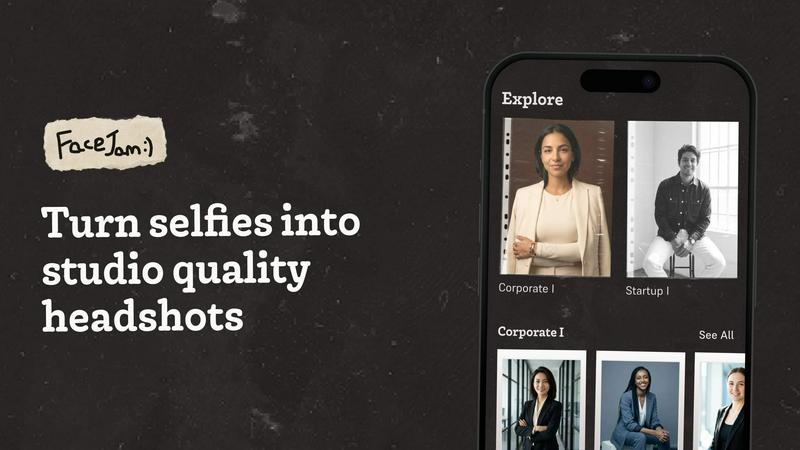
Transform selfies into stunning professional headshots in minutes, no photographer needed, with FaceJam's AI magic.
Last updated: February 28, 2026

Seedream Pro
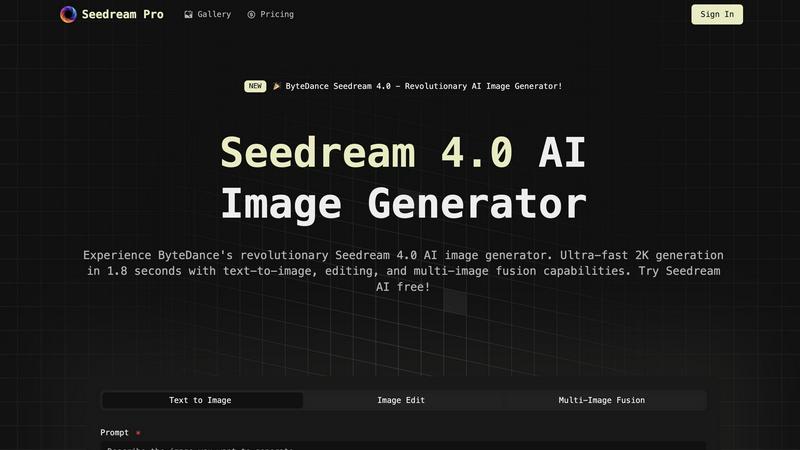
Seedream Pro delivers ultra-fast AI image generation, enabling stunning text-to-image creation and seamless editing in.
Last updated: February 28, 2026
Visual Comparison
Facejam
Seedream Pro
Feature Comparison
Facejam
100+ Professional Styles
FaceJam offers an extensive selection of over 100 professional headshot styles, tailored to fit various industries. From creative fields to legal practices, users can find the perfect look that aligns with their profession, ensuring they make a memorable impression.
Quick and Easy Process
With FaceJam, the headshot creation process is simplified into just two steps: upload your selfies and select your desired template. This means no more waiting for a photographer or dealing with complicated editing software. Your stunning headshots are ready in minutes.
High-Quality Realism
FaceJam prides itself on producing realistic headshots that look like they were taken by a professional photographer. The AI technology ensures that your images appear authentic, eliminating any signs of artificiality that can often accompany AI-generated visuals.
Full Ownership and Privacy
When you create headshots with FaceJam, you retain full ownership of your images. The platform guarantees that your uploaded photos are never shared or used for any other purpose, ensuring your privacy and the security of your personal data.
Seedream Pro
Text-to-Image Generation
Seedream Pro offers ultra-fast text-to-image capabilities, allowing users to generate 2K or 4K-ready images within seconds. This feature supports rapid iterations, enabling creatives to refine their concepts with ease and efficiency.
Mask Editing and Inpainting
With advanced mask editing and inpainting tools, users can make local, non-destructive edits to their images. This functionality allows for precise adjustments without compromising the overall quality of the generated asset, ensuring that every detail aligns with the creative vision.
Multi-Image Fusion
Seedream Pro's multi-image fusion feature enables users to blend several reference images seamlessly. This capability allows for adherence to brand style guides and ensures that every output matches the desired aesthetic, making it a vital tool for branding consistency.
Consistent Export Formats
The platform guarantees consistent export formats that are ideal for marketing campaigns and presentations. Users can easily create high-quality visuals that are ready for use across various platforms, enhancing their professional image and output.
Use Cases
Facejam
LinkedIn Profiles
Elevate your LinkedIn presence with professional headshots tailored for business networking. FaceJam provides the perfect image to help you stand out to potential employers and clients, making a lasting impression.
Corporate Team Photos
FaceJam is ideal for companies seeking to create cohesive, polished team images for their corporate websites and directories. Generate high-quality headshots for all staff members without the need for expensive photoshoots.
Personal Branding
Whether you are an entrepreneur, consultant, or freelancer, maintaining a consistent and professional image across all platforms is vital. FaceJam helps you achieve this by providing uniform headshots that enhance your personal branding.
Marketing Materials
Use FaceJam-generated headshots for marketing collateral, pitch decks, and promotional materials. High-quality images can significantly impact the effectiveness of your marketing efforts, making your business more appealing to clients and partners.
Seedream Pro
Virtual Try-On & Styling
Seedream Pro is perfect for virtual try-on scenarios where users can upload their photos and experiment with different clothing, hairstyles, or professional looks. This functionality maintains character consistency across all generated images, making it invaluable for fashion and beauty industries.
E-commerce Product Images
For e-commerce businesses, Seedream Pro facilitates the generation of high-quality product showcase images. Users can create multiple lifestyle shots and promotional materials in seconds, enhancing product appeal while saving time and resources.
Content Creation for Blogs and Social Media
Content creators can leverage Seedream Pro to produce eye-catching visuals for blogs, articles, and social media posts. The AI-generated images can significantly enhance storytelling, making content more engaging and visually appealing to audiences.
Educational Materials Development
Educators can utilize Seedream Pro to create dynamic visual materials for teaching and training. This includes courseware backgrounds, knowledge point illustrations, and engaging graphics that improve learning effectiveness and student engagement.
Overview
About Facejam
FaceJam is a revolutionary AI-powered tool that transforms your selfies into stunning, studio-quality headshots in mere minutes. Designed for professionals across various industries, FaceJam allows users to upload a few personal photos, select from an extensive library of over 100 styles, and generate high-resolution headshots without the hassle of scheduling a photoshoot. Whether you need a polished image for LinkedIn, a business profile, or a personal portfolio, FaceJam delivers exceptional results that rival traditional photography. This innovative platform is perfect for job seekers, entrepreneurs, and anyone looking to enhance their personal brand with professional images. With FaceJam, you save both time and money while achieving professional-grade headshots that highlight your unique style and personality.
About Seedream Pro
Seedream Pro is an innovative AI-powered image generation tool designed to streamline the creative process for designers, marketers, and independent creators. By transforming text prompts into high-resolution images on a single screen, Seedream Pro eliminates the need for multiple tools, enabling users to generate ad concepts, landing-page visuals, e-commerce product shots, and social media graphics in mere minutes. Its user-friendly interface allows for rapid iterations, making it ideal for professionals who require speed and precision in their workflow. With features like mask editing and multi-image fusion, Seedream Pro ensures that the outputs remain consistent with brand guidelines while providing an intuitive platform to create stunning visuals. The web-based app, accessible via Google sign-in, democratizes image creation, allowing anyone to harness the power of AI for their creative endeavors.
Frequently Asked Questions
Facejam FAQ
How does your AI headshot generator work?
FaceJam operates through a simple two-step process: first, you upload your selfies, then choose a template that suits your style. The AI then generates high-quality headshots tailored to your specifications.
What do you do with my uploaded photos?
Your uploaded photos are used solely to create your personalized headshots. They are not utilized for improving the AI model or for any other users, ensuring your images remain private and secure.
How many good photos can I expect?
FaceJam guarantees a minimum of one high-quality image per pack. However, users who closely follow the guidelines often receive 5-10 excellent photos, depending on the quality of the initial selfies provided.
Who owns my AI photos?
All headshots created through FaceJam are owned by you. The platform provides a full commercial license, allowing you to use your images freely across all personal and professional platforms.
Seedream Pro FAQ
How does Seedream Pro work?
Seedream Pro uses advanced AI algorithms to transform text prompts into high-resolution images. Users input a description, and the software generates visuals almost instantly, allowing for quick iterations and edits.
Is Seedream Pro suitable for beginners?
Absolutely! Seedream Pro is designed with user-friendliness in mind. Its intuitive interface allows even those with minimal technical skills to create professional-quality images effortlessly.
Can I edit the images after generation?
Yes, Seedream Pro includes powerful mask editing and inpainting tools that enable users to make local edits to their images without affecting the overall quality, allowing for refined and personalized outputs.
Is there a mobile version of Seedream Pro?
Currently, Seedream Pro is a web-based application that can be accessed from any device with an internet connection. This makes it versatile and convenient for users on the go, but there isn't a dedicated mobile app at this time.
Alternatives
Facejam Alternatives
Facejam is a cutting-edge AI tool designed to transform your selfies into professional-grade headshots. By simply uploading a few photos, users can choose from over 50 styles tailored to various industries, producing stunning results without the need for photographers or extensive retouching. This innovation falls under the image generation category, offering a quick and efficient solution for anyone in need of high-quality images for their professional or personal branding. Many users seek alternatives to Facejam for various reasons, such as pricing concerns, feature sets, or specific platform needs. In a saturated market, it’s essential to consider factors like the variety of styles available, the realism of the generated images, and the overall user experience. When choosing an alternative, look for tools that prioritize high-quality output, ease of use, and robust security to ensure your images remain private and protected.
Seedream Pro Alternatives
Seedream Pro is an advanced AI image generator developed by ByteDance, designed to streamline the creative process for designers, marketers, and indie makers. As part of the Design Tools category, it allows users to transform text prompts into high-resolution images with ease, enabling rapid generation, precise editing, and effective brand alignment. Users often seek alternatives due to various factors such as pricing, specific feature sets, or platform compatibility. When choosing an alternative, consider aspects like user interface, editing capabilities, and whether it meets your particular needs for image quality and output consistency. The right choice should enhance your workflow without compromising on the creative vision or efficiency.