
FaceShot vs Image3D AI

FaceShot
Create stunning, professional headshots from a selfie in just 60 seconds with FaceShot's AI-powered technology.
Last updated: February 27, 2026

Image3D AI
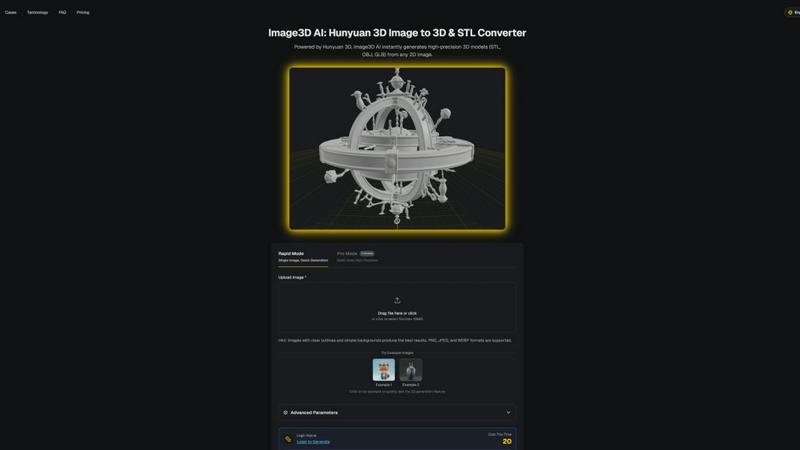
Transform any 2D image into high-precision 3D models in minutes with Image3D AI's powerful conversion technology.
Last updated: February 28, 2026
Visual Comparison
FaceShot
Image3D AI
Feature Comparison
FaceShot
Quick Generation
FaceShot boasts an impressive turnaround time, delivering polished headshots in about 60 seconds. This rapid generation allows users to get high-quality images without the long wait typically associated with traditional photography sessions.
Diverse Style Options
With over 20 professional styles to choose from, FaceShot caters to various needs. Whether you require a corporate LinkedIn headshot, a casual social media portrait, or an editorial-quality image, there is a style that perfectly fits your branding.
High-Quality Output
Every headshot produced by FaceShot is of the highest quality, with no watermarks and available in high resolution. This ensures that your images are suitable for any professional setting, from resumes to press materials.
User-Friendly Process
The entire process is streamlined and intuitive. Users can either upload a photo or take a new one directly through the app, select their desired style, and download multiple variations, making it incredibly easy for anyone to create a professional headshot.
Image3D AI
Multi-Format Export
With Image3D AI, you can download your generated models in various formats, including .STL for 3D printing, .OBJ for detailed editing, and .GLB for seamless integration into WebAR and gaming applications. This flexibility ensures that whatever your project demands, Image3D AI delivers.
PBR Material Generation
Image3D AI automatically generates Physically Based Rendering (PBR) materials, ensuring that your 3D models come alive with realistic textures and materials. This feature enhances the visual quality of your models, making them ideal for professional use in games, AR, and marketing visuals.
Dual Modes
Choose between "Speed Mode" for quick prototypes or "Pro Mode" for high-precision, multi-view reconstruction. This dual functionality allows users to optimize their workflow based on project requirements, whether they need rapid results or detailed accuracy.
Advanced Parameters
Users have the option to tweak advanced parameters to optimize model output quality. This feature is especially beneficial for professionals who require specific attributes in their 3D models, allowing for tailored results that meet unique project demands.
Use Cases
FaceShot
LinkedIn Profiles
Professionals can utilize FaceShot to enhance their LinkedIn presence, ensuring they have a standout headshot that reflects their professional identity and attracts more connections and opportunities.
Company Team Pages
Companies looking to update their team pages can efficiently process multiple employees' headshots. FaceShot allows for consistent, high-quality images that maintain brand coherence across all profiles.
Speaker Bios
For individuals preparing for conferences or public speaking engagements, FaceShot provides polished portraits that can enhance speaker bios, giving a professional edge that resonates with audiences and organizers alike.
Personal Branding
Creatives and entrepreneurs can leverage FaceShot for personal branding purposes, creating unique and striking headshots that tell their story and help establish a memorable presence in their industry.
Image3D AI
For Game Developers
Game developers can rapidly generate high-quality 3D assets directly from 2D concept art or sketches. The PBR material support allows for direct integration into popular game engines like Unity or Unreal Engine, enhancing game development efficiency.
For E-commerce
E-commerce businesses can convert product images into interactive 3D models that are perfect for AR previews or online showcases. This capability not only enhances customer engagement but also improves conversion rates by providing a more immersive shopping experience.
For 3D Printing
Image3D AI serves as a robust image to STL converter, delivering high-precision, print-ready files. This feature is essential for makers and hobbyists looking to bring their digital designs to life with minimal hassle and maximum accuracy.
For Architecture & Design
Architects and designers can quickly generate architectural models from basic 2D drawings or images. This feature significantly reduces modeling time, allowing professionals to focus on creative aspects rather than tedious technical details.
Overview
About FaceShot
FaceShot is a groundbreaking AI headshot generator that revolutionizes the way professionals create portrait photography. Gone are the days of tedious photo studio appointments and long waits for perfect images. With FaceShot, users simply upload a clear selfie, select from over 20 distinct professional styles, and receive high-quality headshots in less than 60 seconds. Designed specifically for portrait photography, our AI ensures natural lighting, accurate skin tones, and compositions that mirror the quality of a session with a professional photographer. Ideal for anyone needing a polished image, from corporate executives to creatives, FaceShot provides versatile solutions for LinkedIn profiles, team pages, speaker bios, and even dating profiles. With no watermarks and high-resolution outputs, the first generation is free, allowing users to experience the exceptional quality before any commitment. Join the thousands who have transformed their professional presence with FaceShot.
About Image3D AI
Image3D AI is a revolutionary tool that leverages advanced AI technology to convert static 2D images into high-quality 3D models in mere seconds. Powered by Tencent's cutting-edge Hunyuan 3D engine, this software democratizes 3D modeling, enabling users without technical skills to create intricate 3D assets from a single photo or multi-view images. The platform is designed for a diverse audience, including 3D printing enthusiasts, game developers, e-commerce professionals, and architectural designers. By providing production-ready models in multiple formats like STL, OBJ, and GLB, Image3D AI streamlines workflows and enhances productivity. Whether you are looking to create prototypes or high-fidelity models, this tool meets your needs with speed and precision, making it an indispensable asset in the modern digital landscape.
Frequently Asked Questions
FaceShot FAQ
How does FaceShot ensure high-quality images?
FaceShot's AI is specifically trained on portrait photography, ensuring that every generated image features natural lighting, accurate skin tones, and professional composition that mimics a real studio shoot.
Is there a cost to use FaceShot?
The first generation of headshots is completely free, allowing users to try the service without any credit card or signup requirements. Additional generations and features may incur costs, but users can experience the quality upfront.
What types of styles are available?
FaceShot offers over 20 professional styles ranging from executive portraits suitable for LinkedIn to creative shots for personal branding, ensuring that users can find the perfect look for any occasion.
Can I use FaceShot for multiple team members?
Yes, FaceShot is designed for efficiency, allowing companies to process multiple headshots quickly. This feature is particularly beneficial for teams looking to update their online presence with minimal hassle.
Image3D AI FAQ
How does Image3D AI work?
Image3D AI uses advanced AI algorithms to analyze 2D images and reconstruct them into 3D models. It can process both single images and multiple views to generate high-fidelity assets efficiently.
What file formats does Image3D AI support for export?
You can export models in several formats, including .STL for 3D printing, .OBJ for editing, and .GLB for WebAR and gaming applications, providing flexibility for various use cases.
Is there a limit on the image size I can upload?
Yes, the maximum file size for uploads is 10MB. For optimal results, it is recommended to use images with clear outlines and simple backgrounds.
Can I try Image3D AI for free?
Yes, Image3D AI offers free sample images for testing the 3D generation feature, allowing users to explore the tool's capabilities without a login or credit cost.
Alternatives
FaceShot Alternatives
FaceShot is an innovative AI headshot generator that transforms a simple selfie into a professional portrait in just 60 seconds. It falls under the categories of AI Assistants, Image & Photo, and Photography, catering to various needs like LinkedIn profiles, team pages, and personal branding. Users often seek alternatives to FaceShot for a variety of reasons, including pricing structures, feature sets, and compatibility with different platforms. When choosing an alternative, it's essential to consider the quality of the generated images, the variety of styles offered, and the ease of use. Look for options that provide high-resolution outputs without watermarks and allow for multiple variations to ensure you find the perfect fit for your professional or personal needs.
Image3D AI Alternatives
Image3D AI is a cutting-edge AI-powered tool designed to convert static 2D images into high-quality 3D models swiftly. As a part of the AI Assistants and Image Generation categories, it leverages Tencent's Hunyuan 3D engine to solve the complexities of 3D modeling, making it accessible for both beginners and professionals alike. Users often seek alternatives to Image3D AI due to various reasons such as pricing structures, specific features, platform compatibility, or the need for different export formats. When searching for an alternative, consider factors like the quality of 3D outputs, ease of use, available export options, and the specific requirements of your projects to ensure a seamless transition and continued productivity.