
File Studio vs Outbid

File Studio
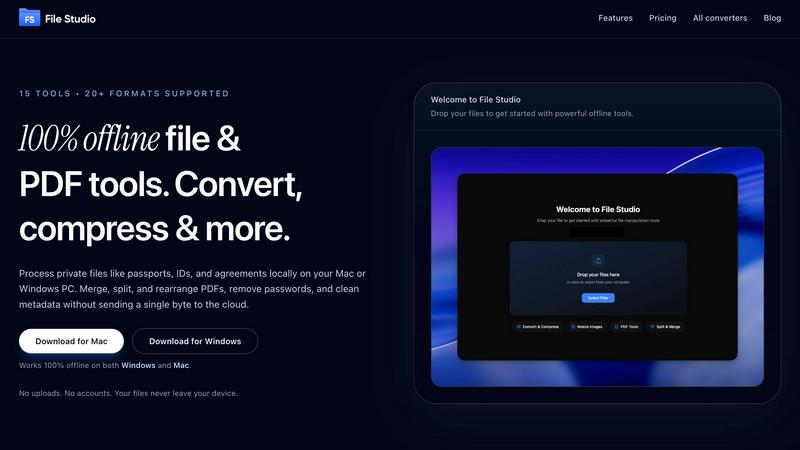
File Studio is the only 100% offline tool that processes your private files locally, never in the cloud.
Last updated: February 28, 2026

Outbid
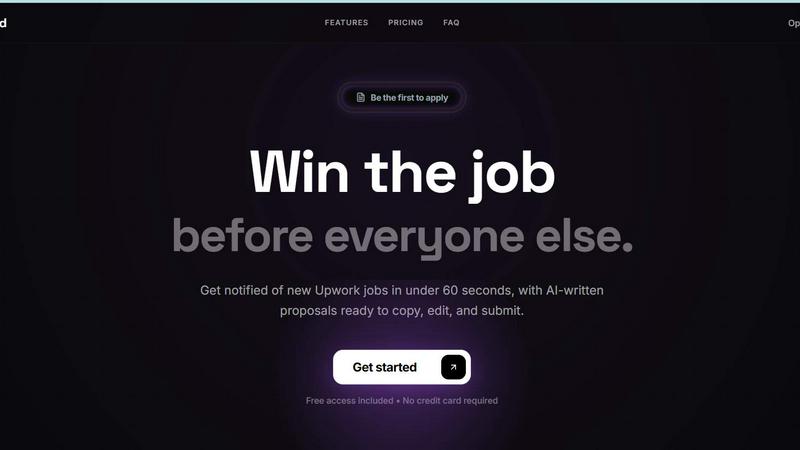
Outbid instantly alerts you to new Upwork jobs and drafts AI proposals so you can apply first and win.
Last updated: March 11, 2026
Visual Comparison
File Studio
Outbid
Feature Comparison
File Studio
100% Offline, On-Device Processing
This is the core, uncompromising feature that defines File Studio. Every operation—from a simple format conversion to merging complex PDFs—is executed locally on your computer's hardware. Your files are never uploaded to the cloud, transmitted over the internet, or stored on a third-party server. This eliminates the security risks, privacy concerns, and bandwidth limitations inherent in web-based tools, providing absolute peace of mind when handling sensitive or confidential material.
Comprehensive PDF Toolkit
File Studio equips you with a full arsenal of PDF manipulation tools that work entirely offline. Effortlessly merge multiple documents into one cohesive file, split a large PDF into individual pages, or reorder and rotate pages to perfect your document's layout. It also includes powerful features for removing password protection from PDFs you have the right to access and cleaning metadata, giving you complete control over your documents without ever needing an internet connection.
Advanced Image Conversion & Editing
Go far beyond basic conversions with support for over 20 image formats, including modern types like HEIC from iPhones, WebP for the web, and AVIF for next-gen compression, plus 14 professional RAW camera formats. Resize images to exact dimensions, compress them intelligently to reduce file size without noticeable quality loss, crop precisely, add text or image watermarks for branding or protection, and even create photo collages—all within a single, streamlined interface.
High-Speed Batch Processing
File Studio is engineered for productivity, allowing you to process hundreds of files simultaneously with batch operations. Simply drag and drop an entire folder of images or PDFs, select your desired action (like convert, compress, or resize), and apply the changes to all files in one click. This massive time-saving feature is perfect for photographers converting RAW shoots, professionals preparing document sets, or anyone needing to optimize large collections of files efficiently.
Outbid
24/7 Real-Time Job Alerts
Outbid operates as your relentless, automated scout. It scans the Upwork platform every 60 seconds, day and night, to detect new job postings the moment they go live. You receive an instant alert in your Telegram app within a minute, ensuring you see opportunities before the majority of freelancers are even aware they exist. This critical head start is the difference between being a top contender and being lost in a crowd of 50+ applications.
AI-Powered Proposal Generation
Stop starting from a blank page. For every matched job alert, Outbid's AI instantly crafts a personalized proposal draft. It intelligently analyzes the job description and seamlessly integrates your pre-set skills and bio to create a compelling, relevant pitch. The draft is formatted for easy mobile copying, allowing you to paste it into Upwork, make quick tweaks, and submit a professional application in one fluid motion, saving invaluable time.
Smart & Granular Filtering
Take control of your workflow and focus only on high-potential leads. Outbid's filtering system lets you define exactly what you're looking for. Set filters based on required skills, minimum and maximum budget ranges, client experience level preferences, and even "quiet hours" to pause notifications during your off-time. This ensures your alerts are for jobs truly worth your time, eliminating noise and boosting your application efficiency.
War Room Strategy Mode
When you encounter a high-value, competitive job, standard tactics won't cut it. Activate War Room mode to deploy advanced strategies. This feature allows you to input custom instructions and regenerate the AI proposal with a different angle or emphasis, helping your application stand out in a crowded field. It's the tool for winning the toughest battles on the platform.
Use Cases
File Studio
Handling Sensitive Legal & Identity Documents
Lawyers, remote notaries, and individuals frequently handle passports, signed contracts, tax forms, and driver's licenses. Using cloud-based tools for these is a privacy gamble. File Studio allows you to merge, split, redact, or convert these sensitive PDFs and scans into required formats entirely on your device, ensuring confidential client and personal data never traverses the internet or sits on a server you don't control.
Photographers Managing Modern Image Workflows
Professional and amateur photographers dealing with HEIC images from iPhones or RAW files from DSLR/mirrorless cameras need reliable conversion. File Studio lets them batch-convert these into universal JPG or PNG formats, resize for web or print, compress for client delivery, and add watermarks for portfolio sharing—all offline, preserving original quality and EXIF data without uploading gigabytes of work to the cloud.
Freelancers & Remote Workers Preparing Client Deliverables
Freelancers compiling reports, designers creating portfolios, and consultants submitting proposals need to merge various documents, compress large image-heavy files for email, and convert files to client-specified formats. File Studio's offline toolkit enables this entire workflow quickly and professionally on a Mac or Windows PC, without being hampered by slow uploads, subscription limits, or insecure web platforms.
Students & Researchers Organizing Digital Materials
Students compiling research papers from multiple PDF sources can merge articles, split textbook chapters, and convert scanned book pages into images for notes. Researchers can batch-process hundreds of image scans or dataset exports. File Studio's one-time cost and offline operation make it an ideal, affordable tool for academic work, ensuring all source materials and drafts remain private and locally managed.
Outbid
The Speed-Focused Freelancer
For freelancers who understand that the first proposal seen is often the first proposal hired, Outbid is essential. It automates the discovery phase, allowing you to bypass the manual refresh cycle and apply with a tailored draft while the job is fresh and the client is most engaged. This use case is about consistently being the first to apply, dramatically increasing visibility and win rates.
The Busy Professional Maximizing Efficiency
If you're managing multiple clients or projects and can't afford to constantly monitor Upwork, Outbid acts as your dedicated assistant. It handles the tedious, round-the-clock monitoring for you. You simply act on the curated, high-quality alerts sent to your phone, turning fragmented checking time into focused, productive application sessions that fit your busy schedule.
The Newcomer Seeking a Competitive Edge
New freelancers often struggle with writing winning proposals and getting lost in the competition. Outbid levels the playing field. It provides the speed of a veteran and the AI-powered draft quality to make a strong first impression. This helps newcomers build momentum, secure early wins, and establish their profile without the paralyzing pressure of perfect proposal writing.
The Veteran Optimizing for Scale
Experienced freelancers looking to scale their business or fill their pipeline faster use Outbid to eliminate bottlenecks. By automating job discovery and the initial proposal draft, they save 10+ hours per week. This reclaimed time can be reinvested into billable client work, skill development, or pursuing even more opportunities, turning efficiency into direct revenue growth.
Pricing Comparison
File Studio
File Studio operates on a simple, transparent, and customer-friendly pricing model designed to contrast sharply with the industry norm of recurring subscriptions. It offers a single, one-time Lifetime Plan.
Lifetime Plan - $29 (one-time payment)
This single purchase grants you a permanent license to use File Studio on your Mac or Windows PC. The license includes unlimited use of all 15+ tools, all current features, and free updates with new features for one year. There are no monthly or annual fees, no account requirements, and no hidden costs. You pay once and own the software forever, with all processing remaining 100% on your device.
Outbid
Outbid offers simple, transparent pricing designed to let you start winning without upfront risk. Begin with a completely Free Access plan that includes unlimited job alerts and a few credits to reveal full proposal details. When you're ready to unlock full power, the Monthly Pro plan at $9.99/month provides unlimited access to AI proposals, direct job links, War Room mode, and priority support. You only upgrade when you're convinced of the value, making it a battle-tested investment in your freelance success.
Overview
About File Studio
File Studio is the definitive desktop fortress for your files, a powerful application that puts you back in control. In a world where every other tool demands an internet connection, uploads your sensitive data to distant servers, and locks you into endless subscriptions, File Studio stands apart. It is a comprehensive suite of 15+ essential PDF and image tools that operate with one non-negotiable principle: 100% offline processing. This means your confidential documents—passports, signed contracts, financial IDs, proprietary images—never leave the security of your Mac or Windows PC. No cloud uploads, no accounts, no data trails.
Built for professionals who value speed, privacy, and ownership, File Studio delivers a one-time purchase license that is yours forever. It replaces a dozen fragmented web services with a single, efficient native application. Seamlessly merge or split PDFs, convert between 20+ modern image formats (including HEIC, WebP, AVIF, and 14 RAW camera types), compress, resize, add watermarks, and even batch-process entire folders of hundreds of files in one go. For photographers, freelancers, remote workers, legal professionals, and anyone tired of the privacy risks and recurring costs of cloud-based alternatives, File Studio is the battle-tested, offline-first champion that guarantees your files are processed quickly and kept permanently private.
About Outbid
Outbid is the ultimate weapon for freelancers who are tired of playing a losing game on Upwork. In the high-stakes arena of freelance bidding, speed is everything. The best jobs are flooded with proposals within hours, leaving clients overwhelmed and your carefully crafted application buried and unread. Outbid flips the script. It's a battle-tested system that monitors Upwork 24/7, delivering real-time job alerts directly to your Telegram within 60 seconds of a job posting. This isn't just a notification; it's a strategic first-strike advantage. Each alert comes with an AI-generated proposal draft, tailored to the specific job description and your unique skills, ready for you to copy, edit, and submit instantly. Built by freelancers for freelancers, Outbid is designed for one purpose: to put you at the front of the line when the client is actively looking and competition is at its lowest. It eliminates the endless manual refreshing, the proposal writer's block, and the frustration of applying too late. If you're serious about winning more high-quality projects and reclaiming hours of your week, Outbid is your command center for dominating the Upwork marketplace.
Frequently Asked Questions
File Studio FAQ
Is my data ever uploaded to the cloud?
Absolutely not. File Studio is built on the principle of local, offline-first processing. Every single operation—conversion, editing, compression—is performed directly on your computer's processor and memory. Your files are never sent over the internet to external servers. This is a core, non-negotiable security advantage over web-based SaaS tools that inherently require uploading your data.
Do you offer a free trial?
Yes, File Studio offers a free trial so you can test all its features and experience the speed and privacy of offline processing on your own files before making a purchase. This allows you to verify it meets your workflow needs and performs seamlessly on your specific Mac or Windows system without any financial commitment upfront.
What is the difference between File Studio and free online converters?
The difference is security, privacy, speed, and ownership. Free online converters require uploading your files to their servers, creating a privacy risk and often imposing file size or batch limits. They are also typically ad-supported. File Studio processes everything instantly on your device, handles unlimited batch jobs, has no ads, and involves a single one-time payment instead of hidden costs or subscriptions.
Does the lifetime license include future updates?
Yes, purchasing the lifetime license grants you ownership of File Studio forever. This license includes all current features and tools, and importantly, it includes free updates and new features for one full year after your purchase. This ensures your software stays current and powerful, protecting your investment.
Outbid FAQ
How fast are the job alerts?
Outbid delivers alerts with unmatched speed. Our system scans Upwork every 60 seconds, 24/7. The moment a job matching your filters is posted, you will receive a notification in your Telegram app typically within 60 seconds. This ensures you are among the very first freelancers to know about and can apply to new opportunities.
Do I need to be tech-savvy to use Outbid?
Absolutely not. Outbid is designed for zero friction. The entire setup happens within Telegram, an app you likely already use. You simply message the bot, follow the intuitive prompts to add your skills and bio (taking under 2 minutes), and set your filters. There is no complex software to install or configure.
Can I customize the AI-generated proposals?
Yes, completely. The AI provides a strong, tailored first draft based on the job and your profile, but you are always in control. You can copy the draft and edit it freely in Upwork to add your personal touch, specific insights, or adjust the tone. For high-competition jobs, use War Room mode to regenerate drafts with custom instructions.
Is Outbid affiliated with Upwork?
No, Outbid is an independent tool built by freelancers to help other freelancers succeed on the Upwork platform. It is a third-party service that monitors publicly available job postings to provide alerts and assistance. You use it to enhance your workflow, but all applications and contracts are managed directly through your official Upwork account.
Alternatives
File Studio Alternatives
File Studio is a desktop application in the productivity and management category, designed for secure, offline processing of PDFs and images. Users often search for alternatives due to factors like subscription fatigue, the need for specific niche features, or because they require a solution that works on a different operating system like Linux. The quest for the right tool is common in a crowded market. When evaluating options, your priorities should guide the choice. Key considerations include whether the software operates offline to guarantee privacy, its pricing model as a one-time purchase versus a recurring fee, and its ability to handle batch processing efficiently. The right alternative should match your need for control, both over your files and your budget, without compromising on core functionality.
Outbid Alternatives
Outbid is an AI-powered proposal and job alert tool designed for freelancers on platforms like Upwork. It operates in the productivity and management category, focusing on giving users a decisive speed advantage by delivering real-time job notifications and AI-generated proposals. Users often seek alternatives for various reasons, such as budget constraints, a need for different features, or compatibility with other freelance platforms beyond Upwork. Some may prefer a different user interface or require more granular control over their automation settings. When evaluating an alternative, key factors to consider are the speed and reliability of job alerts, the quality and customizability of automated proposals, and the range of supported platforms. The right tool should seamlessly integrate into your workflow, saving you time while increasing your proposal visibility and win rate.