
FlashSlides vs Proofapp

FlashSlides
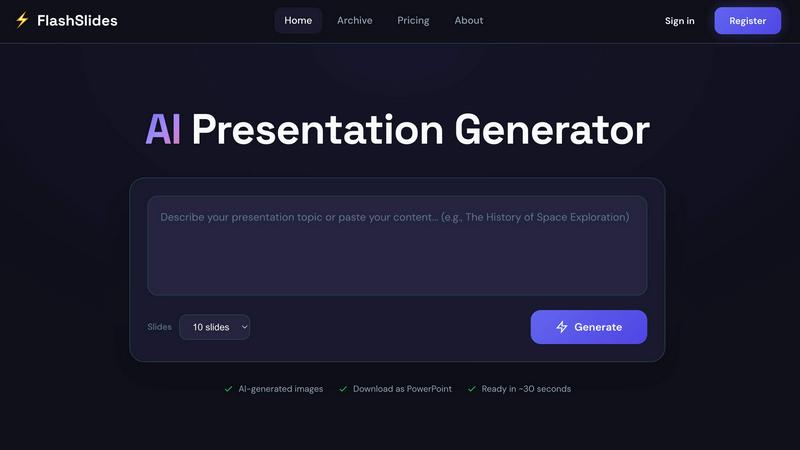
FlashSlides instantly creates stunning presentations from any topic or document, beating manual design.
Last updated: February 28, 2026

Proofapp
Stop wasting time on miscommunication and endless email chains; get instant visual feedback directly on your website.
Last updated: March 3, 2026
Visual Comparison
FlashSlides
Proofapp

Feature Comparison
FlashSlides
Multi-Format Input Intelligence
FlashSlides accepts intelligence from virtually any source, setting it apart from competitors that only work with text prompts. You can type a topic description, paste a YouTube video URL for analysis, drop a website link, or upload PDF and Word documents. The AI ingests this diverse information, extracts key themes and data, and synthesizes it into a structured narrative for your slides. This feature ensures you can start from where your information already lives, making it the most flexible and powerful starting point in the market.
Dynamic Slide & Image Generation
Choose from 1 to 50 slides, and FlashSlides' AI dynamically creates the complete content for each one. It doesn't just populate bullet points; it builds a logical flow with introductions, body content, and conclusions. Simultaneously, a dedicated AI image generator creates a unique, relevant visual for every single slide based on its specific content. This dual-generation capability ensures visually cohesive and informative slides that stand out, a feature where many competitors fail by offering generic stock photos or no images at all.
One-Click Export & Share
Once your presentation is generated, you are never locked into the platform. With a single click, download your complete deck as a fully editable Microsoft PowerPoint (.pptx) file, ready for final tweaks in PowerPoint, Google Slides, or any compatible software. Alternatively, share your presentation instantly via a unique, secure URL without requiring recipients to have an account. This commitment to open, flexible output gives users complete control and ease of distribution.
Public Archive for Inspiration
FlashSlides features a public archive showcasing real, AI-generated presentations on topics ranging from "Biotechnology Techniques" to "Reverse Mortgage Explained." This transparent library serves as a powerful proof-of-concept and an inspiration engine for new users. You can see the quality, structure, and creativity the tool is capable of, providing immediate confidence and sparking ideas for your own projects, a trust-building feature many AI tools keep hidden.
Proofapp
Visual Commenting
With Proofapp's visual commenting feature, users can click anywhere on a screenshot to leave contextual feedback. This eliminates the confusion common with traditional feedback methods, allowing for clear communication about specific design elements.
Multi-Breakpoint Testing
Proofapp automatically captures screenshots at both desktop and mobile breakpoints, facilitating a comprehensive review process. This feature ensures that clients can see how their website appears across devices, leading to more informed feedback.
Real-time Collaboration
Proofapp enables real-time collaboration among team members. As comments are made, everyone involved can see updates instantly, allowing for swift replies and resolutions, which keeps projects moving forward without unnecessary delays.
Secure Share Links
Users can share projects with clients via secure, expirable links. This feature ensures that feedback is gathered securely, giving clients access to only the necessary elements of the project for commenting, without requiring account creation.
Use Cases
FlashSlides
High-Stakes Business Proposals
For consultants, freelancers, and sales teams, speed and professionalism are non-negotiable. FlashSlides empowers professionals to transform a client brief, project outline, or data report into a compelling, visually aligned proposal deck in minutes. This rapid turnaround allows for more iterations and refinements, ensuring the final pitch is sharp, persuasive, and makes a definitive impact, directly translating to higher win rates and client confidence.
Engaging Classroom Lesson Plans
Teachers and educators can break free from repetitive slide creation. By inputting a curriculum topic or textbook chapter, FlashSlides generates a complete, engaging lesson presentation complete with explanatory text and captivating custom images. This saves invaluable preparation time, allowing educators to focus on pedagogy and student interaction rather than design work, and delivers content that captures and holds student attention more effectively.
Dynamic Student Projects & Reports
Students can elevate their academic work from basic to brilliant without the all-night design sessions. Whether it's a history report, a science project, or a literature analysis, FlashSlides helps structure their research into a coherent, professional-looking presentation. The AI-generated images add a sophisticated touch that makes their work stand out in class, helping them communicate their understanding more effectively and achieve better grades.
Compounding Startup Pitch Decks
Startup founders need to tell a compelling story to investors, but often lack the design resources or time. FlashSlides acts as a force multiplier, enabling founders to quickly build the core structure of their pitch deck from a business plan or executive summary. The resulting professional foundation can then be refined and personalized, ensuring they communicate their vision with the clarity and polish required to secure funding and partnerships.
Proofapp
Freelancers
Freelancers can leverage Proofapp to streamline client feedback, allowing for quick and effective revisions. By pinning comments directly on designs, they can present a professional image while saving hours on project management.
Small Development Teams
Small development teams benefit from Proofapp's ability to enhance client approvals without the burden of enterprise pricing. This tool simplifies the feedback process, enabling teams to focus on delivering high-quality work efficiently.
Design Teams
Design teams utilize Proofapp to receive precise visual feedback from clients and stakeholders. By having comments pinned exactly where they matter, designers can make targeted changes that align with client expectations.
Marketing Teams
Marketing teams can employ Proofapp to review landing pages and campaigns visually. The ability to gather feedback in a straightforward manner helps these teams remain agile and responsive to changes, ultimately enhancing campaign effectiveness.
Overview
About FlashSlides
FlashSlides is the AI-powered presentation generator that transforms how professionals, educators, and students create compelling decks. It's not just another template tool; it's a battle-tested content engine that turns raw ideas into polished, presentation-ready slides in under 30 seconds. Forget the grueling hours spent on formatting, image hunting, and content structuring. With FlashSlides, you simply describe your topic, paste a URL, or upload a document (PDF, Word), and the AI does the heavy lifting. It generates coherent, structured content across 1 to 50 slides, complete with custom, AI-generated images that are contextually relevant. Designed for the modern creator who values speed and impact, FlashSlides delivers professional polish for high-stakes business proposals, engaging educational lesson plans, and dynamic student projects. Its core value proposition is undeniable: reclaim your time and eliminate the blank-page paralysis, producing decks that look like you spent hours, not seconds. In a head-to-head comparison with manual creation or basic template libraries, FlashSlides emerges as the decisive victor, automating the entire creative workflow from a single prompt to a downloadable PowerPoint file.
About Proofapp
Proofapp is a revolutionary visual feedback and website review platform designed to enhance collaboration among designers, developers, and clients. By allowing users to upload any website URL, Proofapp automatically captures screenshots for both desktop and mobile views, streamlining the feedback process. This tool is perfect for freelancers, small development teams, and agencies managing multiple projects, as it eliminates the chaos that often accompanies scattered emails and vague revision requests. With features like real-time notifications, Slack integration, and customizable settings, Proofapp transforms the way feedback is gathered and managed. Users can pin comments directly on the designs, reply in threaded conversations, and attach files for clarity—all without needing an account. This not only improves productivity but also ensures that feedback is organized, visual, and actionable, making it an ideal solution for anyone looking to enhance their project workflow.
Frequently Asked Questions
FlashSlides FAQ
How does FlashSlides work?
The process is engineered for maximum speed and simplicity. You provide input via text, a URL, or a document. Our advanced AI analyzes this input, structures the key information into a logical narrative, and generates the written content for each slide you request (1-50). In parallel, a separate AI model creates unique images tailored to each slide's topic. The entire process is completed and ready for download in approximately 30 seconds.
Is FlashSlides really free?
Yes, the free tier is a genuine offer designed to prove our value. Every registered user receives 1 full presentation generation per day completely free, with no credit card required. This allows you to test the tool's capabilities extensively. For users who require more volume, we offer a straightforward credit system where you can purchase additional generations as needed, providing flexibility without mandatory subscriptions.
Can I edit the presentations after generation?
Absolutely. When you download your presentation, it is exported as a standard Microsoft PowerPoint (.pptx) file. This file can be opened, edited, and customized in any compatible software, including Microsoft PowerPoint, Google Slides, Apple Keynote, or LibreOffice. You have full creative control to tweak text, replace images, adjust branding, and perfect the final deck to your exact specifications.
Are my presentations private and secure?
By default, presentations are public and may appear in our community archive to inspire other users. However, you maintain complete control. You can make any presentation private directly from your user dashboard, ensuring sensitive business plans, proprietary data, or personal academic work remain confidential and are not shared publicly on the platform.
Proofapp FAQ
How does Proofapp improve feedback collection?
Proofapp improves feedback collection by providing a visual platform where comments can be pinned directly on designs. This visual approach significantly reduces miscommunication and speeds up the revision process.
Can clients leave feedback without creating an account?
Yes, clients can leave feedback without needing to create an account. Proofapp allows users to generate secure links that clients can use to access the project and provide comments directly on the visuals.
Is Proofapp suitable for larger teams?
Absolutely, Proofapp is designed to scale with your needs. While it's perfect for smaller teams, its robust features make it suitable for larger teams and agencies as well, ensuring efficient collaboration at any scale.
What kind of security measures does Proofapp implement?
Proofapp implements enterprise-level security measures, including role-based permissions, audit logs, and secure data handling practices. These features ensure that all project data is protected and only accessible to authorized users.
Alternatives
FlashSlides Alternatives
FlashSlides is a powerful AI-driven presentation tool in the productivity and management category. It transforms how professionals create meeting decks, proposals, reports, and educational content by generating polished, compelling slides with speed and ease. Users often explore alternatives for several key reasons. These include budget constraints and specific pricing model needs, a desire for different or more advanced feature sets, or requirements for compatibility with other platforms and workflows. The search for the right tool is highly personal and depends on individual or organizational priorities. When evaluating other options, focus on core value. Consider the AI's capability to truly understand your intent and produce quality drafts, the efficiency gains in your specific workflow, and the overall professionalism of the final output. The best alternative is one that seamlessly integrates into your process while elevating the impact of your message.
Proofapp Alternatives
Proofapp is a powerful visual feedback and website review platform designed to streamline collaboration among designers, developers, and their clients. With its ability to capture screenshots of any website on both desktop and mobile, it falls into the Productivity & Management category, making it an essential tool for efficient project management and client communication. Users often seek alternatives to Proofapp due to various reasons, such as budget constraints, specific feature requirements, or compatibility with different platforms. When choosing an alternative, it's crucial to evaluate the range of features offered, user interface, ease of integration with existing workflows, and the overall cost. A good alternative should enhance your ability to collect and manage feedback without adding unnecessary complexity to your projects.