
GLM Image vs Shrinkpad

GLM Image
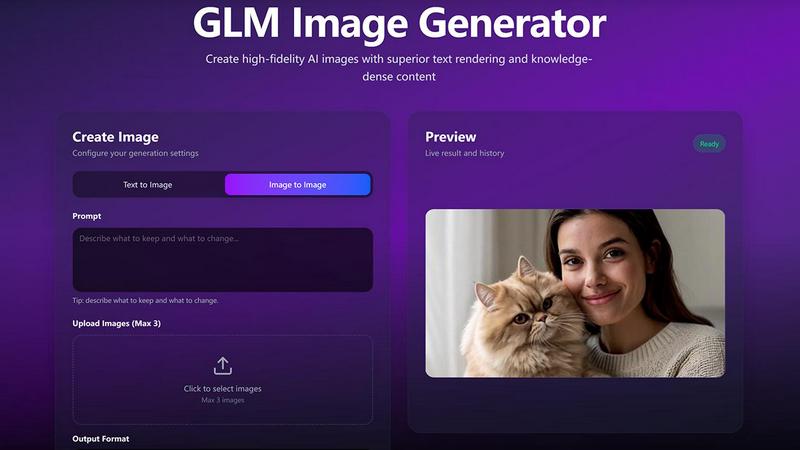
GLM Image is the battle-tested AI that generates professional posters and graphics from simple text.
Last updated: February 28, 2026

Shrinkpad
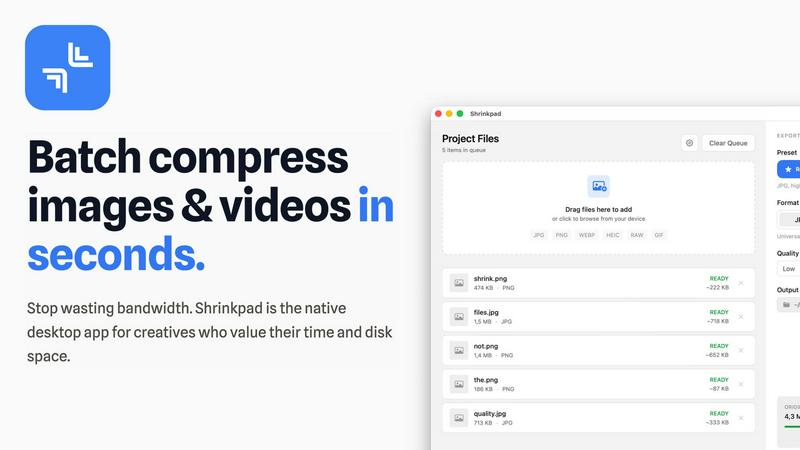
Shrinkpad is the native Mac app that batch compresses images and videos without quality loss.
Last updated: February 28, 2026
Visual Comparison
GLM Image
Shrinkpad
Feature Comparison
GLM Image
Cognitive Architecture for Complex Instructions
GLM Image's hybrid autoregressive and diffusion architecture is its secret weapon. The autoregressive module, inherited from GLM-4-9B, acts as a reasoning engine to parse complex prompts, plan layouts, and determine text placement. The diffusion decoder then brings this cognitive blueprint to life with stunning textures and details. This two-stage process is why it outperforms standard diffusion models in following intricate instructions and maintaining logical scene structure.
Industry-Leading Text Rendering & Accuracy
Forget about garbled letters and misspelled words. GLM Image sets the new standard for text rendering in open-source models, featuring a dedicated lightweight glyph encoder. It excels at generating clean, legible, and accurate multilingual text across multiple regions within an image. This makes it the undisputed champion for creating posters, infographics, UI mockups, and any asset where textual information must be perfect and integral to the design.
Precise Identity & Detail Preservation
GLM Image gives you unparalleled control, allowing you to maintain consistency across edits. It can preserve key elements like specific faces, product designs, brand logos, and core layout structures even when you instruct other changes. This feature is crucial for branding projects, portrait editing, and multi-step creative workflows where losing core identity is not an option, a area where many other generators fall short.
Multi-Reference Image Guidance
Move beyond a single text prompt. GLM Image allows you to upload up to four reference images to guide style, composition, color palette, and specific subject details. The model intelligently synthesizes these references, applying their essence naturally to your new creation. This provides a level of creative control and specificity that accelerates ideation and ensures your output aligns with a precise visual direction.
Shrinkpad
Lightning-Feat Batch Processing
Stop the tedious one-by-one export grind. Shrinkpad is built for massive, real-world workloads. Simply drag and drop an entire folder—it automatically detects all supported images and videos inside, ignoring non-media files. Process thousands of assets in a single, seamless batch queue that runs in minutes, not hours. This is bulk optimization, engineered to handle what web-based tools crash trying to process, saving you countless hours of manual busywork.
Privacy-First Local Processing
In a world of data breaches and slow uploads, Shrinkpad stands firm. Every single compression operation happens locally on your Mac using native Apple frameworks. There are no cloud uploads, no external servers, and no waiting for bandwidth. Your original files, client projects, and sensitive assets never leave your device. This guarantees complete privacy, eliminates dependency on an internet connection, and delivers processing speeds that cloud services can't match.
Intelligent Quality Optimization
Shrinkpad moves beyond basic sliders with smart, automatic analysis. It examines the visual complexity of each image and video to apply the perfect compression ratio, aggressively reducing file size while guarding against artifacts. You can choose from presets or fine-tune settings manually, but the intelligent engine ensures you stop guessing and get optimal results every time, maintaining the quality you need for professional work.
Extensive Format Support & Pro Tools
Forget pre-conversion hassles. Shrinkpad supports over 50 formats out of the box, including JPG, PNG, HEIC, WebP, AVIF, MP4, MOV, and even RAW files. Process mixed media batches (photos and videos together) effortlessly. The app is packed with pro features: customize output formats, create custom file naming patterns, strip metadata with one click, and enjoy deep macOS integration optimized for Apple Silicon for blistering performance.
Use Cases
GLM Image
Marketing & Commercial Asset Creation
GLM Image is the ultimate tool for crafting high-impact marketing materials. Generate precise product posters, social media banners, and ad creatives that not only look stunning but also correctly feature product names, slogans, pricing, and legal disclaimers. Its identity preservation ensures brand consistency, making it a scalable solution for marketing teams needing rapid, on-brand visual production.
Educational & Scientific Illustration
Transform complex information into clear, engaging visuals. GLM Image excels at generating detailed scientific diagrams, multi-panel charts, anatomy illustrations, and textbook graphics with accurate labels and annotations. Its cognitive alignment ensures the visual correctly represents the underlying knowledge, making it an invaluable asset for educators, researchers, and science communicators.
Professional Presentation & Report Design
Elevate your business communications instantly. Create custom, professional slide deck (PPT) illustrations, report covers, and data visualization graphics that integrate seamlessly with your content. The model's ability to handle text-heavy layouts and maintain a clean, structured aesthetic ensures your presentations convey authority and clarity.
UI/UX Mockup & Prototype Design
Accelerate the design process by generating realistic UI screens, app interfaces, and website mockups from descriptive prompts. GLM Image's strength in layout accuracy and text rendering allows designers to quickly visualize concepts for landing pages, mobile apps, or software dashboards, complete with placeholder text and functional-looking elements.
Shrinkpad
Optimizing Web & App Assets for Developers
Front-end developers and app creators can drastically reduce bundle sizes and improve load times. Export assets from design tools at 2x/4x resolution, then let Shrinkpad batch-optimize and rename them for production. This leads to significantly faster Largest Contentful Paint (LCP) scores and a smoother user experience, directly impacting core web vitals and app store performance metrics.
Managing Photo & Video Libraries for Creators
Photographers and videographers drowning in massive RAW files and 4K footage can reclaim terabytes of storage. Shrinkpad allows for the bulk compression of entire shoots or video reels, reducing file sizes by up to 90% for archiving or client delivery while keeping visual quality intact for portfolios and social media, all without uploading sensitive work to the cloud.
Streamlining Design-to-Export Workflows
Designers tired of manually exporting hundreds of icons, screens, and graphics from Figma or Photoshop can automate their pipeline. Export everything at once and use Shrinkpad as the final optimization and renaming station. It processes the entire batch, applies consistent compression, and delivers ready-to-use assets, eliminating a major bottleneck in the design process.
Preparing Client Deliverables & Pitches
Agencies and freelancers can quickly prepare professional deliverables. Compress high-resolution project files, case study images, and presentation videos into manageable sizes for email transfer, shared drives, or pitch decks. The one-folder-drop functionality and consistent output quality ensure a polished, efficient delivery that impresses clients without the hassle.
Overview
About GLM Image
GLM Image is not just another AI art generator; it's a battle-tested cognitive image generation engine built for professionals who need more than just a pretty picture. While competitors like Midjourney and DALL-E 3 focus on broad aesthetic appeal, GLM Image is engineered from the ground up for dense-knowledge scenarios where clarity, accurate text, and precise layouts are non-negotiable. It leverages a revolutionary hybrid architecture, combining a 9B autoregressive reasoning module with a 7B DiT diffusion decoder. This powerhouse setup allows it to first understand complex instructions, determine global composition and hierarchy, and then execute with high-fidelity detail. The result? A model that dominates in rendering multilingual text, maintaining structural relationships, and producing professional-ready assets for business, education, and design. It's the definitive choice for creators, marketers, educators, and enterprises who demand their visuals communicate as effectively as they captivate.
About Shrinkpad
Shrinkpad is the battle-tested, native Mac application that declares war on bloated media files and inefficient cloud-based compressors. It delivers professional-grade batch compression for both images and videos directly on your macOS device. This tool is engineered for photographers, designers, content creators, and developers who refuse to compromise on speed, privacy, or quality. While web tools leak your data to servers and desktop laggards process files one-by-one, Shrinkpad empowers you to drop entire folders containing hundreds of files and compress them in seconds. Its core value proposition is uncompromising: achieve up to 90% file size reduction while preserving visual fidelity, with 100% local processing that guarantees your sensitive assets never leave your Mac. It's the definitive solution for reclaiming disk space, speeding up websites and apps, and streamlining creative workflows without the wait, subscription fees, or privacy concerns of cloud-dependent alternatives.
Frequently Asked Questions
GLM Image FAQ
How is GLM Image different from other AI image generators like Midjourney?
GLM Image is built on a fundamentally different paradigm: cognitive generation. While models like Midjourney prioritize artistic style and broad aesthetics, GLM Image is engineered for dense-knowledge communication. Its hybrid architecture focuses on precise text rendering, accurate layout comprehension, and following complex, multi-part instructions. It's the superior choice for any project where information clarity is as critical as visual appeal.
What does "cognitive alignment" mean in practice?
In practice, cognitive alignment means GLM Image understands the meaning and relationships within your prompt. If you ask for "a poster for a cybersecurity webinar with the title 'Firewall Fundamentals' and a list of three key takeaways on the right," it will correctly position the title, render the list legibly, and create a cohesive layout that logically separates elements. It reasons about the scene structure before generating it.
Can I use GLM Image for free?
Yes, GLM Image offers a way to try the platform for free, allowing users to test its core capabilities. For sustained or commercial use, it operates on a transparent, credit-based billing system. This provides predictable costs without subscription lock-in, scaling linearly with your usage, which is ideal for both individual creators and enterprises.
What image formats and resolutions does GLM Image support?
GLM Image is designed for professional output, supporting flexible resolutions and aspect ratios to fit various needs. You can generate images tailored for social media, print posters, or web graphics. The specific maximum resolutions and format options (like PNG) are detailed within the platform, ensuring you get production-ready assets for any application.
Shrinkpad FAQ
Can I use Shrinkpad for free?
Yes, Shrinkpad offers a Free Starter tier perfect for trying out the core functionality. It includes standard compression for common formats like JPG and PNG with a limit of 10 files per batch. For unlimited processing, all file formats (including RAW and video), and no file size limits, you can upgrade to the one-time purchase Personal or Team licenses.
Does Shrinkpad support video compression?
Absolutely. Unlike many image-only compressors, Shrinkpad is built for mixed media. It provides powerful batch compression for videos in formats like MP4 and MOV, allowing you to process photos and videos together in the same workflow. This makes it an all-in-one solution for comprehensive media library optimization.
Are my files uploaded to the cloud?
Never. Shrinkpad operates on a strict privacy-first principle. All processing is performed 100% locally on your Mac. Your files are never sent to or stored on any external server. This ensures maximum security for sensitive work and provides faster compression speeds since there's no upload/download latency.
How many files can I process at once?
With the paid Personal or Team plans, Shrinkpad supports unlimited batch processing. You can queue up thousands of images and videos in a single folder drop. The app is engineered to handle these massive queues with stability, unlike web-based tools that often fail or crash under heavy loads.
Alternatives
GLM Image Alternatives
GLM Image is a specialized AI image generator in the competitive image generation category, engineered to produce high-fidelity visuals for posters and structured graphics. Its core strength lies in delivering precise text, accurate layouts, and complex information from user prompts, making it a go-to for professional marketing, educational, and design assets. Users often explore alternatives for various reasons, including budget constraints with credit-based systems, a need for different artistic styles, or platform-specific requirements like integration with other tools. The search for a different solution is a normal part of finding the perfect fit for a project's unique demands. When evaluating other platforms, key considerations should be the AI's ability to handle text and layout accuracy, the flexibility of output resolutions, and the availability of essential workflows like image-to-image generation and editing. The right tool balances raw creative power with the practical needs of clear, communicative design.
Shrinkpad Alternatives
Shrinkpad is a powerful Mac application designed for batch compression of images and videos. It belongs to the category of media optimization tools, focusing on reducing file sizes locally on your device without compromising visual quality. Users often explore alternatives for various reasons, including different budget constraints, the need for cross-platform availability, or specific feature sets not covered by a single solution. When evaluating other options, it's crucial to consider several key factors. The core decision often revolves around local processing versus cloud-based services, which impacts privacy, speed, and internet dependency. You should also assess the range of supported file formats, the degree of customization offered for compression settings, and the overall efficiency in handling large batches of files. The ideal tool seamlessly integrates into your workflow while delivering the right balance of quality reduction and storage savings.