
Hush Touch | Voice-to-Text for MacOS vs Proofapp

Hush Touch | Voice-to-Text for MacOS
Hush Touch transforms your voice into text on Mac, learning your vocabulary for smarter, seamless dictation.
Last updated: February 28, 2026

Proofapp
Stop wasting time on miscommunication and endless email chains; get instant visual feedback directly on your website.
Last updated: March 3, 2026
Visual Comparison
Hush Touch | Voice-to-Text for MacOS
Proofapp

Feature Comparison
Hush Touch | Voice-to-Text for MacOS
Dual-Engine Recognition
Hush Touch leverages two advanced Apple dictation engines: DictationTranscriber for managing natural flow and punctuation, and SFSpeechRecognizer for enhancing custom vocabulary. This combination ensures accurate transcription that adapts to your unique speech patterns and terminologies.
Custom Vocabulary
This feature allows users to input up to 500 specialized terms, from technical jargon to specific brand names. Hush Touch learns from corrections made during dictation, ensuring that it recognizes your language preferences over time, enhancing the overall dictation experience.
Smart Text Processing
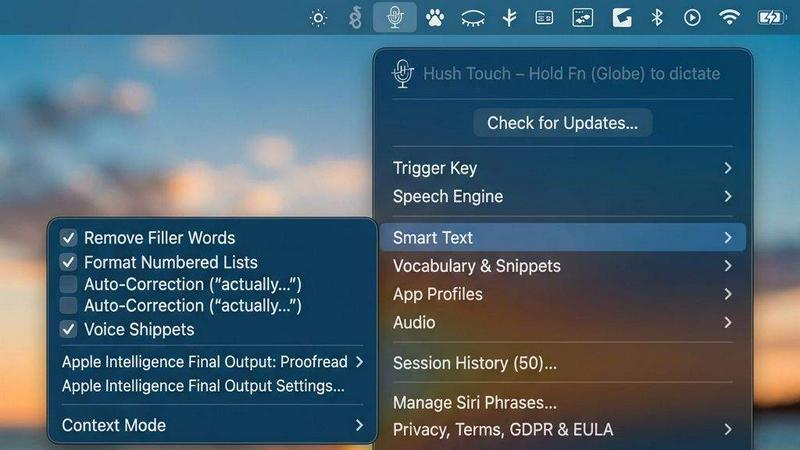
Hush Touch excels in real-time text processing. It automatically removes filler words, corrects common mispronunciations, and formats lists, all while dictating. This intelligent feature ensures your output is polished and professional without the need for extensive editing.
Context Modes & Hands-Free Operation
Switch effortlessly between different dictation contexts such as General, Email, Code, and Notes. Hush Touch also supports hands-free operation via Siri, allowing you to start dictation simply by voice command and automatically inserting text after a brief pause.
Proofapp
Visual Commenting
With Proofapp's visual commenting feature, users can click anywhere on a screenshot to leave contextual feedback. This eliminates the confusion common with traditional feedback methods, allowing for clear communication about specific design elements.
Multi-Breakpoint Testing
Proofapp automatically captures screenshots at both desktop and mobile breakpoints, facilitating a comprehensive review process. This feature ensures that clients can see how their website appears across devices, leading to more informed feedback.
Real-time Collaboration
Proofapp enables real-time collaboration among team members. As comments are made, everyone involved can see updates instantly, allowing for swift replies and resolutions, which keeps projects moving forward without unnecessary delays.
Secure Share Links
Users can share projects with clients via secure, expirable links. This feature ensures that feedback is gathered securely, giving clients access to only the necessary elements of the project for commenting, without requiring account creation.
Use Cases
Hush Touch | Voice-to-Text for MacOS
Professional Email Drafting
With Hush Touch, professionals can dictate emails on-the-go, ensuring that their thoughts are captured accurately without the hassle of typing. This feature is particularly useful for busy executives and remote workers who need to communicate efficiently.
Medical Documentation
Healthcare professionals can leverage Hush Touch to dictate patient notes and medical records accurately. The custom vocabulary feature ensures that complex medical terminology is recognized, making it a valuable tool for physicians and nurses alike.
Creative Writing
Writers can use Hush Touch to brainstorm and draft their projects without being hindered by the mechanics of typing. This allows for a more fluid creative process, encouraging spontaneous ideas to flow without interruption.
Coding and Technical Documentation
Developers can dictate code snippets and technical documentation using Hush Touch. The dual-engine recognition ensures that programming languages and specific commands are accurately captured, facilitating a smoother coding experience.
Proofapp
Freelancers
Freelancers can leverage Proofapp to streamline client feedback, allowing for quick and effective revisions. By pinning comments directly on designs, they can present a professional image while saving hours on project management.
Small Development Teams
Small development teams benefit from Proofapp's ability to enhance client approvals without the burden of enterprise pricing. This tool simplifies the feedback process, enabling teams to focus on delivering high-quality work efficiently.
Design Teams
Design teams utilize Proofapp to receive precise visual feedback from clients and stakeholders. By having comments pinned exactly where they matter, designers can make targeted changes that align with client expectations.
Marketing Teams
Marketing teams can employ Proofapp to review landing pages and campaigns visually. The ability to gather feedback in a straightforward manner helps these teams remain agile and responsive to changes, ultimately enhancing campaign effectiveness.
Overview
About Hush Touch | Voice-to-Text for MacOS
Hush Touch is an innovative voice-to-text application specifically designed for macOS, allowing users to dictate their thoughts seamlessly and privately. This tool is perfect for professionals, students, and anyone who prefers hands-free writing. Hush Touch operates entirely on-device, ensuring that your dictation remains private and secure without relying on cloud services. By utilizing two powerful Apple transcription engines, complemented by an Apple Intelligence final pass, Hush Touch delivers exceptional accuracy and efficiency in transcription. Its lightweight design, at just 5.5 MB, ensures quick launches and minimal impact on system resources. With a one-time purchase of just $20 for a lifetime license, Hush Touch is a cost-effective solution for those who want dependable dictation without ongoing subscription fees. Experience a new level of productivity by drafting emails, notes, and documents with your voice while enjoying a clean and intuitive interface.
About Proofapp
Proofapp is a revolutionary visual feedback and website review platform designed to enhance collaboration among designers, developers, and clients. By allowing users to upload any website URL, Proofapp automatically captures screenshots for both desktop and mobile views, streamlining the feedback process. This tool is perfect for freelancers, small development teams, and agencies managing multiple projects, as it eliminates the chaos that often accompanies scattered emails and vague revision requests. With features like real-time notifications, Slack integration, and customizable settings, Proofapp transforms the way feedback is gathered and managed. Users can pin comments directly on the designs, reply in threaded conversations, and attach files for clarity—all without needing an account. This not only improves productivity but also ensures that feedback is organized, visual, and actionable, making it an ideal solution for anyone looking to enhance their project workflow.
Frequently Asked Questions
Hush Touch | Voice-to-Text for MacOS FAQ
How does Hush Touch ensure privacy?
Hush Touch processes all voice data entirely on your device, meaning there is no reliance on cloud storage or internet connectivity. This guarantees that your dictation remains confidential and secure.
Is there a free trial available?
Yes, Hush Touch offers a 7-day free trial with no credit card required. Users can test the app’s features and functionality before committing to a purchase.
Can I customize the vocabulary for specific needs?
Absolutely! Hush Touch allows users to add up to 500 custom terms, and it learns from your corrections, ensuring that it captures your specific vocabulary over time.
What is the pricing structure for Hush Touch?
Hush Touch is available for a one-time payment of $20. This grants users a lifetime license with no recurring fees or subscriptions, making it an economical choice for long-term use.
Proofapp FAQ
How does Proofapp improve feedback collection?
Proofapp improves feedback collection by providing a visual platform where comments can be pinned directly on designs. This visual approach significantly reduces miscommunication and speeds up the revision process.
Can clients leave feedback without creating an account?
Yes, clients can leave feedback without needing to create an account. Proofapp allows users to generate secure links that clients can use to access the project and provide comments directly on the visuals.
Is Proofapp suitable for larger teams?
Absolutely, Proofapp is designed to scale with your needs. While it's perfect for smaller teams, its robust features make it suitable for larger teams and agencies as well, ensuring efficient collaboration at any scale.
What kind of security measures does Proofapp implement?
Proofapp implements enterprise-level security measures, including role-based permissions, audit logs, and secure data handling practices. These features ensure that all project data is protected and only accessible to authorized users.
Alternatives
Hush Touch | Voice-to-Text for MacOS Alternatives
Hush Touch | Voice-to-Text for MacOS is a cutting-edge dictation app designed to transform spoken words into text effortlessly. As a productivity and management tool, it caters to users seeking a more efficient way to create emails, messages, and documents while maintaining a natural flow in their speech. However, many users often find themselves exploring alternatives due to factors such as pricing, feature sets, or compatibility with different platforms. When searching for an alternative, it's essential to consider key aspects like on-device processing for privacy, ease of use, and the ability to integrate seamlessly into your existing workflow. Users should also evaluate the accuracy of transcription, customization options for commands, and overall performance to ensure they select a solution that meets their unique dictation needs.
Proofapp Alternatives
Proofapp is a powerful visual feedback and website review platform designed to streamline collaboration among designers, developers, and their clients. With its ability to capture screenshots of any website on both desktop and mobile, it falls into the Productivity & Management category, making it an essential tool for efficient project management and client communication. Users often seek alternatives to Proofapp due to various reasons, such as budget constraints, specific feature requirements, or compatibility with different platforms. When choosing an alternative, it's crucial to evaluate the range of features offered, user interface, ease of integration with existing workflows, and the overall cost. A good alternative should enhance your ability to collect and manage feedback without adding unnecessary complexity to your projects.