
BlitzCut vs Kling Motion Control

BlitzCut
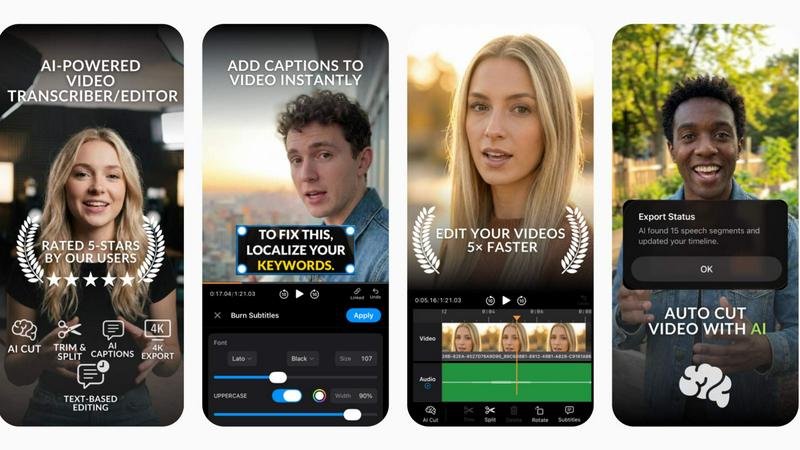
BlitzCut transforms raw video into polished posts in minutes by auto-removing silence and adding stylish captions.
Last updated: February 28, 2026

Last updated: February 28, 2026
Visual Comparison
BlitzCut
Kling Motion Control

Feature Comparison
BlitzCut
Automatic Silence Removal
BlitzCut's Automatic Silence Removal feature uses advanced AI algorithms to instantly detect and remove all silent pauses in your video. This means you no longer have to spend 15-20 minutes manually cutting out dead air. With just one tap, your raw footage becomes a concise, engaging video ready for posting.
AI Captions
With BlitzCut's AI Captions, you can generate text overlays with over 95% accuracy in popular viral styles. This feature not only enhances the accessibility of your videos but also makes them more engaging for viewers. Say goodbye to the tedious task of manually adding captions; BlitzCut does it all for you in seconds.
Text-Based Editing
Text-Based Editing allows you to edit your video by simply deleting sentences from the transcription. This innovative feature eliminates the need for complex timelines and cuts, enabling you to make quick, precise edits that reflect your creative vision effortlessly.
2-Minute Workflow
BlitzCut's 2-Minute Workflow is a game changer for creators on the go. From importing your raw clip to exporting the polished video, the entire process takes less than two minutes. This efficiency is crucial for creators who need to post daily and keep their audience engaged.
Kling Motion Control
Explicit Motion Path Extraction
Kling Motion Control goes far beyond guessing movements. It technically extracts and maps the precise motion trajectories from your uploaded reference video. This means every step, spin, and subtle gesture is analyzed and applied to your character, ensuring the motion is physically coherent and true to the source material, not a random AI hallucination. This core technology is what sets it apart from all probabilistic synthesis models.
Full-Body & Precision Hand Control
While other tools struggle with limb articulation, Kling Motion Control masters it. It ensures smooth, accurate full-body motion for complex actions like dance or martial arts. Critically, it excels where most fail: precision hand and gesture control. Finger movements, expressive signs, and detailed manipulations are preserved, making it suitable for close-up shots and performances where nuance is non-negotiable.
Dual Character Orientation Modes
This feature offers unparalleled compositional control. Choose "Character Orientation Matches Video" to perfectly replicate the original framing and camera perspective. Alternatively, select "Character Orientation Matches Image" to keep your character's original composition and pose stable while the extracted motion is applied, allowing for creative camera movement independent of the subject.
Prompt-Guided Scene Refinement
Kling Motion Control decouples motion from environment. After locking in your character's performance, use text prompts to dynamically control and alter the background, lighting, atmosphere, and overall visual style. This allows you to place your consistently animated character into any scene—from a neon-lit cityscape to a serene forest—without a single frame of motion retraining.
Use Cases
BlitzCut
Social Media Content Creation
BlitzCut is perfect for social media influencers who need to produce high-quality videos quickly. With its AI-driven features, creators can effortlessly turn raw footage into polished content for platforms like TikTok and Instagram Reels in no time.
Educational Video Production
Educators can leverage BlitzCut to create engaging instructional videos. The automatic silence removal and caption features make it easy to produce clear, concise educational content that captures students' attention.
Marketing and Promotions
Businesses can use BlitzCut to create promotional videos that stand out. The ability to quickly edit and caption videos allows marketing teams to respond promptly to trends and engage customers effectively.
Vlog Editing
Vloggers can benefit from BlitzCut by streamlining their editing process. With the AI-powered features, they can focus on storytelling while BlitzCut manages the technical aspects, ensuring their vlogs are both captivating and professional.
Kling Motion Control
Professional Character Animation & Pre-Vis
For animation studios and indie creators, this tool accelerates production. Apply real actor reference footage directly to illustrated characters or storyboard art, generating realistic, motion-accurate pre-visualization sequences in minutes. This enables rapid iteration on character performance early in the pipeline, saving countless hours of manual keyframing.
Brand Marketing & Explainer Videos
Create consistent, high-quality animated content for marketing campaigns. Transfer a spokesperson's authentic gestures and movements to an animated brand mascot or product character. This ensures engaging, on-brand explainer videos and social ads with professional-grade animation that resonates with audiences and builds brand identity reliably.
Social Media & Viral Content Creation
Capitalize on trends instantly. Take a trending dance or meme motion clip from the library or a video, and apply it to your custom character or logo. This allows creators and influencers to produce unique, engaging short-form videos with guaranteed smooth motion that stands out in crowded feeds, all without needing animation expertise.
Game Dev & Interactive Media Prototyping
Game developers can use Kling Motion Control to quickly prototype character animations. By filming reference moves, they can transfer those animations onto concept art or low-poly models to test gameplay feel and character responsiveness before committing to full, expensive motion-capture sessions or manual rigging.
Overview
About BlitzCut
BlitzCut is a revolutionary AI-powered video editing tool designed specifically for content creators eager to streamline their editing process. By leveraging advanced AI technology, BlitzCut transforms the traditional, time-consuming video editing workflow into a lightning-fast experience. Whether you are a TikTok influencer, Instagram Reels creator, or YouTube Shorts producer, BlitzCut makes it possible to generate high-quality, engaging videos in just minutes. The app is built with a mobile-first approach, ensuring that creators can edit their videos directly from their iPhone, iPad, or Mac without the hassle of uploading large files. By automating tedious tasks such as silence removal and caption generation, BlitzCut empowers creators to focus on what truly matters: crafting compelling content. This dedication to efficiency and creativity makes BlitzCut the go-to solution for anyone serious about growing their online presence.
About Kling Motion Control
Kling Motion Control is not just another AI video generator; it's a precision motion transfer engine that puts control back in the creator's hands. Built into the powerful Kling Video 2.6 Pro model, this technology shatters the limitations of traditional probabilistic AI animation, which often produces unpredictable, jittery results. Instead, Kling Motion Control operates on a battle-tested principle: explicit motion extraction. It analyzes real 3-30 second reference videos, deconstructs the exact motion paths of the subject, and faithfully reconstructs that movement frame-by-frame onto your static character image. This process ensures the generated video is a perfect marriage of your character's visual identity and the original performance's kinetic energy. It is engineered for professional creators, marketers, and animators who demand predictable outcomes, require long one-shot action sequences, and need pixel-perfect control over complex hand gestures and body mechanics. In a landscape crowded with guesswork generators, Kling Motion Control stands as the definitive tool for intentional, accurate, and fully guided character animation.
Frequently Asked Questions
BlitzCut FAQ
How does BlitzCut handle silence removal?
BlitzCut utilizes sophisticated AI algorithms to automatically detect and remove silent gaps in your videos, allowing for a smoother and more engaging viewing experience without manual intervention.
Can I export my videos directly to social media platforms?
Yes, BlitzCut enables you to export your edited videos directly to platforms like TikTok, Instagram, and YouTube, making the posting process seamless and efficient.
Is BlitzCut available for free?
BlitzCut is free to download and use, allowing creators to start editing without any upfront costs or the need for an account.
What devices are compatible with BlitzCut?
BlitzCut is designed with a mobile-first approach and is compatible with iPhone, iPad, and Mac, ensuring that you can edit videos anywhere, anytime.
Kling Motion Control FAQ
How is Kling Motion Control different from other AI video tools?
Other tools use probabilistic models that "imagine" motion based on text, often leading to unpredictable, unnatural, and inconsistent movement. Kling Motion Control is deterministic; it extracts exact motion data from a real video source. This results in precise, physically accurate, and repeatable animations, making it superior for projects requiring specific choreography or reliable outputs.
What are the requirements for the input image and video?
You need one clear, well-defined character image (illustration, photo, mascot) and one 3 to 30-second motion reference video. The video should feature a clear subject performing the desired action. For best results, use videos with good lighting and a relatively uncluttered background to facilitate accurate motion extraction by the AI model.
Can I use the audio from my reference video?
Yes, Kling Motion Control provides optional audio preservation. You can choose to keep the original audio track from your motion reference video synced with the new animation, or generate a silent video. This is ideal for transferring dance routines with music or dialogue-driven performances directly into your animated output.
Is there a motion library, or do I need my own videos?
The platform offers both options. You can upload your own custom reference video for unique motions. Alternatively, you can select from a built-in motion library containing a variety of pre-analyzed actions, dances, and gestures, allowing you to get started instantly without needing to source your own footage.
Alternatives
BlitzCut Alternatives
BlitzCut is an innovative AI video editing tool designed specifically for content creators, streamlining the editing process by automatically cutting silence and adding captions. It addresses the needs of social media video production, where speed and efficiency are crucial. As creators seek faster, more effective solutions, they often look for alternatives that may offer different pricing structures, additional features, or compatibility with various platforms. When searching for an alternative to BlitzCut, it's essential to evaluate several factors such as the speed of the editing process, ease of use, and whether the tool can handle specific content formats. Consideration should also be given to customer support, user community, and any unique features that can enhance your creative workflow. Ultimately, the right choice will depend on individual needs and preferences in video editing.
Kling Motion Control Alternatives
Kling Motion Control is a specialized AI video tool in the motion transfer category. It uses a motion-aware model to extract precise movement paths from a reference video and applies them frame-by-frame to a static character image. This approach prioritizes predictable, faithful motion replication over random generation, making it a powerful choice for creators who need exact control over actions, especially for long sequences or detailed hand and body movements. Users often seek alternatives for several key reasons. These include budget constraints, as premium AI tools can be costly, or a need for different core features like text-to-video generation. Platform accessibility, such as a preference for web-based apps over downloadable software, and specific output requirements like resolution or style variety also drive the search for other options. When evaluating an alternative, focus on the core capability: motion control precision. The best competitors will offer robust, deterministic motion transfer, not just random animation. Also, assess the workflow ease, the quality of the output video, and whether the tool fits your technical environment and creative budget. The goal is to find a solution that matches Kling's predictability without compromising on your specific needs.