
Kling Motion Control vs Motion Control AI

Last updated: February 28, 2026

Motion Control AI
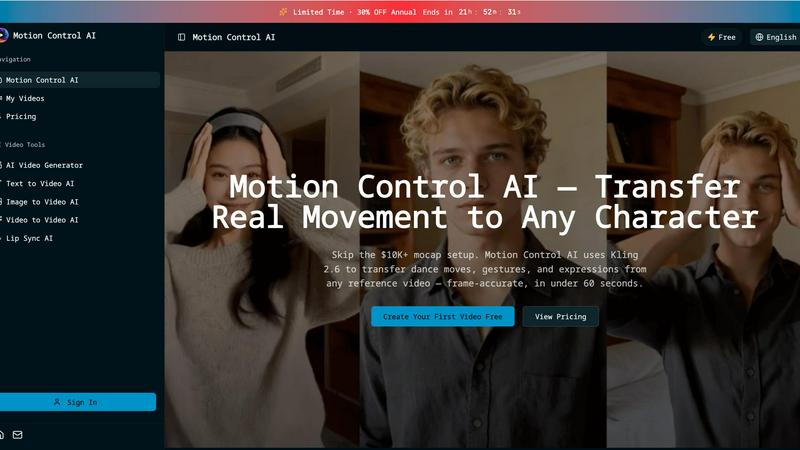
Transfer realistic movements and expressions from any video to your characters in under 60 seconds with Motion Control.
Last updated: February 28, 2026
Visual Comparison
Kling Motion Control

Motion Control AI
Feature Comparison
Kling Motion Control
Explicit Motion Path Extraction
Kling Motion Control goes far beyond guessing movements. It technically extracts and maps the precise motion trajectories from your uploaded reference video. This means every step, spin, and subtle gesture is analyzed and applied to your character, ensuring the motion is physically coherent and true to the source material, not a random AI hallucination. This core technology is what sets it apart from all probabilistic synthesis models.
Full-Body & Precision Hand Control
While other tools struggle with limb articulation, Kling Motion Control masters it. It ensures smooth, accurate full-body motion for complex actions like dance or martial arts. Critically, it excels where most fail: precision hand and gesture control. Finger movements, expressive signs, and detailed manipulations are preserved, making it suitable for close-up shots and performances where nuance is non-negotiable.
Dual Character Orientation Modes
This feature offers unparalleled compositional control. Choose "Character Orientation Matches Video" to perfectly replicate the original framing and camera perspective. Alternatively, select "Character Orientation Matches Image" to keep your character's original composition and pose stable while the extracted motion is applied, allowing for creative camera movement independent of the subject.
Prompt-Guided Scene Refinement
Kling Motion Control decouples motion from environment. After locking in your character's performance, use text prompts to dynamically control and alter the background, lighting, atmosphere, and overall visual style. This allows you to place your consistently animated character into any scene—from a neon-lit cityscape to a serene forest—without a single frame of motion retraining.
Motion Control AI
Motion Transfer
This feature enables users to upload a reference video and extract skeletal motion data frame-by-frame. The tool captures all body movements, such as dance choreography and athletic actions, allowing characters to replicate these motions while preserving their unique identities.
Gesture Control
Unlike many other AI video generators, Motion Control AI excels in capturing detailed hand movements. With its precise finger articulation and gesture recognition, users can animate complex actions like pointing and sign language, enhancing the realism of character interactions.
Expression Sync
Motion Control AI addresses the common issue of the uncanny valley by accurately mapping facial expressions from the source video to characters. This feature allows for emotional authenticity, ensuring that smiles, frowns, and eye movements are replicated convincingly, fostering a deeper connection with the audience.
Cinematic Realism
The software delivers broadcast-quality output at resolutions up to 1080p and 30fps. With full camera control, including smooth pans and dynamic tilts, Motion Control AI incorporates professional lighting and composition techniques, making every frame visually striking and ready for distribution.
Use Cases
Kling Motion Control
Professional Character Animation & Pre-Vis
For animation studios and indie creators, this tool accelerates production. Apply real actor reference footage directly to illustrated characters or storyboard art, generating realistic, motion-accurate pre-visualization sequences in minutes. This enables rapid iteration on character performance early in the pipeline, saving countless hours of manual keyframing.
Brand Marketing & Explainer Videos
Create consistent, high-quality animated content for marketing campaigns. Transfer a spokesperson's authentic gestures and movements to an animated brand mascot or product character. This ensures engaging, on-brand explainer videos and social ads with professional-grade animation that resonates with audiences and builds brand identity reliably.
Social Media & Viral Content Creation
Capitalize on trends instantly. Take a trending dance or meme motion clip from the library or a video, and apply it to your custom character or logo. This allows creators and influencers to produce unique, engaging short-form videos with guaranteed smooth motion that stands out in crowded feeds, all without needing animation expertise.
Game Dev & Interactive Media Prototyping
Game developers can use Kling Motion Control to quickly prototype character animations. By filming reference moves, they can transfer those animations onto concept art or low-poly models to test gameplay feel and character responsiveness before committing to full, expensive motion-capture sessions or manual rigging.
Motion Control AI
Social Media Content Creation
For short-form creators on platforms like TikTok and Instagram, Motion Control AI provides a quick and efficient way to generate engaging character animations. By transferring movements from reference videos, creators can produce eye-catching clips that resonate with their audience.
Game Development
Game developers can utilize Motion Control AI for prototyping character animations, allowing them to bring movements and actions to life without the need for extensive rigging. This accelerates the development process while maintaining high-quality animations.
Marketing Campaigns
Marketing teams can leverage Motion Control AI to create compelling product demonstrations and brand mascot animations. By using realistic character movements, campaigns can achieve a higher engagement rate, enhancing brand visibility and driving conversions.
Film and Animation Production
Motion Control AI significantly reduces the time and cost associated with traditional animation methods. Film studios can now transfer actor performances to animated characters, achieving cinematic quality in a fraction of the time, which is perfect for short films and visual effects.
Overview
About Kling Motion Control
Kling Motion Control is not just another AI video generator; it's a precision motion transfer engine that puts control back in the creator's hands. Built into the powerful Kling Video 2.6 Pro model, this technology shatters the limitations of traditional probabilistic AI animation, which often produces unpredictable, jittery results. Instead, Kling Motion Control operates on a battle-tested principle: explicit motion extraction. It analyzes real 3-30 second reference videos, deconstructs the exact motion paths of the subject, and faithfully reconstructs that movement frame-by-frame onto your static character image. This process ensures the generated video is a perfect marriage of your character's visual identity and the original performance's kinetic energy. It is engineered for professional creators, marketers, and animators who demand predictable outcomes, require long one-shot action sequences, and need pixel-perfect control over complex hand gestures and body mechanics. In a landscape crowded with guesswork generators, Kling Motion Control stands as the definitive tool for intentional, accurate, and fully guided character animation.
About Motion Control AI
Motion Control AI is a cutting-edge tool designed to revolutionize the way character animations and AI videos are created. By leveraging advanced motion capture technology, specifically Kling 2.6, this software allows users to transfer real-life movements from a reference video to animated characters seamlessly and in under 60 seconds. Whether you are a content creator, game developer, or part of a marketing team, Motion Control AI provides a user-friendly platform to generate expressive, high-quality animations without the need for expensive motion capture equipment. Its robust features ensure consistent character performance across multiple takes, making it an ideal solution for social media content, product demonstrations, and even film production. With Motion Control AI, creators can achieve professional results quickly, allowing for fast iteration and enhanced creativity.
Frequently Asked Questions
Kling Motion Control FAQ
How is Kling Motion Control different from other AI video tools?
Other tools use probabilistic models that "imagine" motion based on text, often leading to unpredictable, unnatural, and inconsistent movement. Kling Motion Control is deterministic; it extracts exact motion data from a real video source. This results in precise, physically accurate, and repeatable animations, making it superior for projects requiring specific choreography or reliable outputs.
What are the requirements for the input image and video?
You need one clear, well-defined character image (illustration, photo, mascot) and one 3 to 30-second motion reference video. The video should feature a clear subject performing the desired action. For best results, use videos with good lighting and a relatively uncluttered background to facilitate accurate motion extraction by the AI model.
Can I use the audio from my reference video?
Yes, Kling Motion Control provides optional audio preservation. You can choose to keep the original audio track from your motion reference video synced with the new animation, or generate a silent video. This is ideal for transferring dance routines with music or dialogue-driven performances directly into your animated output.
Is there a motion library, or do I need my own videos?
The platform offers both options. You can upload your own custom reference video for unique motions. Alternatively, you can select from a built-in motion library containing a variety of pre-analyzed actions, dances, and gestures, allowing you to get started instantly without needing to source your own footage.
Motion Control AI FAQ
How does Motion Control AI work?
Motion Control AI works by analyzing a reference video to extract motion data, which is then applied to character models. Users can upload a video and generate animations in just minutes.
What types of videos can I upload as a reference?
You can upload various video formats, including MP4, MOV, and MKV, as reference videos. The maximum size for reference videos is 100MB, and they can be up to 10 seconds long.
Can I use my own character designs?
Yes, Motion Control AI allows users to upload their own character images in JPEG or PNG formats, enabling customization and personal branding in animations.
What are the benefits of using Motion Control AI for marketing?
Using Motion Control AI in marketing campaigns can lead to higher engagement rates, increased viewer retention, and a more dynamic presentation of products and services, ultimately driving better results in advertising efforts.
Alternatives
Kling Motion Control Alternatives
Kling Motion Control is a specialized AI video tool in the motion transfer category. It uses a motion-aware model to extract precise movement paths from a reference video and applies them frame-by-frame to a static character image. This approach prioritizes predictable, faithful motion replication over random generation, making it a powerful choice for creators who need exact control over actions, especially for long sequences or detailed hand and body movements. Users often seek alternatives for several key reasons. These include budget constraints, as premium AI tools can be costly, or a need for different core features like text-to-video generation. Platform accessibility, such as a preference for web-based apps over downloadable software, and specific output requirements like resolution or style variety also drive the search for other options. When evaluating an alternative, focus on the core capability: motion control precision. The best competitors will offer robust, deterministic motion transfer, not just random animation. Also, assess the workflow ease, the quality of the output video, and whether the tool fits your technical environment and creative budget. The goal is to find a solution that matches Kling's predictability without compromising on your specific needs.
Motion Control AI Alternatives
Motion Control AI is a cutting-edge tool designed for animating characters seamlessly using motion capture from any reference video. It falls into the content creation category, specifically targeting creators working with social media, gaming, and marketing. Users often seek alternatives to Motion Control AI due to varying needs such as budget constraints, specific feature requirements, or platform compatibility. When evaluating alternatives, it’s essential to consider factors like ease of use, overall performance, the quality of output, and whether the solution aligns with your creative goals and workflow preferences.