
Melograph vs Motion Control AI

Last updated: February 28, 2026

Motion Control AI
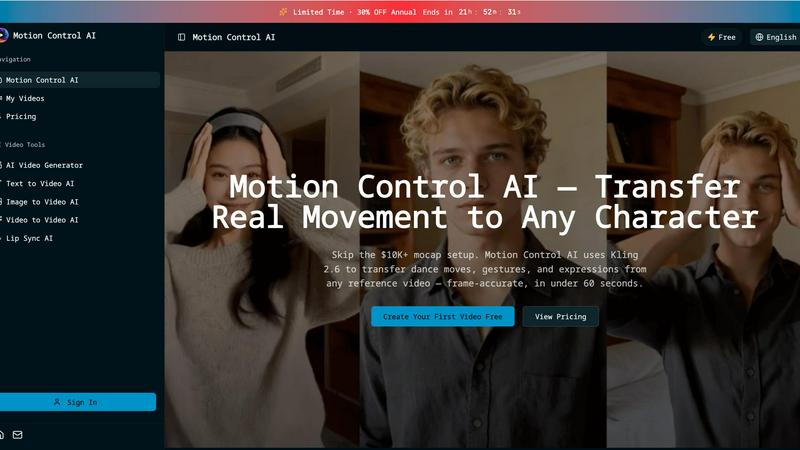
Transfer realistic movements and expressions from any video to your characters in under 60 seconds with Motion Control.
Last updated: February 28, 2026
Visual Comparison
Melograph
Motion Control AI
Feature Comparison
Melograph
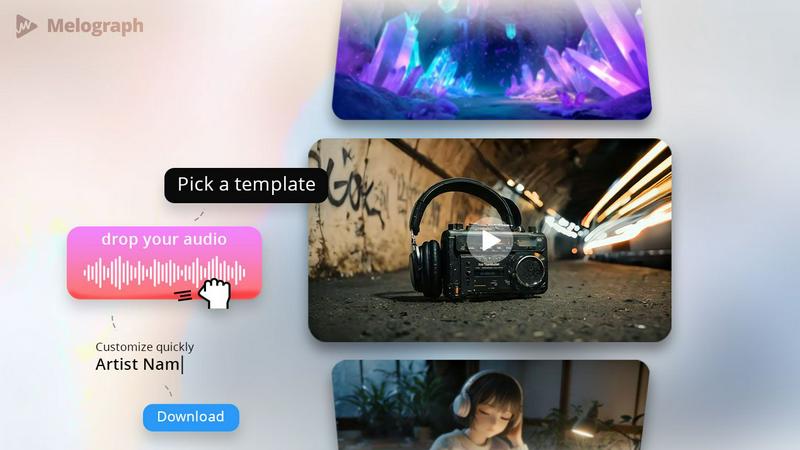
Quick Template Selection
With Melograph, users can choose from a variety of high-quality templates that suit different vibes, including minimalistic, cinematic, retro, and futuristic styles. This feature allows musicians to find the perfect look that resonates with their music genre without spending hours crafting visuals from scratch.
Audio-Reactive Waveforms
Melograph's audio-reactive waveforms bring your music to life. As your track plays, the visualizer responds in real time, creating dynamic motion that captures the essence of your sound. This feature ensures that the visuals are not only aesthetically pleasing but also intimately connected to the audio.
Multiple Export Formats
Melograph understands the diverse needs of social media platforms. Users can export their videos in 1080p MP4 format and choose from various aspect ratios, including 9:16, 1:1, 4:5, and 16:9. This flexibility ensures that your visuals look great whether they are intended for TikTok, Instagram, or YouTube.
User-Friendly Interface
Designed for ease of use, Melograph requires no prior editing experience. The straightforward interface allows anyone to select a template, upload audio, and customize text with minimal effort. This user-centric design makes it accessible for indie artists, producers, and labels alike.
Motion Control AI
Motion Transfer
This feature enables users to upload a reference video and extract skeletal motion data frame-by-frame. The tool captures all body movements, such as dance choreography and athletic actions, allowing characters to replicate these motions while preserving their unique identities.
Gesture Control
Unlike many other AI video generators, Motion Control AI excels in capturing detailed hand movements. With its precise finger articulation and gesture recognition, users can animate complex actions like pointing and sign language, enhancing the realism of character interactions.
Expression Sync
Motion Control AI addresses the common issue of the uncanny valley by accurately mapping facial expressions from the source video to characters. This feature allows for emotional authenticity, ensuring that smiles, frowns, and eye movements are replicated convincingly, fostering a deeper connection with the audience.
Cinematic Realism
The software delivers broadcast-quality output at resolutions up to 1080p and 30fps. With full camera control, including smooth pans and dynamic tilts, Motion Control AI incorporates professional lighting and composition techniques, making every frame visually striking and ready for distribution.
Use Cases
Melograph
Music Releases
Indie artists and established musicians can utilize Melograph to create stunning visualizers for their new singles or album releases. The professional-quality templates ensure that every release stands out in crowded feeds.
Promo Posts
Producers looking to generate buzz around upcoming projects can use Melograph to create eye-catching teasers. A short, visually appealing video can capture attention and drive engagement leading up to a release.
Background Visuals for Live Streams
DJs and live performers can enhance their sets with Melograph by using the audio-reactive visuals as backdrops. This engaging element elevates the overall live experience and captivates the audience.
Social Media Content
For content creators who regularly post music-related content, Melograph provides a reliable and efficient way to produce consistent visuals. This ensures a cohesive brand identity across all social media platforms, making it easier for followers to recognize your work.
Motion Control AI
Social Media Content Creation
For short-form creators on platforms like TikTok and Instagram, Motion Control AI provides a quick and efficient way to generate engaging character animations. By transferring movements from reference videos, creators can produce eye-catching clips that resonate with their audience.
Game Development
Game developers can utilize Motion Control AI for prototyping character animations, allowing them to bring movements and actions to life without the need for extensive rigging. This accelerates the development process while maintaining high-quality animations.
Marketing Campaigns
Marketing teams can leverage Motion Control AI to create compelling product demonstrations and brand mascot animations. By using realistic character movements, campaigns can achieve a higher engagement rate, enhancing brand visibility and driving conversions.
Film and Animation Production
Motion Control AI significantly reduces the time and cost associated with traditional animation methods. Film studios can now transfer actor performances to animated characters, achieving cinematic quality in a fraction of the time, which is perfect for short films and visual effects.
Overview
About Melograph
Melograph is a cutting-edge, web-based music visualizer maker tailored specifically for musicians, producers, and creators who seek to enhance their audio content with stunning visuals. This innovative platform eliminates the cumbersome process of traditional video editing, allowing users to create captivating, audio-reactive visualizers in just a few clicks. With Melograph, you start with professionally designed templates that look premium right out of the box. Simply upload your track, customize it with your artist and song title, and even add branding elements if necessary. The result is a polished, ready-to-post video that fits seamlessly into your social media strategy. Melograph is perfect for anyone looking to maintain a consistent visual style across their music releases without the time-consuming headaches usually associated with video editing.
About Motion Control AI
Motion Control AI is a cutting-edge tool designed to revolutionize the way character animations and AI videos are created. By leveraging advanced motion capture technology, specifically Kling 2.6, this software allows users to transfer real-life movements from a reference video to animated characters seamlessly and in under 60 seconds. Whether you are a content creator, game developer, or part of a marketing team, Motion Control AI provides a user-friendly platform to generate expressive, high-quality animations without the need for expensive motion capture equipment. Its robust features ensure consistent character performance across multiple takes, making it an ideal solution for social media content, product demonstrations, and even film production. With Motion Control AI, creators can achieve professional results quickly, allowing for fast iteration and enhanced creativity.
Frequently Asked Questions
Melograph FAQ
Do I need editing experience?
No, Melograph is designed for users of all skill levels. If you can choose a template and type a title, you can create great visuals effortlessly.
Will this work for TikTok, Reels, and Shorts?
Absolutely! Melograph offers multiple export formats that cater specifically to popular social media platforms like TikTok, Instagram Reels, and YouTube Shorts.
Can I use it for multiple songs?
Yes, Melograph allows you to create visuals for multiple tracks, making it an ideal tool for artists and producers with an extensive catalog or upcoming releases.
Is it web-based?
Yes, Melograph is entirely web-based, meaning you can access it from any device with an internet connection, eliminating the need for heavy software downloads or installations.
Motion Control AI FAQ
How does Motion Control AI work?
Motion Control AI works by analyzing a reference video to extract motion data, which is then applied to character models. Users can upload a video and generate animations in just minutes.
What types of videos can I upload as a reference?
You can upload various video formats, including MP4, MOV, and MKV, as reference videos. The maximum size for reference videos is 100MB, and they can be up to 10 seconds long.
Can I use my own character designs?
Yes, Motion Control AI allows users to upload their own character images in JPEG or PNG formats, enabling customization and personal branding in animations.
What are the benefits of using Motion Control AI for marketing?
Using Motion Control AI in marketing campaigns can lead to higher engagement rates, increased viewer retention, and a more dynamic presentation of products and services, ultimately driving better results in advertising efforts.
Alternatives
Melograph Alternatives
Melograph is a cutting-edge web-based music visualizer maker tailored for musicians and creators seeking to produce stunning audio visuals effortlessly. By providing a library of premium templates, Melograph simplifies the process of crafting visually appealing music videos without the complexities of traditional video editing software. This platform is particularly popular among artists looking for a streamlined solution to enhance their promotional efforts. Users often seek alternatives to Melograph due to various factors such as pricing, specific feature sets, or compatibility with their preferred platforms. Additionally, some may require more advanced customization options or different export formats. When exploring alternatives, it’s essential to consider factors like ease of use, the diversity of templates, the quality of the final output, and the adaptability to various social media formats to ensure an effective visual presence.
Motion Control AI Alternatives
Motion Control AI is a cutting-edge tool designed for animating characters seamlessly using motion capture from any reference video. It falls into the content creation category, specifically targeting creators working with social media, gaming, and marketing. Users often seek alternatives to Motion Control AI due to varying needs such as budget constraints, specific feature requirements, or platform compatibility. When evaluating alternatives, it’s essential to consider factors like ease of use, overall performance, the quality of output, and whether the solution aligns with your creative goals and workflow preferences.