
Melograph vs Seedance 2.0

Last updated: February 28, 2026

Seedance 2.0
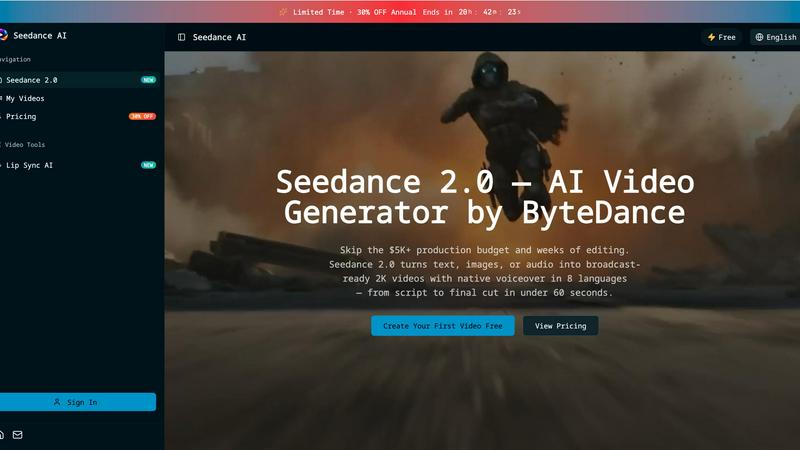
Seedance 2.0 instantly creates broadcast-ready 2K videos from text, images, or audio in under 60 seconds.
Last updated: February 28, 2026
Visual Comparison
Melograph
Seedance 2.0
Feature Comparison
Melograph
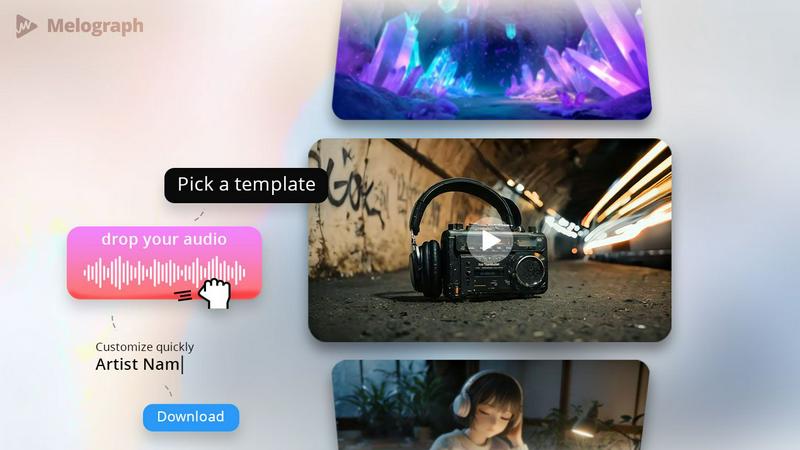
Quick Template Selection
With Melograph, users can choose from a variety of high-quality templates that suit different vibes, including minimalistic, cinematic, retro, and futuristic styles. This feature allows musicians to find the perfect look that resonates with their music genre without spending hours crafting visuals from scratch.
Audio-Reactive Waveforms
Melograph's audio-reactive waveforms bring your music to life. As your track plays, the visualizer responds in real time, creating dynamic motion that captures the essence of your sound. This feature ensures that the visuals are not only aesthetically pleasing but also intimately connected to the audio.
Multiple Export Formats
Melograph understands the diverse needs of social media platforms. Users can export their videos in 1080p MP4 format and choose from various aspect ratios, including 9:16, 1:1, 4:5, and 16:9. This flexibility ensures that your visuals look great whether they are intended for TikTok, Instagram, or YouTube.
User-Friendly Interface
Designed for ease of use, Melograph requires no prior editing experience. The straightforward interface allows anyone to select a template, upload audio, and customize text with minimal effort. This user-centric design makes it accessible for indie artists, producers, and labels alike.
Seedance 2.0
Multi-Modal Input & @Asset Tagging
Stop rebuilding from scratch. Seedance 2.0 accepts 12 different input types, from text and images to existing video clips and audio files. Its powerful @asset tag system lets you precisely guide generation: tag @Image1 as your character, use @Video1 for camera movement reference, and describe the scene in plain text. This granular control drastically reduces guesswork and allows you to repurpose existing assets intelligently, setting a superior baseline faster than any text-only tool.
Audio-Native Generation with Lip Sync
Eliminate the costly, time-consuming post-production steps of hiring voice actors and manually syncing audio. Seedance 2.0 generates lip-synced dialogue, realistic Foley sound effects, and fitting background music natively alongside your video, supporting 8 languages. This integrated approach means what used to cost $300+ per video in external services is now a built-in feature, delivering a complete, polished asset ready for immediate use.
Multi-Shot Narrative Sequences
Battle-tested against single-clip generators that leave you manually stitching scenes together. Seedance 2.0's advanced engine can compose logical, multi-scene sequences from a single, cohesive prompt. It intelligently maintains consistency across cuts—keeping characters, outfits, and lighting stable—allowing you to build engaging narratives up to 2 minutes long without the tedious manual editing required by lesser platforms.
Director-Level Scene Editing
Why re-prompt an entire generation when you only need to change one element? Seedance 2.0 provides unprecedented control for fine-tuning. Edit any generated scene with a simple sentence instruction: swap a character, remove an unwanted object, or change the camera angle. This precision-editing capability slashes iteration time and delivers client-ready results 30% faster than competing render-heavy tools.
Use Cases
Melograph
Music Releases
Indie artists and established musicians can utilize Melograph to create stunning visualizers for their new singles or album releases. The professional-quality templates ensure that every release stands out in crowded feeds.
Promo Posts
Producers looking to generate buzz around upcoming projects can use Melograph to create eye-catching teasers. A short, visually appealing video can capture attention and drive engagement leading up to a release.
Background Visuals for Live Streams
DJs and live performers can enhance their sets with Melograph by using the audio-reactive visuals as backdrops. This engaging element elevates the overall live experience and captivates the audience.
Social Media Content
For content creators who regularly post music-related content, Melograph provides a reliable and efficient way to produce consistent visuals. This ensures a cohesive brand identity across all social media platforms, making it easier for followers to recognize your work.
Seedance 2.0
Performance Marketing & Ad Creation
Marketing teams can now launch data-driven video ad campaigns at lightning speed. Generate high-converting product demos, brand story videos, and spokesperson ads with perfect lip-sync and native audio in multiple languages. This agility allows for rapid A/B testing of creative assets, with teams reporting over 35% higher click-through rates using AI-generated videos compared to static or slower-produced content.
Social Media & Short-Form Content
Dominate platforms like TikTok, YouTube Shorts, and Instagram Reels by producing trending, audio-synced content in minutes, not hours. Turn a viral tweet or a product highlight into a multi-shot narrative clip ready for publishing. This speed enables creators to consistently post high-quality, engaging video content that capitalizes on trends before they fade, replacing reliance on freelancers.
E-Learning & Training Video Production
Revolutionize educational content by generating instructor-led tutorials with animated, multilingual presenters. Seedance 2.0 transforms dry scripts or slide decks into dynamic, engaging videos with natural speech, leading to up to 45% higher student completion rates compared to static materials. It's ideal for creating scalable training videos and course content quickly and cost-effectively.
Indie Film & Animation Pre-Production
Slash pre-production costs by 90% compared to traditional pipelines. Filmmakers and animators can use Seedance 2.0 to produce detailed storyboards, animate characters with consistent styles, and visualize complex scenes or visual effects sequences. The multi-shot narrative feature is perfect for crafting short films and animated shorts with professional continuity from concept to visual draft.
Overview
About Melograph
Melograph is a cutting-edge, web-based music visualizer maker tailored specifically for musicians, producers, and creators who seek to enhance their audio content with stunning visuals. This innovative platform eliminates the cumbersome process of traditional video editing, allowing users to create captivating, audio-reactive visualizers in just a few clicks. With Melograph, you start with professionally designed templates that look premium right out of the box. Simply upload your track, customize it with your artist and song title, and even add branding elements if necessary. The result is a polished, ready-to-post video that fits seamlessly into your social media strategy. Melograph is perfect for anyone looking to maintain a consistent visual style across their music releases without the time-consuming headaches usually associated with video editing.
About Seedance 2.0
Forget the endless, frustrating loop of trial-and-error prompting that plagues other AI video tools. Seedance 2.0 is the multi-modal AI video generator engineered to break the real bottleneck in video creation: the iteration process. While competitors hand you a rough first draft and leave you to figure out the rest, Seedance 2.0 delivers broadcast-ready 2K videos with native voiceover in under 60 seconds. It's built for creators, marketers, agencies, and product teams who need to move at the speed of social media, not the speed of a traditional edit suite. The core value proposition is brutal efficiency: skip the $5,000+ production budgets and weeks of editing. With capabilities spanning text-to-video, image animation, video restyling, and multi-shot narratives, it provides director-level control to edit scenes with a single sentence, maintaining consistency where other tools fail. This isn't just another generator; it's a complete production pipeline that turns ideas into publishable short videos for ads, Reels, demos, and landing pages in minutes, not days.
Frequently Asked Questions
Melograph FAQ
Do I need editing experience?
No, Melograph is designed for users of all skill levels. If you can choose a template and type a title, you can create great visuals effortlessly.
Will this work for TikTok, Reels, and Shorts?
Absolutely! Melograph offers multiple export formats that cater specifically to popular social media platforms like TikTok, Instagram Reels, and YouTube Shorts.
Can I use it for multiple songs?
Yes, Melograph allows you to create visuals for multiple tracks, making it an ideal tool for artists and producers with an extensive catalog or upcoming releases.
Is it web-based?
Yes, Melograph is entirely web-based, meaning you can access it from any device with an internet connection, eliminating the need for heavy software downloads or installations.
Seedance 2.0 FAQ
How does Seedance 2.0 handle consistency across video generations?
Seedance 2.0 uses advanced multi-shot narrative technology and its @asset tagging system to maintain core elements like character appearance, clothing, and environmental lighting across different scenes and generations. This is a direct advantage over tools where each prompt creates a visually disjointed result, requiring manual correction.
What kind of audio does Seedance 2.0 generate?
The platform generates a complete audio track natively, including synchronized character dialogue with accurate lip movements, ambient Foley sound effects, and complementary background music. It supports 8 languages, creating a fully-produced soundscape that matches the on-screen action without needing external editing software or voice talent.
Can I edit a specific part of a generated video without starting over?
Yes, this is a key competitive feature. With Director-Level Control, you can submit a simple text instruction (e.g., "swap the woman's jacket from red to blue" or "change the camera to a close-up") to edit a specific scene. The tool regenerates only that portion, preserving the rest of your video and saving immense time compared to full re-generations.
What are the main output specifications for videos?
Seedance 2.0 generates broadcast-ready videos in up to 2K (1080p) resolution. You can choose from multiple aspect ratios (like 9:16 for Reels or 16:9 for YouTube) and durations (from 4 to 12 seconds per basic clip, with multi-shot sequences building longer narratives). Outputs are immediately suitable for social media, marketing campaigns, and professional demos.
Alternatives
Melograph Alternatives
Melograph is a cutting-edge web-based music visualizer maker tailored for musicians and creators seeking to produce stunning audio visuals effortlessly. By providing a library of premium templates, Melograph simplifies the process of crafting visually appealing music videos without the complexities of traditional video editing software. This platform is particularly popular among artists looking for a streamlined solution to enhance their promotional efforts. Users often seek alternatives to Melograph due to various factors such as pricing, specific feature sets, or compatibility with their preferred platforms. Additionally, some may require more advanced customization options or different export formats. When exploring alternatives, it’s essential to consider factors like ease of use, the diversity of templates, the quality of the final output, and the adaptability to various social media formats to ensure an effective visual presence.
Seedance 2.0 Alternatives
Seedance 2.0 is a multi-modal AI video generator from ByteDance, designed to accelerate the creation of short-form video content. It belongs to the competitive category of AI-powered video creation tools that promise to turn ideas into polished clips for social media, marketing, and demos. Users often explore alternatives for several key reasons. Budget constraints and specific pricing models can be a primary driver, as costs vary widely. Others may seek different feature sets, such as longer video generation, unique stylistic filters, or integration with a preferred editing platform. The need for a tool that aligns with a specific workflow or creative process is also a common motivator. When evaluating other options, focus on your core needs. Consider the consistency of output, as many tools struggle with maintaining style across iterations. Assess the true speed of the editing loop, not just the initial generation time. Finally, examine the practical export quality and formats to ensure the final product is truly ready for your intended use case.