
Motion Control AI vs Wan 2.6 Cinematic AI Video

Motion Control AI
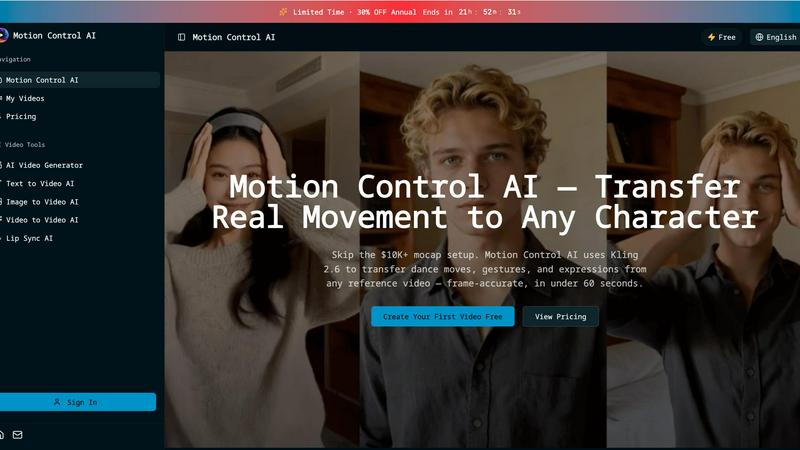
Transfer realistic movements and expressions from any video to your characters in under 60 seconds with Motion Control.
Last updated: February 28, 2026

Last updated: February 28, 2026
Visual Comparison
Motion Control AI
Wan 2.6 Cinematic AI Video

Feature Comparison
Motion Control AI
Motion Transfer
This feature enables users to upload a reference video and extract skeletal motion data frame-by-frame. The tool captures all body movements, such as dance choreography and athletic actions, allowing characters to replicate these motions while preserving their unique identities.
Gesture Control
Unlike many other AI video generators, Motion Control AI excels in capturing detailed hand movements. With its precise finger articulation and gesture recognition, users can animate complex actions like pointing and sign language, enhancing the realism of character interactions.
Expression Sync
Motion Control AI addresses the common issue of the uncanny valley by accurately mapping facial expressions from the source video to characters. This feature allows for emotional authenticity, ensuring that smiles, frowns, and eye movements are replicated convincingly, fostering a deeper connection with the audience.
Cinematic Realism
The software delivers broadcast-quality output at resolutions up to 1080p and 30fps. With full camera control, including smooth pans and dynamic tilts, Motion Control AI incorporates professional lighting and composition techniques, making every frame visually striking and ready for distribution.
Wan 2.6 Cinematic AI Video
Intelligent Multi-Shot Narrative Generation
Wan 2.6 doesn't just create a clip; it directs a scene. The AI automatically plans and generates multiple connected shots within a single video sequence, intelligently splitting the narrative for cinematic flow. It focuses on preserving crucial story elements and visual details across these shots, directly tackling the common AI video pitfalls of fragmented clips and unstable, jumping subjects. This ensures your story unfolds coherently from start to finish.
Video Reference-Based Creation
Gain unprecedented control over your AI-generated content. With the Reference to Video mode, you can upload an existing video to reuse specific visual appearances, styles, or audio traits. This feature supports single or dual-subject storytelling, allowing you to maintain character consistency or replicate a specific aesthetic across new generated sequences. It’s the key to building branded content or serialized stories with reliable, recognizable elements.
Extended 15-Second Video Output
Move beyond fleeting snippets. Wan 2.6 delivers up to 15 seconds of generated video, a significant capacity that enables richer scene development, smoother narrative pacing, and more complete story arcs. This extended duration allows for proper build-up and resolution, making your videos feel less like AI experiments and more like purposeful, engaging short films or advertisements.
Unified High-Quality Audio Generation
The experience isn't just visual. Wan 2.6 integrates natural, realistic audio generation synchronized with your video. It produces high-quality soundscapes and supports stable multi-speaker dialogue, ensuring character conversations are clear and lifelike. This holistic approach means your final product arrives complete with professional-grade audio, eliminating the need for cumbersome post-production sound editing.
Use Cases
Motion Control AI
Social Media Content Creation
For short-form creators on platforms like TikTok and Instagram, Motion Control AI provides a quick and efficient way to generate engaging character animations. By transferring movements from reference videos, creators can produce eye-catching clips that resonate with their audience.
Game Development
Game developers can utilize Motion Control AI for prototyping character animations, allowing them to bring movements and actions to life without the need for extensive rigging. This accelerates the development process while maintaining high-quality animations.
Marketing Campaigns
Marketing teams can leverage Motion Control AI to create compelling product demonstrations and brand mascot animations. By using realistic character movements, campaigns can achieve a higher engagement rate, enhancing brand visibility and driving conversions.
Film and Animation Production
Motion Control AI significantly reduces the time and cost associated with traditional animation methods. Film studios can now transfer actor performances to animated characters, achieving cinematic quality in a fraction of the time, which is perfect for short films and visual effects.
Wan 2.6 Cinematic AI Video
Social Media Ad Campaigns
Craft captivating, story-driven ads for platforms like Instagram Reels or TikTok. Generate cohesive 15-second narratives that showcase a product's features through multiple angles and scenes, maintaining brand character consistency throughout. The high-quality audio and smooth transitions create polished, professional ads at a fraction of the traditional production time and cost.
Concept Visualization and Storyboarding
Rapidly bring creative ideas to life for pitches and pre-production. Filmmakers and content teams can use text prompts to generate dynamic multi-shot sequences, visualizing complex scenes, camera movements, and character interactions before a single real-world shot is scheduled. It accelerates the brainstorming and approval process dramatically.
Educational and Explainer Content
Create engaging educational shorts that hold viewer attention. Transform a static diagram or a text-based explanation into a dynamic video where concepts unfold over multiple connected shots. The consistent visual elements and clear audio narration help simplify complex topics, making learning more effective and visually stimulating.
Personalized Video Content
Produce unique, narrative-driven content for clients or audiences. Using the reference feature, you can incorporate a client's likeness or specific branding elements into a custom-generated story. This is ideal for personalized marketing messages, unique greeting videos, or serialized web content where character continuity is paramount.
Overview
About Motion Control AI
Motion Control AI is a cutting-edge tool designed to revolutionize the way character animations and AI videos are created. By leveraging advanced motion capture technology, specifically Kling 2.6, this software allows users to transfer real-life movements from a reference video to animated characters seamlessly and in under 60 seconds. Whether you are a content creator, game developer, or part of a marketing team, Motion Control AI provides a user-friendly platform to generate expressive, high-quality animations without the need for expensive motion capture equipment. Its robust features ensure consistent character performance across multiple takes, making it an ideal solution for social media content, product demonstrations, and even film production. With Motion Control AI, creators can achieve professional results quickly, allowing for fast iteration and enhanced creativity.
About Wan 2.6 Cinematic AI Video
Stop wrestling with fragmented AI clips that break your story. Wan 2.6 is the battle-tested AI video model engineered for one purpose: to generate coherent, multi-shot cinematic sequences from a single prompt. While other tools output disjointed scenes, Wan 2.6 intelligently storyboards your narrative, preserving key characters and details across shots for up to 15 seconds of seamless video. It’s a unified system that combines intelligent shot sequencing, high-fidelity audio generation with stable multi-speaker dialogue, and powerful reference-based creation. Built for professional creators, marketers, and storytellers who demand reliability, Wan 2.6 transforms simple text, images, or video references into complete, expressive narratives with smooth transitions and consistent visual flow. This isn't just another video generator; it's your AI director for structured, professional-grade storytelling.
Frequently Asked Questions
Motion Control AI FAQ
How does Motion Control AI work?
Motion Control AI works by analyzing a reference video to extract motion data, which is then applied to character models. Users can upload a video and generate animations in just minutes.
What types of videos can I upload as a reference?
You can upload various video formats, including MP4, MOV, and MKV, as reference videos. The maximum size for reference videos is 100MB, and they can be up to 10 seconds long.
Can I use my own character designs?
Yes, Motion Control AI allows users to upload their own character images in JPEG or PNG formats, enabling customization and personal branding in animations.
What are the benefits of using Motion Control AI for marketing?
Using Motion Control AI in marketing campaigns can lead to higher engagement rates, increased viewer retention, and a more dynamic presentation of products and services, ultimately driving better results in advertising efforts.
Wan 2.6 Cinematic AI Video FAQ
What makes Wan 2.6 different from other AI video tools?
Wan 2.6 is specifically architected for coherent multi-shot storytelling, a major differentiator. While many tools produce single, often disjointed clips, Wan 2.6 acts as an AI director, planning sequential shots that maintain narrative and visual consistency. Its combination of extended 15-second duration, reference-based generation, and unified high-quality audio creates a more complete and professional output tailored for structured narratives.
How does the Video Reference mode work?
In Reference to Video mode, you upload an existing video. Wan 2.6's AI then analyzes this reference to extract specific visual traits (like a character's appearance or art style) and/or audio characteristics. When you generate a new video, it applies these learned traits to create content that is visually or sonically consistent with your source material, perfect for continuing a story or maintaining brand identity.
Can I control the number of shots in a multi-shot sequence?
The multi-shot sequencing is intelligently automated by the AI based on your prompt and the chosen video duration. You enable the "Multi-Shot" option, and the model plans the most coherent shot breakdown for your narrative. This automated storyboarding is a core strength, designed to optimize pacing and continuity without requiring manual shot-by-shot direction from the user.
What are the resolution and aspect ratio options?
Wan 2.6 offers flexible output settings to match your platform needs. You can generate videos in 720P or 1080P resolution. For aspect ratios, it supports landscape (16:9), vertical (9:16), square (1:1), and both horizontal and vertical cinematic ratios (4:3 and 3:4), ensuring your content is optimized for everything from YouTube to mobile-first social feeds.
Alternatives
Motion Control AI Alternatives
Motion Control AI is a cutting-edge tool designed for animating characters seamlessly using motion capture from any reference video. It falls into the content creation category, specifically targeting creators working with social media, gaming, and marketing. Users often seek alternatives to Motion Control AI due to varying needs such as budget constraints, specific feature requirements, or platform compatibility. When evaluating alternatives, it’s essential to consider factors like ease of use, overall performance, the quality of output, and whether the solution aligns with your creative goals and workflow preferences.
Wan 2.6 Cinematic AI Video Alternatives
Wan 2.6 Cinematic AI Video is a powerful contender in the image-to-video AI space. It specializes in transforming static pictures into dynamic, story-driven video clips complete with intelligent scene sequencing and high-quality audio. This tool is for creators who want to quickly generate expressive, short-form narrative content from visual assets. Users often seek alternatives for various practical reasons. Budget constraints, specific feature requirements like longer video lengths or different artistic styles, and platform compatibility needs are common drivers. The search for the right tool is about finding a perfect balance between creative power, ease of use, and cost. When evaluating other options, focus on core capabilities. Look for robust storyboarding logic, output quality and duration, audio generation realism, and the overall coherence of the final video. The best alternative will match your specific production workflow and creative vision without compromise.