
OpenClaw Agent vs Proofapp

OpenClaw Agent
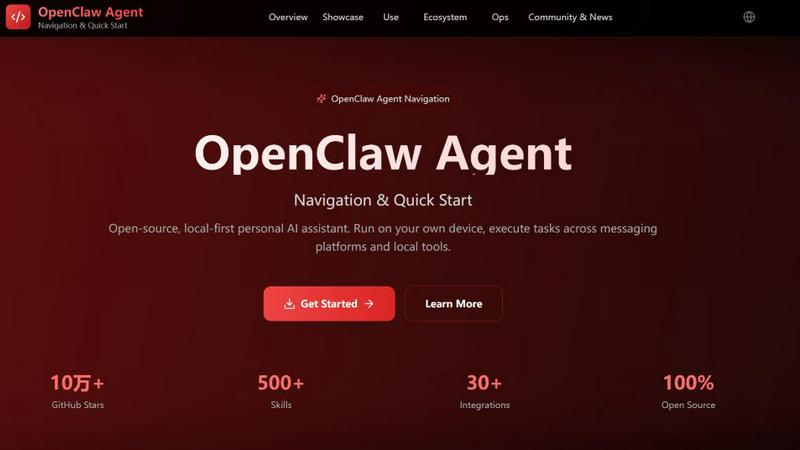
OpenClaw is your private, open-source AI assistant that runs locally and controls your messaging apps.
Last updated: February 28, 2026

Proofapp
Stop wasting time on miscommunication and endless email chains; get instant visual feedback directly on your website.
Last updated: March 3, 2026
Visual Comparison
OpenClaw Agent
Proofapp

Feature Comparison
OpenClaw Agent
Local-First & Open Source Architecture
OpenClaw Agent is 100% open-source and engineered to run on your infrastructure. This fundamental design eliminates reliance on external APIs for core functionality, giving you complete data sovereignty and operational control. Unlike proprietary assistants, you can audit the code, modify it, and deploy it anywhere—from a Raspberry Pi at home to a private cloud server. This battle-tested framework ensures your personal and professional automation remains private, secure, and always available, directly challenging the closed, data-hungry models of mainstream AI assistants.
Multi-Platform Messaging Gateway
Act as a single, powerful assistant across all your communication channels. OpenClaw Agent's gateway provides unified management for sessions, channels, tools, and events, connecting natively to WhatsApp, Telegram, Slack, Discord, Feishu (Lark), and WeCom. This means you can check your calendar, run a script, or control your smart lights from any chat platform you use daily. It consolidates your digital command interface, proving more versatile and integrated than any platform-specific bot or siloed assistant.
Expansive Skills Ecosystem & ClawHub
Move beyond basic commands with a robust marketplace of over 500 ready-to-deploy skills via ClawHub, the official skill directory. This ecosystem covers everything from email automation and GitHub integration to desktop automation and smart home control. You can browse, install, and share skills that extend your agent's capabilities instantly. For developers, the framework provides comprehensive tools and templates to build custom skills, making OpenClaw Agent infinitely adaptable to specialized workflows that off-the-shelf assistants could never handle.
Voice & Talk Mode with Gateway Control
OpenClaw Agent brings hands-free, continuous conversation to your devices with native Voice & Talk Mode support for macOS, iOS, and Android. Featuring voice wake-up capabilities, it allows for natural, ongoing dialogues just like commercial assistants, but with a critical difference: all processing is managed through your local gateway control plane. This unified system manages voice sessions alongside all other tools and events, ensuring a cohesive and secure experience where voice data is processed according to your deployment rules, not a third-party's cloud.
Proofapp
Visual Commenting
With Proofapp's visual commenting feature, users can click anywhere on a screenshot to leave contextual feedback. This eliminates the confusion common with traditional feedback methods, allowing for clear communication about specific design elements.
Multi-Breakpoint Testing
Proofapp automatically captures screenshots at both desktop and mobile breakpoints, facilitating a comprehensive review process. This feature ensures that clients can see how their website appears across devices, leading to more informed feedback.
Real-time Collaboration
Proofapp enables real-time collaboration among team members. As comments are made, everyone involved can see updates instantly, allowing for swift replies and resolutions, which keeps projects moving forward without unnecessary delays.
Secure Share Links
Users can share projects with clients via secure, expirable links. This feature ensures that feedback is gathered securely, giving clients access to only the necessary elements of the project for commenting, without requiring account creation.
Use Cases
OpenClaw Agent
Unified Multi-Platform Personal Assistant
Tired of switching between different bots for different apps? Deploy OpenClaw Agent as your singular, cross-platform concierge. Manage your schedule from WhatsApp, fetch documents via Slack, and send reminders through Telegram—all through one intelligent agent. This use case demonstrates OpenClaw's superior integration capabilities, battling the fragmented experience of using separate, limited bots for each messaging service and centralizing your digital life under one autonomous command center.
Developer Workflow & Code Assistant
Supercharge your development process by integrating OpenClaw Agent directly into your local environment. Connect it to GitHub for issue tracking and PR summaries, use it with local LLMs via Ollama or LM Studio for code explanation and generation, and automate repetitive git or build tasks. It acts as a context-aware pair programmer that lives in your terminal and chat apps, offering a more private and toolchain-specific alternative to cloud-based coding assistants.
Desktop Automation & Smart Home Control
Transform your computer and home into an automated environment responsive to natural language. OpenClaw Agent can control browsers, fill forms, take screenshots, and manipulate files via local skills. Simultaneously, connect it to smart home platforms to adjust lights, temperature, or appliances through a chat command or voice. This local-first automation use case highlights OpenClaw's practical utility, executing real-world actions that purely cloud-based chat interfaces cannot perform directly.
AI Social & Multi-Agent Collaboration
Explore advanced AI interactions by creating a network of specialized OpenClaw agents. Set up scenarios where an email assistant, a calendar manager, and a research bot collaborate on projects, chatting and sharing information autonomously in a "Moltbook-style" environment. This use case showcases the framework's advanced capabilities for users and researchers interested in multi-agent systems, all while maintaining full control over the data and interactions within your own private ecosystem.
Proofapp
Freelancers
Freelancers can leverage Proofapp to streamline client feedback, allowing for quick and effective revisions. By pinning comments directly on designs, they can present a professional image while saving hours on project management.
Small Development Teams
Small development teams benefit from Proofapp's ability to enhance client approvals without the burden of enterprise pricing. This tool simplifies the feedback process, enabling teams to focus on delivering high-quality work efficiently.
Design Teams
Design teams utilize Proofapp to receive precise visual feedback from clients and stakeholders. By having comments pinned exactly where they matter, designers can make targeted changes that align with client expectations.
Marketing Teams
Marketing teams can employ Proofapp to review landing pages and campaigns visually. The ability to gather feedback in a straightforward manner helps these teams remain agile and responsive to changes, ultimately enhancing campaign effectiveness.
Overview
About OpenClaw Agent
OpenClaw Agent is not just another chatbot; it's a battle-tested, open-source personal AI assistant framework designed for those who demand control, privacy, and real-world utility. While cloud-based assistants like ChatGPT or Google Assistant lock you into their ecosystems and data policies, OpenClaw Agent adopts a defiantly local-first approach. It runs directly on your own device or server, ensuring your data, conversations, and workflows never leave your infrastructure without your explicit consent. This is the core of its value proposition: unparalleled sovereignty and security.
Built for power users, developers, and privacy-conscious individuals, OpenClaw Agent connects seamlessly to your digital life. It integrates with major messaging platforms like WhatsApp, Telegram, Slack, and Discord, acting as a unified command center. More importantly, it executes tasks across your local tools—browsers, calendars, smart home devices, and codebases—transforming it from a conversational novelty into a potent productivity engine. With over 500 curated skills in its ecosystem and deep customization via its Node.js core, OpenClaw Agent is the definitive choice for anyone who wants an AI assistant that works for them, on their terms, without compromises.
About Proofapp
Proofapp is a revolutionary visual feedback and website review platform designed to enhance collaboration among designers, developers, and clients. By allowing users to upload any website URL, Proofapp automatically captures screenshots for both desktop and mobile views, streamlining the feedback process. This tool is perfect for freelancers, small development teams, and agencies managing multiple projects, as it eliminates the chaos that often accompanies scattered emails and vague revision requests. With features like real-time notifications, Slack integration, and customizable settings, Proofapp transforms the way feedback is gathered and managed. Users can pin comments directly on the designs, reply in threaded conversations, and attach files for clarity—all without needing an account. This not only improves productivity but also ensures that feedback is organized, visual, and actionable, making it an ideal solution for anyone looking to enhance their project workflow.
Frequently Asked Questions
OpenClaw Agent FAQ
What is OpenClaw Agent and how is it different?
OpenClaw Agent is an open-source, local-first personal AI assistant and agent framework. The critical difference is that it runs on your own device or server, not in a vendor's cloud. It doesn't just chat—it executes tasks across your messaging platforms and local tools (like your browser, calendar, or smart home). This gives you complete data privacy, security, and customization freedom, directly challenging the locked-down, data-extractive models of assistants like Alexa or Google Assistant.
How do I get started with OpenClaw Agent?
Getting started is straightforward and demonstrates its developer-friendly design. First, install it globally via npm with the command npm install -g openclaw@latest. Then, run the onboarding wizard using openclaw onboard --install-daemon to configure the core system and daemon. Finally, initiate a chat session with openclaw chat to begin interacting with your agent immediately. The entire process can be completed in minutes, putting a powerful, local AI assistant at your fingertips.
Is OpenClaw Agent secure to use?
Security is a foundational pillar of OpenClaw Agent's design. Its local-first nature is the primary security feature, keeping sensitive data off external servers. The project provides a clear security checklist: never expose the Gateway websocket directly to the public internet (use a reverse proxy with TLS or Tailscale), apply the principle of least privilege to skills and file access, manage API keys securely, and keep the software updated. By following the official security guide, you maintain a robust security posture superior to opaque cloud services.
Can I extend what OpenClaw Agent can do?
Absolutely. Extensibility is where OpenClaw Agent dominates. You can instantly expand its capabilities by browsing and installing from over 500 community and official skills on ClawHub. For custom needs, you can develop your own skills using the provided templates and comprehensive development documentation. The framework is built on Node.js, and the entire ecosystem is open for modification, allowing you to build deep integrations with any local tool or web service, making it infinitely more adaptable than closed-platform assistants.
Proofapp FAQ
How does Proofapp improve feedback collection?
Proofapp improves feedback collection by providing a visual platform where comments can be pinned directly on designs. This visual approach significantly reduces miscommunication and speeds up the revision process.
Can clients leave feedback without creating an account?
Yes, clients can leave feedback without needing to create an account. Proofapp allows users to generate secure links that clients can use to access the project and provide comments directly on the visuals.
Is Proofapp suitable for larger teams?
Absolutely, Proofapp is designed to scale with your needs. While it's perfect for smaller teams, its robust features make it suitable for larger teams and agencies as well, ensuring efficient collaboration at any scale.
What kind of security measures does Proofapp implement?
Proofapp implements enterprise-level security measures, including role-based permissions, audit logs, and secure data handling practices. These features ensure that all project data is protected and only accessible to authorized users.
Alternatives
OpenClaw Agent Alternatives
OpenClaw Agent is a local-first personal AI assistant, squarely in the productivity and management category. It empowers users by operating directly on their device, prioritizing privacy and user control while offering robust navigation, quick-start guides, and deployment resources. Users often seek alternatives for various reasons, including budget constraints, specific feature requirements not met, or compatibility needs with different operating systems and workflows. The quest for the right tool is driven by the need to balance power, convenience, and personalization. When evaluating alternatives, focus on core principles: uncompromising data security, true offline capability, ease of setup, and the depth of actionable documentation. The winner will be the tool that doesn't just assist but integrates seamlessly and securely into your daily command center.
Proofapp Alternatives
Proofapp is a powerful visual feedback and website review platform designed to streamline collaboration among designers, developers, and their clients. With its ability to capture screenshots of any website on both desktop and mobile, it falls into the Productivity & Management category, making it an essential tool for efficient project management and client communication. Users often seek alternatives to Proofapp due to various reasons, such as budget constraints, specific feature requirements, or compatibility with different platforms. When choosing an alternative, it's crucial to evaluate the range of features offered, user interface, ease of integration with existing workflows, and the overall cost. A good alternative should enhance your ability to collect and manage feedback without adding unnecessary complexity to your projects.