
Perkoon vs Proofapp

Perkoon
Perkoon transfers files directly for free, beating costly services like WeTransfer.
Last updated: March 3, 2026

Proofapp
Stop wasting time on miscommunication and endless email chains; get instant visual feedback directly on your website.
Last updated: March 3, 2026
Visual Comparison
Perkoon
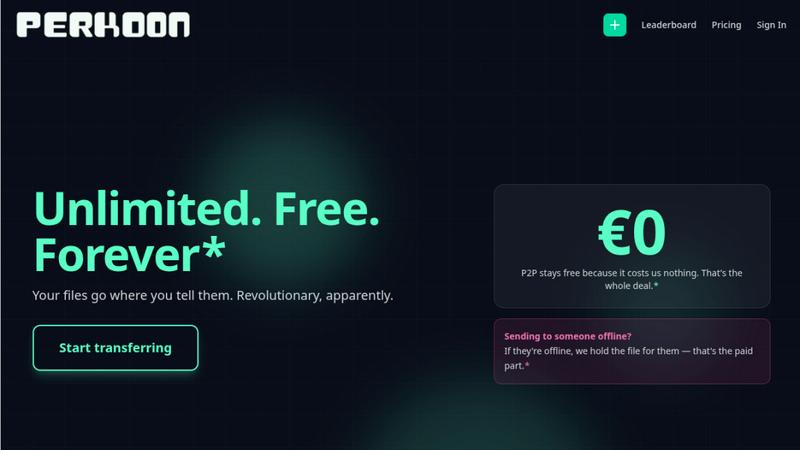
Proofapp

Feature Comparison
Perkoon
Unlimited Free P2P Transfers
This is the core revolution. When both sender and receiver are online, Perkoon establishes a direct, encrypted connection between their browsers. Files stream from one device to another without ever touching Perkoon's servers. This means there are absolutely no file size limits, no mandatory account creation, and it costs you nothing because it costs Perkoon virtually nothing. It's file transfer reduced to simple, efficient physics, eliminating the bloated infrastructure and restrictions of legacy services.
Native Agent & Automation API
Perkoon is the first file transfer service built from the ground up for the age of AI. It exposes a stable, machine-readable interface (window.__perkoon) so your scripts, bots, and AI agents can interact with it programmatically. They can send and receive files directly through the API without the fragile, error-prone process of simulating human clicks and scraping the DOM. This is a fundamental architectural advantage for automated workflows.
Encrypted Cloud Storage for Offline Recipients
For real-world scenarios where the recipient isn't available, Perkoon offers an honest, paid solution. Files can be uploaded to Perkoon's servers, where they are encrypted and held securely until the recipient is ready. This service has a clear cost, which Perkoon transparently charges for, drawing a stark contrast with "free" services that monetize your data or hit you with unexpected paywalls mid-transfer.
Full-Featured Command Line Interface (CLI)
Perkoon respects all workflows, including terminal-based ones. With npx perkoon send/receive, users can initiate and receive transfers directly from their command line. It enables seamless browser-to-CLI, CLI-to-browser, and CLI-to-CLI operations, making it an indispensable tool for developers, sysadmins, and anyone who values speed and scriptability over graphical interfaces.
Proofapp
Visual Commenting
With Proofapp's visual commenting feature, users can click anywhere on a screenshot to leave contextual feedback. This eliminates the confusion common with traditional feedback methods, allowing for clear communication about specific design elements.
Multi-Breakpoint Testing
Proofapp automatically captures screenshots at both desktop and mobile breakpoints, facilitating a comprehensive review process. This feature ensures that clients can see how their website appears across devices, leading to more informed feedback.
Real-time Collaboration
Proofapp enables real-time collaboration among team members. As comments are made, everyone involved can see updates instantly, allowing for swift replies and resolutions, which keeps projects moving forward without unnecessary delays.
Secure Share Links
Users can share projects with clients via secure, expirable links. This feature ensures that feedback is gathered securely, giving clients access to only the necessary elements of the project for commenting, without requiring account creation.
Use Cases
Perkoon
Sending Large Project Files to Clients
Freelancers and agencies can instantly send massive video edits, design prototypes, or code repositories directly to a client's browser. No more compressing files into multiple ZIP archives, dealing with WeTransfer's 2GB limit, or begging clients to sign up for a Dropbox account. Just generate a link and beam the files over with no size caps.
Automating Data Pipelines with AI Agents
Developers can integrate Perkoon's API into their automated workflows. An AI agent that processes user-uploaded images can receive them directly via Perkoon's API, and a script backing up server logs can send them to an engineer's Perkoon CLI. This removes the human bottleneck from machine-driven file exchange.
Ad-Hoc Collaboration Between Teams
When teams need to share a large dataset, screen recording, or batch of assets quickly during a live call or chat, Perkoon's P2P transfer is perfect. No setup required for either party; just share a link and the transfer begins immediately, keeping the collaborative momentum going without friction.
Secure and Private File Sharing
For users concerned about privacy, P2P transfers are the gold standard. Since the files never reside on a central server, they cannot be scanned, mined for data, or accidentally exposed in a breach. Perkoon provides a trustworthy channel for sharing sensitive documents without "corporate nonsense."
Proofapp
Freelancers
Freelancers can leverage Proofapp to streamline client feedback, allowing for quick and effective revisions. By pinning comments directly on designs, they can present a professional image while saving hours on project management.
Small Development Teams
Small development teams benefit from Proofapp's ability to enhance client approvals without the burden of enterprise pricing. This tool simplifies the feedback process, enabling teams to focus on delivering high-quality work efficiently.
Design Teams
Design teams utilize Proofapp to receive precise visual feedback from clients and stakeholders. By having comments pinned exactly where they matter, designers can make targeted changes that align with client expectations.
Marketing Teams
Marketing teams can employ Proofapp to review landing pages and campaigns visually. The ability to gather feedback in a straightforward manner helps these teams remain agile and responsive to changes, ultimately enhancing campaign effectiveness.
Overview
About Perkoon
File transfer was a solved problem, until the industry decided to break it with size caps, forced logins, and surprise paywalls. Perkoon is the defiant answer, unsolving the mess and restoring sanity. It is a next-generation file transfer service built on a simple, powerful principle: if both people are online, files should move directly between them. This is achieved through unlimited, free, browser-based Peer-to-Peer (P2P) transfers with no middleman, no accounts, and no artificial limits. For when the recipient is offline, Perkoon offers encrypted cloud storage as an honest, paid add-on. But where Perkoon truly declares war on the old guard is with its native agent accessibility, featuring a machine-readable state and automation API so AI workflows can send and receive files directly, without clumsy human emulation. With a full-featured CLI for terminal users, Perkoon is built for the future of work, offering battle-tested reliability for everyone from creative professionals sending massive project files to developers automating their pipelines. Its core value proposition is uncompromising: your files go where you tell them, on your terms, with transparent technology and pricing that only charges for what actually costs money.
About Proofapp
Proofapp is a revolutionary visual feedback and website review platform designed to enhance collaboration among designers, developers, and clients. By allowing users to upload any website URL, Proofapp automatically captures screenshots for both desktop and mobile views, streamlining the feedback process. This tool is perfect for freelancers, small development teams, and agencies managing multiple projects, as it eliminates the chaos that often accompanies scattered emails and vague revision requests. With features like real-time notifications, Slack integration, and customizable settings, Proofapp transforms the way feedback is gathered and managed. Users can pin comments directly on the designs, reply in threaded conversations, and attach files for clarity—all without needing an account. This not only improves productivity but also ensures that feedback is organized, visual, and actionable, making it an ideal solution for anyone looking to enhance their project workflow.
Frequently Asked Questions
Perkoon FAQ
How can P2P transfers be completely free?
The model is transparent and technically sound. In a P2P transfer, the file data flows directly between the two users' devices. Perkoon's servers only facilitate the initial connection handshake, which uses minimal bandwidth and resources. Since this costs Perkoon almost nothing, they charge nothing for it. They only charge for the cloud storage service, which involves real infrastructure costs.
What happens if the recipient is offline?
If you start a transfer and the recipient is not available to accept the direct P2P connection, Perkoon will automatically offer you the option to use encrypted cloud storage instead. You can upload the file to Perkoon's servers, where it will be held securely until your recipient comes online. This cloud storage feature is part of the paid plans.
Can my AI assistant or scripts use Perkoon?
Absolutely. This is a key differentiator. Perkoon is built with a public automation API (window.__perkoon) and stable DOM selectors specifically for this purpose. Your automation scripts or AI agents can interact with Perkoon programmatically to send and receive files without any human-in-the-loop simulation, making it a robust tool for automated workflows.
Which browsers are supported for P2P transfers?
For the best, unlimited experience, Chromium-based browsers like Chrome, Edge, and Brave are fully supported. Firefox and Safari can be used but have inherent browser-level restrictions that may limit performance or maximum concurrent connections for very large transfers. The CLI works independently of browser limitations.
Proofapp FAQ
How does Proofapp improve feedback collection?
Proofapp improves feedback collection by providing a visual platform where comments can be pinned directly on designs. This visual approach significantly reduces miscommunication and speeds up the revision process.
Can clients leave feedback without creating an account?
Yes, clients can leave feedback without needing to create an account. Proofapp allows users to generate secure links that clients can use to access the project and provide comments directly on the visuals.
Is Proofapp suitable for larger teams?
Absolutely, Proofapp is designed to scale with your needs. While it's perfect for smaller teams, its robust features make it suitable for larger teams and agencies as well, ensuring efficient collaboration at any scale.
What kind of security measures does Proofapp implement?
Proofapp implements enterprise-level security measures, including role-based permissions, audit logs, and secure data handling practices. These features ensure that all project data is protected and only accessible to authorized users.
Alternatives
Perkoon Alternatives
Perkoon is a next-generation file transfer service in the productivity and management category, designed to cut through the noise of broken promises and hidden fees. Users often search for alternatives due to restrictive pricing models, missing features like automation, or simply needing a tool that works across different platforms and workflows. When evaluating other options, the key is to look beyond the marketing. Scrutinize the actual transfer mechanics—are your files taking a detour through a corporate server? Check for hard limits on size or speed, and be wary of free tiers that bait you before hitting a paywall. Most critically, assess if the service treats automation as a first-class citizen or an afterthought. The right tool should feel like an extension of your work, not a bottleneck. It should offer clarity in its model, robustness in its security, and genuine utility whether you're a human or a machine. Your file transfer shouldn't be the weakest link in your process.
Proofapp Alternatives
Proofapp is a powerful visual feedback and website review platform designed to streamline collaboration among designers, developers, and their clients. With its ability to capture screenshots of any website on both desktop and mobile, it falls into the Productivity & Management category, making it an essential tool for efficient project management and client communication. Users often seek alternatives to Proofapp due to various reasons, such as budget constraints, specific feature requirements, or compatibility with different platforms. When choosing an alternative, it's crucial to evaluate the range of features offered, user interface, ease of integration with existing workflows, and the overall cost. A good alternative should enhance your ability to collect and manage feedback without adding unnecessary complexity to your projects.