
Perkoon vs Pullsy

Perkoon
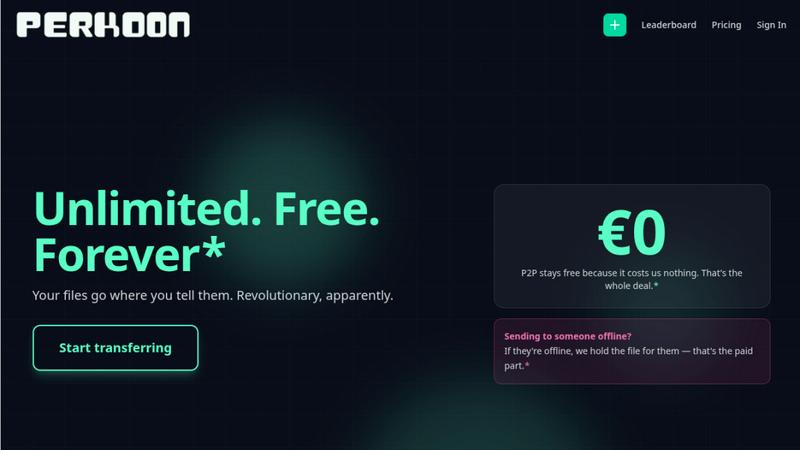
Perkoon transfers files directly for free, beating costly services like WeTransfer.
Last updated: March 3, 2026

Pullsy
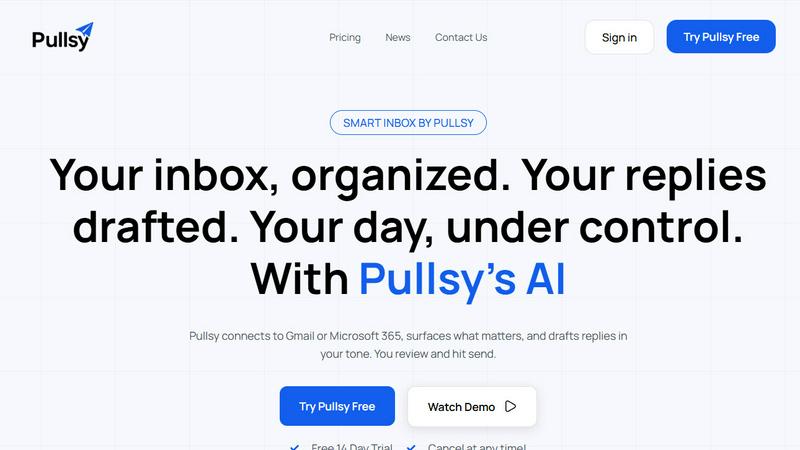
Pullsy's AI organizes your inbox and drafts replies in your tone, saving you hours.
Last updated: February 28, 2026
Visual Comparison
Perkoon
Pullsy
Feature Comparison
Perkoon
Unlimited Free P2P Transfers
This is the core revolution. When both sender and receiver are online, Perkoon establishes a direct, encrypted connection between their browsers. Files stream from one device to another without ever touching Perkoon's servers. This means there are absolutely no file size limits, no mandatory account creation, and it costs you nothing because it costs Perkoon virtually nothing. It's file transfer reduced to simple, efficient physics, eliminating the bloated infrastructure and restrictions of legacy services.
Native Agent & Automation API
Perkoon is the first file transfer service built from the ground up for the age of AI. It exposes a stable, machine-readable interface (window.__perkoon) so your scripts, bots, and AI agents can interact with it programmatically. They can send and receive files directly through the API without the fragile, error-prone process of simulating human clicks and scraping the DOM. This is a fundamental architectural advantage for automated workflows.
Encrypted Cloud Storage for Offline Recipients
For real-world scenarios where the recipient isn't available, Perkoon offers an honest, paid solution. Files can be uploaded to Perkoon's servers, where they are encrypted and held securely until the recipient is ready. This service has a clear cost, which Perkoon transparently charges for, drawing a stark contrast with "free" services that monetize your data or hit you with unexpected paywalls mid-transfer.
Full-Featured Command Line Interface (CLI)
Perkoon respects all workflows, including terminal-based ones. With npx perkoon send/receive, users can initiate and receive transfers directly from their command line. It enables seamless browser-to-CLI, CLI-to-browser, and CLI-to-CLI operations, making it an indispensable tool for developers, sysadmins, and anyone who values speed and scriptability over graphical interfaces.
Pullsy
Smart Inbox & Priority Highlighting
Pullsy's AI doesn't just organize; it declutters with intent. It automatically scans your incoming messages to identify and surface the emails that truly matter—like urgent requests from leadership, time-sensitive documents, or critical project updates—while filtering out the noise. This means you start your day with a "Your Day at a Glance" summary, focusing only on what requires your immediate attention and never missing a crucial message buried in the clutter.
AI-Drafted Replies in Your Tone
This is where Pullsy outmaneuvers generic AI tools. It doesn't just generate a reply; it analyzes the email context to detect questions, tasks, scheduling needs, or follow-ups, then drafts a precise, action-oriented response. You can select your tone—Professional, Friendly, or Quick—and Pullsy adapts. It learns your writing style over time, ensuring every drafted reply sounds authentically like you, ready for you to review, tweak if needed, and send with one confident click.
"Ask Pullsy" Inbox Intelligence
Transform your inbox into a searchable, intelligent database. With the "Ask Pullsy" feature, you can conversationally ask questions about your emails and attachments. Need a summary of a long thread? Ask. Have to extract key dates from a PDF contract? Ask. Looking for that one piece of information from last month? Just ask. This feature eliminates tedious manual searching, delivering instant insights and keeping you organized effortlessly.
Integrated Day Management Dashboard
Pullsy consolidates your workflow by connecting your inbox, calendar, and soon Slack into one actionable dashboard. It provides a clear overview of new messages, highlights your top tasks extracted from emails, and lists upcoming meetings with details. This holistic view ensures you are fully prepared and organized, turning scattered information across apps into a single source of truth for your daily priorities.
Use Cases
Perkoon
Sending Large Project Files to Clients
Freelancers and agencies can instantly send massive video edits, design prototypes, or code repositories directly to a client's browser. No more compressing files into multiple ZIP archives, dealing with WeTransfer's 2GB limit, or begging clients to sign up for a Dropbox account. Just generate a link and beam the files over with no size caps.
Automating Data Pipelines with AI Agents
Developers can integrate Perkoon's API into their automated workflows. An AI agent that processes user-uploaded images can receive them directly via Perkoon's API, and a script backing up server logs can send them to an engineer's Perkoon CLI. This removes the human bottleneck from machine-driven file exchange.
Ad-Hoc Collaboration Between Teams
When teams need to share a large dataset, screen recording, or batch of assets quickly during a live call or chat, Perkoon's P2P transfer is perfect. No setup required for either party; just share a link and the transfer begins immediately, keeping the collaborative momentum going without friction.
Secure and Private File Sharing
For users concerned about privacy, P2P transfers are the gold standard. Since the files never reside on a central server, they cannot be scanned, mined for data, or accidentally exposed in a breach. Perkoon provides a trustworthy channel for sharing sensitive documents without "corporate nonsense."
Pullsy
The Overwhelmed Executive
For leaders drowning in a sea of updates, requests, and reports, Pullsy is a lifeline. It automatically highlights emails from key team members and stakeholders, drafts professional responses to routine queries, and summarizes lengthy briefing threads in seconds. This allows executives to stay informed and responsive without spending hours manually processing their inbox, reclaiming time for strategic decision-making.
The Entrepreneur Wearing Multiple Hats
Solo founders and small business owners juggle sales, support, and operations from one inbox. Pullsy helps them instantly identify customer inquiries, draft friendly yet professional replies, extract action items from client emails, and manage their schedule—all from a single interface. It acts as a force multiplier, enabling one person to operate with the efficiency of a small team.
The Project Manager Coordinating Teams
Project managers deal with constant updates, task confirmations, and document requests. Pullsy organizes project-related emails into clear categories, detects tasks and promises within threads to prevent things from falling through the cracks, and drafts clear, confirmatory responses. This ensures seamless communication, keeps projects on track, and reduces the mental load of tracking every detail across countless emails.
The Sales Professional Nurturing Leads
For sales reps, speed and personalization are key. Pullsy helps prioritize new lead inquiries, instantly drafts tailored follow-up emails in a chosen tone, and can quickly pull details from attached proposals or calendars to suggest meeting times. This allows sales professionals to respond faster and more effectively, improving conversion rates and managing their pipeline without the administrative drag.
Overview
About Perkoon
File transfer was a solved problem, until the industry decided to break it with size caps, forced logins, and surprise paywalls. Perkoon is the defiant answer, unsolving the mess and restoring sanity. It is a next-generation file transfer service built on a simple, powerful principle: if both people are online, files should move directly between them. This is achieved through unlimited, free, browser-based Peer-to-Peer (P2P) transfers with no middleman, no accounts, and no artificial limits. For when the recipient is offline, Perkoon offers encrypted cloud storage as an honest, paid add-on. But where Perkoon truly declares war on the old guard is with its native agent accessibility, featuring a machine-readable state and automation API so AI workflows can send and receive files directly, without clumsy human emulation. With a full-featured CLI for terminal users, Perkoon is built for the future of work, offering battle-tested reliability for everyone from creative professionals sending massive project files to developers automating their pipelines. Its core value proposition is uncompromising: your files go where you tell them, on your terms, with transparent technology and pricing that only charges for what actually costs money.
About Pullsy
Pullsy is the AI-powered inbox assistant engineered for professionals, entrepreneurs, and small teams who are done letting email dictate their productivity. It's not just another email client; it's a strategic workflow weapon. Pullsy integrates directly with Gmail and Microsoft 365 to transform your chaotic inbox into a command center. It goes beyond simple sorting by intelligently labeling emails, drafting context-aware replies in your unique voice, and providing instant summaries and insights. The core battle is for your time, and Pullsy delivers a decisive victory, enabling users to move through their inbox up to 3x faster. With its "Ask Pullsy" feature, you can chat with your inbox to find information, review attachments, and extract key details without endless scrolling. From a clean, simple setup to enterprise-grade security, Pullsy turns the daily burden of email management into a streamlined, AI-driven advantage, putting you firmly back in control of your day.
Frequently Asked Questions
Perkoon FAQ
How can P2P transfers be completely free?
The model is transparent and technically sound. In a P2P transfer, the file data flows directly between the two users' devices. Perkoon's servers only facilitate the initial connection handshake, which uses minimal bandwidth and resources. Since this costs Perkoon almost nothing, they charge nothing for it. They only charge for the cloud storage service, which involves real infrastructure costs.
What happens if the recipient is offline?
If you start a transfer and the recipient is not available to accept the direct P2P connection, Perkoon will automatically offer you the option to use encrypted cloud storage instead. You can upload the file to Perkoon's servers, where it will be held securely until your recipient comes online. This cloud storage feature is part of the paid plans.
Can my AI assistant or scripts use Perkoon?
Absolutely. This is a key differentiator. Perkoon is built with a public automation API (window.__perkoon) and stable DOM selectors specifically for this purpose. Your automation scripts or AI agents can interact with Perkoon programmatically to send and receive files without any human-in-the-loop simulation, making it a robust tool for automated workflows.
Which browsers are supported for P2P transfers?
For the best, unlimited experience, Chromium-based browsers like Chrome, Edge, and Brave are fully supported. Firefox and Safari can be used but have inherent browser-level restrictions that may limit performance or maximum concurrent connections for very large transfers. The CLI works independently of browser limitations.
Pullsy FAQ
What is Pullsy and how does it work?
Pullsy is an AI-powered inbox management tool designed to give you back control of your email. It works by securely connecting to your Gmail or Microsoft 365 account. Once connected, its AI automatically organizes your messages, highlights urgent and important emails, drafts context-aware replies in your tone, and provides tools like summarization and intelligent search. The goal is to reduce the hours you spend on email management by streamlining your entire workflow into one intelligent assistant.
Is Pullsy safe to use?
Absolutely. Your data security is Pullsy's top priority. The platform is built with enterprise-grade security, including Google OAuth verification and CASA completion. It is GDPR compliant, and SOC Type 2 certification is in process. Pullsy uses secure, encrypted connections and does not store your email data improperly. You retain full control, and the integration is designed with the highest standards of data protection in mind.
Can Pullsy draft replies for me?
Yes, and it does so with superior context-awareness. Pullsy's AI analyzes the content of the email you receive, identifying questions, tasks, scheduling needs, and action items. It then drafts a complete, relevant reply that directly addresses these points. You can choose from tone options like Professional or Friendly, and the system adapts to your writing style. You always review and approve every draft before sending, ensuring perfect, personalized communication every time.
What tools can I integrate with Pullsy?
Currently, Pullsy offers seamless native integration with Gmail and Microsoft 365 for your email, and it connects to your calendar for smart scheduling and day management. The platform is actively evolving, with integration for Slack coming soon. This expanding ecosystem is designed to centralize your communication and task management, pulling key information into your Pullsy dashboard for a unified workflow command center.
Alternatives
Perkoon Alternatives
Perkoon is a next-generation file transfer service in the productivity and management category, designed to cut through the noise of broken promises and hidden fees. Users often search for alternatives due to restrictive pricing models, missing features like automation, or simply needing a tool that works across different platforms and workflows. When evaluating other options, the key is to look beyond the marketing. Scrutinize the actual transfer mechanics—are your files taking a detour through a corporate server? Check for hard limits on size or speed, and be wary of free tiers that bait you before hitting a paywall. Most critically, assess if the service treats automation as a first-class citizen or an afterthought. The right tool should feel like an extension of your work, not a bottleneck. It should offer clarity in its model, robustness in its security, and genuine utility whether you're a human or a machine. Your file transfer shouldn't be the weakest link in your process.
Pullsy Alternatives
Pullsy is an AI-powered inbox assistant in the productivity and management category, designed to help professionals and teams reclaim hours from their email. Users often explore alternatives for various reasons, such as budget constraints, specific feature requirements like deeper CRM integration, or a need for support on platforms beyond Gmail and Outlook. When evaluating other solutions, it's crucial to consider your core workflow needs. Look for a tool that genuinely understands context for drafting, offers robust summarization, and provides tangible time savings without a steep learning curve. The right fit should feel like a seamless extension of your process, not another complicated app to manage. Ultimately, the goal is to find an assistant that moves beyond simple automation to become a true partner for your inbox, turning a daily chore into a strategic advantage.