
Proofapp vs UseSkill

Proofapp
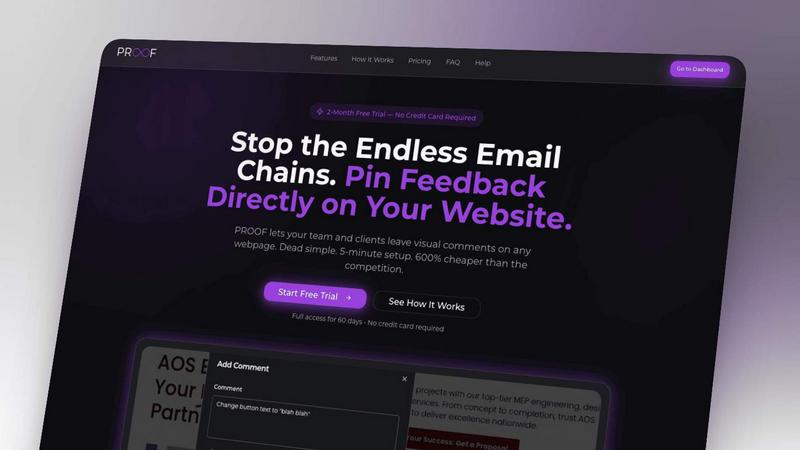
Stop wasting time on miscommunication and endless email chains; get instant visual feedback directly on your website.
Last updated: March 3, 2026

UseSkill
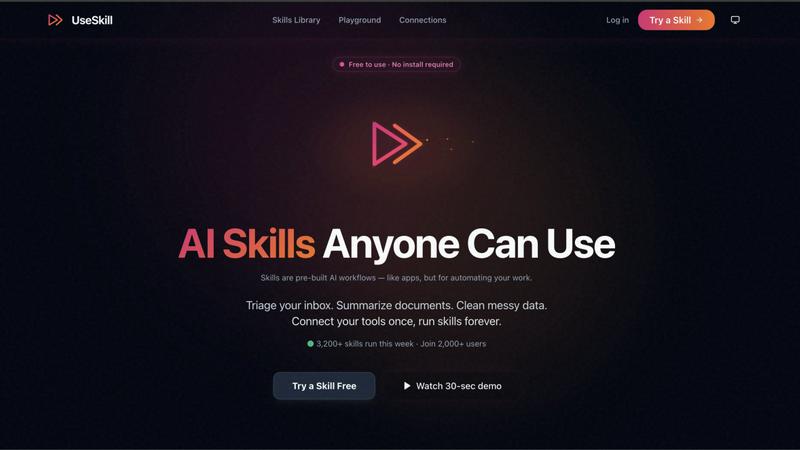
Stop prompting and pasting; run battle-tested AI workflows across 100+ apps in 30 seconds.
Last updated: February 28, 2026
Visual Comparison
Proofapp
UseSkill
Feature Comparison
Proofapp
Visual Commenting
With Proofapp's visual commenting feature, users can click anywhere on a screenshot to leave contextual feedback. This eliminates the confusion common with traditional feedback methods, allowing for clear communication about specific design elements.
Multi-Breakpoint Testing
Proofapp automatically captures screenshots at both desktop and mobile breakpoints, facilitating a comprehensive review process. This feature ensures that clients can see how their website appears across devices, leading to more informed feedback.
Real-time Collaboration
Proofapp enables real-time collaboration among team members. As comments are made, everyone involved can see updates instantly, allowing for swift replies and resolutions, which keeps projects moving forward without unnecessary delays.
Secure Share Links
Users can share projects with clients via secure, expirable links. This feature ensures that feedback is gathered securely, giving clients access to only the necessary elements of the project for commenting, without requiring account creation.
UseSkill
Pre-Built AI Skills Library
Forget starting from a blank prompt. UseSkill offers a vast library of ready-to-run AI workflows, each designed and tested for specific business tasks. These are not vague suggestions but precise skills like "Enrich leads from Apollo" or "Triage support tickets," built by experts and refined through thousands of weekly runs. You get proven, effective automation without any guesswork or prompt engineering required.
One-Click Integration with 100+ Apps
Connect your entire tech stack in seconds, not days. UseSkill integrates with over 100 critical tools including Salesforce, HubSpot, Slack, Snowflake, GitHub, and Zendesk via the Model Context Protocol (MCP). Authentication is secure OAuth 2.0—you never share passwords. Connect an app once, and it's available for all relevant skills forever, eliminating tedious copy-paste between tabs.
Consistent, Battle-Tested Results
The era of unpredictable AI is over. Every UseSkill skill is engineered to produce the same high-quality output on every run. They are tested on real data and refined based on performance across thousands of executions. This means you get reliable, organized results you can trust and act upon immediately, eliminating the "it worked yesterday" frustration of manual prompting.
Privacy-First & Enterprise-Secure Architecture
Your data is yours alone. UseSkill operates on a strict privacy-first model. When you run a skill, your data flows through temporarily for processing and is never stored on UseSkill's servers. We use OAuth 2.0 exclusively, never see your passwords, and do not train AI models on your content. You maintain full control with instant disconnect capabilities.
Use Cases
Proofapp
Freelancers
Freelancers can leverage Proofapp to streamline client feedback, allowing for quick and effective revisions. By pinning comments directly on designs, they can present a professional image while saving hours on project management.
Small Development Teams
Small development teams benefit from Proofapp's ability to enhance client approvals without the burden of enterprise pricing. This tool simplifies the feedback process, enabling teams to focus on delivering high-quality work efficiently.
Design Teams
Design teams utilize Proofapp to receive precise visual feedback from clients and stakeholders. By having comments pinned exactly where they matter, designers can make targeted changes that align with client expectations.
Marketing Teams
Marketing teams can employ Proofapp to review landing pages and campaigns visually. The ability to gather feedback in a straightforward manner helps these teams remain agile and responsive to changes, ultimately enhancing campaign effectiveness.
UseSkill
Sales Team Lead Management & Sync
Sales teams can automate the grunt work. A single skill can enrich new leads from Apollo with company data, automatically populate records in Salesforce, and sync the updated information to HubSpot. This eliminates hours of manual data entry and copy-pasting between CRMs, allowing reps to focus entirely on closing deals and personalized outreach.
Engineering & DevOps Alert Triage
Engineering teams can automate incident response. Connect Sentry, PagerDuty, and Jira. A skill can automatically trize incoming error alerts, summarize the critical issue, and create a formatted Jira ticket with all relevant context. This ensures fast, consistent response to incidents and keeps project management systems perfectly in sync without manual intervention.
Customer Support Inbox Automation
Support teams can conquer ticket chaos. By connecting Zendesk or Gmail, a skill can automatically categorize incoming support emails, extract key customer and issue details, prioritize urgency, and draft a structured first response. This dramatically reduces triage time and ensures consistent, prompt handling of every customer inquiry.
Data Team Reporting & Cleanup
Data analysts and engineers can automate repetitive data tasks. Connect to Snowflake or BigQuery and run a skill to automatically clean messy datasets, standardize formats, and generate summary reports. This transforms what was a manual, error-prone process into a reliable 30-second operation, freeing up time for deep analysis.
Overview
About Proofapp
Proofapp is a revolutionary visual feedback and website review platform designed to enhance collaboration among designers, developers, and clients. By allowing users to upload any website URL, Proofapp automatically captures screenshots for both desktop and mobile views, streamlining the feedback process. This tool is perfect for freelancers, small development teams, and agencies managing multiple projects, as it eliminates the chaos that often accompanies scattered emails and vague revision requests. With features like real-time notifications, Slack integration, and customizable settings, Proofapp transforms the way feedback is gathered and managed. Users can pin comments directly on the designs, reply in threaded conversations, and attach files for clarity—all without needing an account. This not only improves productivity but also ensures that feedback is organized, visual, and actionable, making it an ideal solution for anyone looking to enhance their project workflow.
About UseSkill
Stop wrestling with generic AI chatbots. UseSkill is the battle-tested AI skills library that delivers consistent, automated results in 30 seconds, not 30 minutes of frustrating prompting. It solves the core problem with tools like ChatGPT: the endless cycle of explaining tasks, copying data between apps, and getting unpredictable outputs. UseSkill provides pre-built, expert-designed workflows that connect your essential tools. Simply pick a skill, connect your apps like Salesforce, Gmail, or Jira once via secure OAuth, and click run. It's built for professionals across Sales, Support, Engineering, and Data teams who need reliable automation without the technical setup. With over 50,000 skills run weekly by 5,000+ users, UseSkill's value proposition is undeniable: enterprise-grade automation that is instantly usable, privacy-first, and delivers the same high-quality result every single time. This isn't just another AI tool; it's the end of manual, inconsistent AI work.
Frequently Asked Questions
Proofapp FAQ
How does Proofapp improve feedback collection?
Proofapp improves feedback collection by providing a visual platform where comments can be pinned directly on designs. This visual approach significantly reduces miscommunication and speeds up the revision process.
Can clients leave feedback without creating an account?
Yes, clients can leave feedback without needing to create an account. Proofapp allows users to generate secure links that clients can use to access the project and provide comments directly on the visuals.
Is Proofapp suitable for larger teams?
Absolutely, Proofapp is designed to scale with your needs. While it's perfect for smaller teams, its robust features make it suitable for larger teams and agencies as well, ensuring efficient collaboration at any scale.
What kind of security measures does Proofapp implement?
Proofapp implements enterprise-level security measures, including role-based permissions, audit logs, and secure data handling practices. These features ensure that all project data is protected and only accessible to authorized users.
UseSkill FAQ
How is UseSkill different from using ChatGPT or Copilot?
UseSkill is built for consistent, multi-app automation, while ChatGPT is a general-purpose conversational tool. With ChatGPT, you must explain the task from scratch every time, manually move data between apps, and deal with inconsistent outputs. UseSkill provides pre-built, tested workflows that connect your apps directly. You click run and get the same reliable result in 30 seconds, eliminating prompt engineering and manual work.
Is my data safe and private with UseSkill?
Absolutely. UseSkill is designed with a privacy-first architecture. You connect your tools (like Gmail or Salesforce) using secure OAuth 2.0; we never see or store your passwords. Your data flows through our system temporarily during the skill execution and is never stored afterward. We do not train any AI models on your content. You have instant disconnect access at any time.
Do I need technical skills or to install anything to use UseSkill?
No technical skills and no installation required. UseSkill is entirely browser-based. You simply sign up, browse the library of pre-built skills, connect your apps with one click via OAuth, and run the skill. There is no coding, no complex setup, and no software to download. It's built for business users to get results immediately.
What does "Free, no credit card required" include?
The free plan allows you to fully experience UseSkill's core value. You can sign up without a credit card, explore the skills library, connect your tools via secure OAuth, and run skills to see real results. This lets you automate tasks and prove the value firsthand. For details on higher usage limits or team features, check the pricing page on the UseSkill website.
Alternatives
Proofapp Alternatives
Proofapp is a powerful visual feedback and website review platform designed to streamline collaboration among designers, developers, and their clients. With its ability to capture screenshots of any website on both desktop and mobile, it falls into the Productivity & Management category, making it an essential tool for efficient project management and client communication. Users often seek alternatives to Proofapp due to various reasons, such as budget constraints, specific feature requirements, or compatibility with different platforms. When choosing an alternative, it's crucial to evaluate the range of features offered, user interface, ease of integration with existing workflows, and the overall cost. A good alternative should enhance your ability to collect and manage feedback without adding unnecessary complexity to your projects.
UseSkill Alternatives
UseSkill is a powerful AI workflow automation platform in the productivity and management category. It replaces manual prompting and app-switching with a library of pre-built, one-click skills that connect your essential tools. Users often seek alternatives for various reasons, such as budget constraints, the need for different integration capabilities, or a preference for a specific platform like a desktop application versus a browser-based tool. When evaluating other options, it's crucial to consider core needs. Key factors include the speed and consistency of results, the breadth and depth of native integrations with your stack, and the overall security model. The goal is to find a solution that eliminates repetitive work without creating new complexity or compromising on data privacy. The ideal alternative should deliver reliable, automated outcomes in seconds, not minutes. It must connect seamlessly to your CRM, productivity suites, and data systems, acting as a true force multiplier for your team. Ultimately, the right choice is the one that makes AI-assisted work predictable, integrated, and effortlessly fast.