
Changeflow vs Pullsy

Changeflow
Changeflow's AI tracks critical website changes for you, eliminating manual checks and false alerts.
Last updated: March 4, 2026

Pullsy
Pullsy's AI organizes your inbox and drafts replies in your tone, saving you hours.
Last updated: February 28, 2026
Visual Comparison
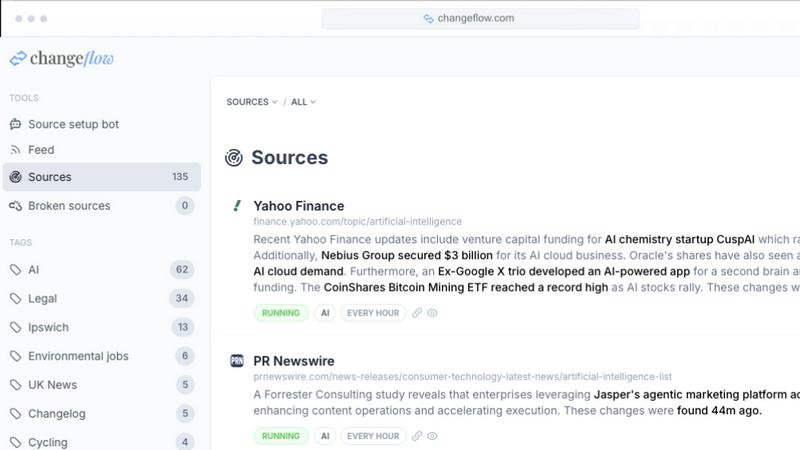
Changeflow
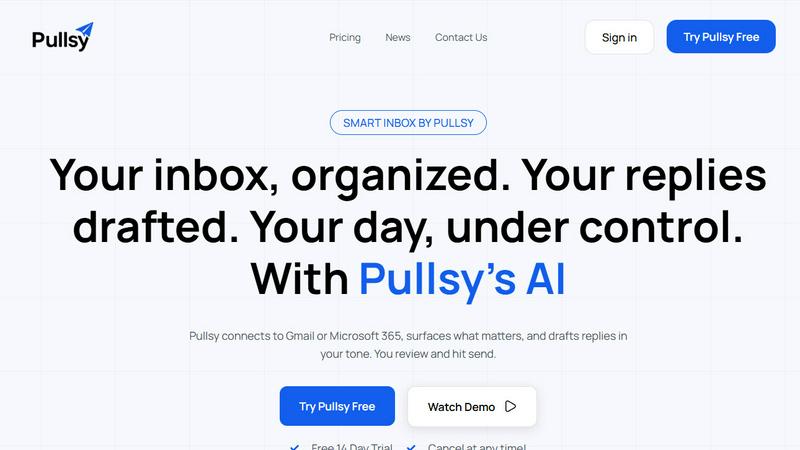
Pullsy
Feature Comparison
Changeflow
AI-Powered Intelligence & Summarization
Changeflow's core AI doesn't just detect changes; it understands them. It reads the content of a page, grasps the context of your specific monitoring goals, and filters out meaningless updates. You receive a clear, AI-generated summary that explains what changed and its significance, eliminating the need to waste time deciphering full pages or comparing screenshots to find the relevant detail.
Natural Language Setup & Smart Link Following
Forget configuring complex RSS feeds or writing custom selectors. Describe what you care about in plain English. Furthermore, point Changeflow at any page containing links, and it will intelligently follow them, read the target pages, determine their relevance to your goal, and summarize key updates. This turns a single URL into a dynamic, intelligent feed tracking an entire topic or competitor's site.
Advanced Anti-Blocking Technology
Built on a decade of experience, Changeflow's sophisticated technology achieves a 99.9% success rate at accessing pages that commonly block other monitoring tools. It reliably navigates JavaScript-heavy sites, login walls, and other challenging structures, ensuring your monitoring is consistent and uninterrupted where less capable solutions fail.
Enterprise-Grade Collaboration & Forensics
Changeflow is built for business teams. Shared workspaces keep everyone aligned on critical updates. The interactive change viewer allows for forensic analysis, highlighting exact modifications. Coupled with Site Version Control—which creates navigable, timestamped archives—and full API access for workflow integration, it provides a complete operational platform.
Pullsy
Smart Inbox & Priority Highlighting
Pullsy's AI doesn't just organize; it declutters with intent. It automatically scans your incoming messages to identify and surface the emails that truly matter—like urgent requests from leadership, time-sensitive documents, or critical project updates—while filtering out the noise. This means you start your day with a "Your Day at a Glance" summary, focusing only on what requires your immediate attention and never missing a crucial message buried in the clutter.
AI-Drafted Replies in Your Tone
This is where Pullsy outmaneuvers generic AI tools. It doesn't just generate a reply; it analyzes the email context to detect questions, tasks, scheduling needs, or follow-ups, then drafts a precise, action-oriented response. You can select your tone—Professional, Friendly, or Quick—and Pullsy adapts. It learns your writing style over time, ensuring every drafted reply sounds authentically like you, ready for you to review, tweak if needed, and send with one confident click.
"Ask Pullsy" Inbox Intelligence
Transform your inbox into a searchable, intelligent database. With the "Ask Pullsy" feature, you can conversationally ask questions about your emails and attachments. Need a summary of a long thread? Ask. Have to extract key dates from a PDF contract? Ask. Looking for that one piece of information from last month? Just ask. This feature eliminates tedious manual searching, delivering instant insights and keeping you organized effortlessly.
Integrated Day Management Dashboard
Pullsy consolidates your workflow by connecting your inbox, calendar, and soon Slack into one actionable dashboard. It provides a clear overview of new messages, highlights your top tasks extracted from emails, and lists upcoming meetings with details. This holistic view ensures you are fully prepared and organized, turning scattered information across apps into a single source of truth for your daily priorities.
Use Cases
Changeflow
Competitive & Pricing Intelligence
Business teams use Changeflow to automatically track competitor pricing pages, product catalogs, and promotional announcements. Get immediate, summarized alerts on price changes, new product launches, or feature updates, enabling you to respond strategically and maintain your market edge without manual daily checks.
Legal & Regulatory Monitoring
Legal librarians at top law firms and compliance teams at major corporations rely on Changeflow to monitor court dockets, legal citation updates, FDA guidance documents, and SEC filings. The AI filters vast amounts of regulatory text to surface only the pertinent changes, ensuring strict adherence and timely action.
News & Brand Mention Tracking
Marketing and PR professionals use Changeflow to follow news mentions, industry blog coverage, and forum discussions. By turning news hub pages into intelligent feeds, you receive concise summaries of relevant articles or conversations about your brand, competitors, or market, keeping your finger on the pulse of public perception.
Market & Supply Chain Movement Tracking
Procurement and strategy teams monitor vendor terms pages, shipping carrier updates, and commodity market reports. Changeflow provides timely intelligence on rate changes, policy updates, or market shifts that could impact supply chains or costs, allowing for proactive planning and risk mitigation.
Pullsy
The Overwhelmed Executive
For leaders drowning in a sea of updates, requests, and reports, Pullsy is a lifeline. It automatically highlights emails from key team members and stakeholders, drafts professional responses to routine queries, and summarizes lengthy briefing threads in seconds. This allows executives to stay informed and responsive without spending hours manually processing their inbox, reclaiming time for strategic decision-making.
The Entrepreneur Wearing Multiple Hats
Solo founders and small business owners juggle sales, support, and operations from one inbox. Pullsy helps them instantly identify customer inquiries, draft friendly yet professional replies, extract action items from client emails, and manage their schedule—all from a single interface. It acts as a force multiplier, enabling one person to operate with the efficiency of a small team.
The Project Manager Coordinating Teams
Project managers deal with constant updates, task confirmations, and document requests. Pullsy organizes project-related emails into clear categories, detects tasks and promises within threads to prevent things from falling through the cracks, and drafts clear, confirmatory responses. This ensures seamless communication, keeps projects on track, and reduces the mental load of tracking every detail across countless emails.
The Sales Professional Nurturing Leads
For sales reps, speed and personalization are key. Pullsy helps prioritize new lead inquiries, instantly drafts tailored follow-up emails in a chosen tone, and can quickly pull details from attached proposals or calendars to suggest meeting times. This allows sales professionals to respond faster and more effectively, improving conversion rates and managing their pipeline without the administrative drag.
Overview
About Changeflow
Changeflow is the battle-tested web monitoring platform that goes beyond simple change detection to deliver intelligent, actionable intelligence. While other tools bombard you with screenshots and vague "something changed" alerts, Changeflow's AI reads and comprehends web pages like a human expert. It understands context, filters out irrelevant noise, and delivers clear, concise summaries of exactly what changed and why it matters to your business. Designed for professionals who can't afford to miss a beat, it transforms the tedious task of manual website checking into a strategic advantage. Setup is effortless: simply describe what you want to track in plain English and point Changeflow at a starting page. The platform then handles the complex work, including navigating login walls, executing JavaScript, and intelligently following links to build a comprehensive feed of updates. Trusted by Fortune 500 compliance teams and Am Law 200 legal librarians, Changeflow offers enterprise-grade reliability, shared team workspaces, full API access, and a unique Site Version Control for navigating timestamped page archives. This isn't a hobbyist tool with features bolted on; it's a purpose-built solution that has already checked over 1 billion pages, saving customers more than 125,000 hours.
About Pullsy
Pullsy is the AI-powered inbox assistant engineered for professionals, entrepreneurs, and small teams who are done letting email dictate their productivity. It's not just another email client; it's a strategic workflow weapon. Pullsy integrates directly with Gmail and Microsoft 365 to transform your chaotic inbox into a command center. It goes beyond simple sorting by intelligently labeling emails, drafting context-aware replies in your unique voice, and providing instant summaries and insights. The core battle is for your time, and Pullsy delivers a decisive victory, enabling users to move through their inbox up to 3x faster. With its "Ask Pullsy" feature, you can chat with your inbox to find information, review attachments, and extract key details without endless scrolling. From a clean, simple setup to enterprise-grade security, Pullsy turns the daily burden of email management into a streamlined, AI-driven advantage, putting you firmly back in control of your day.
Frequently Asked Questions
Changeflow FAQ
How is Changeflow different from other website monitoring tools?
Most tools simply take screenshots and tell you "something changed," forcing you to manually hunt for the difference. Changeflow uses AI to read and comprehend the page content. It understands what you're looking for, filters out irrelevant noise (like ad rotations or date stamps), and delivers a clear summary of the meaningful change. It's built for business intelligence, not just technical detection.
Can Changeflow monitor websites that require a login or are built with complex JavaScript?
Yes, absolutely. Our advanced anti-blocking technology is a key differentiator. Changeflow is engineered to handle JavaScript-rendered content, login walls, and other complex structures that typically block simpler tools, boasting a 99.9% success rate. This ensures reliable monitoring of the modern web.
How do I set up a monitor? Is it technically complex?
Setup is intentionally simple and requires no technical expertise. You describe what you want to track in plain English (e.g., "track price changes for product X on this competitor's page") and provide a starting URL. Our AI agent handles the configuration, including intelligently following relevant links from that page to build out your monitoring feed.
Can my team collaborate and share monitored feeds?
Yes. Changeflow is built for team collaboration from the ground up. Shared workspaces allow your entire team to view and manage monitored pages, see the same feed of AI-summarized updates, and stay perfectly aligned. Centralized user administration and billing make team management straightforward.
Pullsy FAQ
What is Pullsy and how does it work?
Pullsy is an AI-powered inbox management tool designed to give you back control of your email. It works by securely connecting to your Gmail or Microsoft 365 account. Once connected, its AI automatically organizes your messages, highlights urgent and important emails, drafts context-aware replies in your tone, and provides tools like summarization and intelligent search. The goal is to reduce the hours you spend on email management by streamlining your entire workflow into one intelligent assistant.
Is Pullsy safe to use?
Absolutely. Your data security is Pullsy's top priority. The platform is built with enterprise-grade security, including Google OAuth verification and CASA completion. It is GDPR compliant, and SOC Type 2 certification is in process. Pullsy uses secure, encrypted connections and does not store your email data improperly. You retain full control, and the integration is designed with the highest standards of data protection in mind.
Can Pullsy draft replies for me?
Yes, and it does so with superior context-awareness. Pullsy's AI analyzes the content of the email you receive, identifying questions, tasks, scheduling needs, and action items. It then drafts a complete, relevant reply that directly addresses these points. You can choose from tone options like Professional or Friendly, and the system adapts to your writing style. You always review and approve every draft before sending, ensuring perfect, personalized communication every time.
What tools can I integrate with Pullsy?
Currently, Pullsy offers seamless native integration with Gmail and Microsoft 365 for your email, and it connects to your calendar for smart scheduling and day management. The platform is actively evolving, with integration for Slack coming soon. This expanding ecosystem is designed to centralize your communication and task management, pulling key information into your Pullsy dashboard for a unified workflow command center.
Alternatives
Changeflow Alternatives
Changeflow is a leading AI-powered business web monitoring platform. It goes beyond simple change detection to understand context and deliver summarized, actionable intelligence on what truly matters on the web pages you track. Users explore alternatives for various reasons, including budget constraints, specific feature requirements like deeper analytics or different integration paths, or a need for a platform tailored to a particular niche or industry. It's a common step in finding the perfect operational fit. When evaluating options, prioritize solutions that offer true AI comprehension over basic alerts, robust handling of complex modern websites, and proven reliability for business-critical monitoring. The right tool should save time, not create more work.
Pullsy Alternatives
Pullsy is an AI-powered inbox assistant in the productivity and management category, designed to help professionals and teams reclaim hours from their email. Users often explore alternatives for various reasons, such as budget constraints, specific feature requirements like deeper CRM integration, or a need for support on platforms beyond Gmail and Outlook. When evaluating other solutions, it's crucial to consider your core workflow needs. Look for a tool that genuinely understands context for drafting, offers robust summarization, and provides tangible time savings without a steep learning curve. The right fit should feel like a seamless extension of your process, not another complicated app to manage. Ultimately, the goal is to find an assistant that moves beyond simple automation to become a true partner for your inbox, turning a daily chore into a strategic advantage.