
LinkPilot vs Pullsy

LinkPilot
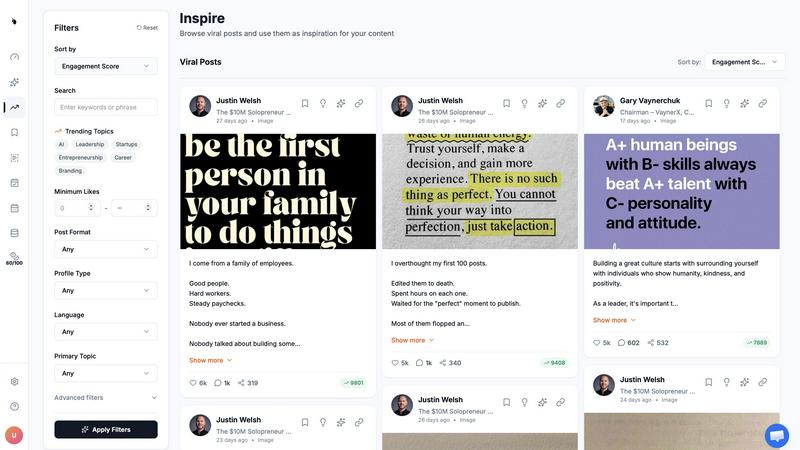
LinkPilot transforms LinkedIn into a client-attracting powerhouse with smart automation and strategic content planning.
Last updated: February 28, 2026

Pullsy
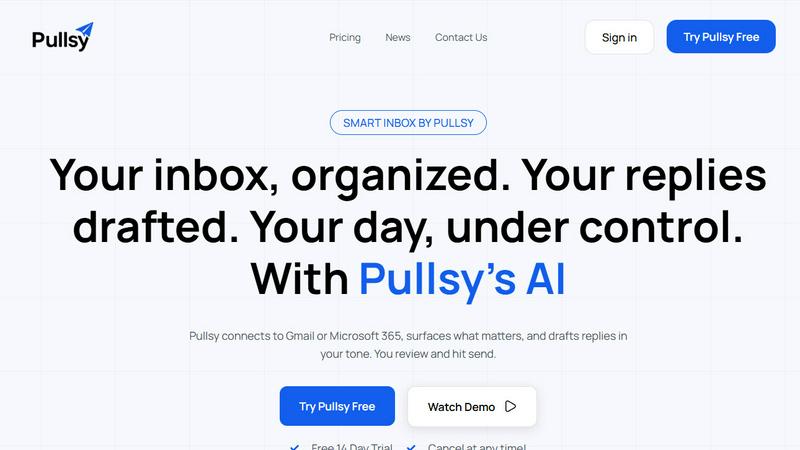
Pullsy's AI organizes your inbox and drafts replies in your tone, saving you hours.
Last updated: February 28, 2026
Visual Comparison
LinkPilot
Pullsy
Feature Comparison
LinkPilot
LinkedIn Scheduler
The LinkedIn Scheduler automates the posting process, allowing you to publish content at peak engagement times without manual intervention. This smart scheduling feature ensures your posts reach the audience when they are most active, maximizing visibility and interaction.
AI Content Generator
The AI Content Generator creates a month’s worth of posts tailored to your voice and niche in one session. It uses proven frameworks and insights from your industry to ensure that every post resonates with your target audience and drives engagement.
Profile Analytics
Profile Analytics provides deep insights into your LinkedIn performance, helping you track engagement metrics that matter. It offers a clear view of how your content is performing and identifies what drives real interactions, allowing you to refine your strategy over time.
Competitor Analysis
With Competitor Analysis, LinkPilot keeps you informed about your competitors' activities and strategies. It highlights content gaps and areas where you can outperform them, equipping you with the knowledge you need to position yourself as an authority in your niche.
Pullsy
Smart Inbox & Priority Highlighting
Pullsy's AI doesn't just organize; it declutters with intent. It automatically scans your incoming messages to identify and surface the emails that truly matter—like urgent requests from leadership, time-sensitive documents, or critical project updates—while filtering out the noise. This means you start your day with a "Your Day at a Glance" summary, focusing only on what requires your immediate attention and never missing a crucial message buried in the clutter.
AI-Drafted Replies in Your Tone
This is where Pullsy outmaneuvers generic AI tools. It doesn't just generate a reply; it analyzes the email context to detect questions, tasks, scheduling needs, or follow-ups, then drafts a precise, action-oriented response. You can select your tone—Professional, Friendly, or Quick—and Pullsy adapts. It learns your writing style over time, ensuring every drafted reply sounds authentically like you, ready for you to review, tweak if needed, and send with one confident click.
"Ask Pullsy" Inbox Intelligence
Transform your inbox into a searchable, intelligent database. With the "Ask Pullsy" feature, you can conversationally ask questions about your emails and attachments. Need a summary of a long thread? Ask. Have to extract key dates from a PDF contract? Ask. Looking for that one piece of information from last month? Just ask. This feature eliminates tedious manual searching, delivering instant insights and keeping you organized effortlessly.
Integrated Day Management Dashboard
Pullsy consolidates your workflow by connecting your inbox, calendar, and soon Slack into one actionable dashboard. It provides a clear overview of new messages, highlights your top tasks extracted from emails, and lists upcoming meetings with details. This holistic view ensures you are fully prepared and organized, turning scattered information across apps into a single source of truth for your daily priorities.
Use Cases
LinkPilot
For Founders
Founders can harness LinkPilot to streamline their content creation process, ensuring they maintain a consistent posting schedule. By automating posts and analyzing performance, founders can focus on building their products while still engaging their audience effectively.
For Consultants
Consultants can utilize LinkPilot to enhance their personal brand. By automating content tailored to their expertise, they can establish credibility and attract potential clients without the hassle of daily posting.
For Service Businesses
Service businesses can leverage LinkPilot to create targeted marketing campaigns on LinkedIn. With insights into what content performs best, they can engage their audience more effectively and convert connections into clients.
For Marketing Teams
Marketing teams can use LinkPilot to optimize their social media strategy. By analyzing competitors and tracking performance metrics, they can adjust their content strategies to achieve better results and drive inbound leads.
Pullsy
The Overwhelmed Executive
For leaders drowning in a sea of updates, requests, and reports, Pullsy is a lifeline. It automatically highlights emails from key team members and stakeholders, drafts professional responses to routine queries, and summarizes lengthy briefing threads in seconds. This allows executives to stay informed and responsive without spending hours manually processing their inbox, reclaiming time for strategic decision-making.
The Entrepreneur Wearing Multiple Hats
Solo founders and small business owners juggle sales, support, and operations from one inbox. Pullsy helps them instantly identify customer inquiries, draft friendly yet professional replies, extract action items from client emails, and manage their schedule—all from a single interface. It acts as a force multiplier, enabling one person to operate with the efficiency of a small team.
The Project Manager Coordinating Teams
Project managers deal with constant updates, task confirmations, and document requests. Pullsy organizes project-related emails into clear categories, detects tasks and promises within threads to prevent things from falling through the cracks, and drafts clear, confirmatory responses. This ensures seamless communication, keeps projects on track, and reduces the mental load of tracking every detail across countless emails.
The Sales Professional Nurturing Leads
For sales reps, speed and personalization are key. Pullsy helps prioritize new lead inquiries, instantly drafts tailored follow-up emails in a chosen tone, and can quickly pull details from attached proposals or calendars to suggest meeting times. This allows sales professionals to respond faster and more effectively, improving conversion rates and managing their pipeline without the administrative drag.
Overview
About LinkPilot
LinkPilot is the ultimate AI-powered LinkedIn growth platform designed specifically for B2B founders, consultants, and service businesses. It transforms your LinkedIn presence from a mere profile into a high-converting inbound channel. By leveraging advanced AI, LinkPilot conducts in-depth research to uncover viral content trends, generates engaging posts that reflect your unique voice, and schedules them for optimal visibility. With features like competitor analysis and performance tracking, it empowers users to understand their positioning in the market better and to create a strategic authority plan. LinkPilot saves you time and eliminates the stress of daily content creation, ensuring you maintain a consistent and impactful online presence that attracts inbound clients rather than just followers.
About Pullsy
Pullsy is the AI-powered inbox assistant engineered for professionals, entrepreneurs, and small teams who are done letting email dictate their productivity. It's not just another email client; it's a strategic workflow weapon. Pullsy integrates directly with Gmail and Microsoft 365 to transform your chaotic inbox into a command center. It goes beyond simple sorting by intelligently labeling emails, drafting context-aware replies in your unique voice, and providing instant summaries and insights. The core battle is for your time, and Pullsy delivers a decisive victory, enabling users to move through their inbox up to 3x faster. With its "Ask Pullsy" feature, you can chat with your inbox to find information, review attachments, and extract key details without endless scrolling. From a clean, simple setup to enterprise-grade security, Pullsy turns the daily burden of email management into a streamlined, AI-driven advantage, putting you firmly back in control of your day.
Frequently Asked Questions
LinkPilot FAQ
What makes LinkPilot different from other LinkedIn tools?
LinkPilot focuses on building authority and driving inbound leads, not just vanity metrics like follower counts or likes. It combines competitor intelligence with strategic content creation to maximize revenue potential.
How does the AI content generator work?
The AI content generator analyzes your industry and competitors to create a tailored 30-day content roadmap. It ensures that every post reflects your voice and adheres to successful content frameworks.
Can I customize the posts generated by LinkPilot?
Yes, LinkPilot allows you to edit and customize the posts generated by the AI to ensure they align perfectly with your brand voice and messaging strategy.
Is there a free trial available for LinkPilot?
Yes, LinkPilot offers a free trial for users to explore its features and capabilities. You can start without any credit card requirement and cancel anytime if it doesn’t meet your needs.
Pullsy FAQ
What is Pullsy and how does it work?
Pullsy is an AI-powered inbox management tool designed to give you back control of your email. It works by securely connecting to your Gmail or Microsoft 365 account. Once connected, its AI automatically organizes your messages, highlights urgent and important emails, drafts context-aware replies in your tone, and provides tools like summarization and intelligent search. The goal is to reduce the hours you spend on email management by streamlining your entire workflow into one intelligent assistant.
Is Pullsy safe to use?
Absolutely. Your data security is Pullsy's top priority. The platform is built with enterprise-grade security, including Google OAuth verification and CASA completion. It is GDPR compliant, and SOC Type 2 certification is in process. Pullsy uses secure, encrypted connections and does not store your email data improperly. You retain full control, and the integration is designed with the highest standards of data protection in mind.
Can Pullsy draft replies for me?
Yes, and it does so with superior context-awareness. Pullsy's AI analyzes the content of the email you receive, identifying questions, tasks, scheduling needs, and action items. It then drafts a complete, relevant reply that directly addresses these points. You can choose from tone options like Professional or Friendly, and the system adapts to your writing style. You always review and approve every draft before sending, ensuring perfect, personalized communication every time.
What tools can I integrate with Pullsy?
Currently, Pullsy offers seamless native integration with Gmail and Microsoft 365 for your email, and it connects to your calendar for smart scheduling and day management. The platform is actively evolving, with integration for Slack coming soon. This expanding ecosystem is designed to centralize your communication and task management, pulling key information into your Pullsy dashboard for a unified workflow command center.
Alternatives
LinkPilot Alternatives
LinkPilot is an AI-driven platform designed to supercharge your LinkedIn growth by researching viral content, generating posts that reflect your unique voice, scheduling them for optimal engagement, and tracking your performance metrics. It falls into the Marketing, Productivity & Management, and Social Media categories, positioning itself as an indispensable tool for professionals aiming to enhance their LinkedIn presence. Despite its robust capabilities, users often seek alternatives to LinkPilot due to reasons such as pricing constraints, specific feature requirements, or the need for compatibility with different platforms. When exploring alternatives, consider factors like usability, customization options, scalability, and the breadth of analytics offered. The right choice should align with your unique LinkedIn growth strategy and overall marketing goals.
Pullsy Alternatives
Pullsy is an AI-powered inbox assistant in the productivity and management category, designed to help professionals and teams reclaim hours from their email. Users often explore alternatives for various reasons, such as budget constraints, specific feature requirements like deeper CRM integration, or a need for support on platforms beyond Gmail and Outlook. When evaluating other solutions, it's crucial to consider your core workflow needs. Look for a tool that genuinely understands context for drafting, offers robust summarization, and provides tangible time savings without a steep learning curve. The right fit should feel like a seamless extension of your process, not another complicated app to manage. Ultimately, the goal is to find an assistant that moves beyond simple automation to become a true partner for your inbox, turning a daily chore into a strategic advantage.