
qtrl.ai vs Screenshot to Code

qtrl.ai
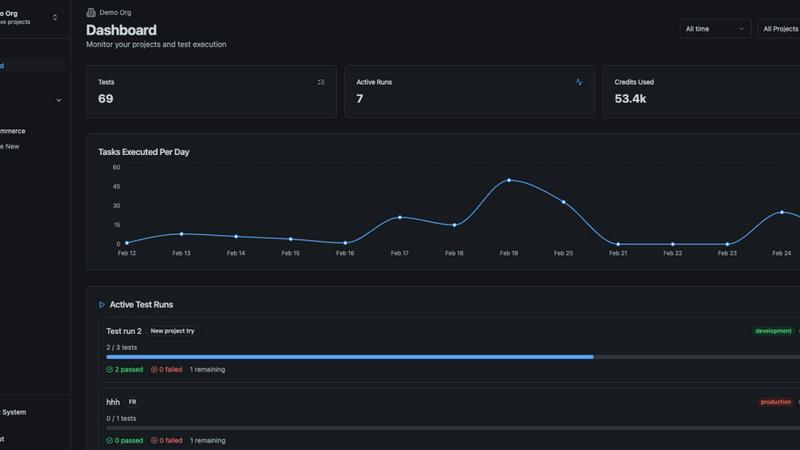
qtrl.ai revolutionizes QA with seamless test management and AI-driven automation for faster, controlled quality.
Last updated: February 27, 2026

Screenshot to Code
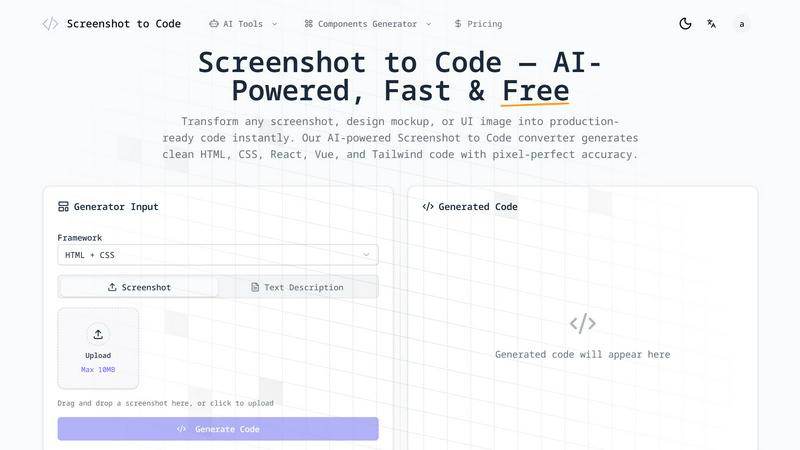
Stop coding from scratch; instantly convert any screenshot into clean, production-ready HTML and React code with AI.
Last updated: February 28, 2026
Visual Comparison
qtrl.ai
Screenshot to Code
Feature Comparison
qtrl.ai
Autonomous QA Agents
qtrl.ai's autonomous QA agents can execute testing instructions on demand or continuously, ensuring that tests run efficiently across different environments at scale. These agents operate within predefined rules, providing real browser execution rather than relying on simulations, which enhances the accuracy and reliability of test outcomes.
Enterprise-Grade Test Management
The platform offers centralized management for test cases, plans, and runs, ensuring full traceability and audit trails. With support for both manual and automated workflows, qtrl.ai is built for compliance and auditability, making it an ideal choice for organizations that require stringent governance in their QA processes.
Progressive Automation
With qtrl.ai, teams can begin with human-written test instructions and gradually transition to AI-generated tests when they are ready. The platform intelligently suggests new tests based on coverage gaps, allowing teams to review, approve, and refine tests at every step, which promotes a culture of continuous improvement.
Adaptive Memory
qtrl.ai features an adaptive memory system that constructs a living knowledge base of the application. This capability allows the platform to learn from exploration, test execution, and issues, powering smarter, context-aware test generation that improves with every interaction, thereby enhancing overall testing efficiency.
Screenshot to Code
Multi-Framework Code Generation
Don't get locked into a single tech stack. Screenshot to Code empowers you to generate clean, ready-to-use code in the framework of your choice. Instantly convert your screenshot into vanilla HTML & CSS, React components (with JSX), Vue 3 single-file components, utility-first Tailwind CSS, Bootstrap, Ionic, or even SVG. This flexibility ensures seamless integration directly into your existing project, eliminating the need for tedious manual refactoring.
Gemini-Powered AI Visual Recognition
Forget about basic shape detection. Screenshot to Code is powered by cutting-edge AI models like Gemini Vision, which provides human-like comprehension of complex UI layouts. It doesn't just see boxes and text; it intelligently identifies interactive components like buttons, forms, and navigation menus, understands their hierarchical relationships, and interprets design context to generate semantically correct and logically structured code every single time.
Pixel-Perfect Accuracy & Responsive Output
This tool guarantees visual fidelity. Our engine meticulously analyzes your original design, preserving exact layouts, precise spacing, typography, colors, and responsive breakpoints. The generated code isn't just a rough approximation; it's a faithful, pixel-perfect translation that maintains the designer's intent, ensuring the final product looks and behaves exactly as envisioned, across device sizes.
Instant Live Preview & One-Click Export
See your code come to life in real-time. The integrated live preview editor allows you to review the generated output immediately, making quick adjustments if needed. When you're satisfied, export your work instantly with a single click—download organized, commented code files or copy directly to your clipboard. This streamlined workflow integrates directly into your development process with zero friction.
Use Cases
qtrl.ai
Continuous Integration and Delivery (CI/CD)
For teams adopting CI/CD practices, qtrl.ai seamlessly integrates into existing workflows, allowing for real-time testing and quality feedback. This ensures that development cycles remain fast-paced without compromising on quality, ultimately leading to a more robust product.
Legacy Workflow Modernization
Organizations looking to modernize their legacy QA processes can leverage qtrl.ai to transition from outdated manual testing to a more sophisticated, automated approach. The platform supports gradual adoption, allowing teams to implement changes at a comfortable pace.
Compliance and Governance
For enterprises that require strict compliance and governance, qtrl.ai provides the necessary tools to maintain detailed audit trails and compliance records. This feature is crucial for regulated industries, ensuring that all testing processes meet industry standards.
Scaling QA Efforts
As companies grow, so do their testing needs. qtrl.ai allows QA teams to scale their efforts without losing control, providing a balance between speed and oversight. Teams can automate where it makes sense while retaining manual processes for complex scenarios.
Screenshot to Code
Rapid Prototyping & MVP Development
Speed is your ultimate weapon. Transform a napkin sketch or a quick Figma mockup into a functional, interactive prototype in under a minute. Screenshot to Code allows developers and entrepreneurs to validate ideas, demonstrate concepts to stakeholders, and build MVPs at a pace that leaves manual coding—and your competitors—in the dust.
Streamlining Developer-Designer Handoff
Eliminate the costly back-and-forth and misinterpretation that plagues traditional handoffs. Designers can simply export a screenshot of their final mockup, and developers can feed it into Screenshot to Code to receive instant, production-quality code. This creates a seamless bridge between teams, drastically reducing development cycles and ensuring design integrity is never compromised.
Converting Legacy UI & Client References
Modernizing an old website or building from a client's provided image reference is now trivial. Simply take a screenshot of the existing UI or the client's inspiration (like a competitor's site or a PDF wireframe) and let the AI generate the foundational code. This bypasses hours of tedious reconstruction, allowing you to focus on functionality and improvements instead of reverse-engineering visuals.
Learning & Code Generation for New Frameworks
Accelerate your learning curve for a new CSS framework like Tailwind or a component library like Ionic. By uploading a clean UI design and selecting your target framework, you can instantly see how experts would structure and style the code. It's an invaluable tool for understanding framework-specific patterns and best practices through practical, generated examples.
Overview
About qtrl.ai
qtrl.ai is a cutting-edge test management platform designed for enterprises that want to elevate their quality assurance (QA) processes. It empowers teams by providing tools to organize test cases, plan and execute test runs, and trace requirements to coverage while tracking quality metrics through real-time dashboards. The platform generates structured data from every test run, equipping engineering leads and QA managers with critical insights into testing results, pass rates, and risk areas. What sets qtrl.ai apart is its intelligent AI layer, which includes autonomous agents capable of generating UI tests from natural language descriptions and executing them across various environments and browsers. This progressive automation model allows teams to start with manual testing and gradually transition to AI-assisted automation, making qtrl.ai the ideal solution for organizations at any stage of QA maturity.
About Screenshot to Code
Screenshot to Code is a battle-tested, AI-powered engine that obliterates the barrier between design and development. It's not just another converter; it's a direct pipeline from visual concept to production-ready code. This tool is engineered for front-end developers, UI/UX designers, and product teams who are tired of the tedious, error-prone manual translation of screenshots, Figma mockups, or even hand-drawn sketches into functional HTML and component code. Its core value proposition is ruthless efficiency: reclaim 90% of the time you waste on repetitive markup and styling. While other tools promise conversion, Screenshot to Code delivers pixel-perfect, framework-specific code with military precision. It goes beyond simple element detection, utilizing advanced computer vision to understand layout hierarchies, spacing relationships, and design intent, generating clean, semantic, and maintainable code in seconds. This is the definitive tool for accelerating prototyping, streamlining developer-designer handoff, and bringing ideas to life at an unprecedented pace.
Frequently Asked Questions
qtrl.ai FAQ
What types of organizations benefit the most from qtrl.ai?
qtrl.ai is particularly beneficial for product-led engineering teams, QA teams scaling beyond manual testing, companies modernizing legacy QA workflows, and enterprises that require stringent governance and traceability in their testing processes.
How does the AI layer enhance test automation?
The AI layer in qtrl.ai enables autonomous agents to generate UI tests from natural language descriptions, manage these tests as applications evolve, and execute them across various environments. This reduces the manual workload and increases testing efficiency.
Can qtrl.ai integrate with existing tools?
Yes, qtrl.ai is designed to work with your existing tools, facilitating requirements management integration and CI/CD pipeline support. This ensures a smooth transition to more advanced testing methods without disrupting current workflows.
How does qtrl.ai ensure data security?
qtrl.ai is built with enterprise-grade security protocols, including permissioned autonomy levels and full agent visibility. The platform is designed to keep sensitive information secure, ensuring that secrets are never exposed to AI agents during test execution.
Screenshot to Code FAQ
What image formats and file sizes does Screenshot to Code support?
Screenshot to Code supports all common image formats including PNG, JPG, and WebP. You can upload files directly from your device, with a maximum file size limit of 10MB per image. This covers high-fidelity screenshots from design tools like Figma or Sketch, as well as photos of hand-drawn wireframes.
How accurate is the code generated by the AI?
The accuracy is exceptionally high, thanks to advanced AI models like Gemini Vision. It excels at identifying standard UI components, layouts, and styles. For clean, well-defined screenshots (e.g., from a design tool), the output is often pixel-perfect and production-ready. For complex or ambiguous images, the generated code serves as a superb, fully-structured foundation that requires only minor tweaks.
Which frameworks and technologies can it generate code for?
Screenshot to Code offers broad framework support to fit your stack. It can generate code for Vanilla HTML and CSS, React (with JSX), Vue 3, Tailwind CSS, Bootstrap, Ionic, and SVG. This covers the vast majority of modern web and mobile development workflows, allowing for direct integration without switching tools.
Is the generated code clean and maintainable?
Absolutely. Unlike many code generators that produce bloated, messy markup, Screenshot to Code is engineered to output clean, semantic, and well-structured code. It uses appropriate HTML tags, follows CSS best practices, and creates logically named components. The code is commented and organized, making it easy for you or your team to read, understand, and extend.
Alternatives
qtrl.ai Alternatives
qtrl.ai is a leading solution in the realm of QA test management and automation, designed to empower teams with the tools necessary to ensure software quality at scale. It offers enterprise-grade capabilities such as test case organization, test run execution, requirements tracing, and real-time quality metrics dashboards. Users often seek alternatives due to various reasons, including pricing concerns, specific feature requirements, or integration capabilities with existing platforms. When exploring alternatives, it's essential to consider factors such as the level of automation offered, ease of use, scalability, and the ability to adapt as your testing needs evolve. A solution that allows for gradual adoption of automation features can be particularly beneficial for organizations at different stages of their QA journey.
Screenshot to Code Alternatives
Screenshot to Code is a leading AI-powered code generator in the Dev Tools category. It instantly converts visual screenshots into clean, production-ready code for frameworks like HTML, React, Tailwind, Vue, Ionic, and Bootstrap. This tool is a game-changer for developers and designers looking to accelerate their prototyping and development workflows. Users often explore alternatives for various reasons. Some may require specific integrations or support for niche frameworks not covered. Others might be evaluating different pricing models, from freemium tiers to enterprise plans. Platform compatibility, such as desktop applications versus browser-based tools, and the need for advanced features like team collaboration or version history also drive the search for other options. When choosing an alternative, focus on core capabilities. The accuracy of the AI in interpreting complex designs is paramount. Evaluate the quality and cleanliness of the generated code across your required tech stack. Consider the tool's ease of use, speed, and how well it fits into your existing development environment to ensure a seamless and productive experience.