
Proofapp vs Seedream Pro

Proofapp
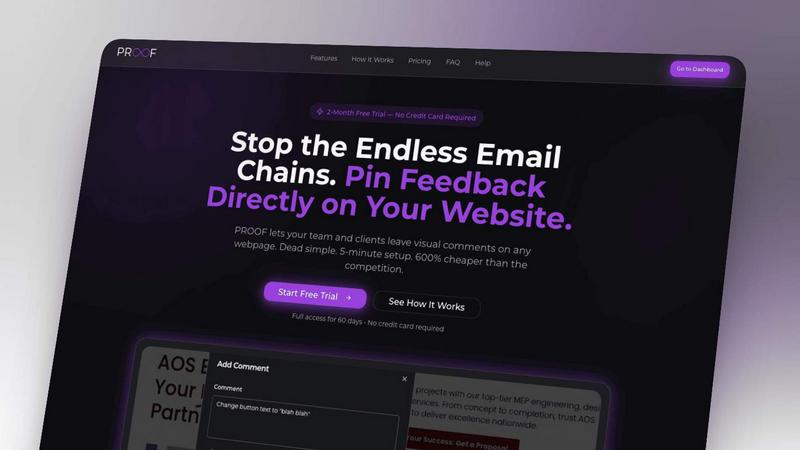
Stop wasting time on miscommunication and endless email chains; get instant visual feedback directly on your website.
Last updated: March 3, 2026

Seedream Pro
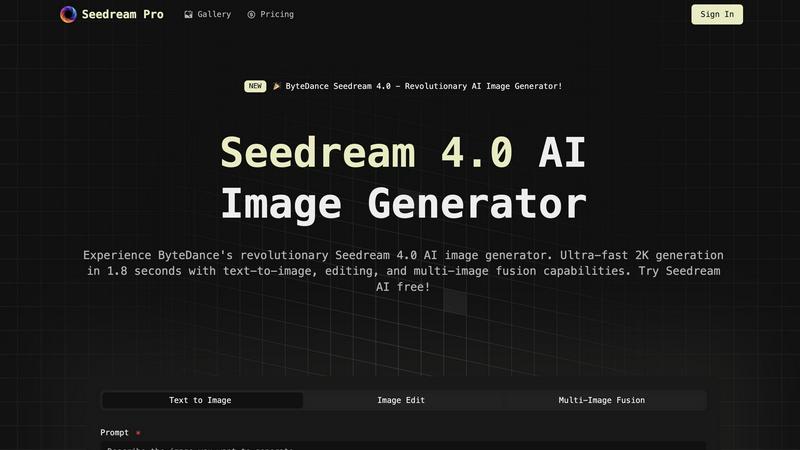
Seedream Pro delivers ultra-fast AI image generation, enabling stunning text-to-image creation and seamless editing in.
Last updated: February 28, 2026
Visual Comparison
Proofapp
Seedream Pro
Feature Comparison
Proofapp
Visual Commenting
With Proofapp's visual commenting feature, users can click anywhere on a screenshot to leave contextual feedback. This eliminates the confusion common with traditional feedback methods, allowing for clear communication about specific design elements.
Multi-Breakpoint Testing
Proofapp automatically captures screenshots at both desktop and mobile breakpoints, facilitating a comprehensive review process. This feature ensures that clients can see how their website appears across devices, leading to more informed feedback.
Real-time Collaboration
Proofapp enables real-time collaboration among team members. As comments are made, everyone involved can see updates instantly, allowing for swift replies and resolutions, which keeps projects moving forward without unnecessary delays.
Secure Share Links
Users can share projects with clients via secure, expirable links. This feature ensures that feedback is gathered securely, giving clients access to only the necessary elements of the project for commenting, without requiring account creation.
Seedream Pro
Text-to-Image Generation
Seedream Pro offers ultra-fast text-to-image capabilities, allowing users to generate 2K or 4K-ready images within seconds. This feature supports rapid iterations, enabling creatives to refine their concepts with ease and efficiency.
Mask Editing and Inpainting
With advanced mask editing and inpainting tools, users can make local, non-destructive edits to their images. This functionality allows for precise adjustments without compromising the overall quality of the generated asset, ensuring that every detail aligns with the creative vision.
Multi-Image Fusion
Seedream Pro's multi-image fusion feature enables users to blend several reference images seamlessly. This capability allows for adherence to brand style guides and ensures that every output matches the desired aesthetic, making it a vital tool for branding consistency.
Consistent Export Formats
The platform guarantees consistent export formats that are ideal for marketing campaigns and presentations. Users can easily create high-quality visuals that are ready for use across various platforms, enhancing their professional image and output.
Use Cases
Proofapp
Freelancers
Freelancers can leverage Proofapp to streamline client feedback, allowing for quick and effective revisions. By pinning comments directly on designs, they can present a professional image while saving hours on project management.
Small Development Teams
Small development teams benefit from Proofapp's ability to enhance client approvals without the burden of enterprise pricing. This tool simplifies the feedback process, enabling teams to focus on delivering high-quality work efficiently.
Design Teams
Design teams utilize Proofapp to receive precise visual feedback from clients and stakeholders. By having comments pinned exactly where they matter, designers can make targeted changes that align with client expectations.
Marketing Teams
Marketing teams can employ Proofapp to review landing pages and campaigns visually. The ability to gather feedback in a straightforward manner helps these teams remain agile and responsive to changes, ultimately enhancing campaign effectiveness.
Seedream Pro
Virtual Try-On & Styling
Seedream Pro is perfect for virtual try-on scenarios where users can upload their photos and experiment with different clothing, hairstyles, or professional looks. This functionality maintains character consistency across all generated images, making it invaluable for fashion and beauty industries.
E-commerce Product Images
For e-commerce businesses, Seedream Pro facilitates the generation of high-quality product showcase images. Users can create multiple lifestyle shots and promotional materials in seconds, enhancing product appeal while saving time and resources.
Content Creation for Blogs and Social Media
Content creators can leverage Seedream Pro to produce eye-catching visuals for blogs, articles, and social media posts. The AI-generated images can significantly enhance storytelling, making content more engaging and visually appealing to audiences.
Educational Materials Development
Educators can utilize Seedream Pro to create dynamic visual materials for teaching and training. This includes courseware backgrounds, knowledge point illustrations, and engaging graphics that improve learning effectiveness and student engagement.
Overview
About Proofapp
Proofapp is a revolutionary visual feedback and website review platform designed to enhance collaboration among designers, developers, and clients. By allowing users to upload any website URL, Proofapp automatically captures screenshots for both desktop and mobile views, streamlining the feedback process. This tool is perfect for freelancers, small development teams, and agencies managing multiple projects, as it eliminates the chaos that often accompanies scattered emails and vague revision requests. With features like real-time notifications, Slack integration, and customizable settings, Proofapp transforms the way feedback is gathered and managed. Users can pin comments directly on the designs, reply in threaded conversations, and attach files for clarity—all without needing an account. This not only improves productivity but also ensures that feedback is organized, visual, and actionable, making it an ideal solution for anyone looking to enhance their project workflow.
About Seedream Pro
Seedream Pro is an innovative AI-powered image generation tool designed to streamline the creative process for designers, marketers, and independent creators. By transforming text prompts into high-resolution images on a single screen, Seedream Pro eliminates the need for multiple tools, enabling users to generate ad concepts, landing-page visuals, e-commerce product shots, and social media graphics in mere minutes. Its user-friendly interface allows for rapid iterations, making it ideal for professionals who require speed and precision in their workflow. With features like mask editing and multi-image fusion, Seedream Pro ensures that the outputs remain consistent with brand guidelines while providing an intuitive platform to create stunning visuals. The web-based app, accessible via Google sign-in, democratizes image creation, allowing anyone to harness the power of AI for their creative endeavors.
Frequently Asked Questions
Proofapp FAQ
How does Proofapp improve feedback collection?
Proofapp improves feedback collection by providing a visual platform where comments can be pinned directly on designs. This visual approach significantly reduces miscommunication and speeds up the revision process.
Can clients leave feedback without creating an account?
Yes, clients can leave feedback without needing to create an account. Proofapp allows users to generate secure links that clients can use to access the project and provide comments directly on the visuals.
Is Proofapp suitable for larger teams?
Absolutely, Proofapp is designed to scale with your needs. While it's perfect for smaller teams, its robust features make it suitable for larger teams and agencies as well, ensuring efficient collaboration at any scale.
What kind of security measures does Proofapp implement?
Proofapp implements enterprise-level security measures, including role-based permissions, audit logs, and secure data handling practices. These features ensure that all project data is protected and only accessible to authorized users.
Seedream Pro FAQ
How does Seedream Pro work?
Seedream Pro uses advanced AI algorithms to transform text prompts into high-resolution images. Users input a description, and the software generates visuals almost instantly, allowing for quick iterations and edits.
Is Seedream Pro suitable for beginners?
Absolutely! Seedream Pro is designed with user-friendliness in mind. Its intuitive interface allows even those with minimal technical skills to create professional-quality images effortlessly.
Can I edit the images after generation?
Yes, Seedream Pro includes powerful mask editing and inpainting tools that enable users to make local edits to their images without affecting the overall quality, allowing for refined and personalized outputs.
Is there a mobile version of Seedream Pro?
Currently, Seedream Pro is a web-based application that can be accessed from any device with an internet connection. This makes it versatile and convenient for users on the go, but there isn't a dedicated mobile app at this time.
Alternatives
Proofapp Alternatives
Proofapp is a powerful visual feedback and website review platform designed to streamline collaboration among designers, developers, and their clients. With its ability to capture screenshots of any website on both desktop and mobile, it falls into the Productivity & Management category, making it an essential tool for efficient project management and client communication. Users often seek alternatives to Proofapp due to various reasons, such as budget constraints, specific feature requirements, or compatibility with different platforms. When choosing an alternative, it's crucial to evaluate the range of features offered, user interface, ease of integration with existing workflows, and the overall cost. A good alternative should enhance your ability to collect and manage feedback without adding unnecessary complexity to your projects.
Seedream Pro Alternatives
Seedream Pro is an advanced AI image generator developed by ByteDance, designed to streamline the creative process for designers, marketers, and indie makers. As part of the Design Tools category, it allows users to transform text prompts into high-resolution images with ease, enabling rapid generation, precise editing, and effective brand alignment. Users often seek alternatives due to various factors such as pricing, specific feature sets, or platform compatibility. When choosing an alternative, consider aspects like user interface, editing capabilities, and whether it meets your particular needs for image quality and output consistency. The right choice should enhance your workflow without compromising on the creative vision or efficiency.