
AI Photo Editor - Free Online AI Image Editor vs Shrinkpad

AI Photo Editor - Free Online AI Image Editor
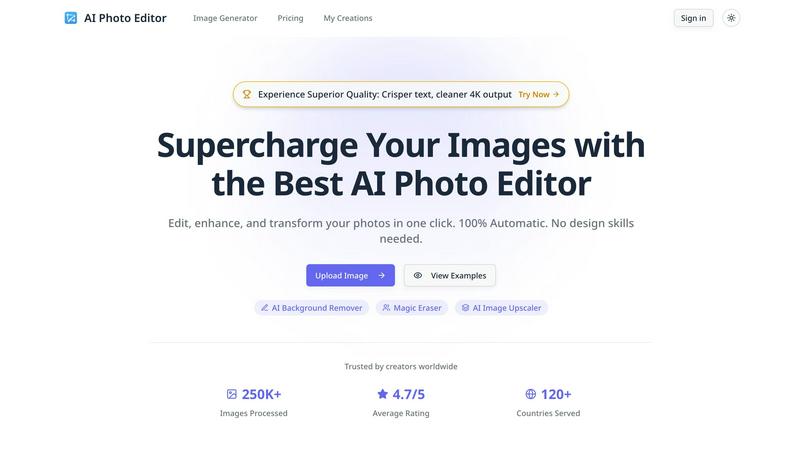
Transform and enhance your photos effortlessly with our AI Photo Editor, no design skills required.
Last updated: February 28, 2026

Shrinkpad
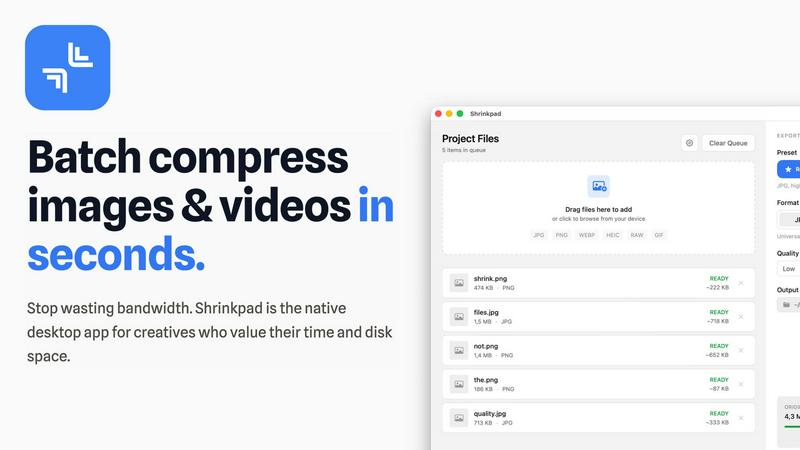
Shrinkpad is the native Mac app that batch compresses images and videos without quality loss.
Last updated: February 28, 2026
Visual Comparison
AI Photo Editor - Free Online AI Image Editor
Shrinkpad
Feature Comparison
AI Photo Editor - Free Online AI Image Editor
AI Background Remover
Instantly remove backgrounds from images with the AI Background Remover feature. This tool leverages advanced AI algorithms to detect and eliminate backgrounds, enabling you to isolate subjects and create professional-looking images with ease. Whether for product photos, portraits, or graphic design, this feature saves you hours of tedious editing.
Magic Eraser
The Magic Eraser tool brings precision to your image editing by allowing you to remove unwanted objects or distractions from photos seamlessly. With just a click, you can erase blemishes, stray elements, or any other imperfections, ensuring your images are polished and visually appealing. Achieve immaculate edits in record time.
AI Image Upscaler
Enhance the quality of your images instantly with the AI Image Upscaler. This feature uses cutting-edge technology to upscale images while preserving details and clarity. Ideal for printing, web use, or any scenario where high-resolution images are required, it transforms low-quality images into stunning visuals without losing integrity.
Cinematic Lighting Control
Master the mood of your images with Cinematic Lighting Control. Adjust lighting direction, color grading, and intensity to create studio-quality atmospheres for any scene. This feature allows you to manipulate the light in your images, enhancing the overall feel and ensuring your visuals evoke the desired emotions and responses.
Shrinkpad
Lightning-Feat Batch Processing
Stop the tedious one-by-one export grind. Shrinkpad is built for massive, real-world workloads. Simply drag and drop an entire folder—it automatically detects all supported images and videos inside, ignoring non-media files. Process thousands of assets in a single, seamless batch queue that runs in minutes, not hours. This is bulk optimization, engineered to handle what web-based tools crash trying to process, saving you countless hours of manual busywork.
Privacy-First Local Processing
In a world of data breaches and slow uploads, Shrinkpad stands firm. Every single compression operation happens locally on your Mac using native Apple frameworks. There are no cloud uploads, no external servers, and no waiting for bandwidth. Your original files, client projects, and sensitive assets never leave your device. This guarantees complete privacy, eliminates dependency on an internet connection, and delivers processing speeds that cloud services can't match.
Intelligent Quality Optimization
Shrinkpad moves beyond basic sliders with smart, automatic analysis. It examines the visual complexity of each image and video to apply the perfect compression ratio, aggressively reducing file size while guarding against artifacts. You can choose from presets or fine-tune settings manually, but the intelligent engine ensures you stop guessing and get optimal results every time, maintaining the quality you need for professional work.
Extensive Format Support & Pro Tools
Forget pre-conversion hassles. Shrinkpad supports over 50 formats out of the box, including JPG, PNG, HEIC, WebP, AVIF, MP4, MOV, and even RAW files. Process mixed media batches (photos and videos together) effortlessly. The app is packed with pro features: customize output formats, create custom file naming patterns, strip metadata with one click, and enjoy deep macOS integration optimized for Apple Silicon for blistering performance.
Use Cases
AI Photo Editor - Free Online AI Image Editor
Professional Graphic Design
Graphic designers can utilize AI Photo Editor to create stunning visuals for marketing campaigns, social media posts, and more. With features like background removal and flawless typography integration, designers can enhance their workflow and bring creative visions to life without extensive manual editing.
E-commerce Product Photography
E-commerce businesses can significantly benefit from using AI Photo Editor for product photography. The AI Background Remover allows sellers to create clean, appealing product images that attract customers. Upscaling images enhances detail, making products more enticing for potential buyers.
Educational Resources Creation
Educators can use AI Photo Editor to create visually engaging materials for their students. Whether designing infographics, presentations, or educational posters, the platform’s tools help in producing high-quality visuals that effectively communicate information and concepts.
Social Media Management
Social media managers can streamline their content creation process by using AI Photo Editor to produce eye-catching images for posts and stories. The ability to quickly edit, enhance, and adapt images for different platforms ensures that social media feeds remain vibrant and engaging, driving user interaction and brand awareness.
Shrinkpad
Optimizing Web & App Assets for Developers
Front-end developers and app creators can drastically reduce bundle sizes and improve load times. Export assets from design tools at 2x/4x resolution, then let Shrinkpad batch-optimize and rename them for production. This leads to significantly faster Largest Contentful Paint (LCP) scores and a smoother user experience, directly impacting core web vitals and app store performance metrics.
Managing Photo & Video Libraries for Creators
Photographers and videographers drowning in massive RAW files and 4K footage can reclaim terabytes of storage. Shrinkpad allows for the bulk compression of entire shoots or video reels, reducing file sizes by up to 90% for archiving or client delivery while keeping visual quality intact for portfolios and social media, all without uploading sensitive work to the cloud.
Streamlining Design-to-Export Workflows
Designers tired of manually exporting hundreds of icons, screens, and graphics from Figma or Photoshop can automate their pipeline. Export everything at once and use Shrinkpad as the final optimization and renaming station. It processes the entire batch, applies consistent compression, and delivers ready-to-use assets, eliminating a major bottleneck in the design process.
Preparing Client Deliverables & Pitches
Agencies and freelancers can quickly prepare professional deliverables. Compress high-resolution project files, case study images, and presentation videos into manageable sizes for email transfer, shared drives, or pitch decks. The one-folder-drop functionality and consistent output quality ensure a polished, efficient delivery that impresses clients without the hassle.
Overview
About AI Photo Editor - Free Online AI Image Editor
AI Photo Editor is your ultimate solution for supercharging image editing and enhancing workflows. Designed for creators, marketers, and educators alike, this free online AI image editor processes images in seconds, applying complex edits like background removal, upscaling, and more with unparalleled ease. The platform is 100% automatic, meaning you don’t need any design skills to achieve high-quality results. Whether you're a professional designer or a casual user, AI Photo Editor enables you to edit, enhance, and transform your photos in just one click. With a user-friendly interface and advanced AI technology, it caters to a global audience, having already processed over 250,000 images across 120 countries. Say goodbye to tedious manual editing and hello to a streamlined, effective editing experience that ensures your images stand out.
About Shrinkpad
Shrinkpad is the battle-tested, native Mac application that declares war on bloated media files and inefficient cloud-based compressors. It delivers professional-grade batch compression for both images and videos directly on your macOS device. This tool is engineered for photographers, designers, content creators, and developers who refuse to compromise on speed, privacy, or quality. While web tools leak your data to servers and desktop laggards process files one-by-one, Shrinkpad empowers you to drop entire folders containing hundreds of files and compress them in seconds. Its core value proposition is uncompromising: achieve up to 90% file size reduction while preserving visual fidelity, with 100% local processing that guarantees your sensitive assets never leave your Mac. It's the definitive solution for reclaiming disk space, speeding up websites and apps, and streamlining creative workflows without the wait, subscription fees, or privacy concerns of cloud-dependent alternatives.
Frequently Asked Questions
AI Photo Editor - Free Online AI Image Editor FAQ
How does AI Photo Editor work?
AI Photo Editor uses advanced artificial intelligence algorithms to analyze and process images. Users can upload images, select desired edits, and the tool automatically applies these changes, making it an efficient solution for quick and high-quality photo editing.
Is AI Photo Editor free to use?
Yes, AI Photo Editor is free to use, allowing anyone to access its powerful editing tools without any cost. Users can edit and enhance their images without the need for expensive software or subscriptions.
What file formats are supported for uploads?
AI Photo Editor supports various image formats including PNG, JPG, JPEG, and WEBP. Users can upload images with a maximum size of 10MB each, enabling flexibility in the types of images that can be edited.
Can I use AI Photo Editor for commercial purposes?
Absolutely! AI Photo Editor is designed for both personal and commercial use. Users can create and edit images for business purposes, ensuring high-quality visuals for marketing, e-commerce, and other professional applications.
Shrinkpad FAQ
Can I use Shrinkpad for free?
Yes, Shrinkpad offers a Free Starter tier perfect for trying out the core functionality. It includes standard compression for common formats like JPG and PNG with a limit of 10 files per batch. For unlimited processing, all file formats (including RAW and video), and no file size limits, you can upgrade to the one-time purchase Personal or Team licenses.
Does Shrinkpad support video compression?
Absolutely. Unlike many image-only compressors, Shrinkpad is built for mixed media. It provides powerful batch compression for videos in formats like MP4 and MOV, allowing you to process photos and videos together in the same workflow. This makes it an all-in-one solution for comprehensive media library optimization.
Are my files uploaded to the cloud?
Never. Shrinkpad operates on a strict privacy-first principle. All processing is performed 100% locally on your Mac. Your files are never sent to or stored on any external server. This ensures maximum security for sensitive work and provides faster compression speeds since there's no upload/download latency.
How many files can I process at once?
With the paid Personal or Team plans, Shrinkpad supports unlimited batch processing. You can queue up thousands of images and videos in a single folder drop. The app is engineered to handle these massive queues with stability, unlike web-based tools that often fail or crash under heavy loads.
Alternatives
AI Photo Editor - Free Online AI Image Editor Alternatives
AI Photo Editor - Free Online AI Image Editor is a cutting-edge tool designed to enhance your image editing process by leveraging the power of artificial intelligence. As a design tool, it allows users to perform complex edits such as background removal and image upscaling in mere seconds, significantly boosting productivity. Despite its strengths, users often seek alternatives for a variety of reasons, including pricing concerns, specific feature needs, or compatibility with certain platforms. When exploring alternatives to an AI photo editor, it's essential to consider factors such as the range of features offered, ease of use, and whether the platform aligns with your workflow. Additionally, look for tools that provide similar speed and quality in image processing to ensure you can maintain a high standard of work without sacrificing efficiency.
Shrinkpad Alternatives
Shrinkpad is a powerful Mac application designed for batch compression of images and videos. It belongs to the category of media optimization tools, focusing on reducing file sizes locally on your device without compromising visual quality. Users often explore alternatives for various reasons, including different budget constraints, the need for cross-platform availability, or specific feature sets not covered by a single solution. When evaluating other options, it's crucial to consider several key factors. The core decision often revolves around local processing versus cloud-based services, which impacts privacy, speed, and internet dependency. You should also assess the range of supported file formats, the degree of customization offered for compression settings, and the overall efficiency in handling large batches of files. The ideal tool seamlessly integrates into your workflow while delivering the right balance of quality reduction and storage savings.