
Shrinkpad vs The New Black AI

Shrinkpad
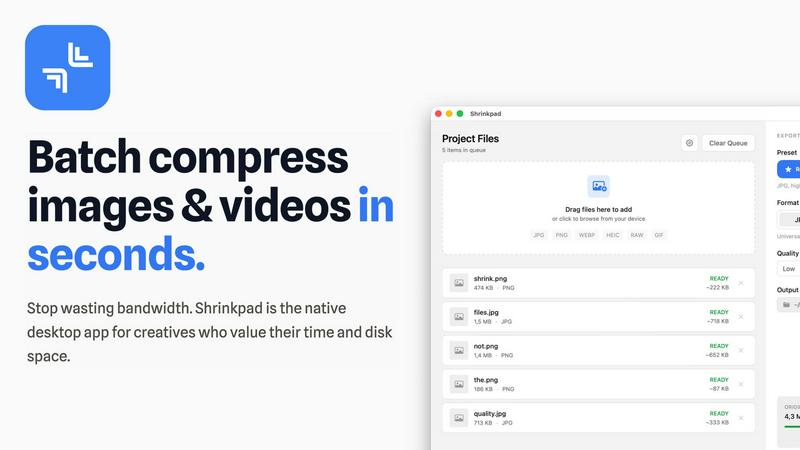
Shrinkpad is the native Mac app that batch compresses images and videos without quality loss.
Last updated: February 28, 2026

The New Black AI
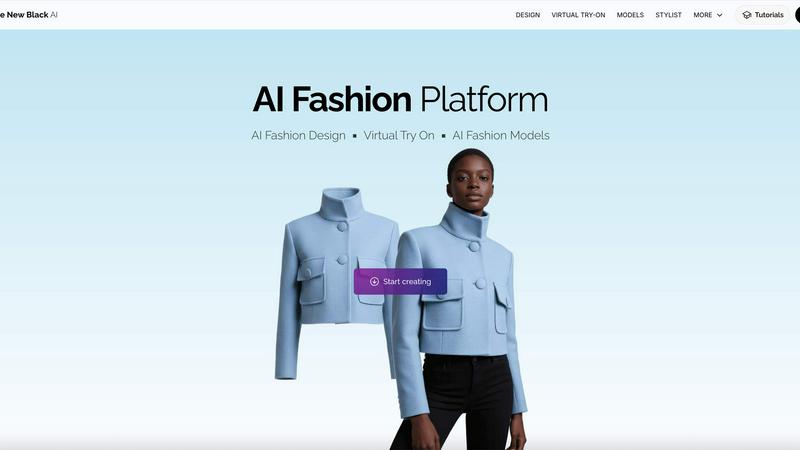
The New Black AI empowers fashion creators to design, customize, and visualize products with cutting-edge AI models.
Last updated: February 28, 2026
Visual Comparison
Shrinkpad
The New Black AI
Feature Comparison
Shrinkpad
Lightning-Feat Batch Processing
Stop the tedious one-by-one export grind. Shrinkpad is built for massive, real-world workloads. Simply drag and drop an entire folder—it automatically detects all supported images and videos inside, ignoring non-media files. Process thousands of assets in a single, seamless batch queue that runs in minutes, not hours. This is bulk optimization, engineered to handle what web-based tools crash trying to process, saving you countless hours of manual busywork.
Privacy-First Local Processing
In a world of data breaches and slow uploads, Shrinkpad stands firm. Every single compression operation happens locally on your Mac using native Apple frameworks. There are no cloud uploads, no external servers, and no waiting for bandwidth. Your original files, client projects, and sensitive assets never leave your device. This guarantees complete privacy, eliminates dependency on an internet connection, and delivers processing speeds that cloud services can't match.
Intelligent Quality Optimization
Shrinkpad moves beyond basic sliders with smart, automatic analysis. It examines the visual complexity of each image and video to apply the perfect compression ratio, aggressively reducing file size while guarding against artifacts. You can choose from presets or fine-tune settings manually, but the intelligent engine ensures you stop guessing and get optimal results every time, maintaining the quality you need for professional work.
Extensive Format Support & Pro Tools
Forget pre-conversion hassles. Shrinkpad supports over 50 formats out of the box, including JPG, PNG, HEIC, WebP, AVIF, MP4, MOV, and even RAW files. Process mixed media batches (photos and videos together) effortlessly. The app is packed with pro features: customize output formats, create custom file naming patterns, strip metadata with one click, and enjoy deep macOS integration optimized for Apple Silicon for blistering performance.
The New Black AI
AI Model Generation
The New Black AI allows users to generate realistic AI models effortlessly. By selecting specific parameters such as product type, gender, age, and ethnicity, businesses can create tailored models that accurately represent their brand and target market.
Virtual Try-On Capability
One of the standout features of The New Black AI is its virtual try-on functionality. Customers can visualize how clothing, jewelry, and accessories will look on a model before making a purchase, enhancing the shopping experience and reducing return rates.
Product Customization
Users can swap models while keeping the product details intact. This feature allows for endless creativity, enabling businesses to experiment with various looks and presentations without compromising on product accuracy.
High-Definition Outputs
The platform ensures that all AI-generated models are of high definition, preserving the intricate details of the products. Businesses can confidently use these visuals in marketing campaigns, ensuring their products look their best across all platforms.
Use Cases
Shrinkpad
Optimizing Web & App Assets for Developers
Front-end developers and app creators can drastically reduce bundle sizes and improve load times. Export assets from design tools at 2x/4x resolution, then let Shrinkpad batch-optimize and rename them for production. This leads to significantly faster Largest Contentful Paint (LCP) scores and a smoother user experience, directly impacting core web vitals and app store performance metrics.
Managing Photo & Video Libraries for Creators
Photographers and videographers drowning in massive RAW files and 4K footage can reclaim terabytes of storage. Shrinkpad allows for the bulk compression of entire shoots or video reels, reducing file sizes by up to 90% for archiving or client delivery while keeping visual quality intact for portfolios and social media, all without uploading sensitive work to the cloud.
Streamlining Design-to-Export Workflows
Designers tired of manually exporting hundreds of icons, screens, and graphics from Figma or Photoshop can automate their pipeline. Export everything at once and use Shrinkpad as the final optimization and renaming station. It processes the entire batch, applies consistent compression, and delivers ready-to-use assets, eliminating a major bottleneck in the design process.
Preparing Client Deliverables & Pitches
Agencies and freelancers can quickly prepare professional deliverables. Compress high-resolution project files, case study images, and presentation videos into manageable sizes for email transfer, shared drives, or pitch decks. The one-folder-drop functionality and consistent output quality ensure a polished, efficient delivery that impresses clients without the hassle.
The New Black AI
Fashion Retail Enhancement
Fashion retailers can utilize The New Black AI to create diverse and relatable models that showcase their collections. By presenting products on models that reflect various body types and ethnicities, retailers can connect more deeply with their audience.
Jewelry Marketing
Jewelry brands can bring their pieces to life by using realistic AI models. The platform's ability to generate models with customizable features allows brands to highlight their jewelry in a way that resonates with potential customers, ultimately driving sales.
Accessory Promotion
For accessory brands, The New Black AI serves as an invaluable tool to demonstrate how items can complement different outfits. By swapping models and backgrounds, brands can effectively illustrate the versatility and style of their products.
Swimwear Showcasing
Swimwear companies can leverage The New Black AI to present their collections confidently. The virtual try-on feature allows potential buyers to see how swimsuits fit on various body types, enhancing buyer confidence and reducing hesitation in online purchases.
Overview
About Shrinkpad
Shrinkpad is the battle-tested, native Mac application that declares war on bloated media files and inefficient cloud-based compressors. It delivers professional-grade batch compression for both images and videos directly on your macOS device. This tool is engineered for photographers, designers, content creators, and developers who refuse to compromise on speed, privacy, or quality. While web tools leak your data to servers and desktop laggards process files one-by-one, Shrinkpad empowers you to drop entire folders containing hundreds of files and compress them in seconds. Its core value proposition is uncompromising: achieve up to 90% file size reduction while preserving visual fidelity, with 100% local processing that guarantees your sensitive assets never leave your Mac. It's the definitive solution for reclaiming disk space, speeding up websites and apps, and streamlining creative workflows without the wait, subscription fees, or privacy concerns of cloud-dependent alternatives.
About The New Black AI
The New Black AI revolutionizes the fashion and accessories industry by providing businesses with the capability to create realistic AI models for clothing, jewelry, and accessories without the need for traditional photoshoots. This cutting-edge tool gives designers, retailers, and marketers the creative control to visualize their products on various models that can be tailored to fit any demographic. With an extensive library of attributes including gender, age, ethnicity, and body type, users can generate models that resonate with their target audience. The platform not only saves time and resources but also enhances marketing strategies by allowing businesses to showcase their products in a dynamic and engaging manner. Whether you're a fashion designer looking to present your latest collection or a retailer aiming to enhance your online presence, The New Black AI equips you with the tools to bring your vision to life.
Frequently Asked Questions
Shrinkpad FAQ
Can I use Shrinkpad for free?
Yes, Shrinkpad offers a Free Starter tier perfect for trying out the core functionality. It includes standard compression for common formats like JPG and PNG with a limit of 10 files per batch. For unlimited processing, all file formats (including RAW and video), and no file size limits, you can upgrade to the one-time purchase Personal or Team licenses.
Does Shrinkpad support video compression?
Absolutely. Unlike many image-only compressors, Shrinkpad is built for mixed media. It provides powerful batch compression for videos in formats like MP4 and MOV, allowing you to process photos and videos together in the same workflow. This makes it an all-in-one solution for comprehensive media library optimization.
Are my files uploaded to the cloud?
Never. Shrinkpad operates on a strict privacy-first principle. All processing is performed 100% locally on your Mac. Your files are never sent to or stored on any external server. This ensures maximum security for sensitive work and provides faster compression speeds since there's no upload/download latency.
How many files can I process at once?
With the paid Personal or Team plans, Shrinkpad supports unlimited batch processing. You can queue up thousands of images and videos in a single folder drop. The app is engineered to handle these massive queues with stability, unlike web-based tools that often fail or crash under heavy loads.
The New Black AI FAQ
What are AI generated fashion models?
AI generated fashion models are digital representations created by The New Black AI to showcase clothing, jewelry, and accessories. These models can be tailored to specific demographics, allowing brands to visually present their products to a wider audience.
How can I create AI generated models for fashion?
Creating AI generated models with The New Black AI is simple. Users select the desired product type, model attributes like gender and age, and the platform generates a realistic model that can be used for marketing and promotional purposes.
Can I customize the background of the AI models?
Yes, The New Black AI allows users to customize the background of their AI models. This feature enables businesses to present their products in various contexts, enhancing the visual appeal and relevance of their marketing materials.
Is there a limit to the number of models I can create?
The New Black AI does not impose strict limits on the number of models you can create. Users can continuously generate AI models as needed, allowing for extensive experimentation and creativity in showcasing products.
Alternatives
Shrinkpad Alternatives
Shrinkpad is a powerful Mac application designed for batch compression of images and videos. It belongs to the category of media optimization tools, focusing on reducing file sizes locally on your device without compromising visual quality. Users often explore alternatives for various reasons, including different budget constraints, the need for cross-platform availability, or specific feature sets not covered by a single solution. When evaluating other options, it's crucial to consider several key factors. The core decision often revolves around local processing versus cloud-based services, which impacts privacy, speed, and internet dependency. You should also assess the range of supported file formats, the degree of customization offered for compression settings, and the overall efficiency in handling large batches of files. The ideal tool seamlessly integrates into your workflow while delivering the right balance of quality reduction and storage savings.
The New Black AI Alternatives
The New Black AI is a cutting-edge AI solution tailored for fashion creators, revolutionizing how clothing, jewelry, and accessory designs are conceptualized and visualized. Positioned within the image and photo category, it empowers users to generate high-quality visuals without the hassle of traditional e-commerce photoshoots, allowing for greater creative control over their projects. As the demand for versatility and cost-effective solutions grows, users frequently seek alternatives to The New Black AI due to factors such as pricing, specific feature sets, and platform compatibility. When selecting an alternative, it is essential to consider the overall value, user experience, and the specific needs of your creative workflow to ensure you find a solution that not only matches but enhances your design capabilities.