
LinkPilot vs TemplateFox

LinkPilot
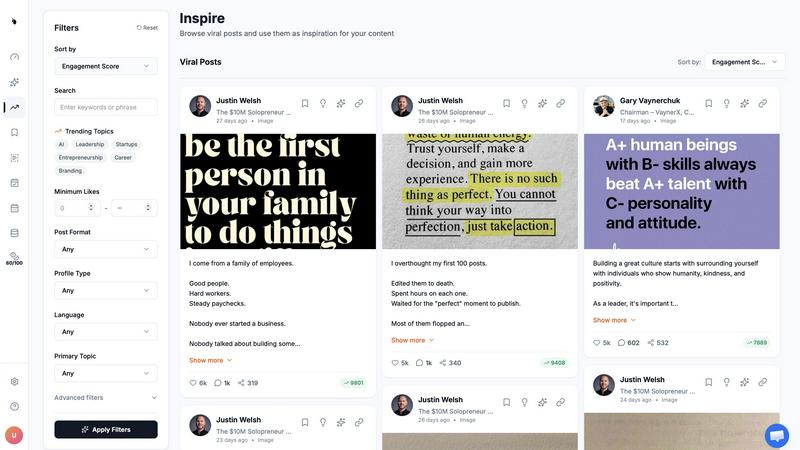
LinkPilot transforms LinkedIn into a client-attracting powerhouse with smart automation and strategic content planning.
Last updated: February 28, 2026

TemplateFox
TemplateFox is the battle-tested PDF automation engine that scales your documents while competitors struggle.
Last updated: February 28, 2026
Visual Comparison
LinkPilot
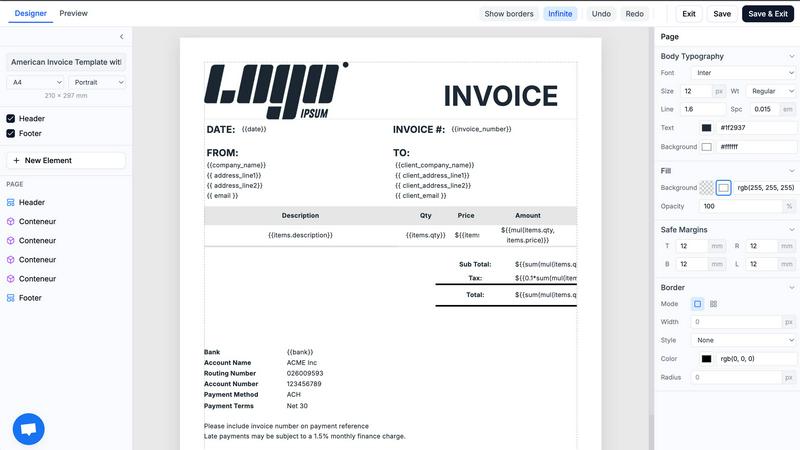
TemplateFox
Feature Comparison
LinkPilot
LinkedIn Scheduler
The LinkedIn Scheduler automates the posting process, allowing you to publish content at peak engagement times without manual intervention. This smart scheduling feature ensures your posts reach the audience when they are most active, maximizing visibility and interaction.
AI Content Generator
The AI Content Generator creates a month’s worth of posts tailored to your voice and niche in one session. It uses proven frameworks and insights from your industry to ensure that every post resonates with your target audience and drives engagement.
Profile Analytics
Profile Analytics provides deep insights into your LinkedIn performance, helping you track engagement metrics that matter. It offers a clear view of how your content is performing and identifies what drives real interactions, allowing you to refine your strategy over time.
Competitor Analysis
With Competitor Analysis, LinkPilot keeps you informed about your competitors' activities and strategies. It highlights content gaps and areas where you can outperform them, equipping you with the knowledge you need to position yourself as an authority in your niche.
TemplateFox
Visual Drag-and-Drop Template Designer
Ditch the code editor. TemplateFox's core power lies in its WYSIWYG (What You See Is What You Get) designer. Build complex, professional document templates visually by dragging, dropping, and configuring elements. Fine-tune every component—text, images, tables, barcodes—through a dedicated properties panel. This feature completely removes the barrier of HTML/CSS expertise, allowing anyone to design pixel-perfect templates in minutes, not days.
Dynamic Data Binding & Built-in Functions
Go beyond simple text replacement. Inject any JSON data into your templates using powerful expressions. Automatically populate names, addresses, line items, and totals. Utilize over 100 built-in functions to format dates, calculate sums, round numbers, and manipulate strings on the fly. You can even access system variables like {{sys.page_number}} and {{sys.current_date}} automatically, making your documents truly intelligent and adaptive.
Smart Tables & Automatic Layout Engine
Handle dynamic data with confidence. TemplateFox's table component is engineered for real-world documents. Whether your invoice has 3 line items or 300, the table rows grow automatically, and the entire document layout adapts. Tables can seamlessly span multiple pages with headers repeating, ensuring readability and a professional format every single time, regardless of data volume.
Integrated Barcode & QR Code Generation
Generate scanner-ready codes directly within your PDFs. This built-in feature supports industry-standard formats like Code128, EAN-13, and QR codes. Create shipping labels with tracking barcodes, asset tags, or promotional QR codes dynamically from your data—all without needing external image services or complex integrations, streamlining your document creation process.
Use Cases
LinkPilot
For Founders
Founders can harness LinkPilot to streamline their content creation process, ensuring they maintain a consistent posting schedule. By automating posts and analyzing performance, founders can focus on building their products while still engaging their audience effectively.
For Consultants
Consultants can utilize LinkPilot to enhance their personal brand. By automating content tailored to their expertise, they can establish credibility and attract potential clients without the hassle of daily posting.
For Service Businesses
Service businesses can leverage LinkPilot to create targeted marketing campaigns on LinkedIn. With insights into what content performs best, they can engage their audience more effectively and convert connections into clients.
For Marketing Teams
Marketing teams can use LinkPilot to optimize their social media strategy. By analyzing competitors and tracking performance metrics, they can adjust their content strategies to achieve better results and drive inbound leads.
TemplateFox
Automating Ecommerce Order Documents
Automatically generate and dispatch invoices, packing slips, and shipping labels for every order. Connect TemplateFox via Zapier or API to your Shopify, WooCommerce, or custom backend. When an order is placed, trigger the generation of a branded PDF with all order details, customer info, and a tracking barcode, then email it directly to the customer. This eliminates manual work and ensures instant, professional communication.
Streamlining B2B Invoicing & Reporting
For SaaS companies, agencies, and freelancers, automate client invoicing and reporting. Pull data from your time-tracking or project management tool (like Toggl or Jira) via Make or a custom script. Use TemplateFox to generate detailed, branded invoices or monthly performance reports populated with dynamic data, and send them on a scheduled basis. This ensures accuracy, saves administrative hours, and projects a polished corporate image.
Generating Certificates & Diplomas at Scale
Educational platforms, online course providers, and corporate training programs can automate certificate issuance. Upon course completion, trigger a PDF certificate generation via API. Dynamically insert the participant's name, course title, completion date, and a unique credential ID or QR code for verification. Generate thousands of personalized, secure certificates instantly without manual design work.
Creating Asset Tags & Inventory Labels
Manufacturing, logistics, and IT departments can automate the creation of physical asset tags and inventory labels. Use TemplateFox to design a label template with sequential numbering, asset details, and a scannable barcode. Integrate with your asset management system to batch-generate hundreds of unique PDF labels for printing, enabling efficient asset tracking and inventory control.
Overview
About LinkPilot
LinkPilot is the ultimate AI-powered LinkedIn growth platform designed specifically for B2B founders, consultants, and service businesses. It transforms your LinkedIn presence from a mere profile into a high-converting inbound channel. By leveraging advanced AI, LinkPilot conducts in-depth research to uncover viral content trends, generates engaging posts that reflect your unique voice, and schedules them for optimal visibility. With features like competitor analysis and performance tracking, it empowers users to understand their positioning in the market better and to create a strategic authority plan. LinkPilot saves you time and eliminates the stress of daily content creation, ensuring you maintain a consistent and impactful online presence that attracts inbound clients rather than just followers.
About TemplateFox
TemplateFox is a battle-tested, developer-first API for generating professional PDFs at scale. Forget wrestling with complex libraries like Puppeteer or wkhtmltopdf. TemplateFox provides a superior, reliable alternative that just works. It empowers indie hackers, developers, and businesses to automate their entire document workflow without the typical headaches. The core value proposition is simple: design visually once using an intuitive, drag-and-drop editor that requires zero HTML or CSS knowledge, then generate thousands of perfect PDFs—invoices, certificates, reports, packing slips—with a single API call or through no-code tools like Zapier and Make. Get results in 1-3 seconds delivered via signed URLs or direct binary downloads. Start for free with a generous 100 PDFs per month and scale seamlessly with transparent, affordable pricing. In the competitive landscape of PDF generation, TemplateFox stands out by eliminating the development bottleneck, offering unparalleled ease of use, and guaranteeing production-ready reliability for automated systems.
Frequently Asked Questions
LinkPilot FAQ
What makes LinkPilot different from other LinkedIn tools?
LinkPilot focuses on building authority and driving inbound leads, not just vanity metrics like follower counts or likes. It combines competitor intelligence with strategic content creation to maximize revenue potential.
How does the AI content generator work?
The AI content generator analyzes your industry and competitors to create a tailored 30-day content roadmap. It ensures that every post reflects your voice and adheres to successful content frameworks.
Can I customize the posts generated by LinkPilot?
Yes, LinkPilot allows you to edit and customize the posts generated by the AI to ensure they align perfectly with your brand voice and messaging strategy.
Is there a free trial available for LinkPilot?
Yes, LinkPilot offers a free trial for users to explore its features and capabilities. You can start without any credit card requirement and cancel anytime if it doesn’t meet your needs.
TemplateFox FAQ
How does TemplateFox compare to building my own PDF generator?
Building and maintaining a reliable in-house PDF generator is a significant engineering burden. You must manage libraries like Puppeteer, handle server scaling, ensure font rendering consistency, and debug layout issues across updates. TemplateFox is a battle-tested, dedicated service that handles all this infrastructure. You get a reliable API, a visual designer for non-developers, and consistent output, freeing your team to focus on core product features rather than document rendering complexities.
Can I use my own custom fonts and logos?
Absolutely. TemplateFox's visual editor allows you to upload and use any custom font (TTF, OTF) and image files directly in your templates. This ensures your generated PDFs maintain complete brand consistency, using your exact typography and logo assets, resulting in professional, on-brand documents every time.
What integrations does TemplateFox support?
TemplateFox is built for seamless integration. For developers, we offer a powerful REST API with comprehensive documentation and Postman collections. For no-code automation, we provide native integrations with Zapier, Make (Integromat), Airtable, Bubble, FlutterFlow, and n8n. This allows you to connect PDF generation to hundreds of other apps in your workflow without writing code.
Is there a free plan or trial?
Yes. TemplateFox offers a completely free tier that includes 100 PDF generations per month, which is perfect for testing, prototyping, and low-volume use cases. This free plan includes access to all core features, the visual template designer, and basic integrations. No credit card is required to start, allowing you to fully evaluate the platform's capabilities.
Alternatives
LinkPilot Alternatives
LinkPilot is an AI-driven platform designed to supercharge your LinkedIn growth by researching viral content, generating posts that reflect your unique voice, scheduling them for optimal engagement, and tracking your performance metrics. It falls into the Marketing, Productivity & Management, and Social Media categories, positioning itself as an indispensable tool for professionals aiming to enhance their LinkedIn presence. Despite its robust capabilities, users often seek alternatives to LinkPilot due to reasons such as pricing constraints, specific feature requirements, or the need for compatibility with different platforms. When exploring alternatives, consider factors like usability, customization options, scalability, and the breadth of analytics offered. The right choice should align with your unique LinkedIn growth strategy and overall marketing goals.
TemplateFox Alternatives
TemplateFox is a powerful SaaS platform in the PDF generation and document automation category. It empowers users to create professional PDFs from visual templates and deliver them at scale via API, eliminating the need for manual design and coding. Users often explore alternatives for various reasons, including budget constraints, the need for specific advanced features, or integration requirements with their existing tech stack. Some may seek more granular control over the design layer or different pricing models that better suit their volume. When evaluating other solutions, key factors to consider are the ease of template design, the reliability and speed of the API, the transparency and scalability of pricing, and the strength of security and compliance measures. The right tool should fit seamlessly into your workflow without creating new bottlenecks.