
Perkoon vs TemplateFox

Perkoon
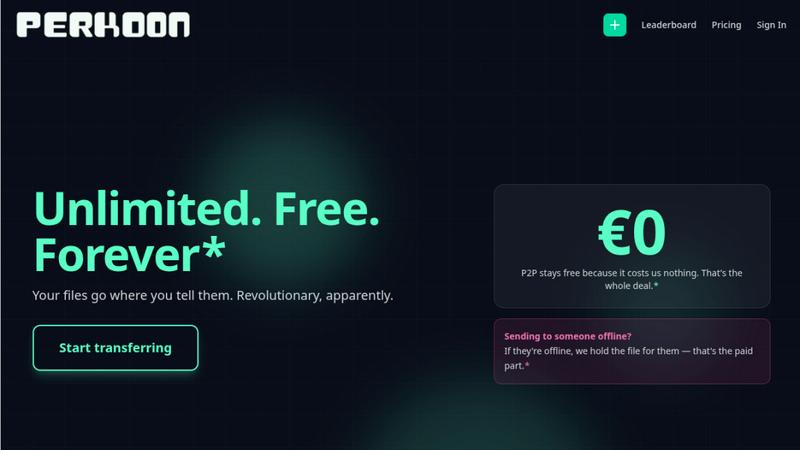
Perkoon transfers files directly for free, beating costly services like WeTransfer.
Last updated: March 3, 2026

TemplateFox
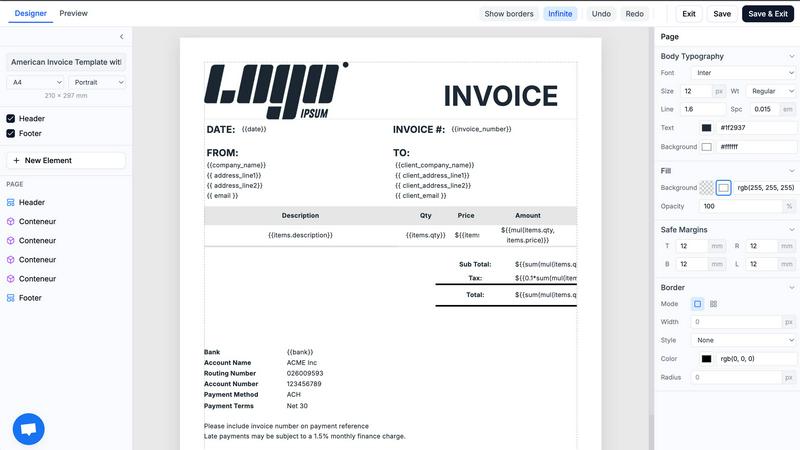
TemplateFox is the battle-tested PDF automation engine that scales your documents while competitors struggle.
Last updated: February 28, 2026
Visual Comparison
Perkoon
TemplateFox
Feature Comparison
Perkoon
Unlimited Free P2P Transfers
This is the core revolution. When both sender and receiver are online, Perkoon establishes a direct, encrypted connection between their browsers. Files stream from one device to another without ever touching Perkoon's servers. This means there are absolutely no file size limits, no mandatory account creation, and it costs you nothing because it costs Perkoon virtually nothing. It's file transfer reduced to simple, efficient physics, eliminating the bloated infrastructure and restrictions of legacy services.
Native Agent & Automation API
Perkoon is the first file transfer service built from the ground up for the age of AI. It exposes a stable, machine-readable interface (window.__perkoon) so your scripts, bots, and AI agents can interact with it programmatically. They can send and receive files directly through the API without the fragile, error-prone process of simulating human clicks and scraping the DOM. This is a fundamental architectural advantage for automated workflows.
Encrypted Cloud Storage for Offline Recipients
For real-world scenarios where the recipient isn't available, Perkoon offers an honest, paid solution. Files can be uploaded to Perkoon's servers, where they are encrypted and held securely until the recipient is ready. This service has a clear cost, which Perkoon transparently charges for, drawing a stark contrast with "free" services that monetize your data or hit you with unexpected paywalls mid-transfer.
Full-Featured Command Line Interface (CLI)
Perkoon respects all workflows, including terminal-based ones. With npx perkoon send/receive, users can initiate and receive transfers directly from their command line. It enables seamless browser-to-CLI, CLI-to-browser, and CLI-to-CLI operations, making it an indispensable tool for developers, sysadmins, and anyone who values speed and scriptability over graphical interfaces.
TemplateFox
Visual Drag-and-Drop Template Designer
Ditch the code editor. TemplateFox's core power lies in its WYSIWYG (What You See Is What You Get) designer. Build complex, professional document templates visually by dragging, dropping, and configuring elements. Fine-tune every component—text, images, tables, barcodes—through a dedicated properties panel. This feature completely removes the barrier of HTML/CSS expertise, allowing anyone to design pixel-perfect templates in minutes, not days.
Dynamic Data Binding & Built-in Functions
Go beyond simple text replacement. Inject any JSON data into your templates using powerful expressions. Automatically populate names, addresses, line items, and totals. Utilize over 100 built-in functions to format dates, calculate sums, round numbers, and manipulate strings on the fly. You can even access system variables like {{sys.page_number}} and {{sys.current_date}} automatically, making your documents truly intelligent and adaptive.
Smart Tables & Automatic Layout Engine
Handle dynamic data with confidence. TemplateFox's table component is engineered for real-world documents. Whether your invoice has 3 line items or 300, the table rows grow automatically, and the entire document layout adapts. Tables can seamlessly span multiple pages with headers repeating, ensuring readability and a professional format every single time, regardless of data volume.
Integrated Barcode & QR Code Generation
Generate scanner-ready codes directly within your PDFs. This built-in feature supports industry-standard formats like Code128, EAN-13, and QR codes. Create shipping labels with tracking barcodes, asset tags, or promotional QR codes dynamically from your data—all without needing external image services or complex integrations, streamlining your document creation process.
Use Cases
Perkoon
Sending Large Project Files to Clients
Freelancers and agencies can instantly send massive video edits, design prototypes, or code repositories directly to a client's browser. No more compressing files into multiple ZIP archives, dealing with WeTransfer's 2GB limit, or begging clients to sign up for a Dropbox account. Just generate a link and beam the files over with no size caps.
Automating Data Pipelines with AI Agents
Developers can integrate Perkoon's API into their automated workflows. An AI agent that processes user-uploaded images can receive them directly via Perkoon's API, and a script backing up server logs can send them to an engineer's Perkoon CLI. This removes the human bottleneck from machine-driven file exchange.
Ad-Hoc Collaboration Between Teams
When teams need to share a large dataset, screen recording, or batch of assets quickly during a live call or chat, Perkoon's P2P transfer is perfect. No setup required for either party; just share a link and the transfer begins immediately, keeping the collaborative momentum going without friction.
Secure and Private File Sharing
For users concerned about privacy, P2P transfers are the gold standard. Since the files never reside on a central server, they cannot be scanned, mined for data, or accidentally exposed in a breach. Perkoon provides a trustworthy channel for sharing sensitive documents without "corporate nonsense."
TemplateFox
Automating Ecommerce Order Documents
Automatically generate and dispatch invoices, packing slips, and shipping labels for every order. Connect TemplateFox via Zapier or API to your Shopify, WooCommerce, or custom backend. When an order is placed, trigger the generation of a branded PDF with all order details, customer info, and a tracking barcode, then email it directly to the customer. This eliminates manual work and ensures instant, professional communication.
Streamlining B2B Invoicing & Reporting
For SaaS companies, agencies, and freelancers, automate client invoicing and reporting. Pull data from your time-tracking or project management tool (like Toggl or Jira) via Make or a custom script. Use TemplateFox to generate detailed, branded invoices or monthly performance reports populated with dynamic data, and send them on a scheduled basis. This ensures accuracy, saves administrative hours, and projects a polished corporate image.
Generating Certificates & Diplomas at Scale
Educational platforms, online course providers, and corporate training programs can automate certificate issuance. Upon course completion, trigger a PDF certificate generation via API. Dynamically insert the participant's name, course title, completion date, and a unique credential ID or QR code for verification. Generate thousands of personalized, secure certificates instantly without manual design work.
Creating Asset Tags & Inventory Labels
Manufacturing, logistics, and IT departments can automate the creation of physical asset tags and inventory labels. Use TemplateFox to design a label template with sequential numbering, asset details, and a scannable barcode. Integrate with your asset management system to batch-generate hundreds of unique PDF labels for printing, enabling efficient asset tracking and inventory control.
Overview
About Perkoon
File transfer was a solved problem, until the industry decided to break it with size caps, forced logins, and surprise paywalls. Perkoon is the defiant answer, unsolving the mess and restoring sanity. It is a next-generation file transfer service built on a simple, powerful principle: if both people are online, files should move directly between them. This is achieved through unlimited, free, browser-based Peer-to-Peer (P2P) transfers with no middleman, no accounts, and no artificial limits. For when the recipient is offline, Perkoon offers encrypted cloud storage as an honest, paid add-on. But where Perkoon truly declares war on the old guard is with its native agent accessibility, featuring a machine-readable state and automation API so AI workflows can send and receive files directly, without clumsy human emulation. With a full-featured CLI for terminal users, Perkoon is built for the future of work, offering battle-tested reliability for everyone from creative professionals sending massive project files to developers automating their pipelines. Its core value proposition is uncompromising: your files go where you tell them, on your terms, with transparent technology and pricing that only charges for what actually costs money.
About TemplateFox
TemplateFox is a battle-tested, developer-first API for generating professional PDFs at scale. Forget wrestling with complex libraries like Puppeteer or wkhtmltopdf. TemplateFox provides a superior, reliable alternative that just works. It empowers indie hackers, developers, and businesses to automate their entire document workflow without the typical headaches. The core value proposition is simple: design visually once using an intuitive, drag-and-drop editor that requires zero HTML or CSS knowledge, then generate thousands of perfect PDFs—invoices, certificates, reports, packing slips—with a single API call or through no-code tools like Zapier and Make. Get results in 1-3 seconds delivered via signed URLs or direct binary downloads. Start for free with a generous 100 PDFs per month and scale seamlessly with transparent, affordable pricing. In the competitive landscape of PDF generation, TemplateFox stands out by eliminating the development bottleneck, offering unparalleled ease of use, and guaranteeing production-ready reliability for automated systems.
Frequently Asked Questions
Perkoon FAQ
How can P2P transfers be completely free?
The model is transparent and technically sound. In a P2P transfer, the file data flows directly between the two users' devices. Perkoon's servers only facilitate the initial connection handshake, which uses minimal bandwidth and resources. Since this costs Perkoon almost nothing, they charge nothing for it. They only charge for the cloud storage service, which involves real infrastructure costs.
What happens if the recipient is offline?
If you start a transfer and the recipient is not available to accept the direct P2P connection, Perkoon will automatically offer you the option to use encrypted cloud storage instead. You can upload the file to Perkoon's servers, where it will be held securely until your recipient comes online. This cloud storage feature is part of the paid plans.
Can my AI assistant or scripts use Perkoon?
Absolutely. This is a key differentiator. Perkoon is built with a public automation API (window.__perkoon) and stable DOM selectors specifically for this purpose. Your automation scripts or AI agents can interact with Perkoon programmatically to send and receive files without any human-in-the-loop simulation, making it a robust tool for automated workflows.
Which browsers are supported for P2P transfers?
For the best, unlimited experience, Chromium-based browsers like Chrome, Edge, and Brave are fully supported. Firefox and Safari can be used but have inherent browser-level restrictions that may limit performance or maximum concurrent connections for very large transfers. The CLI works independently of browser limitations.
TemplateFox FAQ
How does TemplateFox compare to building my own PDF generator?
Building and maintaining a reliable in-house PDF generator is a significant engineering burden. You must manage libraries like Puppeteer, handle server scaling, ensure font rendering consistency, and debug layout issues across updates. TemplateFox is a battle-tested, dedicated service that handles all this infrastructure. You get a reliable API, a visual designer for non-developers, and consistent output, freeing your team to focus on core product features rather than document rendering complexities.
Can I use my own custom fonts and logos?
Absolutely. TemplateFox's visual editor allows you to upload and use any custom font (TTF, OTF) and image files directly in your templates. This ensures your generated PDFs maintain complete brand consistency, using your exact typography and logo assets, resulting in professional, on-brand documents every time.
What integrations does TemplateFox support?
TemplateFox is built for seamless integration. For developers, we offer a powerful REST API with comprehensive documentation and Postman collections. For no-code automation, we provide native integrations with Zapier, Make (Integromat), Airtable, Bubble, FlutterFlow, and n8n. This allows you to connect PDF generation to hundreds of other apps in your workflow without writing code.
Is there a free plan or trial?
Yes. TemplateFox offers a completely free tier that includes 100 PDF generations per month, which is perfect for testing, prototyping, and low-volume use cases. This free plan includes access to all core features, the visual template designer, and basic integrations. No credit card is required to start, allowing you to fully evaluate the platform's capabilities.
Alternatives
Perkoon Alternatives
Perkoon is a next-generation file transfer service in the productivity and management category, designed to cut through the noise of broken promises and hidden fees. Users often search for alternatives due to restrictive pricing models, missing features like automation, or simply needing a tool that works across different platforms and workflows. When evaluating other options, the key is to look beyond the marketing. Scrutinize the actual transfer mechanics—are your files taking a detour through a corporate server? Check for hard limits on size or speed, and be wary of free tiers that bait you before hitting a paywall. Most critically, assess if the service treats automation as a first-class citizen or an afterthought. The right tool should feel like an extension of your work, not a bottleneck. It should offer clarity in its model, robustness in its security, and genuine utility whether you're a human or a machine. Your file transfer shouldn't be the weakest link in your process.
TemplateFox Alternatives
TemplateFox is a powerful SaaS platform in the PDF generation and document automation category. It empowers users to create professional PDFs from visual templates and deliver them at scale via API, eliminating the need for manual design and coding. Users often explore alternatives for various reasons, including budget constraints, the need for specific advanced features, or integration requirements with their existing tech stack. Some may seek more granular control over the design layer or different pricing models that better suit their volume. When evaluating other solutions, key factors to consider are the ease of template design, the reliability and speed of the API, the transparency and scalability of pricing, and the strength of security and compliance measures. The right tool should fit seamlessly into your workflow without creating new bottlenecks.