
Proofapp vs TemplateFox

Proofapp
Stop wasting time on miscommunication and endless email chains; get instant visual feedback directly on your website.
Last updated: March 3, 2026

TemplateFox
TemplateFox is the battle-tested PDF automation engine that scales your documents while competitors struggle.
Last updated: February 28, 2026
Visual Comparison
Proofapp

TemplateFox
Feature Comparison
Proofapp
Visual Commenting
With Proofapp's visual commenting feature, users can click anywhere on a screenshot to leave contextual feedback. This eliminates the confusion common with traditional feedback methods, allowing for clear communication about specific design elements.
Multi-Breakpoint Testing
Proofapp automatically captures screenshots at both desktop and mobile breakpoints, facilitating a comprehensive review process. This feature ensures that clients can see how their website appears across devices, leading to more informed feedback.
Real-time Collaboration
Proofapp enables real-time collaboration among team members. As comments are made, everyone involved can see updates instantly, allowing for swift replies and resolutions, which keeps projects moving forward without unnecessary delays.
Secure Share Links
Users can share projects with clients via secure, expirable links. This feature ensures that feedback is gathered securely, giving clients access to only the necessary elements of the project for commenting, without requiring account creation.
TemplateFox
Visual Drag-and-Drop Template Designer
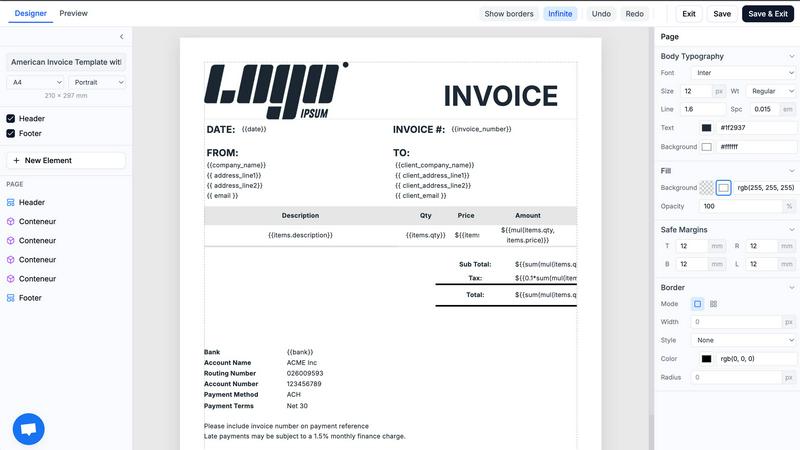
Ditch the code editor. TemplateFox's core power lies in its WYSIWYG (What You See Is What You Get) designer. Build complex, professional document templates visually by dragging, dropping, and configuring elements. Fine-tune every component—text, images, tables, barcodes—through a dedicated properties panel. This feature completely removes the barrier of HTML/CSS expertise, allowing anyone to design pixel-perfect templates in minutes, not days.
Dynamic Data Binding & Built-in Functions
Go beyond simple text replacement. Inject any JSON data into your templates using powerful expressions. Automatically populate names, addresses, line items, and totals. Utilize over 100 built-in functions to format dates, calculate sums, round numbers, and manipulate strings on the fly. You can even access system variables like {{sys.page_number}} and {{sys.current_date}} automatically, making your documents truly intelligent and adaptive.
Smart Tables & Automatic Layout Engine
Handle dynamic data with confidence. TemplateFox's table component is engineered for real-world documents. Whether your invoice has 3 line items or 300, the table rows grow automatically, and the entire document layout adapts. Tables can seamlessly span multiple pages with headers repeating, ensuring readability and a professional format every single time, regardless of data volume.
Integrated Barcode & QR Code Generation
Generate scanner-ready codes directly within your PDFs. This built-in feature supports industry-standard formats like Code128, EAN-13, and QR codes. Create shipping labels with tracking barcodes, asset tags, or promotional QR codes dynamically from your data—all without needing external image services or complex integrations, streamlining your document creation process.
Use Cases
Proofapp
Freelancers
Freelancers can leverage Proofapp to streamline client feedback, allowing for quick and effective revisions. By pinning comments directly on designs, they can present a professional image while saving hours on project management.
Small Development Teams
Small development teams benefit from Proofapp's ability to enhance client approvals without the burden of enterprise pricing. This tool simplifies the feedback process, enabling teams to focus on delivering high-quality work efficiently.
Design Teams
Design teams utilize Proofapp to receive precise visual feedback from clients and stakeholders. By having comments pinned exactly where they matter, designers can make targeted changes that align with client expectations.
Marketing Teams
Marketing teams can employ Proofapp to review landing pages and campaigns visually. The ability to gather feedback in a straightforward manner helps these teams remain agile and responsive to changes, ultimately enhancing campaign effectiveness.
TemplateFox
Automating Ecommerce Order Documents
Automatically generate and dispatch invoices, packing slips, and shipping labels for every order. Connect TemplateFox via Zapier or API to your Shopify, WooCommerce, or custom backend. When an order is placed, trigger the generation of a branded PDF with all order details, customer info, and a tracking barcode, then email it directly to the customer. This eliminates manual work and ensures instant, professional communication.
Streamlining B2B Invoicing & Reporting
For SaaS companies, agencies, and freelancers, automate client invoicing and reporting. Pull data from your time-tracking or project management tool (like Toggl or Jira) via Make or a custom script. Use TemplateFox to generate detailed, branded invoices or monthly performance reports populated with dynamic data, and send them on a scheduled basis. This ensures accuracy, saves administrative hours, and projects a polished corporate image.
Generating Certificates & Diplomas at Scale
Educational platforms, online course providers, and corporate training programs can automate certificate issuance. Upon course completion, trigger a PDF certificate generation via API. Dynamically insert the participant's name, course title, completion date, and a unique credential ID or QR code for verification. Generate thousands of personalized, secure certificates instantly without manual design work.
Creating Asset Tags & Inventory Labels
Manufacturing, logistics, and IT departments can automate the creation of physical asset tags and inventory labels. Use TemplateFox to design a label template with sequential numbering, asset details, and a scannable barcode. Integrate with your asset management system to batch-generate hundreds of unique PDF labels for printing, enabling efficient asset tracking and inventory control.
Overview
About Proofapp
Proofapp is a revolutionary visual feedback and website review platform designed to enhance collaboration among designers, developers, and clients. By allowing users to upload any website URL, Proofapp automatically captures screenshots for both desktop and mobile views, streamlining the feedback process. This tool is perfect for freelancers, small development teams, and agencies managing multiple projects, as it eliminates the chaos that often accompanies scattered emails and vague revision requests. With features like real-time notifications, Slack integration, and customizable settings, Proofapp transforms the way feedback is gathered and managed. Users can pin comments directly on the designs, reply in threaded conversations, and attach files for clarity—all without needing an account. This not only improves productivity but also ensures that feedback is organized, visual, and actionable, making it an ideal solution for anyone looking to enhance their project workflow.
About TemplateFox
TemplateFox is a battle-tested, developer-first API for generating professional PDFs at scale. Forget wrestling with complex libraries like Puppeteer or wkhtmltopdf. TemplateFox provides a superior, reliable alternative that just works. It empowers indie hackers, developers, and businesses to automate their entire document workflow without the typical headaches. The core value proposition is simple: design visually once using an intuitive, drag-and-drop editor that requires zero HTML or CSS knowledge, then generate thousands of perfect PDFs—invoices, certificates, reports, packing slips—with a single API call or through no-code tools like Zapier and Make. Get results in 1-3 seconds delivered via signed URLs or direct binary downloads. Start for free with a generous 100 PDFs per month and scale seamlessly with transparent, affordable pricing. In the competitive landscape of PDF generation, TemplateFox stands out by eliminating the development bottleneck, offering unparalleled ease of use, and guaranteeing production-ready reliability for automated systems.
Frequently Asked Questions
Proofapp FAQ
How does Proofapp improve feedback collection?
Proofapp improves feedback collection by providing a visual platform where comments can be pinned directly on designs. This visual approach significantly reduces miscommunication and speeds up the revision process.
Can clients leave feedback without creating an account?
Yes, clients can leave feedback without needing to create an account. Proofapp allows users to generate secure links that clients can use to access the project and provide comments directly on the visuals.
Is Proofapp suitable for larger teams?
Absolutely, Proofapp is designed to scale with your needs. While it's perfect for smaller teams, its robust features make it suitable for larger teams and agencies as well, ensuring efficient collaboration at any scale.
What kind of security measures does Proofapp implement?
Proofapp implements enterprise-level security measures, including role-based permissions, audit logs, and secure data handling practices. These features ensure that all project data is protected and only accessible to authorized users.
TemplateFox FAQ
How does TemplateFox compare to building my own PDF generator?
Building and maintaining a reliable in-house PDF generator is a significant engineering burden. You must manage libraries like Puppeteer, handle server scaling, ensure font rendering consistency, and debug layout issues across updates. TemplateFox is a battle-tested, dedicated service that handles all this infrastructure. You get a reliable API, a visual designer for non-developers, and consistent output, freeing your team to focus on core product features rather than document rendering complexities.
Can I use my own custom fonts and logos?
Absolutely. TemplateFox's visual editor allows you to upload and use any custom font (TTF, OTF) and image files directly in your templates. This ensures your generated PDFs maintain complete brand consistency, using your exact typography and logo assets, resulting in professional, on-brand documents every time.
What integrations does TemplateFox support?
TemplateFox is built for seamless integration. For developers, we offer a powerful REST API with comprehensive documentation and Postman collections. For no-code automation, we provide native integrations with Zapier, Make (Integromat), Airtable, Bubble, FlutterFlow, and n8n. This allows you to connect PDF generation to hundreds of other apps in your workflow without writing code.
Is there a free plan or trial?
Yes. TemplateFox offers a completely free tier that includes 100 PDF generations per month, which is perfect for testing, prototyping, and low-volume use cases. This free plan includes access to all core features, the visual template designer, and basic integrations. No credit card is required to start, allowing you to fully evaluate the platform's capabilities.
Alternatives
Proofapp Alternatives
Proofapp is a powerful visual feedback and website review platform designed to streamline collaboration among designers, developers, and their clients. With its ability to capture screenshots of any website on both desktop and mobile, it falls into the Productivity & Management category, making it an essential tool for efficient project management and client communication. Users often seek alternatives to Proofapp due to various reasons, such as budget constraints, specific feature requirements, or compatibility with different platforms. When choosing an alternative, it's crucial to evaluate the range of features offered, user interface, ease of integration with existing workflows, and the overall cost. A good alternative should enhance your ability to collect and manage feedback without adding unnecessary complexity to your projects.
TemplateFox Alternatives
TemplateFox is a powerful SaaS platform in the PDF generation and document automation category. It empowers users to create professional PDFs from visual templates and deliver them at scale via API, eliminating the need for manual design and coding. Users often explore alternatives for various reasons, including budget constraints, the need for specific advanced features, or integration requirements with their existing tech stack. Some may seek more granular control over the design layer or different pricing models that better suit their volume. When evaluating other solutions, key factors to consider are the ease of template design, the reliability and speed of the API, the transparency and scalability of pricing, and the strength of security and compliance measures. The right tool should fit seamlessly into your workflow without creating new bottlenecks.