
Magic Hour vs Veo 4 AI Video Generator

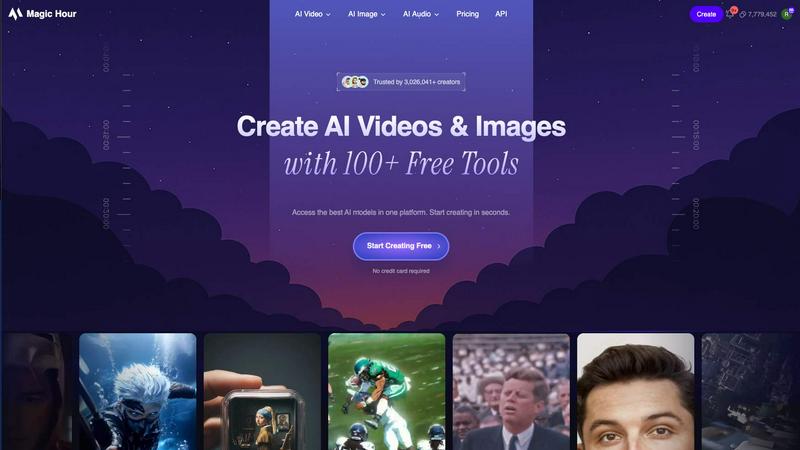
Magic Hour
Transform your creativity with Magic Hour's powerful AI tools for fast face swaps, lip syncs, and stunning video.
Last updated: February 27, 2026

Veo 4 AI Video Generator
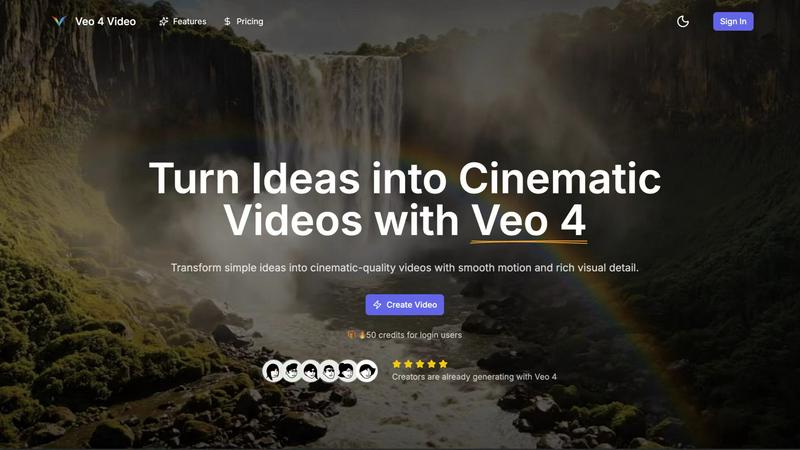
Veo 4 AI transforms your text into cinematic videos with realistic motion and sound.
Last updated: February 28, 2026
Visual Comparison
Magic Hour
Veo 4 AI Video Generator
Feature Comparison
Magic Hour
Text-to-Video
Transform your text prompts into engaging videos instantly. This feature allows users to create visually appealing content from simple text descriptions, making video production accessible to everyone, regardless of their technical skills.
Image-to-Video
Convert static images into dynamic video content with just a click. This feature enables creators to turn their photos into captivating videos, adding movement and narrative depth without requiring advanced editing techniques.
AI Face Swap
Effortlessly swap faces in any video using this innovative feature. With a few clicks, users can create fun or professional content by replacing faces, making it ideal for personalized videos, memes, or marketing materials that resonate with audiences.
AI Image Editor
Edit images with ease using the AI Image Editor. This tool allows users to enhance their photos, add text, and apply various effects, ensuring that every image meets the desired aesthetic without the need for complex software.
Veo 4 AI Video Generator
Cinematic Text-to-Video Engine
Go beyond basic animation. Veo 4's text-to-video engine is built for directors. Input a clear, descriptive prompt and watch as it generates a coherent, richly detailed cinematic clip. You have direct control over critical elements like time of day, specific camera movements (e.g., dolly in, panning shot), and overall mood. This precision ensures the final video matches your creative vision with intentionality, eliminating the random, disjointed results common in lesser AI video tools.
Advanced Image-to-Video Motion Control
Breathe life into still images with unparalleled control. Upload a single photo, and Veo 4 animates it with natural, smooth motion. For ultimate creative direction, use the two-image mode: upload a starting frame and an ending frame. Veo 4 intelligently generates the motion in between, allowing you to dictate exactly how the scene transforms. This feature is a game-changer for storyboarding, creating before/after sequences, and animating product shots.
Dual-Speed Generation Modes (Fast & Quality)
Adapt the tool to your workflow, not the other way around. Choose "Fast" mode for rapid ideation, quick drafts, and testing prompt variations when speed is critical. When you're ready for final output, switch to "Quality" mode. This setting prioritizes superior visual detail, enhanced stability, and smoother motion for a polished, broadcast-ready finish. This dual-mode system gives you the flexibility to iterate quickly and deliver flawlessly.
Native Synchronized Audio Generation
This is where Veo 4 dominates the competition. It doesn't just create silent videos; it generates native, synchronized audio that matches the scene. This includes realistic dialogue, ambient background sounds, and precise sound effects that are temporally aligned with the on-screen action. The result is a complete, immersive video package ready for publishing, eliminating the need for separate, complex audio editing workflows.
Use Cases
Magic Hour
Social Media Content Creation
Magic Hour is perfect for creating eye-catching social media videos that stand out. Whether it's for Instagram, TikTok, or Facebook, users can quickly produce tailored content that engages their audience and drives interaction.
Marketing Campaigns
Utilize Magic Hour for high-impact video marketing campaigns without the hassle of traditional production. Marketers can generate promotional videos, product demos, and ad creatives that align with their branding, all while saving time and resources.
Training and Educational Videos
Create informative training clips and educational videos effortlessly. With Magic Hour, educators and trainers can produce engaging content that simplifies complex topics, making learning more accessible and enjoyable for their audience.
Personalized Content for Events
For businesses and agencies, Magic Hour allows for the creation of personalized video content for events. From custom greetings to highlight reels, users can generate unique videos that enhance attendee experiences and foster engagement.
Veo 4 AI Video Generator
High-Impact Product Advertisement Clips
Kill your production bottlenecks. Instantly transform a product description or key selling point into a punchy, cinematic promo clip. Showcase your product in dynamic, realistic environments with perfect lighting and professional camera work. Use Veo 4 to generate multiple consistent takes for A/B testing on landing pages, paid social campaigns, and email marketing, all without a single day of filming.
Viral-Ready Social Media Shorts
Dominate TikTok, Instagram Reels, and YouTube Shorts. Generate loopable, eye-catching B-roll from a simple hook or story beat. Create expressive, text-on-screen animations, dynamic transitions, and trending visual concepts in minutes. Veo 4's 9:16 aspect ratio and clean, watermark-free exports mean you can go from idea to posted content faster than your competitors can schedule a meeting.
Dynamic Storyboarding & Concept Visualization
Bring creative pitches to life instantly. Instead of static sketches or mood boards, use Veo 4 to animate key scenes from a script or treatment. Upload concept art and animate it to demonstrate camera moves and pacing. This provides clients, teams, or stakeholders with a tangible, moving visualization of an idea, securing buy-in and streamlining pre-production like never before.
Consistent Branded Content Series
Maintain a flawless visual identity across all your video content. By reusing and refining successful prompt patterns, you can generate an entire series of clips with consistent lighting, color grading, and cinematic style. This ensures your brand looks professional and cohesive, whether you're producing 50 social posts or a sequence of explainer videos, all generated from a single, controllable AI model.
Overview
About Magic Hour
Magic Hour is a revolutionary browser-based AI video generator and editor designed for creators, marketers, and teams seeking to produce videos swiftly and efficiently. By leveraging advanced AI technology, Magic Hour allows users to generate videos from text or images (text-to-video, image-to-video), restyle existing footage (video-to-video), and personalize content using AI-driven features such as Face Swap and Lip Sync. This platform caters to a wide array of users, from individual creators to large marketing teams, enabling them to create professional-quality videos and images without needing extensive editing skills or costly equipment. Its seamless workflow—from uploading a photo or video, selecting tools or templates, to downloading results—ensures quick iterations, consistent styles, and shareable outputs. With over 100 free tools at your disposal, Magic Hour empowers users to create everything from short-form social media content to training clips and localized ads, making it an indispensable resource for anyone in the digital content space.
About Veo 4 AI Video Generator
Stop wrestling with complex video production. The battle for the best AI video is over, and Veo 4 has emerged as the definitive champion. This is Google's most advanced AI video model, engineered to transform your simple text prompts or static images into breathtaking, cinematic-quality videos in minutes. Built for creators, marketers, and teams who refuse to compromise, Veo 4 delivers what others only promise: high-fidelity realism, intentional cinematic motion, and synchronized audio that brings scenes to life. Unlike other generators that produce uncanny, unstable clips, Veo 4 is battle-tested for real-world production, offering unmatched consistency and control. Its core value is brutal simplicity: turn an idea directly into a usable, 8-second, watermark-free 1080p video without a crew, expensive software, or a steep learning curve. For anyone needing to produce professional video content at speed—from social media shorts to product ads—Veo 4 is the powerhouse that makes high-end cinematic output fast, simple, and repeatable.
Frequently Asked Questions
Magic Hour FAQ
What types of videos can I create with Magic Hour?
You can create a wide variety of videos including promotional content, training videos, social media posts, and more. Magic Hour supports text-to-video, image-to-video, and video-to-video transformations, making it versatile for any project.
Is Magic Hour suitable for beginners?
Absolutely! Magic Hour is designed for users of all skill levels. Its intuitive interface and streamlined workflow allow even those without prior video editing experience to create professional-quality videos and images quickly.
Can I use Magic Hour for commercial projects?
Yes, Magic Hour is suitable for commercial use. Whether you're a freelancer, a marketing agency, or a corporate team, you can use the platform to create content for various marketing and promotional activities.
Are there any limitations on the free version of Magic Hour?
While the free version provides access to over 100 tools, there may be limitations in terms of video resolution, export quality, or the number of projects you can create simultaneously. For extensive features, consider exploring premium options.
Veo 4 AI Video Generator FAQ
What makes Veo 4 different from other AI video generators?
Veo 4 is built on Google's most advanced video model, prioritizing cinematic realism and intentional motion over chaotic, artificial-looking outputs. Its key differentiators are native synchronized audio generation, superior prompt adherence for consistent results, and a dual-speed system that caters to both rapid ideation and final-quality production. It's engineered for repeatable, professional use, not just one-off novelties.
How long are the videos Veo 4 can generate?
Veo 4 is optimized to produce tight, engaging 8-second cinematic clips. This duration is perfect for modern attention spans and platforms like social media feeds, providing enough time to convey a complete idea or scene without unnecessary filler. The focused length encourages clear, impactful storytelling and fast-paced content creation.
Can I use images I already own with Veo 4?
Absolutely. The Image-to-Video mode is designed specifically for this. You can upload a single photograph to animate it with natural motion, or upload two images to define the start and end frames of a scene. Veo 4 will generate the smooth motion in between, giving you direct control over the animation's narrative arc using your own assets.
Are there watermarks on exported videos?
No. Videos exported from Veo 4 are completely clean, professional, and ready for commercial use. You receive a 1080p high-definition video file without any logos, watermarks, or branding, allowing you to publish directly to any platform, client presentation, or advertising campaign immediately after generation.
Alternatives
Magic Hour Alternatives
Magic Hour is an innovative browser-based AI video generator and editor that empowers creators, marketers, and teams to produce videos swiftly and efficiently. With its ability to generate content from text and images, perform AI face swaps, and enhance media quality, Magic Hour caters to a broad spectrum of content creation needs. Users often seek alternatives when they encounter limitations such as pricing, specific feature sets, or the need for compatibility across different platforms. When exploring alternatives to Magic Hour, it's essential to consider several factors. Look for platforms that offer a robust set of features, ease of use, and flexibility in content generation. Additionally, assess the pricing structure and whether it aligns with your budget and expected use cases, ensuring that it meets your unique content creation requirements.
Veo 4 AI Video Generator Alternatives
Veo 4 AI Video Generator is a leading tool in the AI video creation category, designed to transform simple text prompts into high-quality, cinematic videos quickly. It promises a fast and simple workflow for turning ideas into visual stories, positioning itself as a powerful solution for content creators. Users often seek alternatives to Veo 4 for various reasons. Some may find its pricing model doesn't fit their budget, while others might need specific features it lacks, such as different video formats, more control over the generation process, or integration with other platforms. The search for the right tool is driven by the need to match unique project requirements and workflow preferences. When evaluating an alternative, focus on core capabilities. Key factors include the quality and realism of the generated video, the speed of rendering, the flexibility of the input prompts, and the overall cost-effectiveness for your volume of work. The best choice will be the one that delivers professional results without unnecessary complexity or hidden costs.