
PhotoWeather
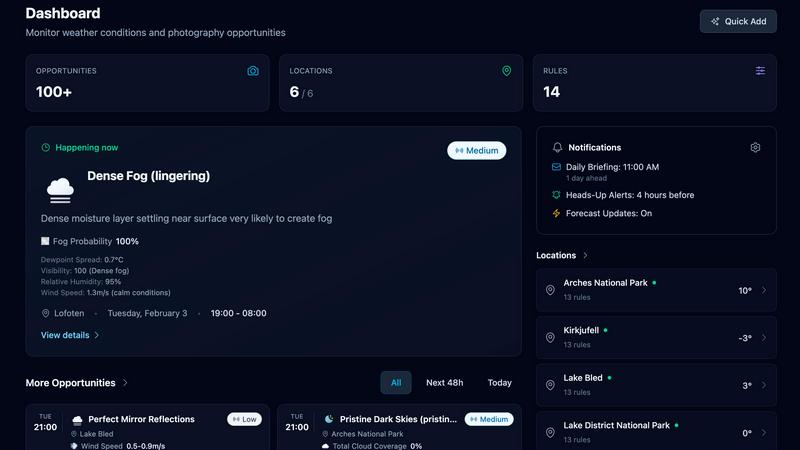
PhotoWeather alerts outdoor photographers to perfect shooting conditions based on their customized weather preferences.
About PhotoWeather
PhotoWeather is a cutting-edge weather alert system tailored specifically for outdoor photographers. This innovative tool eliminates the need for constant weather app checks by monitoring forecasts around the clock. It sends alerts only when weather conditions align with your photography goals, ensuring you never miss breathtaking moments like the ethereal sunrise fog, intense storm clouds, or the coveted golden-hour light breaks. Designed for professionals and enthusiasts alike, PhotoWeather allows photographers to set precise conditions for their shoots, providing a level of customization that generic weather apps simply cannot match. With support for landscape, astro, and wildlife photography, this app empowers users to focus more on their craft while reducing the guesswork associated with weather-dependent photography.
Features of PhotoWeather
Ready-Made Templates
PhotoWeather offers a selection of ready-made templates designed with photographers in mind. Templates cover various conditions, such as "Fog and Mist," "Golden Hour," and "Aurora Visibility," allowing users to quickly set up alerts for the specific weather conditions they need. This feature simplifies the process of customization, making it easy to get started and ensuring that photographers can focus on capturing stunning images.
Powerful Rule Builder
The powerful rule builder is a standout feature of PhotoWeather, offering over 80 parameters to choose from, including clouds, visibility, wind, humidity, and astronomical events. This level of detail enables photographers to create highly specific alerts using logical combinations of conditions. For example, users can set rules like "Golden hour + 20-60% cloud coverage + wind under 7 m/s," ensuring they are always prepared for the perfect photographic opportunity.
Smart Notifications
PhotoWeather keeps users informed with intelligent notifications that can be tailored to their preferences. Daily digests provide a summary of upcoming opportunities, while real-time alerts notify users instantly when conditions change. Additionally, the calendar sync feature automatically adds events to the user's calendar, allowing for seamless planning and organization, ensuring photographers never miss a chance to capture extraordinary moments.
Trusted Forecast Sources
PhotoWeather aggregates data from reputable weather services, including ECMWF, NOAA, DWD, and others. This multi-model confidence approach ensures that users receive the most accurate and reliable forecasts available. With a commitment to providing trustworthy information, photographers can make informed decisions about when and where to shoot, enhancing their overall experience and increasing the likelihood of capturing remarkable images.
Use Cases of PhotoWeather
Landscape Photography
Landscape photographers can benefit significantly from PhotoWeather's detailed alerts. By setting specific conditions such as fog, cloud cover, and golden hour light, they can ensure they are on location at the right time to capture breathtaking landscapes, maximizing their chances of taking stunning photos.
Astro Photography
For astro photographers, knowing when astronomical events will occur is crucial. PhotoWeather allows users to set alerts for conditions like moon phases, low cloud cover, and optimal visibility. This feature ensures that photographers can plan their shoots around significant celestial events, resulting in incredible night sky images.
Wildlife Photography
Wildlife photographers often face the challenge of unpredictable weather. With PhotoWeather’s customizable alerts, they can set rules for conditions such as wind speed and precipitation. This capability helps them time their outings to coincide with favorable weather, enhancing their chances of successful wildlife captures.
Coastal Photography
Coastal photographers can take advantage of PhotoWeather’s templates and rule builder to monitor conditions that create dramatic coastal scenes. By tracking parameters like storm intensity, tides, and cloud coverage, they can ensure they are present for the most visually stunning moments, whether it be during a storm or a tranquil sunrise.
Frequently Asked Questions
How do I get started?
To begin using PhotoWeather, simply download the app from the App Store or Google Play, create an account, and add your favorite shooting locations. From there, you can set conditions using templates or customize your own alerts.
How accurate are the forecasts?
PhotoWeather aggregates data from multiple trusted weather services, including ECMWF and NOAA. This ensures that users receive reliable forecasts, helping them make informed decisions about their shooting plans.
Can I create my own rules?
Absolutely! PhotoWeather features a powerful rule builder that allows users to create highly specific alerts based on over 80 weather parameters. You can combine these parameters using AND/OR/NOT logic to tailor alerts to your exact needs.
Do you support calendar sync?
Yes, PhotoWeather offers calendar sync functionality. This feature allows your alerts and scheduled opportunities to be automatically added to your calendar, helping you stay organized and ensuring you never miss a perfect moment to shoot.
Top Alternatives to PhotoWeather
FaceShot
Create stunning, professional headshots from a selfie in just 60 seconds with FaceShot's AI-powered technology.

Facejam
Transform selfies into stunning professional headshots in minutes, no photographer needed, with FaceJam's AI magic.
MyImageUpscaler
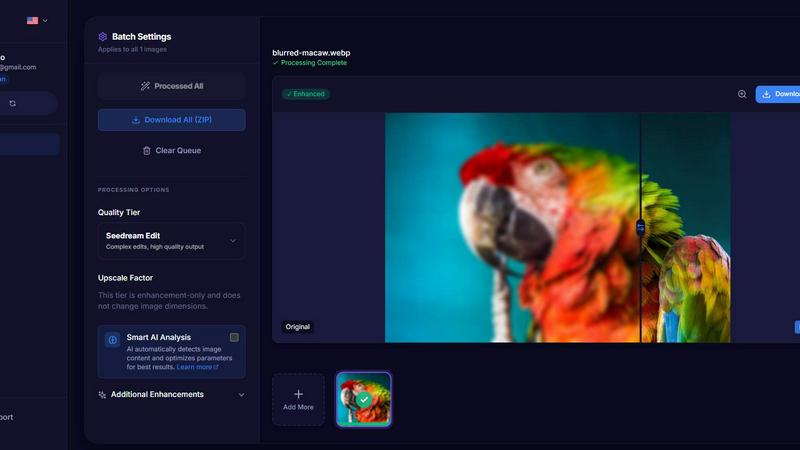
MyImageUpscaler battles blurry images and wins with crisp, instant AI upscaling.