
RoomCreator
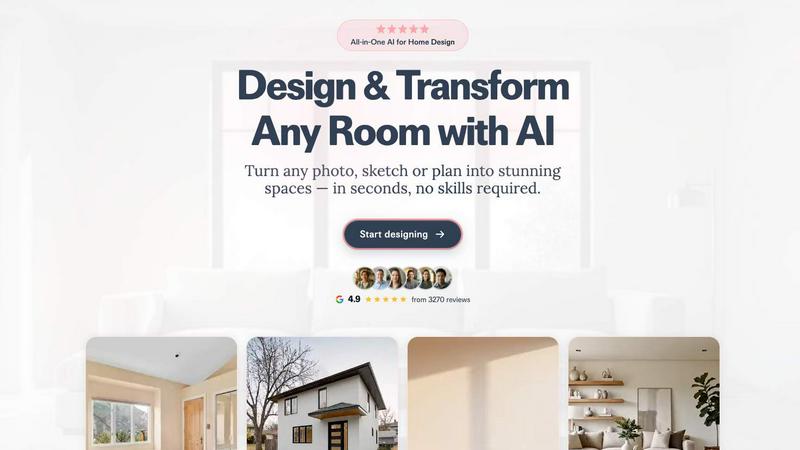
Battle-tested AI that transforms any room photo into a stunning design in seconds, no skills required.
About RoomCreator
Forget the slow, expensive, and complex world of traditional interior design. RoomCreator is the battle-tested AI design engine that demolishes the competition, delivering hyper-realistic room transformations in a blistering 10 seconds. This isn't just another filter app; it's a comprehensive, professional-grade toolkit built for decisive action. Upload any photo—whether it's a messy living room, an empty rental property, or a rough hand-drawn sketch—and watch as our AI generates stunning, fully-realized redesigns with smart layout changes, new furniture arrangements, and perfect lighting. Designed for homeowners, real estate agents, and investors who need results, not just ideas, RoomCreator eliminates guesswork and costly mistakes. Visualize a full kitchen remodel, test exterior paint colors, or stage a vacant property instantly. In a head-to-head comparison, while other tools offer generic edits, RoomCreator provides precision tools like the Brush Editor for targeted changes and Empty Room decluttering, giving you unparalleled control. Stop dreaming and start doing. Turn your space into your dream home with the AI tool that's fast, fearless, and free to try.
Features of RoomCreator
Instant AI Interior Redesign
This is the core powerhouse. Upload a single photo of any room and receive multiple, professionally-styled redesigns in just 10 seconds. The AI doesn't just swap colors; it reimagines your space with intelligent furniture layouts, cohesive decor, new flooring, and realistic natural lighting applied directly to your room's dimensions. It's like having a team of designers on demand, built for making confident decisions before you commit a single dollar to renovation.
Precision Brush Editor
Why regenerate an entire room when you only want to change one thing? RoomCreator's Brush Editor puts you in the driver's seat. Simply paint over any specific area—an old sofa, outdated artwork, or a blank wall—to remove, replace, or adjust elements with surgical precision. This feature offers complete creative control without starting from scratch, a tactical advantage over tools that only offer full-room overhauls.
Empty Room Declutter
See the true potential of any space by instantly stripping it clean. With one tap, the AI removes all furniture and clutter while perfectly preserving the room's architecture—walls, floors, windows, and lighting remain intact. This creates a pristine, blank canvas, essential for real estate staging, planning a new layout from scratch, or simply visualizing a space's bare bones before your redesign begins.
Exterior Design & Color Visualizer
Curb appeal is critical, and guessing is for amateurs. Upload a photo of your home's exterior and test drive new paint colors, siding materials, roofing styles, and landscaping in real-time. This tool is a game-changer for homeowners planning repaints and a secret weapon for real estate agents who need to showcase a property's potential, creating stunning, sellable visuals before any physical work begins.
Use Cases of RoomCreator
Homeowner Renovation Planning
Eliminate costly renovation regrets by visualizing changes first. Homeowners can test bold wall colors, new flooring, and complete furniture rearrangements in their actual space. This transforms weeks of debate into a 10-second visual confirmation, ensuring every design decision is informed, agreed upon, and guaranteed to work before purchasing a single can of paint or piece of furniture.
Real Estate Listing Enhancement
Make property listings stand out in a crowded market. Agents can transform empty, dated, or cluttered rooms into beautifully staged, magazine-worthy interiors. For exteriors, instantly boost curb appeal with fresh color visualizations. This creates emotionally compelling marketing materials that attract more buyers and can significantly increase perceived property value without the cost of physical staging.
Interior Design Concept Development
From napkin sketch to photorealistic render in seconds. Designers and DIY enthusiasts can upload hand-drawn sketches or basic layout plans and watch RoomCreator's AI bring them to life with realistic textures, lighting, and furnishings. This accelerates the early ideation phase, allowing for rapid iteration and client presentations that are vivid and easy to understand, streamlining the entire design process.
Rental Property Optimization
Maximize appeal and minimize vacancy costs. Property managers and individual investors can quickly visualize different furnishing styles for a unit or see the impact of a minor kitchen/bathroom refresh. This helps in making cost-effective upgrade decisions that enhance rental value and allows for the creation of enticing promotional visuals that attract higher-quality tenants faster.
Frequently Asked Questions
How accurate and realistic are the RoomCreator designs?
RoomCreator generates hyper-realistic previews that accurately apply new elements like furniture, colors, and materials to the perspective and lighting of your original photo. While it provides a highly convincing visualization for planning, it is a design preview tool. Always check paint swatches and furniture dimensions in real life before final purchases.
Do I need any design skills or experience to use RoomCreator?
Absolutely not. RoomCreator is built specifically for homeowners and DIY lovers with zero design experience. The process is simple: upload a photo, pick a style, and get results in seconds. The AI handles all the complex design work, providing you with professional-grade outcomes effortlessly.
What kind of photos work best for uploading?
The AI is highly robust and can work with a variety of images, including messy rooms, pixelated pictures, or even rough hand-drawn sketches. For the most accurate and stunning results, use a clear, well-lit photo taken from a corner of the room to show the most walls and space.
Is RoomCreator really free to try?
Yes. You can start designing immediately with 10 free credits upon sign-up, no credit card required. This allows you to fully experience several room transformations and test the core features. If you need more, flexible paid plans are available for unlimited creativity.
Top Alternatives to RoomCreator
Collectform
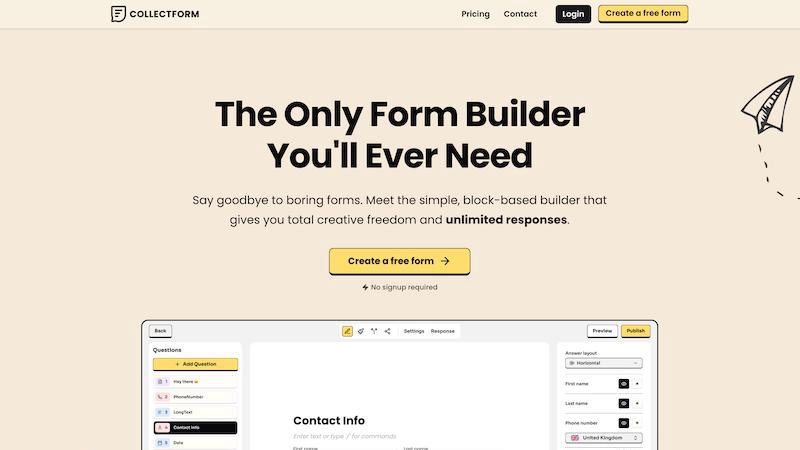
Collectform is the best free Typeform alternative with unlimited responses and advanced logic, no coding or hidden fees.

EDIBridge
EDIBridge simplifies EDI setup with pre-built packages, saving you time and money while ensuring compliance with major retailers.


Vibetoolstack
Vibetoolstack provides essential AI-native tools and workflows designed for builders to streamline, compare, and enhance their projects.

VideoFX Studio
VideoFX Studio empowers you to effortlessly create stunning AI-generated videos with advanced lip sync and motion control features, all online for.

EveryEcomApp
Discover and compare top-rated e-commerce apps for Shopify, WooCommerce, and BigCommerce to elevate your online store effortlessly.

Smart Comparison Widget
Empower your customers to compare products effortlessly, boosting conversions and reducing returns with our smart comparison widget.