
Blueberry vs CloudBurn

Blueberry
Blueberry is an all-in-one AI-native workspace that simplifies web app development, letting you build and ship.
Last updated: February 28, 2026

Last updated: February 28, 2026
Visual Comparison
Blueberry
CloudBurn
Feature Comparison
Blueberry
Integrated Workspace
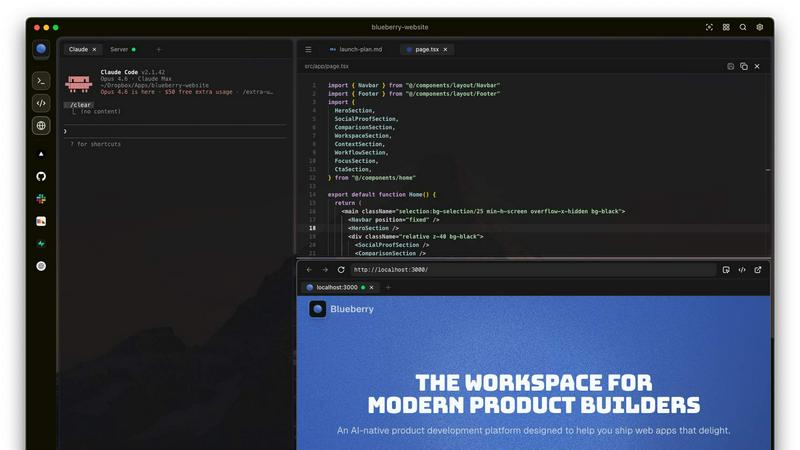
Blueberry offers a unique integrated workspace that combines a code editor, terminal, and preview browser into one cohesive environment. This eliminates the need to switch between multiple applications, saving you time and enhancing focus.
AI Context Awareness
The powerful MCP server allows your chosen AI models to have full context of your project. This means your AI can see your code and running applications in real time, helping you get more accurate and relevant responses without losing context.
Pinned Apps
Keep essential tools like GitHub, Linear, Figma, and PostHog docked within your workspace. These pinned apps load seamlessly with your project, enabling your AI to interact with them and provide you with live contextual information.
Multi-Device Preview
Blueberry includes built-in previews for desktop, tablet, and mobile views. This feature allows you to see exactly how your web applications will appear on different devices, ensuring that you deliver a flawless user experience.
CloudBurn
Automatic Cost Analysis
Every time a developer opens a pull request with infrastructure changes, CloudBurn automatically analyzes the modifications using real-time AWS pricing. This ensures that teams are aware of the financial implications of their changes before they are deployed, reducing the risk of expensive surprises.
Real-Time AWS Pricing
CloudBurn provides real-time AWS pricing tailored to your specific region, allowing for precise cost estimates that reflect the current market. This feature ensures that teams have the most accurate financial information at their fingertips, enhancing decision-making during the development process.
Resource-Level Cost Breakdown
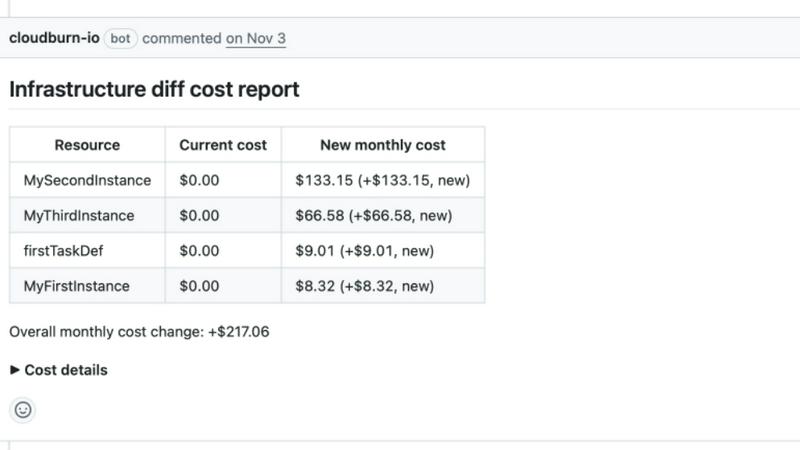
With CloudBurn, teams receive a resource-level breakdown of costs, illustrating the old versus new monthly costs for each change. This transparency helps developers understand exactly how their modifications impact overall expenses, enabling them to make necessary adjustments before deployment.
Integrated Code Review Process
CloudBurn integrates cost awareness into the code review process, just like unit testing and traditional code reviews. This change fosters a culture of financial responsibility among developers, ensuring that cost considerations are part of the development lifecycle from the very beginning.
Use Cases
Blueberry
Streamlined Development
Developers can leverage Blueberry's integrated environment to streamline their development processes, making it easier to write, test, and deploy code without the need for constant app-switching.
Enhanced Collaboration
With real-time context sharing through pinned apps and AI integration, teams can collaborate more effectively, ensuring everyone is on the same page and can access the same tools and information instantly.
Learning and Experimentation
Blueberry serves as an excellent platform for new developers to learn coding and AI integration. The user-friendly workspace encourages experimentation and hands-on learning without overwhelming distractions.
Rapid Prototyping
Product teams can use Blueberry to rapidly prototype web applications, utilizing the AI's contextual awareness to quickly iterate on their ideas and receive instant feedback on their code and design choices.
CloudBurn
Cost Management During Development
With CloudBurn, teams can manage costs effectively during the development phase. By analyzing infrastructure changes in real-time, developers can identify and rectify potential financial pitfalls before they escalate.
Enhanced Collaboration in Code Reviews
CloudBurn transforms the code review process by incorporating cost discussions into team meetings. This leads to collaborative decision-making, where developers can discuss financial implications alongside technical considerations, resulting in better overall project outcomes.
Streamlined CI/CD Workflows
Integrating CloudBurn into CI/CD workflows automates the cost analysis process, allowing teams to focus on delivering quality code without the worry of unexpected costs. This streamlining enhances efficiency and promotes continuous delivery without financial surprises.
Prevention of Costly Misconfigurations
By catching mistakes early in the development cycle, CloudBurn significantly reduces the chances of deploying misconfigured resources that can lead to substantial financial losses. This proactive approach ensures that teams can deploy with confidence.
Overview
About Blueberry
Blueberry is a revolutionary macOS application designed specifically for modern product builders who demand efficiency and clarity in their workflow. By consolidating your editor, terminal, and browser into one focused workspace, Blueberry eliminates the frustration of juggling multiple windows and applications. With Blueberry, developers can seamlessly connect to AI models like Claude, Codex, and Gemini through its built-in MCP server, enabling the AI to access your files, terminal output, and live project previews simultaneously. This innovative platform enhances productivity and reduces the need for tedious copy-pasting, allowing you to focus on what truly matters: building exceptional web applications. Whether you are a seasoned developer or just starting, Blueberry is designed to cater to your needs, providing a streamlined environment that fosters creativity and efficiency. Experience the future of product development with Blueberry—100% free during its beta phase.
About CloudBurn
CloudBurn is an innovative solution designed specifically for teams using Terraform or AWS CDK, focusing on preventing costly infrastructure mistakes before they are deployed to production. Many organizations face the challenge of discovering AWS cost overruns weeks after changes are implemented, leading to significant financial implications. With CloudBurn, this issue is addressed head-on by providing real-time cost analysis during the code review phase, allowing teams to make informed decisions about their infrastructure changes. This proactive approach not only helps in avoiding unexpected bills but also integrates seamlessly into existing workflows. By catching potential cost issues early, CloudBurn empowers teams to optimize their cloud infrastructure without the fear of incurring unnecessary expenses.
Frequently Asked Questions
Blueberry FAQ
Is Blueberry really free during the beta phase?
Yes, Blueberry is completely free to use during its beta phase, allowing users to explore all its features without any cost.
Which AI models can I connect to Blueberry?
You can connect various AI models to Blueberry, including Claude, Codex, and Gemini, through its integrated MCP server for enhanced productivity.
Can I use Blueberry for team collaboration?
Absolutely! Blueberry’s workspace allows teams to collaborate effectively by keeping all necessary tools and context within a single environment.
What operating system is required to run Blueberry?
Blueberry is exclusively available for macOS, ensuring a seamless experience for Apple users looking to enhance their development workflow.
CloudBurn FAQ
How does CloudBurn integrate with GitHub?
CloudBurn integrates seamlessly with GitHub by allowing teams to install it from the GitHub Marketplace. Once installed, it automatically analyzes pull requests for infrastructure changes, providing real-time cost estimates.
What types of infrastructure changes can CloudBurn analyze?
CloudBurn can analyze infrastructure changes made through Terraform and AWS CDK. It automatically detects changes made in pull requests and evaluates their potential cost implications.
Is there a trial period for CloudBurn?
Yes, CloudBurn offers a 14-day Pro Trial that allows users to experience its advanced features for free. Users can cancel at any time or continue using the Community plan indefinitely.
How does CloudBurn help prevent unexpected AWS bills?
CloudBurn provides immediate visibility into the costs associated with infrastructure changes before they are deployed. By generating detailed cost reports during code reviews, it enables teams to make informed decisions and prevent costly misconfigurations.
Alternatives
Blueberry Alternatives
Blueberry is an innovative macOS application designed for developers, combining an editor, terminal, and browser into a singular, focused workspace. This product builder's workspace eliminates the hassle of juggling multiple windows, streamlining the development process and boosting productivity. Users often seek alternatives to Blueberry for various reasons, including pricing considerations, the desire for specific features, or compatibility with different operating systems. When searching for an alternative, look for an application that offers similar functionality, a user-friendly interface, and robust integration capabilities with other tools. Additionally, consider the responsiveness of the support team, the community surrounding the product, and the overall performance to ensure it meets your development needs effectively.
CloudBurn Alternatives
CloudBurn is a cutting-edge tool designed for teams utilizing Terraform or AWS CDK, allowing them to visualize infrastructure costs within code reviews rather than discovering them post-deployment on their bills. As a part of the Dev Tools category, CloudBurn empowers developers to catch costly infrastructure decisions before they reach production, enhancing both financial and operational efficiency. Many users seek alternatives to CloudBurn due to varying needs such as pricing structures, feature sets, or compatibility with different platforms. When evaluating alternatives, consider factors like real-time cost analysis capabilities, regional pricing accuracy, and the ability to provide detailed breakdowns of cost implications for proposed infrastructure changes. The right choice should align with your team’s workflow and financial oversight requirements.