
BudgetSheet vs ConvertBankToExcel

BudgetSheet
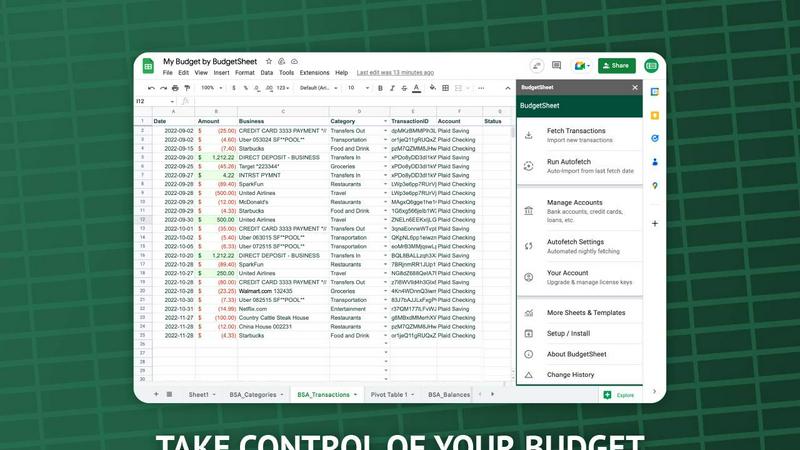
Stop manual data entry; BudgetSheet automates live bank feeds directly into your Google Sheets.
Last updated: February 28, 2026

ConvertBankToExcel
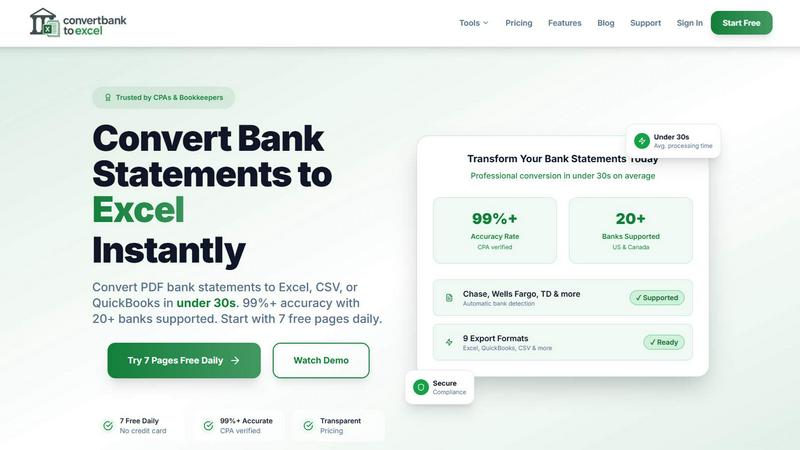
ConvertBankToExcel swiftly transforms your PDF bank statements into accurate Excel or CSV files in under 30 seconds.
Last updated: February 28, 2026
Visual Comparison
BudgetSheet
ConvertBankToExcel
Feature Comparison
BudgetSheet
Direct Bank-to-Sheet Automation
Forget manual downloads. BudgetSheet eliminates the tedious process of logging into each bank, exporting CSV files, and reformatting data. With a single click, you can fetch the latest transactions from all your linked accounts directly into your Google Sheet. This feature provides a seamless, automated pipeline that ensures your financial data is always current without any manual intervention, saving you hours each month.
Support for 10,000+ Financial Institutions
BudgetSheet connects to virtually any bank or financial service in the U.S. and Canada through its integration with Plaid. Whether you're tracking a checking account, savings, credit cards, mortgages, or investment portfolios, chances are your institution is supported. This universal compatibility ensures you can consolidate all your financial data in one place, no matter how fragmented your accounts are across different providers.
Full Customization & Advanced Control
Unlike closed-platform apps, BudgetSheet delivers raw transaction data into your own spreadsheet. This gives you complete freedom to create custom budgets, build dynamic dashboards, run complex analyses, and set up automated workflows using Google Apps Script, Zapier, or other tools. You define the categories, rules, and visualizations that matter for your unique financial picture.
Secure, Read-Only Connections
Security is paramount. BudgetSheet uses Plaid for all bank connections, meaning your login credentials are never handled or stored by BudgetSheet. The add-on only stores an encrypted, read-only access token. Furthermore, BudgetSheet itself does not store your transaction data; it acts as a secure conduit, passing data directly from your bank to your spreadsheet, which you fully own and control.
ConvertBankToExcel
99%+ Accuracy Rate
Our platform boasts an impressive accuracy rate exceeding 99%, as verified by CPAs. This means you can trust ConvertBankToExcel to deliver precise data extraction from your bank statements, minimizing errors and ensuring reliability in financial reporting.
Lightning-Fast Processing
ConvertBankToExcel processes bank statements in under 30 seconds on average. This rapid turnaround allows accounting professionals to handle large volumes of data quickly, making it an indispensable tool for time-sensitive financial tasks.
Comprehensive Format Support
We support an extensive range of export formats, including Excel, CSV, QuickBooks (QBO/QFX/OFX/IIF), JSON, and XML. This versatility ensures that you can easily import your converted data into any accounting software, enhancing your workflow and efficiency.
AI-Powered OCR Technology
Our advanced Optical Character Recognition (OCR) technology automatically extracts data from both digital and scanned PDF documents. This feature allows for seamless processing of various statement types, including checking, savings, and credit card statements, ensuring comprehensive coverage of your financial documents.
Use Cases
BudgetSheet
For Power Users Building Custom Financial Dashboards
Financial analysts, small business owners, and savvy individuals use BudgetSheet to feed live transaction data into complex, custom-built Google Sheet dashboards. They can create real-time profit & loss statements, cash flow forecasts, and custom spending analyses that off-the-shelf software cannot match, maintaining complete control over formulas, charts, and data structure.
For Individuals Escaping Restrictive Budgeting Apps
Users frustrated with the one-size-fits-all approach of apps like Mint or YNAB turn to BudgetSheet for liberation. It allows them to import all their transactions into a familiar spreadsheet environment where they can design a budgeting system that perfectly fits their lifestyle, categories, and financial goals without being forced into a rigid template.
For Streamlining Business Expense Tracking
Freelancers and small business owners connect their business accounts to automatically pull transactions into a dedicated Google Sheet. This automates the foundational step of bookkeeping, making it easy to categorize expenses, prepare for tax season, and generate reports without manually compiling statements from multiple sources.
For Advanced Automation and Integration
Tech-oriented users leverage BudgetSheet as a reliable data source for advanced automation. By having clean, updated transaction data in Sheets, they can trigger workflows in Zapier, use Google Apps Script to send custom alerts, or integrate with other APIs to build a fully automated personal finance ecosystem tailored to their specific needs.
ConvertBankToExcel
Streamlining Tax Preparation
ConvertBankToExcel simplifies the tax preparation process by organizing and converting bank statements into easily manageable formats. Accountants can efficiently gather necessary documentation for IRS requirements, reducing the risk of audits and ensuring compliance.
Enhancing Mortgage Applications
When applying for a mortgage, clear and organized financial statements are crucial. ConvertBankToExcel allows users to transform their bank statements into professional formats, making it easier to present financial history to lenders and facilitate the approval process.
Simplifying Visa Applications
For individuals seeking visas, demonstrating financial stability is often required. ConvertBankToExcel helps applicants convert their bank statements into formats required by immigration authorities, streamlining the process and increasing the chances of approval.
Supporting Financial Audits
During financial audits, having accurate and organized data is vital. ConvertBankToExcel provides auditors with the ability to quickly convert and review bank statements, ensuring that financial records are transparent and easily accessible for review.
Overview
About BudgetSheet
Tired of clunky, restrictive budgeting apps that lock your data away? BudgetSheet is the battle-tested solution that puts you back in the driver's seat. This powerful Google Sheets add-on delivers live, automated bank transactions directly into your spreadsheet, ending the manual nightmare of CSV exports and copy-pasting forever. It's built for financial power users, savvy analysts, and anyone who demands full control over their financial data. While other platforms like Mint force you into their pre-defined categories and dashboards, BudgetSheet gives you the raw data to build custom budgets, forecasts, and reports exactly your way. By leveraging Plaid's secure infrastructure, it connects to over 10,000 financial institutions—including checking, savings, credit cards, loans, and investment accounts—and automates the data flow. Your spreadsheet becomes the single source of truth, ready for advanced automation with tools like Google Apps Script or Zapier. If you've outgrown basic apps and need a flexible, powerful system that adapts to you, not the other way around, BudgetSheet is your definitive tool.
About ConvertBankToExcel
ConvertBankToExcel is an innovative AI-powered platform designed specifically for accounting professionals who demand precision and efficiency in financial data management. This tool revolutionizes the arduous task of manual data entry by automatically extracting transaction data from PDF bank statements and converting it into various formats including Excel, CSV, and QuickBooks. With a proven accuracy rate of over 99% — verified by CPAs — ConvertBankToExcel significantly reduces the time spent on data entry, enabling accountants and bookkeepers to focus on strategic tasks rather than tedious paperwork. Trusted by over 50,000 professionals, this solution is tailored for seamless integration with more than 20 major banks in the US and Canada, ensuring that users can manage and analyze their financial data effortlessly. Embrace the future of accounting with ConvertBankToExcel and transform your bank statement processing into a fast, reliable, and secure experience.
Frequently Asked Questions
BudgetSheet FAQ
Is my bank login information secure with BudgetSheet?
Absolutely. BudgetSheet never sees or stores your bank login credentials. It uses Plaid, a industry-leading financial data network, to establish secure, read-only connections. Your credentials are entered directly into Plaid's secure interface. BudgetSheet only receives and stores an encrypted token that allows it to retrieve transaction data, ensuring the highest level of security.
How does BudgetSheet compare to Mint or Personal Capital?
BudgetSheet is for those who want control, while others offer a closed system. Mint provides pre-built charts and categories but locks your data in. BudgetSheet gives you the raw data in your spreadsheet, allowing for unlimited customization, complex analysis, and integration with other tools. It's the choice for users who have outgrown generic templates and want to build their own financial command center.
Can I automate the transaction import process?
Yes. After your initial setup, you can enable the "Autofetch" feature within the add-on. This tells BudgetSheet to automatically fetch new transactions from all your linked accounts every night, fully automating the data pipeline so your spreadsheet is always up-to-date without any manual clicks required.
What happens after the 15-day free trial?
After the free trial, you can choose to upgrade to a paid annual plan starting at $59 USD per year. The upgrade is managed directly from within the BudgetSheet add-on menu in Google Sheets. If you do not upgrade, the add-on will cease to fetch new transactions, but all your historical data and setup will remain intact in your spreadsheet.
ConvertBankToExcel FAQ
How does ConvertBankToExcel ensure data accuracy?
ConvertBankToExcel utilizes advanced AI-powered Optical Character Recognition (OCR) technology, which has been CPA verified for accuracy. This ensures that data extraction from bank statements is reliable and precise.
What types of bank statements can I convert?
You can convert a wide variety of bank statements, including checking, savings, and credit card statements from over 20 major US and Canadian banks. Both digital and scanned PDFs are supported for conversion.
Is my data secure when using ConvertBankToExcel?
Absolutely. ConvertBankToExcel employs bank-grade encryption to protect your data during processing. Additionally, all files are automatically deleted after 24 hours to ensure your privacy and security.
Can I try ConvertBankToExcel for free?
Yes! ConvertBankToExcel offers a free tier where you can convert up to 7 pages daily without the need for a credit card. This allows you to experience the platform's capabilities before committing to a paid plan.
Alternatives
BudgetSheet Alternatives
BudgetSheet is the live, automated bridge between your bank accounts and Google Sheets. It belongs to the personal finance automation category, eliminating the tedious manual work of exporting and pasting CSV files. Users get real-time transaction data flowing directly into their custom spreadsheets. People often seek alternatives for a few key reasons. Pricing structures can be a primary driver, as needs evolve from simple tracking to complex budgeting. Others might require integrations beyond Google Sheets or seek a platform with a different set of automated features or reporting tools built directly into an app. When evaluating other options, focus on core needs. Consider the automation depth—does it truly eliminate manual steps? Assess platform compatibility and whether it supports your specific financial institutions. Finally, scrutinize the value: does the cost justify the time saved and the level of financial clarity provided?
ConvertBankToExcel Alternatives
ConvertBankToExcel is an innovative AI-powered platform designed to convert bank statement PDFs into structured Excel or CSV formats, catering primarily to accounting professionals. Users often seek alternatives due to various reasons, including pricing structures, specific feature sets, or the need for compatibility with different platforms and software. Choosing the right alternative requires careful consideration of factors such as accuracy, processing speed, security measures, and the ability to handle multiple file types efficiently. When evaluating alternatives, it's essential to focus on the accuracy of data extraction, the speed of processing statements, and the range of export formats available. Additionally, consider the user interface, customer support, and the trustworthiness of the platform to ensure a seamless transition from your current solution.