
ConvertBankToExcel vs ExpenseManager

ConvertBankToExcel
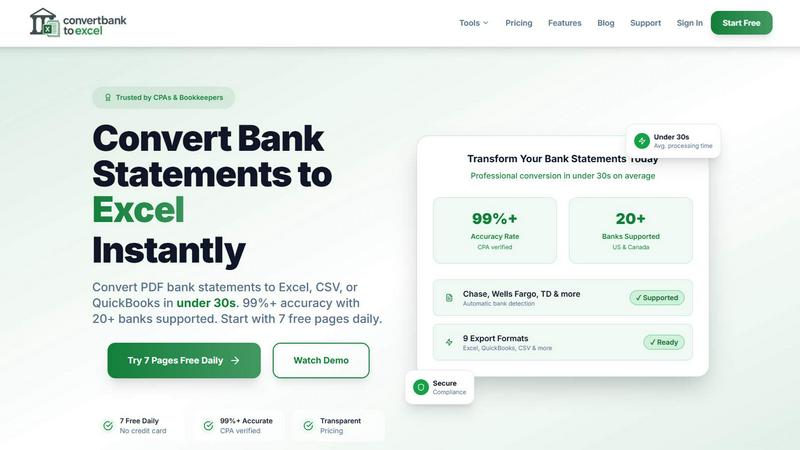
ConvertBankToExcel swiftly transforms your PDF bank statements into accurate Excel or CSV files in under 30 seconds.
Last updated: February 28, 2026

ExpenseManager
ExpenseManager beats spreadsheets by instantly tracking and splitting all expenses with AI insights.
Last updated: February 28, 2026
Visual Comparison
ConvertBankToExcel
ExpenseManager

Feature Comparison
ConvertBankToExcel
99%+ Accuracy Rate
Our platform boasts an impressive accuracy rate exceeding 99%, as verified by CPAs. This means you can trust ConvertBankToExcel to deliver precise data extraction from your bank statements, minimizing errors and ensuring reliability in financial reporting.
Lightning-Fast Processing
ConvertBankToExcel processes bank statements in under 30 seconds on average. This rapid turnaround allows accounting professionals to handle large volumes of data quickly, making it an indispensable tool for time-sensitive financial tasks.
Comprehensive Format Support
We support an extensive range of export formats, including Excel, CSV, QuickBooks (QBO/QFX/OFX/IIF), JSON, and XML. This versatility ensures that you can easily import your converted data into any accounting software, enhancing your workflow and efficiency.
AI-Powered OCR Technology
Our advanced Optical Character Recognition (OCR) technology automatically extracts data from both digital and scanned PDF documents. This feature allows for seamless processing of various statement types, including checking, savings, and credit card statements, ensuring comprehensive coverage of your financial documents.
ExpenseManager
AI-Powered Receipt Scanner & OCR
Ditch manual data entry forever. Simply snap a photo of any receipt, and our advanced AI-powered Optical Character Recognition (OCR) instantly and accurately extracts the total amount, merchant name, and spending category. This transforms a pile of paper slips into organized, digital data in seconds, forming the flawless foundation for all your tracking, budgeting, and splitting.
Proactive Budgeting with Smart Alerts
Go beyond basic budget tracking with a system designed to prevent overspending before it happens. Set custom budgets for categories like groceries, dining, or travel. ExpenseManager then acts as your financial sentry, sending you intelligent push notifications when you hit 50%, 75%, and 90% of your limit. This gives you real-time, actionable warnings to adjust your spending, not just a disappointing report at the end of the month.
Flexible Expense Splitting & Auto-Settlement
Split any cost with anyone, any way you need. Whether it's an equal split for rent, a percentage-based split for shared income contributions, or a custom split for complex group dinners, ExpenseManager handles it flawlessly. The app automatically calculates who owes what and provides clear settlement tracking, turning the awkward "you owe me" conversations into automated, transparent updates that keep relationships strong.
Multi-Currency & Cash Flow Intelligence
Manage global finances with confidence, perfect for travelers and digital nomads. ExpenseManager supports over 30 currencies, allowing you to track and split expenses in local amounts without conversion headaches. Furthermore, our AI analyzes your spending patterns to provide cash flow forecasts, helping those with variable incomes plan with certainty and identify new opportunities to save.
Use Cases
ConvertBankToExcel
Streamlining Tax Preparation
ConvertBankToExcel simplifies the tax preparation process by organizing and converting bank statements into easily manageable formats. Accountants can efficiently gather necessary documentation for IRS requirements, reducing the risk of audits and ensuring compliance.
Enhancing Mortgage Applications
When applying for a mortgage, clear and organized financial statements are crucial. ConvertBankToExcel allows users to transform their bank statements into professional formats, making it easier to present financial history to lenders and facilitate the approval process.
Simplifying Visa Applications
For individuals seeking visas, demonstrating financial stability is often required. ConvertBankToExcel helps applicants convert their bank statements into formats required by immigration authorities, streamlining the process and increasing the chances of approval.
Supporting Financial Audits
During financial audits, having accurate and organized data is vital. ConvertBankToExcel provides auditors with the ability to quickly convert and review bank statements, ensuring that financial records are transparent and easily accessible for review.
ExpenseManager
Couples Managing Household Finances
Eliminate money arguments and build financial trust. Couples can seamlessly track joint household expenses, from mortgage payments to grocery runs, and split them according to their agreement (equal, income-based, etc.). The shared dashboard provides instant clarity on who paid for what and any outstanding balances, fostering transparency and partnership in financial goals.
Individual Budgeting & Financial Clarity
Take complete control of your personal finances. For solo users, ExpenseManager is a powerful budgeting and spending analysis tool. By categorizing every expense (automated via OCR), you gain deep insights into where your money goes. Proactive budget alerts help you stay on track, while cash flow forecasting is invaluable for freelancers and anyone wanting to save more effectively.
Group Travel & Trip Expense Management
End the post-vacation spreadsheet nightmare. When traveling with friends or family, easily log shared expenses for hotels, meals, and activities in the local currency. The app automatically splits costs among the group and tracks who has settled up. Everyone stays on the same page in real-time, so you can focus on enjoying the trip, not debating the bills.
Roommates Splitting Recurring Costs
Simplify the shared living financial logistics. Roommates can use ExpenseManager to track and split recurring bills like rent, utilities, and internet seamlessly. Set up repeating expenses with custom splits, and the app maintains a running, indisputable record of what each person owes and has paid, ensuring fairness and eliminating monthly calculation hassles.
Overview
About ConvertBankToExcel
ConvertBankToExcel is an innovative AI-powered platform designed specifically for accounting professionals who demand precision and efficiency in financial data management. This tool revolutionizes the arduous task of manual data entry by automatically extracting transaction data from PDF bank statements and converting it into various formats including Excel, CSV, and QuickBooks. With a proven accuracy rate of over 99% — verified by CPAs — ConvertBankToExcel significantly reduces the time spent on data entry, enabling accountants and bookkeepers to focus on strategic tasks rather than tedious paperwork. Trusted by over 50,000 professionals, this solution is tailored for seamless integration with more than 20 major banks in the US and Canada, ensuring that users can manage and analyze their financial data effortlessly. Embrace the future of accounting with ConvertBankToExcel and transform your bank statement processing into a fast, reliable, and secure experience.
About ExpenseManager
Forget juggling multiple apps. ExpenseManager is the definitive, battle-tested platform that unifies personal budgeting and shared expense management into a single, powerful command center. While other apps force you to choose between tracking your own spending (like Mint) and splitting bills with others (like Splitwise), ExpenseManager conquers both fronts. It's built for anyone who demands absolute clarity and control over their finances, whether flying solo, building a life with a partner, sharing an apartment, or exploring the world with friends. Its core value proposition is ruthless efficiency: eliminate financial friction, automate tedious tasks, and gain actionable insights, all protected by bank-grade security. From snapping a receipt to settling debts across 30+ currencies, ExpenseManager is the only tool you need to win with your money.
Frequently Asked Questions
ConvertBankToExcel FAQ
How does ConvertBankToExcel ensure data accuracy?
ConvertBankToExcel utilizes advanced AI-powered Optical Character Recognition (OCR) technology, which has been CPA verified for accuracy. This ensures that data extraction from bank statements is reliable and precise.
What types of bank statements can I convert?
You can convert a wide variety of bank statements, including checking, savings, and credit card statements from over 20 major US and Canadian banks. Both digital and scanned PDFs are supported for conversion.
Is my data secure when using ConvertBankToExcel?
Absolutely. ConvertBankToExcel employs bank-grade encryption to protect your data during processing. Additionally, all files are automatically deleted after 24 hours to ensure your privacy and security.
Can I try ConvertBankToExcel for free?
Yes! ConvertBankToExcel offers a free tier where you can convert up to 7 pages daily without the need for a credit card. This allows you to experience the platform's capabilities before committing to a paid plan.
ExpenseManager FAQ
What is the Founding Member offer?
The Founding Member offer is a limited-time opportunity for the first 100 users to claim lifetime access to all of ExpenseManager's premium features for a one-time fee of $0. This means you secure a forever-free premium subscription, bypassing any future annual fees, simply by being an early adopter and completing a quick setup process.
Is my financial data secure?
Absolutely. ExpenseManager employs bank-grade AES-256 encryption to protect all your financial data. We treat your sensitive information with the highest level of security protocols, ensuring that your receipts, transaction details, and account information are stored and transmitted safely, giving you peace of mind.
What happens if I don't stay active?
To maintain your lifetime Founding Member status, you need to use the app occasionally. This means completing the initial setup, adding some expenses, creating a budget, and logging in periodically. This reasonable activity clause ensures our community is built with engaged users who truly benefit from the platform.
Do you support multiple currencies?
Yes, we support over 30 currencies. This feature is essential for international travelers, expats, or anyone dealing with foreign transactions. You can add expenses in their original currency, and the app will handle the tracking and splitting without forcing immediate conversion, providing accurate and flexible multi-currency management.
Alternatives
ConvertBankToExcel Alternatives
ConvertBankToExcel is an innovative AI-powered platform designed to convert bank statement PDFs into structured Excel or CSV formats, catering primarily to accounting professionals. Users often seek alternatives due to various reasons, including pricing structures, specific feature sets, or the need for compatibility with different platforms and software. Choosing the right alternative requires careful consideration of factors such as accuracy, processing speed, security measures, and the ability to handle multiple file types efficiently. When evaluating alternatives, it's essential to focus on the accuracy of data extraction, the speed of processing statements, and the range of export formats available. Additionally, consider the user interface, customer support, and the trustworthiness of the platform to ensure a seamless transition from your current solution.
ExpenseManager Alternatives
ExpenseManager is a powerful personal finance app that uniquely combines personal budgeting with shared expense management. It belongs to the category of modern financial tools designed to give users complete clarity and control over their money, whether they are managing it alone or with others. Users often explore alternatives for various reasons, such as specific pricing needs, a desire for different feature sets, or compatibility with their preferred platforms. Some may seek a simpler tool focused only on personal tracking, while others might prioritize different methods for splitting bills or require integrations with other financial services. When evaluating other options, it's crucial to identify your core needs. Consider whether you require robust shared expense features, advanced receipt scanning, real-time budget alerts, or multi-currency support. The best choice will be the tool that most effectively bridges the gap between your individual financial discipline and any collaborative spending responsibilities.