
Invoice Guru vs ProcessBankStatement

Invoice Guru
Invoice Guru creates HMRC-compliant invoices for UK tradespeople in 60 seconds flat.
Last updated: February 28, 2026

ProcessBankStatement
Stop manual data entry; instantly convert any PDF bank statement into a clean, ready-to-use CSV file.
Last updated: March 11, 2026
Visual Comparison
Invoice Guru
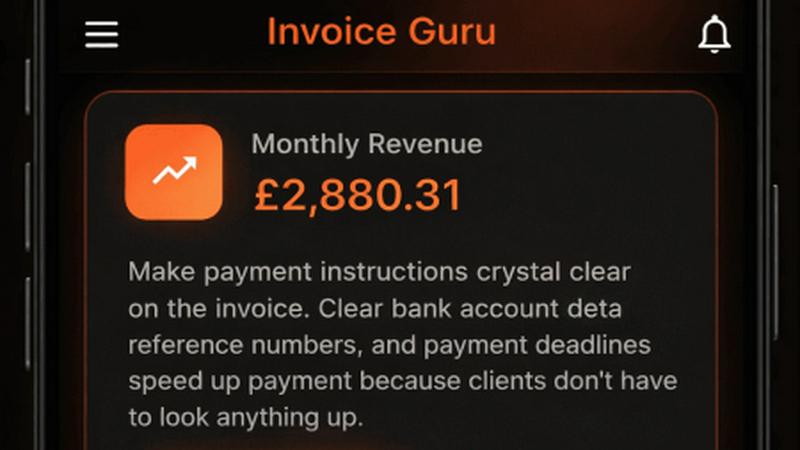
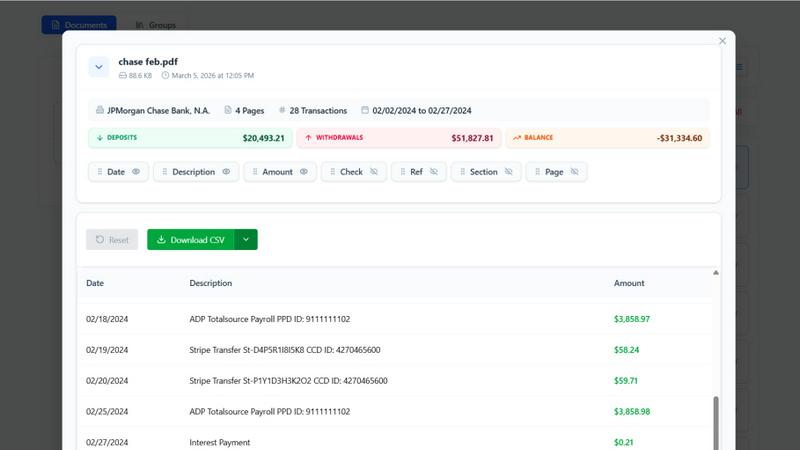
ProcessBankStatement
Feature Comparison
Invoice Guru
Lightning-Fast, Mobile-First Invoice Creation
Ditch the clipboard and desktop. Invoice Guru's intuitive mobile interface lets you generate and send a fully branded, professional invoice in less than a minute directly from a job site. Pre-filled client details, automatic VAT calculations, and seamless addition of line items mean you get paid faster, not buried in paperwork.
AI-Powered OCR Receipt Scanner
Eliminate manual data entry and lost receipts forever. Simply snap a photo of any paper receipt, and Invoice Guru's advanced AI instantly reads and extracts all key details—vendor, date, amount, tax—saving it as a categorized expense. This turns hours of weekly admin into a task of seconds, keeping your expense tracking flawless.
Smart Bank Integration & Payment Matching
Stop cross-referencing bank statements. Connect your business account securely, and Invoice Guru automatically imports transactions and matches them to your unpaid invoices. This real-time reconciliation shows you exactly who has paid and what's overdue, giving you crystal-clear financial control without the manual hunt.
Future-Proof Tax Compliance (MTD, KSeF)
Built for the evolving regulatory landscape, Invoice Guru has upcoming mandates like Making Tax Digital (MTD) for the UK and Poland's KSeF system baked into its core. You won't need to panic-switch tools when rules change; your invoicing software is already prepared, ensuring you stay 100% compliant without extra cost or complexity.
ProcessBankStatement
Lightning-Fast, Intelligent Parsing
Our proprietary parsing engine is built for speed and accuracy, not guesswork. It doesn't just read text; it intelligently identifies transaction dates, descriptions, amounts, and balances across diverse bank formats. This means you get a clean, structured CSV in seconds, not minutes, with data perfectly formatted for immediate import into QuickBooks, Excel, or any custom software, eliminating the need for post-processing cleanup.
Military-Grade Security & User Control
Your financial data is sacred. Every file uploaded to ProcessBankStatement is encrypted during transit using enterprise-grade protocols. We believe you should own your data completely, which is why you have full, transparent control to view and permanently delete your statements and extracted files from our servers at any time, with no hidden retention policies.
Universal PDF & Scanned Document Support
Forget about pre-formatting or finding the "right" type of statement. Our tool is engineered to handle the real-world chaos of financial documents. It seamlessly processes both digital/text-based PDFs and image-based scanned statements or photos, ensuring no client file is ever a hassle. Multi-page statements and batch uploads are fully supported for maximum workflow efficiency.
Optimized for Accounting Workflows
This tool is built from the ground up for professional use. The output CSV is meticulously structured with clean column headers and consistent formatting that matches the import requirements of major platforms like QuickBooks. This turnkey readiness transforms a raw bank statement into a directly usable asset, slashing the time from document receipt to reconciled books.
Use Cases
Invoice Guru
The On-Site Tradesperson Closing a Job
A plumber finishes a repair. Instead of promising to "send the invoice later," they open Invoice Guru on their phone, select the client from their list, add the service items, and hit send before leaving the property. The client receives a professional PDF instantly, enabling faster payment and projecting a highly professional image.
The Small Business Owner Managing Cash Flow
A painting company owner uses the bank integration and dashboard to see all outstanding invoices and automatically matched payments at a glance. They can immediately identify late payers and send automated reminders, proactively managing their cash flow without spending their evening chasing payments manually.
The Contractor Tracking Expenses for Tax Time
An electrician collects receipts for materials, fuel, and tools throughout the week. Using the OCR scanner, they instantly digitize and categorize each one. Come tax season or accountant review, all expenses are perfectly organized and reported, maximizing claimable deductions and saving hours of administrative chaos.
The Service Business Expanding Across Borders
A UK-based decorator gets a project for a client in Poland. Using Invoice Guru, they can easily issue an invoice in Polish currency (PLN) with compliant Polish formatting and tax details for KSeF, all from the same app they use for domestic work. This multi-currency, multi-language capability supports seamless international service.
ProcessBankStatement
Streamlining Bookkeeping & Client Onboarding
Accountants and bookkeepers can revolutionize their service delivery. Instead of manually keying in transactions from a stack of client PDFs, they simply upload statements in bulk. This cuts data entry time from hours to seconds per client, allowing for faster onboarding, more clients served, and the ability to focus on high-value advisory services rather than data processing.
Accelerating Loan & Mortgage Processing
Loan officers and mortgage processors can dramatically reduce application turnaround times. By instantly converting applicant bank statements into structured data, they can quickly analyze cash flow, verify deposits, and populate their internal systems. This eliminates a major bottleneck, leading to faster decisions, happier clients, and a significant competitive edge in a time-sensitive industry.
Empowering Small Business Financial Management
Small business owners and solopreneurs can take control of their finances without the accounting headache. By converting monthly statements to CSV, they can easily import data into Excel or accounting software to track expenses, prepare for taxes, and understand profitability—all without paying for expensive bookkeeping hours for simple data entry tasks.
Enabling Custom Financial Analysis & Reporting
Financial analysts and consultants who need to perform deep dives into transaction data can bypass manual compilation. ProcessBankStatement provides the clean, structured data foundation needed to build custom models, create spending reports, identify trends, and generate insights in tools like Excel, Python, or R, turning raw documents into strategic intelligence.
Overview
About Invoice Guru
Invoice Guru is the battle-tested, mobile-first invoicing weapon built exclusively for tradespeople and on-site service businesses. While other tools chain you to a desk, Invoice Guru is engineered for the real world, empowering painters, plumbers, electricians, and contractors to conquer admin from their phone. Its core mission is to obliterate paperwork and reclaim your time through ruthless speed and intelligent automation. Create and send professional, compliant invoices in under 60 seconds, track payments in real-time, and automate the tedious tasks that eat into your profits. With smart features like AI-powered OCR receipt scanning, automatic bank reconciliation, and built-in compliance for regulations like UK MTD and Poland's KSeF, Invoice Guru isn't just another app—it's a strategic partner built by a tradesperson who has been in your boots. Stop adapting to generic software and start using a tool that adapts to you.
About ProcessBankStatement
ProcessBankStatement is the battle-tested weapon of choice for finance professionals, accountants, and business owners who are done with the soul-crushing grind of manual data entry. This isn't just another converter; it's a high-speed, precision-engineered data extraction engine. You upload any PDF bank statement—whether it's a clean text file or a messy scanned document—and within seconds, you get a perfectly structured, downloadable CSV file. The tool is engineered to work flawlessly with statements from major U.S. banks like Chase, Bank of America, and Wells Fargo, turning chaotic financial data into clean, analysis-ready information. Its core value proposition is ruthless efficiency: reclaim hours of lost productivity every week by automating a tedious, error-prone task. With bank-grade security where you retain full control over your data, ProcessBankStatement doesn't just promise a solution; it delivers a tangible competitive advantage, allowing you to focus on strategic analysis and client service instead of mindless typing.
Frequently Asked Questions
Invoice Guru FAQ
Is Invoice Guru really compliant with HMRC's Making Tax Digital (MTD)?
Yes, absolutely. Invoice Guru is designed from the ground up for MTD compliance. It maintains digital records in the required format and will provide seamless, direct submission capabilities to HMRC for VAT returns when the legislation expands, ensuring tradespeople are fully prepared and avoid penalties.
How does the bank integration work, and is it safe?
Bank integration uses secure, read-only connections via established financial data providers (like open banking APIs). Invoice Guru never sees your login credentials and cannot make transactions. It only imports transaction data to match against your invoices, using bank-level encryption to keep your financial data completely secure.
Can I use Invoice Guru on a computer as well as my phone?
While Invoice Guru is built with a mobile-first, on-the-go philosophy for core invoicing, it offers a full-featured web dashboard. This allows you to manage clients, view advanced reports, and handle deeper administrative tasks from any computer, giving you flexibility while keeping the power in your pocket.
What happens if I need to issue a quote or estimate before a job?
Invoice Guru includes full quote and estimate functionality. You can create professional, branded quotes in seconds on your phone, send them to clients, and then with one tap, convert an accepted quote directly into a final invoice, saving you from double data entry and streamlining your entire workflow from lead to payment.
ProcessBankStatement FAQ
What banks and file types do you support?
ProcessBankStatement is battle-tested and trusted to work with statements from all major U.S. banks, including Chase, Bank of America, Wells Fargo, and many others. We currently support PDF bank statements exclusively, but this includes both native digital/text-based PDFs and scanned/image-based PDFs, covering virtually every statement format you'll encounter.
Is there a free plan or trial to test the service?
Absolutely. We encourage you to put us to the test risk-free. Guest users can process up to 3 pages per day. For greater capacity, simply register for a free account and you'll immediately unlock 5 free pages per day to experience the full power and accuracy of our extraction engine with your own documents.
How do you ensure the security and privacy of my data?
Security is non-negotiable. All file transfers to and from our servers are protected with strong encryption. Furthermore, we operate on a principle of user sovereignty: you retain full control and ownership of your data. You can access and permanently delete any uploaded statement or generated CSV file from your dashboard at any time.
Can I use this for multiple clients as an accounting professional?
Yes, and this is where the tool truly shines for professionals. Many accountants, CPAs, and bookkeepers integrate ProcessBankStatement directly into their client workflow. It is perfectly designed for handling diverse statements from multiple clients efficiently, ensuring clean, consistent data output for every single one, which streamlines your entire practice.
Alternatives
Invoice Guru Alternatives
Invoice Guru is a mobile-first invoicing app built specifically for tradespeople and small service businesses. It belongs to the category of on-the-go financial tools designed for speed and simplicity, allowing users to create professional invoices directly from a job site in under 60 seconds. Users often explore alternatives for various reasons, such as budget constraints, the need for more complex accounting features, or a preference for desktop-focused platforms. Some may seek different pricing models or integrations that better suit their existing business workflow. When evaluating other options, it's crucial to consider your primary work environment—mobile or desktop—and the specific compliance needs for your region. Look for tools that genuinely save you time on admin, offer clear payment tracking, and can adapt to changing tax regulations without forcing you to switch systems later.
ProcessBankStatement Alternatives
ProcessBankStatement is a specialized tool in the business and finance category, designed to automate the extraction of transaction data from PDF bank statements. It converts complex documents into clean, structured CSV files in seconds, eliminating tedious manual entry. Users often explore alternatives for various reasons. Cost is a primary driver, as pricing models can vary significantly. Others may seek specific integrations beyond core accounting software, require different export formats, or need support for international banks not covered by a domestic-focused tool. When evaluating other options, key considerations include the accuracy of the data extraction, the range of supported banks and statement formats, and the overall security posture of the platform. The speed of processing and the simplicity of the user interface are also critical factors that impact daily workflow efficiency.