
ConvertBankToExcel vs LeapCount

ConvertBankToExcel
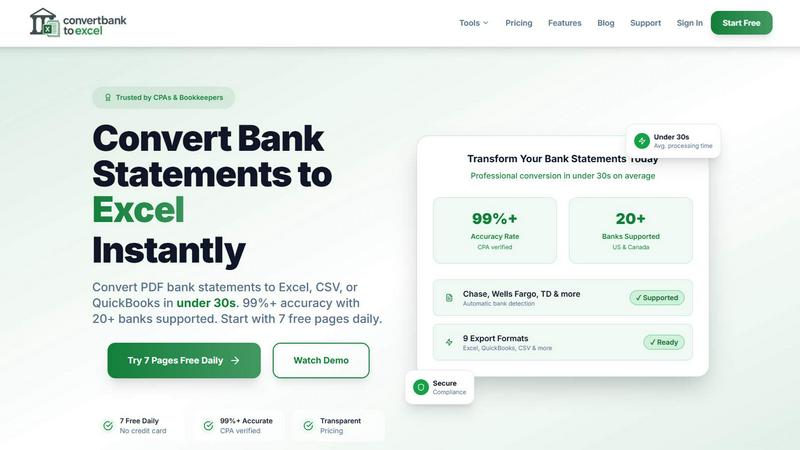
ConvertBankToExcel swiftly transforms your PDF bank statements into accurate Excel or CSV files in under 30 seconds.
Last updated: February 28, 2026

LeapCount
LeapCount is your all-in-one business platform for managing finances, projects, and inventory—all for free for up to 5.
Last updated: February 28, 2026
Visual Comparison
ConvertBankToExcel
LeapCount

Feature Comparison
ConvertBankToExcel
99%+ Accuracy Rate
Our platform boasts an impressive accuracy rate exceeding 99%, as verified by CPAs. This means you can trust ConvertBankToExcel to deliver precise data extraction from your bank statements, minimizing errors and ensuring reliability in financial reporting.
Lightning-Fast Processing
ConvertBankToExcel processes bank statements in under 30 seconds on average. This rapid turnaround allows accounting professionals to handle large volumes of data quickly, making it an indispensable tool for time-sensitive financial tasks.
Comprehensive Format Support
We support an extensive range of export formats, including Excel, CSV, QuickBooks (QBO/QFX/OFX/IIF), JSON, and XML. This versatility ensures that you can easily import your converted data into any accounting software, enhancing your workflow and efficiency.
AI-Powered OCR Technology
Our advanced Optical Character Recognition (OCR) technology automatically extracts data from both digital and scanned PDF documents. This feature allows for seamless processing of various statement types, including checking, savings, and credit card statements, ensuring comprehensive coverage of your financial documents.
LeapCount
Professional Accounting
LeapCount's Professional Accounting feature serves as a robust alternative to industry leaders like Xero and QuickBooks. Users can create stunning invoices, track Accounts Receivable and Payable, and automate journal entries. This module empowers businesses to maintain a well-organized Chart of Accounts, enabling them to manage finances like a pro and potentially saving hundreds of dollars annually.
Project Management
The Project Management module includes dynamic drag-and-drop Kanban boards that rival those of Trello and ClickUp. Teams have the ability to organize tasks and collaborate in real-time, complete with comments and updates. This module not only tracks timelines and priorities but also maintains detailed audit trails, ensuring full accountability and transparency throughout project lifecycles.
Inventory Control
LeapCount's Inventory Control feature is a sophisticated multi-location system that simplifies warehouse management. It effectively handles stock in and out workflows, as well as inter-warehouse transfers, guaranteeing that businesses always have a clear view of their inventory balances. This ensures optimized stock levels and reduces the risk of overstocking or stockouts.
Cloud Storage
With 1GB of free storage, LeapCount offers a powerful cloud storage solution that facilitates team collaboration and file sharing. Users can organize their files into designated workspaces, share documents through public links, and even download files as ZIP archives. This feature enhances productivity, allowing teams to work together efficiently, regardless of their physical location.
Use Cases
ConvertBankToExcel
Streamlining Tax Preparation
ConvertBankToExcel simplifies the tax preparation process by organizing and converting bank statements into easily manageable formats. Accountants can efficiently gather necessary documentation for IRS requirements, reducing the risk of audits and ensuring compliance.
Enhancing Mortgage Applications
When applying for a mortgage, clear and organized financial statements are crucial. ConvertBankToExcel allows users to transform their bank statements into professional formats, making it easier to present financial history to lenders and facilitate the approval process.
Simplifying Visa Applications
For individuals seeking visas, demonstrating financial stability is often required. ConvertBankToExcel helps applicants convert their bank statements into formats required by immigration authorities, streamlining the process and increasing the chances of approval.
Supporting Financial Audits
During financial audits, having accurate and organized data is vital. ConvertBankToExcel provides auditors with the ability to quickly convert and review bank statements, ensuring that financial records are transparent and easily accessible for review.
LeapCount
Freelance Management
Freelancers can leverage LeapCount to streamline their operations. With Professional Accounting, they can manage invoices and track payments effortlessly, while the Project Management module helps keep client projects organized. This comprehensive approach allows freelancers to focus on delivering quality work without getting bogged down by administrative tasks.
Startup Operations
Startups often face tight budgets and resource constraints. LeapCount provides an affordable solution by offering essential tools without the hefty price tag. The integrated modules ensure that all business functions, from finance to project management, are efficiently managed in one place, allowing startups to scale without overburdening their financial resources.
Inventory Management for SMEs
Small to Medium Enterprises can utilize LeapCount's Inventory Control feature to manage their stock effectively. By having a real-time view of inventory across multiple locations, businesses can optimize their supply chains, reduce waste, and enhance their customer service by ensuring product availability.
Team Collaboration
LeapCount enhances team collaboration through its Project Management and Cloud Storage features. Teams can communicate in real-time, share files easily, and track project progress collectively. This unified platform fosters a collaborative environment where teams can work more effectively, leading to increased productivity and faster project completions.
Overview
About ConvertBankToExcel
ConvertBankToExcel is an innovative AI-powered platform designed specifically for accounting professionals who demand precision and efficiency in financial data management. This tool revolutionizes the arduous task of manual data entry by automatically extracting transaction data from PDF bank statements and converting it into various formats including Excel, CSV, and QuickBooks. With a proven accuracy rate of over 99% — verified by CPAs — ConvertBankToExcel significantly reduces the time spent on data entry, enabling accountants and bookkeepers to focus on strategic tasks rather than tedious paperwork. Trusted by over 50,000 professionals, this solution is tailored for seamless integration with more than 20 major banks in the US and Canada, ensuring that users can manage and analyze their financial data effortlessly. Embrace the future of accounting with ConvertBankToExcel and transform your bank statement processing into a fast, reliable, and secure experience.
About LeapCount
LeapCount is a comprehensive business management platform tailored for freelancers, startups, and Small to Medium Enterprises (SMEs) seeking to combat escalating software costs without sacrificing essential functionality. By consolidating crucial business tools into a unified, intuitive interface, LeapCount eradicates the hassle of managing fragmented subscriptions. This all-in-one solution allows teams to seamlessly track finances, manage projects, share files, and control inventory, all from one centralized location. LeapCount is engineered to replace costly and disjointed software stacks, offering five powerful, integrated modules. These include Professional Accounting, Project Management, Inventory Control, Cloud Storage, and Transportation, each designed to enhance productivity and efficiency. With LeapCount, businesses can expect to save significantly while accessing top-tier functionalities, transforming the way they operate and grow.
Frequently Asked Questions
ConvertBankToExcel FAQ
How does ConvertBankToExcel ensure data accuracy?
ConvertBankToExcel utilizes advanced AI-powered Optical Character Recognition (OCR) technology, which has been CPA verified for accuracy. This ensures that data extraction from bank statements is reliable and precise.
What types of bank statements can I convert?
You can convert a wide variety of bank statements, including checking, savings, and credit card statements from over 20 major US and Canadian banks. Both digital and scanned PDFs are supported for conversion.
Is my data secure when using ConvertBankToExcel?
Absolutely. ConvertBankToExcel employs bank-grade encryption to protect your data during processing. Additionally, all files are automatically deleted after 24 hours to ensure your privacy and security.
Can I try ConvertBankToExcel for free?
Yes! ConvertBankToExcel offers a free tier where you can convert up to 7 pages daily without the need for a credit card. This allows you to experience the platform's capabilities before committing to a paid plan.
LeapCount FAQ
How does LeapCount's pricing work? Is it really free?
LeapCount offers a free tier for up to five users, providing access to all essential features without any cost. This allows small teams to manage their operations without the burden of expensive software subscriptions.
What payment options are available for additional features?
While LeapCount is free for the basic version, users can choose to pay for additional features, such as increased storage or advanced functionalities. The platform is designed to scale with your business needs, ensuring you only pay for what you require.
Are there limits on the number of users or companies I can add?
LeapCount allows you to add up to five users for free. If your team grows beyond that, you can explore paid options to accommodate more users and access enhanced capabilities.
What security measures does LeapCount implement to protect my data?
LeapCount prioritizes the security of its users' data. The platform employs robust security protocols and encryption measures to safeguard sensitive information, ensuring that your business data remains confidential and secure at all times.
Alternatives
ConvertBankToExcel Alternatives
ConvertBankToExcel is an innovative AI-powered platform designed to convert bank statement PDFs into structured Excel or CSV formats, catering primarily to accounting professionals. Users often seek alternatives due to various reasons, including pricing structures, specific feature sets, or the need for compatibility with different platforms and software. Choosing the right alternative requires careful consideration of factors such as accuracy, processing speed, security measures, and the ability to handle multiple file types efficiently. When evaluating alternatives, it's essential to focus on the accuracy of data extraction, the speed of processing statements, and the range of export formats available. Additionally, consider the user interface, customer support, and the trustworthiness of the platform to ensure a seamless transition from your current solution.
LeapCount Alternatives
LeapCount is an all-in-one business management platform tailored for freelancers, startups, and small to medium enterprises (SMEs). This comprehensive tool integrates essential functions like professional accounting, project management, and inventory control, enabling users to streamline operations and reduce software costs. Despite its robust features, users may seek alternatives due to various reasons such as budget constraints, specific feature requirements, or the need for a platform that better aligns with their unique business processes. When exploring alternatives, it's crucial to evaluate pricing structures, the breadth of functionalities offered, and the user interface's intuitiveness. Look for platforms that not only meet your immediate needs but can also scale as your business grows, offering seamless integrations with other tools and services you may already be using. A solution that provides exceptional customer support and community resources will also be invaluable in ensuring a smooth transition and ongoing success.