
Nani vs vaethat

Nani
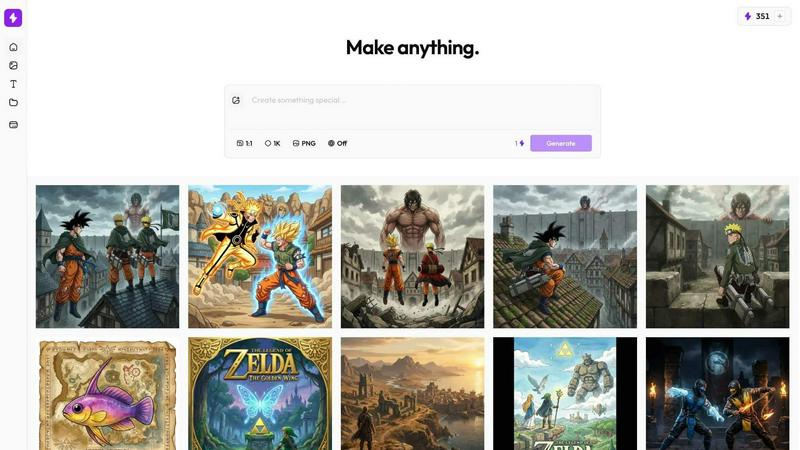
Nani supercharges your AI image generation with reusable prompts and powerful organization tools.
Last updated: February 28, 2026

vaethat
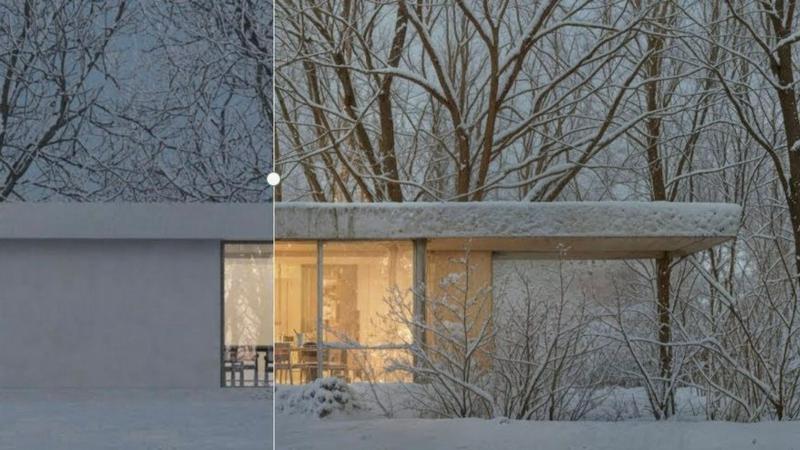
Vaethat is the AI render enhancer that transforms your architectural visuals effortlessly, delivering superior detail.
Last updated: February 28, 2026
Visual Comparison
Nani
vaethat
Feature Comparison
Nani
Composable Sets
This is the heart of Nani's power. Ditch the notepad full of fragmented prompts. Save complete style directions, character bios, and brand guidelines as reusable Prompt Sets. Upload your core reference images once as an Image Set. Then, for any new creation, simply combine these saved sets naturally—like mixing Lego blocks—to build complex, consistent prompts without retyping a single word. It turns prompt engineering from a chore into a strategic, scalable workflow.
Visual Iteration & Drag-Drop Reference
Break the tedious download-upload cycle forever. See a result you want to iterate on? Simply drag it directly from your generation feed back into the reference panel. This seamless visual loop allows for rapid refinement, style adjustment, and consistent evolution of your ideas. It’s a frictionless workflow that keeps you in a creative flow state, eliminating disruptive manual file management steps that plague other platforms.
Scalable Folder Organization
Your library isn't a feed; it's an archive. Nani gives you the tools to manage it like one. Create custom folders to organize projects, clients, or themes. Bulk-select images for moving, downloading, or deleting. Filter your entire collection to instantly surface favorited assets. As your portfolio grows into the thousands, Nani scales with you, ensuring you can always find what you need in seconds, not through endless scrolling.
Nano Banana Pro Supercharged
At its core, Nani leverages the formidable Google Nano Banana Pro model for stunning, high-fidelity image generation with customizable aspect ratios and resolutions. But Nani supercharges it by removing all the friction. Experience a fast, intuitive UI with no sluggish loading, generate images without any visible watermarks, and enjoy web search context included at no extra cost. You get raw power, polished for professional output.
vaethat
AI Render Upscaling
This feature enables users to increase the resolution and sharpness of their 3D architectural renders while maintaining clean and consistent geometry. It allows for high-quality outputs even from lower-resolution images, making it ideal for professional presentations.
Detail Refinement
Vaethat enhances fine textures, edges, and small architectural elements to create a crisper and more polished look. This attention to detail elevates the quality of the renders, ensuring that every aspect of the design is highlighted and presented effectively.
Material and Lighting Enhancement
The tool significantly improves perceived realism by enhancing material definition, contrast, and lighting balance. This feature allows architectural visualizers to create images that not only look good but also accurately represent the intended design aesthetics.
Noise and Artifact Cleanup
Vaethat effectively reduces noise and common rendering artifacts, resulting in cleaner images that are ready for presentation. This cleanup process enhances the overall visual quality, making the renders more appealing to clients and stakeholders.
Use Cases
Nani
Consistent Character & World Design
Concept artists and comic creators can define a character's appearance in an Image Set and their world's aesthetic in a Prompt Set. For every new scene, pose, or interaction, they combine these sets to generate perfectly consistent assets. This ensures the hero's costume, the city's architecture, and the lighting style remain coherent across hundreds of images, building a believable universe without constant manual oversight.
Brand-Aligned Marketing Content
Marketing teams can create a master "Brand Kit" Prompt Set containing official color palettes, tone of voice, and product descriptors, alongside an Image Set of logo files and product shots. Any team member can then generate social media graphics, ad concepts, or blog illustrations that are instantly on-brand. It democratizes creation while enforcing strict brand consistency at scale.
Rapid Product & Concept Iteration
Product designers can upload initial sketches or mood boards as an Image Set and save material/texture descriptions as a Prompt Set. They can then drag-drop generated concepts back as references to iterate on form, explore variations, and visualize different styles or materials in minutes. This accelerates the ideation phase from days to hours, enabling faster prototyping and decision-making.
Structured Content Creation for Creators
Digital creators and bloggers can maintain folders for different content series or topics. They can save a "YouTube Thumbnail Style" Prompt Set and reuse it for every video, or maintain an Image Set of their own face/avatar to insert into custom illustrations. This system turns the chaotic task of daily visual content creation into a streamlined, repeatable assembly line.
vaethat
Architectural Presentations
Professionals can use Vaethat to upscale and enhance their architectural renders for impactful presentations. The tool ensures that images are sharp and detailed, making a strong impression on clients and investors.
Portfolio Development
Architects and visualizers can utilize Vaethat to create high-quality images for their portfolios. With enhanced details and clarity, these images showcase their skills and attract potential clients, setting them apart in a competitive market.
Marketing Materials
Vaethat is ideal for generating stunning visuals for marketing campaigns. By enhancing render quality, businesses can create eye-catching brochures, social media posts, and website imagery that effectively promote their architectural projects.
Project Approvals
When seeking project approvals, clear and detailed visualizations are crucial. Vaethat helps professionals produce the high-quality imagery needed to communicate their design intent effectively, increasing the chances of receiving timely approvals from stakeholders.
Overview
About Nani
Forget the one-off, chaotic playgrounds that pass for AI image generators. They're built for novelty, not for the serious creator who needs to produce consistent, high-quality work day in and day out. Nani is the battle-tested workflow engine built on top of Google's powerful Nano Banana Pro (Gemini) model, engineered specifically to conquer the repetitive, disorganized grind of professional AI image generation. While other tools force you to rewrite prompts, re-upload references, and drown in a single endless feed, Nani brings military-grade organization and reusability to your creative process. It's for illustrators, concept artists, marketers, product designers, and content creators who demand more than just a random image—they demand a reliable, scalable production pipeline. Nani's core value proposition is simple: stop starting from scratch. By allowing you to save and combine Image Sets and Prompt Sets, it transforms isolated generations into a cohesive, evolving body of work, ensuring brand consistency, character fidelity, and stylistic coherence across every piece you create, all within a lightning-fast interface designed for speed, not distraction.
About vaethat
Vaethat is a cutting-edge AI-powered tool specifically designed to upscale and enhance 3D renders for architectural visualization. Tailored for archviz professionals, Vaethat streamlines the process of improving the clarity, sharpness, and realism of architectural images. Unlike generic AI enhancers that require cumbersome prompts and adjustments, Vaethat offers a user-friendly experience where users can simply upload their renders, select a preset, and initiate enhancements. The tool employs advanced algorithms trained exclusively on architectural visualization, ensuring that the unique details of each project are preserved. With its powerful capabilities, Vaethat provides a significant edge in producing stunning, presentation-ready images that meet the high standards of the architectural industry.
Frequently Asked Questions
Nani FAQ
How is Nani different from other AI image generators like Midjourney or DALL-E?
Other platforms are primarily prompt boxes attached to a model—great for experimentation but chaotic for production. Nani is a full workflow layer built on top of Google's Nano Banana Pro. Our focus isn't just on generating a single image; it's on managing the process of generating dozens or hundreds of consistent images. Features like reusable Sets, folder organization, and drag-drop iteration are designed for repetitive, professional work, not just one-off curiosities.
What does "credits never expire" mean, and how does pricing work?
Nani uses a simple pay-as-you-go credit system with no subscriptions or monthly fees. You only pay for what you generate. Crucially, any credits you purchase never expire, so there's no pressure to "use it or lose it." Pricing is transparent at approximately 30 cents per high-quality generation (1K or 2K resolution). We even include web search context for your prompts at no extra cost, and all advanced workflow features are unlocked from day one.
Can I collaborate or share my work with others using Nani?
Absolutely. Nani supports a seamless workflow for sharing and collaboration. You can share any creation via a public link, allowing others to view your image. Furthermore, you can structure your Sets and prompts in a way that lets teammates or clients recreate and riff on your work within their own accounts, making it a powerful tool for team-based creative projects and client approvals.
Do I need a credit card to start using Nani?
No. You can start creating for free immediately without a credit card. We provide 5 free credits upon sign-up so you can fully experience the power of Nani's workflow features—including Sets, folders, and Nano Banana Pro generation—and see how it transforms your process before committing any funds.
vaethat FAQ
How does the AI render enhancer calculate credits?
Credits are calculated based on the complexity and resolution of the images processed. Each enhancement uses a certain number of credits, which allows users to manage their resources effectively while maximizing output quality.
Can I use the archviz AI upscaler with V-Ray, Lumion, Enscape, 3ds Max, and SketchUp?
Yes, Vaethat is compatible with popular architectural software such as V-Ray, Lumion, Enscape, 3ds Max, and SketchUp, making it an integral part of any archviz workflow.
What makes this AI post-production tool different from manual editing?
Vaethat automates the enhancement process, eliminating the need for manual adjustments and reducing the time spent on post-production. This efficiency allows architects to focus on their creative work rather than tedious editing tasks.
Can I upgrade or downgrade my AI enhancement plan anytime?
Yes, users can easily upgrade or downgrade their enhancement plans according to their changing needs. This flexibility ensures that customers only pay for the features and capabilities they require at any given time.
Alternatives
Nani Alternatives
Nani is a workflow-first AI image generation tool built on Google's Gemini model. It's designed for creators and professionals who need to produce consistent, on-brand visuals regularly, not just one-off experiments. The tool solves the repetitive chaos of managing prompts, references, and a growing library of generated images. Users often seek alternatives for various reasons. Cost is a major factor, as subscription tiers vary widely. Some may need a specific core model like DALL-E or Stable Diffusion, while others prioritize different features, such as advanced in-painting or animation. Platform needs also differ, with some users requiring a mobile app or a specific integration that Nani may not offer. When evaluating an alternative, look beyond raw image quality. Consider how the tool handles repetitive tasks. Does it have systems for reusing assets and prompts? How does it organize outputs? The true test is whether a tool saves you time on your tenth or hundredth generation, not just your first. A fast, organized workflow is often more valuable than a slightly more photorealistic one-off image.
vaethat Alternatives
Vaethat is a cutting-edge AI-powered tool designed specifically for enhancing 3D renders in architectural visualization. This innovative solution allows archviz professionals to elevate their work by improving clarity, sharpness, and realism in their architectural images. As users seek to stay ahead in a competitive industry, they often look for alternatives to Vaethat for various reasons, including pricing, specific feature sets, or compatibility with different platforms. When searching for an alternative, it’s essential to consider factors such as the quality of rendering enhancements, ease of use, and the ability to maintain design intent. Users should prioritize tools that offer robust upscaling capabilities, effective noise reduction, and seamless integration into their existing workflows. Ultimately, the right alternative will not only meet user needs but also enhance the overall quality of their architectural visualizations.