
Pro Batch Resizer vs tini.bio

Pro Batch Resizer
Pro Batch Resizer is a lightning-fast online tool to batch resize, edit, and optimize images securely in your browser.
Last updated: February 28, 2026

Last updated: February 28, 2026
Visual Comparison
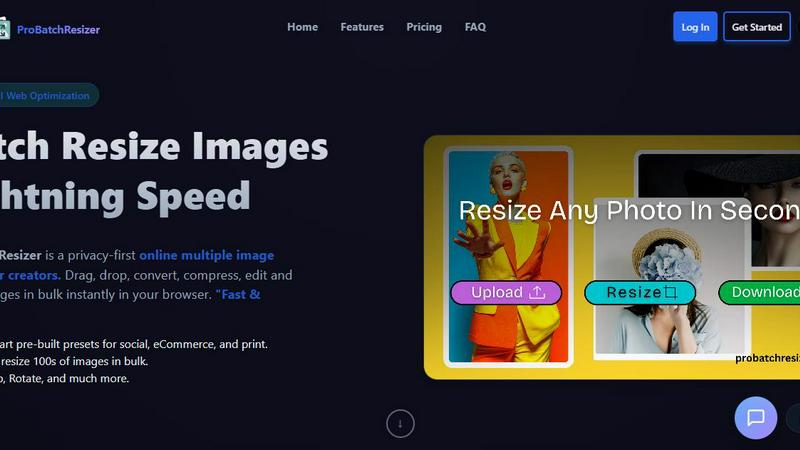
Pro Batch Resizer
tini.bio
Feature Comparison
Pro Batch Resizer
Zero-Upload Privacy
Pro Batch Resizer takes your privacy seriously. Unlike many other online tools, your images are processed locally in your browser, meaning they never leave your device. This zero-upload privacy ensures that your valuable files remain secure and confidential while you work.
130+ One-Click Presets
With over 130 built-in presets tailored for various platforms—including social media, corporate use, and e-commerce—Pro Batch Resizer eliminates the need to remember specific dimensions. Just select your desired preset, and the tool handles the rest, saving you time and effort.
Blazing Speed
Experience lightning-fast image processing with Pro Batch Resizer's multi-threaded capabilities. Whether you are resizing a small batch or hundreds of images, the tool guarantees instant results without lag, allowing you to maintain a smooth workflow even with larger projects.
Total Control
Beyond simple resizing, Pro Batch Resizer offers a suite of editing tools that allow you to crop, flip, rotate, and convert images between formats like JPG, PNG, and WEBP. With professional resampling techniques, you can ensure crisp, high-quality results every time.
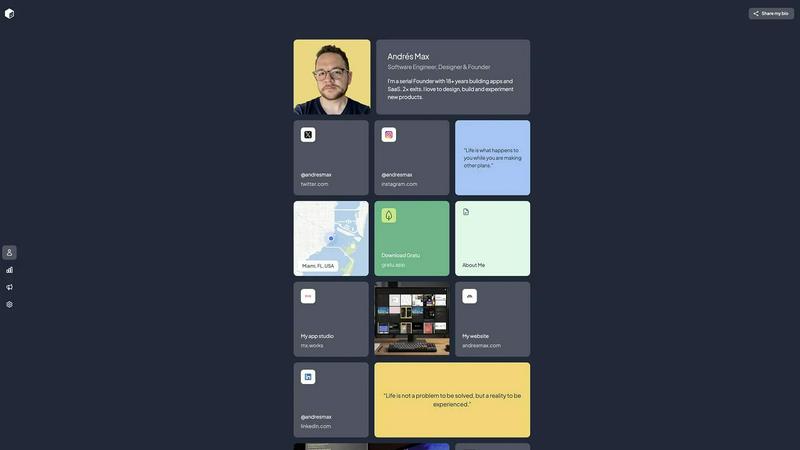
tini.bio
Drag-and-Drop Visual Editor
Forget about rigid templates and complicated settings. tini.bio's intuitive drag-and-drop interface puts you in complete control. You can reorder, resize, and arrange every element on your page in seconds. This means you can prioritize your latest project, highlight a key announcement, or design a unique layout that perfectly matches your brand's flow, all without touching a single line of code.
Rich Content Blocks (More Than Just Links)
This is where tini.bio truly outshines the competition. Move beyond simple URLs. Add rich text pages for menus or case studies, embed image galleries to showcase your work, place maps for your business location, and create colored text blocks for announcements. You can even add social media links that auto-fetch clean favicons, creating a visually cohesive and professional page that engages visitors.
Advanced Analytics & SEO Controls
If you're not measuring, you're guessing. The Pro plan unlocks powerful analytics that show you exactly who is visiting your page and which links they're clicking. This data is crucial for refining your strategy. Furthermore, dedicated SEO settings ensure your tini.bio page can be discovered by Google, turning your simple bio link into a legitimate searchable asset for your brand or business.
Premium, Customizable Themes
First impressions matter. tini.bio offers a selection of premium themes that are actually designed to look good—no clunky, outdated templates here. These themes provide a professional foundation that you can then customize to fit your unique style, ensuring your page stands out for its polish and aesthetic, not just its functionality.
Use Cases
Pro Batch Resizer
Social Media Management
Social media managers can benefit immensely from Pro Batch Resizer by quickly preparing images for various platforms. With smart presets for Facebook, Instagram, Twitter, and more, creating perfectly sized content for posts and ads has never been easier.
E-commerce Optimization
Online sellers can use Pro Batch Resizer to efficiently format product images for their listings on platforms like Amazon, Etsy, and Shopify. The tool streamlines the process of resizing images to meet specific requirements, enhancing the visual appeal of product pages.
Print Material Preparation
Graphic designers and marketers can utilize Pro Batch Resizer to prepare high-quality images for print materials such as flyers, business cards, and posters. The precision offered by multi-unit measurements ensures that every image meets print standards.
Digital Content Creation
Bloggers, vloggers, and content creators can take advantage of Pro Batch Resizer to optimize images for their websites, video thumbnails, and other digital content. The extensive preset library simplifies the resizing process, allowing creators to focus on content rather than technical details.
tini.bio
The Freelancer's Mini-Portfolio
Designers, developers, writers, and consultants can use tini.bio to create a stunning, centralized portfolio. Showcase project images, link to live work or case study pages, list your services, and provide direct contact links. It’s the perfect, lightweight alternative to a full website that impresses potential clients directly from your social profiles.
The Creator's Content Hub
YouTubers, podcasters, artists, and influencers can consolidate their entire digital universe. Link to your latest video on multiple platforms, promote your merch store, share podcast episodes, display an event schedule, and link to all your social channels. It turns a single Instagram bio link into a powerful dashboard for your audience.
The Small Business Landing Page
Restaurants, salons, shops, and local services can operate without a full website. Use tini.bio to post your hours and menu (as a rich text page), embed a map for your location, link to booking platforms, showcase photos of your work or products, and drive traffic to your primary sales channels, all from one professional link.
The "Linktree Upgrade"
For anyone feeling constrained by the basic list format of traditional link-in-bio tools, tini.bio is the definitive upgrade. It provides the visual design freedom, content depth, and professional features needed to present a cohesive brand story. It’s for users who realize their online presence deserves more than just a utilitarian list of URLs.
Overview
About Pro Batch Resizer
Pro Batch Resizer is an innovative, privacy-first online tool designed specifically for creators who need to resize images quickly and securely. This powerful application allows users to drag and drop multiple images into the browser, where images are processed locally using WebAssembly technology—ensuring that your images never leave your device. With a focus on speed and efficiency, Pro Batch Resizer supports batch processing, letting you resize hundreds of images at once without compromising quality. The tool is perfect for marketers, graphic designers, photographers, and anyone who needs to prepare images for social media, e-commerce, or print. Its combination of user-friendly features and advanced functionality makes Pro Batch Resizer the go-to solution for professional image resizing.
About tini.bio
Tired of the same old, boring list of links that every other link-in-bio tool offers? tini.bio is the battle-tested alternative that gives you a real, functional page. It's a powerful mini-website builder designed for creators, freelancers, and small businesses who are serious about their online presence. While competitors offer a static list, tini.bio provides a dynamic, customizable canvas where you can share your entire story. It's built for anyone who has outgrown the limitations of basic tools like Linktree and needs a beautiful, feature-rich hub that does more than just hold links. You can create a polished portfolio, a business landing page, or a central creator hub in minutes—no coding or design skills required. With premium themes, drag-and-drop editing, and powerful features like analytics and SEO, tini.bio positions itself not as a simple utility, but as an essential platform for building a professional brand directly from your social media bio.
Frequently Asked Questions
Pro Batch Resizer FAQ
How does Pro Batch Resizer ensure my images are secure?
Pro Batch Resizer processes all images locally in your browser using WebAssembly technology, meaning no files are uploaded to external servers. This guarantees total privacy and security for your images.
Can I resize images in bulk with Pro Batch Resizer?
Yes! Pro Batch Resizer allows you to drag and drop multiple images at once, enabling you to resize hundreds of files in bulk quickly and efficiently.
What formats can I convert my images into?
Pro Batch Resizer supports conversions between JPG, PNG, and WEBP formats. This flexibility allows you to choose the best format for your specific needs.
Are there any subscriptions or accounts required to use Pro Batch Resizer?
No, Pro Batch Resizer is designed for ease of use, requiring no accounts or subscriptions. Simply access the tool through your browser, and you can start resizing images right away.
tini.bio FAQ
How is tini.bio different from Linktree?
tini.bio is built as a true mini-website, while Linktree functions primarily as a list of links. We offer rich content blocks like image galleries, text pages, and maps, a drag-and-drop editor for custom layouts, premium themes, and advanced features like SEO and analytics. It's designed for users who need a professional, customizable hub, not just a simple directory.
Do I need design or coding skills to use tini.bio?
Absolutely not. tini.bio is built specifically for users with zero technical expertise. The drag-and-drop editor is intuitive, and our professionally designed themes provide a beautiful starting point. You can create a stunning, fully functional page in minutes through a simple visual interface.
What happens after the 7-day free Pro trial?
After your free trial of the Pro features ends, your page will automatically revert to the Free plan. You won't lose any content you've created. The Free plan is robust and includes 6 total blocks, 1 page, 2 images, and 1 theme, allowing you to maintain a functional page. You can upgrade back to Pro at any time to unlock unlimited blocks, all themes, analytics, and remove branding.
What types of links and content can I add?
You can add any standard web link, and we'll automatically fetch the favicon for a clean look. Beyond links, you can upload image galleries, create rich text pages (like an "About Me" or menu), add text announcement blocks, embed Google Maps locations, and link directly to all major social media profiles. It's a complete content platform.
Alternatives
Pro Batch Resizer Alternatives
Pro Batch Resizer is a professional-grade, browser-based tool designed for efficient batch image processing. As a leader in the image and photo category, it excels in providing users with a fast and secure solution for resizing, cropping, and converting images without the need for uploads. However, users often seek alternatives due to various reasons, such as pricing constraints, specific feature requirements, or compatibility with different platforms. When searching for an alternative, it’s essential to consider factors like privacy, processing speed, ease of use, and available features. Users should prioritize tools that offer similar functionalities, such as local processing, preset options, and multi-format support to ensure they receive the best value and performance for their image editing needs.
tini.bio Alternatives
Tini.bio is a premium link-in-bio platform that redefines the category by offering a true, customizable mini-website instead of a basic list of links. It's designed for professionals, creators, and businesses who want to present a cohesive and visually compelling story in their social media bios. The platform stands out by blending essential link aggregation with rich content blocks like galleries, text, and maps. Users often explore alternatives for various reasons, whether they're seeking a different pricing model, require specific integrations not offered, or need a platform tailored to a niche like e-commerce or music. Some may prioritize absolute simplicity over tini.bio's feature-rich design approach, while others might have outgrown the constraints of more basic tools and are looking for the next step up in customization and capability. When evaluating other options, key considerations should include the depth of design control, the types of content blocks available, and the quality of analytics. It's crucial to assess whether a tool merely organizes links or truly builds a branded digital hub. The right choice balances aesthetic flexibility with intuitive editing, ensuring your one link works as hard as you do.