
AutomagicWP vs RocketShare

Last updated: February 27, 2026

Last updated: March 3, 2026
Visual Comparison
AutomagicWP

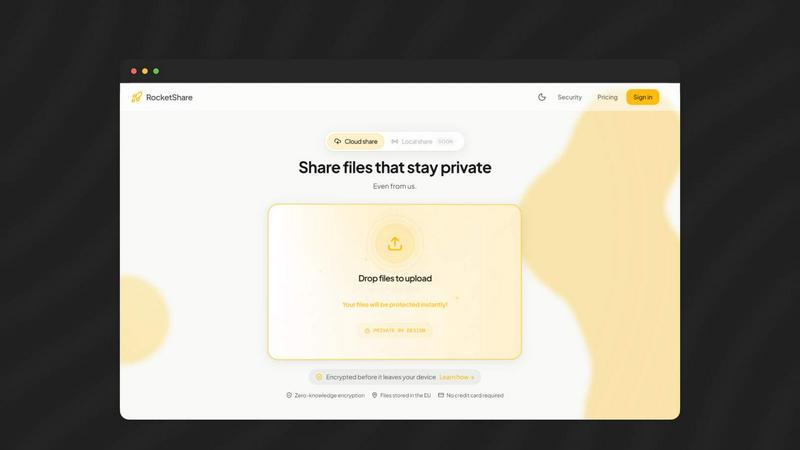
RocketShare
Feature Comparison
AutomagicWP
One-Click, Site-Wide Updates
Upload a single plugin or theme release ZIP file to your AutomagicWP dashboard. Once published, the update propagates automatically to every connected WordPress site. The platform integrates directly with the native WordPress update checker, meaning your clients' sites will see and install the update just like they would from the official WordPress.org repository. This eliminates the need for manual FTP uploads or logging into individual wp-admin panels, saving hours of repetitive work and ensuring consistency across your entire network.
Professional Plugin Repository & Management
Turn your private plugins into first-class products. AutomagicWP provides a centralized dashboard to manage all your plugins, complete with support for icons, banners, screenshots, detailed descriptions, changelogs, and FAQs. This creates a professional, repository-like experience within the wp-admin of every connected site, building trust and clarity for end-users. You maintain full version history, can roll back to previous releases if needed, and have a single source of truth for all your distributed code.
Automated CI/CD Pipeline
Integrate your development workflow directly with deployment. By connecting your GitHub repository, you can trigger releases automatically by simply pushing a tag. The included GitHub Action handles the build and publishing process, creating a true "set it and forget it" pipeline. This means zero manual steps between merging code and shipping updates live to all sites, enabling rapid, reliable iteration and reducing the risk of human error in the release process.
Comprehensive API & Developer Toolkit
AutomagicWP is built for developers who demand control and flexibility. A full REST API allows you to integrate update distribution into your own custom tooling, dashboards, or client portals. For the client side, a dedicated Composer package seamlessly hooks into the WordPress update system on each site, ensuring clean, standards-compliant integration. This open architecture means you're never locked in and can tailor the update flow to your exact operational needs.
RocketShare
Zero-Knowledge, Client-Side Encryption
This is the cornerstone of RocketShare's ironclad security. Every file is encrypted on your own device using a unique key before upload. This encryption key is never transmitted to or stored on RocketShare's servers. Without this key, the data on our servers is completely useless, even to us. This architecture guarantees that your intellectual property, client documents, and trade secrets remain exclusively accessible to you and your intended recipients, placing ultimate control back in your hands.
Secure Share Links with Embedded Keys
RocketShare's sharing mechanism is ingeniously secure. When you create a shareable link, the decryption key is embedded directly within the URL fragment (the part after the #). This fragment is never sent to the server during transmission. The backend only handles the encrypted file blob and metadata. The recipient's browser uses the key from the URL to decrypt the file locally. This eliminates the risk of key interception on our servers and ensures that sharing is both seamless and profoundly private.
EU-Based Data Storage
For global users concerned with data sovereignty and regulations like GDPR, RocketShare provides certainty by storing all encrypted file data exclusively within the European Union. This commitment to EU-based infrastructure offers an additional layer of jurisdictional protection and compliance assurance, making it a trusted choice for international businesses and privacy-conscious individuals who demand clarity on where their data resides.
Self-Serve Expiry & Metadata Control
RocketShare puts you in command of your data's lifecycle. You can set expiration dates on shared links, after which access is permanently revoked. Furthermore, the platform operates on a minimal-data principle: while necessary encrypted blobs and link expiry metadata are stored, RocketShare's zero-knowledge model ensures no access to file contents or personal data beyond what is essential for operation, aligning with privacy-by-design best practices.
Use Cases
AutomagicWP
WordPress Development Agencies
Agencies managing dozens of client sites can standardize and automate plugin updates across their entire portfolio. Instead of billing clients for manual update labor or risking inconsistent versions, they deploy a release once from AutomagicWP. Every client site updates itself reliably, ensuring all sites are secure, on the latest features, and uniformly maintained, which scales service delivery and improves profitability.
Independent Plugin & Theme Developers
Solo creators and small shops distributing premium or private WordPress products can use AutomagicWP as a lightweight, professional distribution channel. It provides all the infrastructure of a commercial platform—update delivery, changelogs, and a polished admin interface—without the complexity, fees, or feature bloat. Developers can focus on building their product while their customers enjoy a seamless update experience.
Enterprises with Internal WordPress Platforms
Companies that develop and maintain custom plugins for their own internal network of WordPress sites (e.g., for departments, brand sites, or franchises) need controlled, reliable distribution. AutomagicWP acts as a private, secure app store, ensuring that internal tools are rolled out consistently and quickly across the entire organization without relying on manual IT processes.
Freelancers Managing Multiple Client Sites
Freelancers who maintain several client websites often juggle similar plugins across them. Manually updating a contact form or SEO plugin on 10 different sites is inefficient. With AutomagicWP, the freelancer can manage their own "fork" or commonly used plugins, pushing updates from a single dashboard and freeing up time for higher-value development and client support work.
RocketShare
Legal Document Exchange
Law firms and legal professionals routinely handle highly confidential case files, contracts, and evidence. RocketShare ensures attorney-client privilege is technically enforced. By encrypting sensitive legal documents client-side and keeping keys off-server, it provides a secure channel for sharing information with clients, co-counsel, and experts, mitigating the risk of data breaches and maintaining rigorous compliance standards.
Healthcare Data Sharing
Healthcare providers, clinics, and telehealth services need to share patient records, lab results, and imaging studies securely to comply with HIPAA and other regulations. RocketShare's zero-knowledge model ensures Protected Health Information (PHI) is encrypted end-to-end. Since RocketShare cannot access the data, it acts as a secure conduit, significantly reducing compliance overhead and breach liability compared to traditional cloud storage or email.
Creative Agency Client Review
Marketing agencies, videographers, and photographers share large, pre-release creative assets like ad campaigns, video edits, and brand designs. Leaks can be catastrophic. RocketShare allows these teams to send watermarked previews or final files securely. Clients access content via a simple link, with the assurance that their upcoming campaign or proprietary creative work isn't being scanned or accessed by the platform itself.
Accountant & Financial Data Transfer
Accountants and financial advisors manage sensitive tax returns, financial statements, and audit trails. Sharing these via email or conventional clouds is a major vulnerability. RocketShare enables the secure transmission of financial portfolios and confidential reports to clients. The client-side encryption guarantees that financial data remains completely private during transit and at rest, providing peace of mind for both the advisor and the client.
Overview
About AutomagicWP
AutomagicWP is the definitive private distribution platform built to liberate WordPress developers and agencies from the manual, soul-crushing grind of plugin and theme updates. Forget the endless cycle of building ZIP files, logging into countless wp-admin dashboards, and manually uploading updates one by one. AutomagicWP replaces that archaic workflow with a single, powerful command center. You upload a release once, and every connected WordPress site updates itself automatically through WordPress's native update mechanism. It's not just a tool; it's a strategic advantage designed for those who build and manage WordPress products at scale. Whether you're a solo developer tired of the "ZIP loop," an agency managing a portfolio of client sites, or a creator distributing a premium plugin without the overhead of a full e-commerce platform, AutomagicWP delivers professional-grade distribution, complete with changelogs, version history, and seamless CI/CD integration. This is distribution, automated and battle-tested for the real world.
About RocketShare
RocketShare is the definitive answer for professionals who refuse to compromise on privacy. In a landscape cluttered with cloud storage that peeks at your data, RocketShare delivers a battle-tested, zero-knowledge file sharing platform. It is engineered for law firms, healthcare providers, accountants, creative agencies, and any business that handles sensitive information. Its core value proposition is uncompromising security married to stunning simplicity. Unlike competitors where your files are encrypted on their servers, RocketShare encrypts everything client-side before it even leaves your device. The encryption keys never touch RocketShare's servers; they are embedded in the share link itself. This means the backend only ever stores encrypted, unreadable blobs. The result is enterprise-grade, end-to-end encryption with a self-serve experience as easy as drag-and-drop. Your files stay private, even from us, ensuring compliance and control without the complexity. Choose RocketShare and own your security.
Frequently Asked Questions
AutomagicWP FAQ
How does AutomagicWP's automatic updating work?
You connect each client's WordPress site to your AutomagicWP account using a unique API key and a small Composer package. This connection allows the site to check your private AutomagicWP repository for updates. When you publish a new release, WordPress's built-in update mechanism detects it on its normal schedule and installs it automatically, just like an update from WordPress.org. No manual intervention is required on the client site.
Is AutomagicWP suitable for commercial or private plugins?
Absolutely. This is the primary use case for AutomagicWP. It is specifically designed as a private, secure distribution channel for plugins and themes that are not listed on the public WordPress.org repository. Whether you sell a premium plugin, develop tools for specific clients, or have internal company plugins, AutomagicWP provides the professional update infrastructure you need without making your code public.
Can I integrate AutomagicWP with my existing development workflow?
Yes, extensively. AutomagicWP is built for modern development practices. You can connect your GitHub repository to enable CI/CD, where pushing a tag automatically builds and releases a new version. For full customization, the comprehensive REST API allows you to trigger releases, manage plugins, and monitor sites from your own custom scripts, dashboards, or deployment tools.
What happens if I need to roll back a release?
AutomagicWP maintains a complete version history of every release you upload. If a new update causes issues, you can easily revert to a previous, stable version directly from your dashboard. Once you select a prior version, it immediately becomes the "latest" release, and all connected sites will roll back to it automatically through the standard WordPress update process, providing a powerful safety net.
RocketShare FAQ
How is RocketShare different from Dropbox or WeTransfer?
RocketShare is built on a fundamentally different security model. While services like Dropbox or WeTransfer encrypt data, they typically hold the encryption keys, meaning they can technically access your files. RocketShare uses zero-knowledge, client-side encryption. Your files are encrypted on your device with a key we never see. We only store the encrypted, unreadable data. This means your privacy is absolute, not conditional on a provider's policy.
What happens if I lose a share link?
If you lose a share link, you cannot retrieve the file through conventional means because RocketShare's servers do not have the key to decrypt your data. This is by design to guarantee privacy. We recommend securely managing your links. For ongoing collaboration, consider using the platform's interface to generate new links from your uploaded encrypted files, as the original encrypted data remains stored.
Is there a file size limit for uploads?
While the provided context does not specify exact file size limits, RocketShare is designed for professional file sharing, accommodating the large files common in industries like videography, game development, and design. For the most current information on upload limits and any potential restrictions based on your plan, please refer to the official RocketShare website or documentation.
Do you offer on-premise or local sharing options?
Yes, RocketShare's feature set includes both "Cloud Share" and "Local Share" options. "Local Share" (marked as SOON in the context) indicates an upcoming or existing feature designed for sharing files directly between devices on the same network without the files ever leaving your local environment, providing an even higher level of control for air-gapped or ultra-sensitive sharing scenarios.
Alternatives
AutomagicWP Alternatives
AutomagicWP is a developer tool that streamlines the distribution and management of WordPress plugins and themes. It belongs to the category of premium update managers, designed to eliminate the tedious manual process of updating client sites. By handling releases through a central dashboard, it connects directly to WordPress's native update mechanism, saving developers significant time and effort. Users often explore alternatives for various reasons. Some may have budget constraints and seek a free or lower-cost solution, while others require specific integrations with their existing tech stack, like a particular e-commerce platform or CI/CD pipeline. The scale of operations also matters; a solo developer's needs differ vastly from those of a large agency managing hundreds of client installations. When evaluating alternatives, focus on core capabilities. The right tool should offer reliable, automated updates without manual site logins. It must provide secure delivery and maintain compatibility with WordPress standards. Consider the ease of integration into your workflow, whether through Git, an API, or other automation tools, to ensure it truly enhances your development cycle, not complicates it.
RocketShare Alternatives
RocketShare is a developer-focused tool for private, secure file sharing. It operates in the Dev Tools category, providing a simple API and SDKs for integrating zero-knowledge file transfer directly into applications. This approach prioritizes user privacy above all else. Developers often explore alternatives for various reasons. Some may require different pricing models or free tiers for testing. Others might need specific platform integrations, advanced user management, or features like custom branding that fall outside a core privacy-focused toolset. The specific needs of a project can dictate a search for a different solution. When evaluating any alternative, key considerations remain. Security architecture is paramount—understand how data is encrypted and who holds the keys. Ease of integration via API quality and documentation is critical for developers. Finally, assess the total cost against the required feature set, ensuring the tool aligns with both technical and budgetary constraints for the long term.