ProcessSpy
ProcessSpy is an advanced macOS tool for in-depth process monitoring, offering powerful filters, real-time insights, and seamless integration.
About ProcessSpy
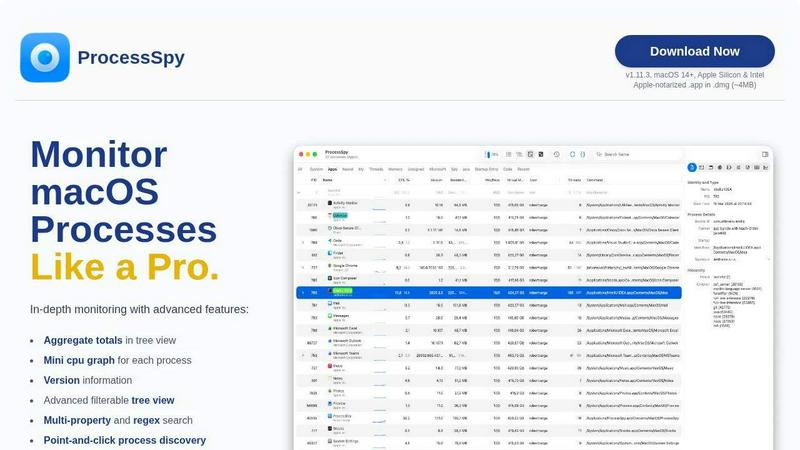
ProcessSpy is the ultimate macOS tool for power users seeking an advanced process monitoring solution. As a native alternative to Sysinternals Process Explorer, it reveals what Activity Monitor hides, providing detailed insights into your system's processes. Designed for developers and tech enthusiasts, ProcessSpy allows users to visualize intricate process trees, inspect open files, and view environment variables efficiently. With its ability to kill stubborn applications instantly, this tool is indispensable for those who require a deeper understanding of their macOS environment. Built using native APIs and UI elements, ProcessSpy ensures a seamless and responsive user experience, making process monitoring a breeze on both Apple Silicon and Intel machines. Whether you're managing multiple Java applications or troubleshooting system performance, ProcessSpy's powerful features offer unparalleled insights and control.
Features of ProcessSpy
Advanced Tree View
Experience a detailed tree view that not only displays running processes but also aggregates totals for CPU, Memory, and Threads. With real-time filtering and advanced search capabilities, including JavaScript filters, users can navigate through processes effortlessly.
JavaScript Filters
Take your filtering to the next level with JavaScript-based filters. This feature allows you to define complex filter conditions, enabling you to customize your process searches with precision. Create tailored views that meet your specific needs and streamline your workflow.
Version Information
ProcessSpy provides essential version information directly in the main table, making it easy to identify different instances of the same application. No more confusion over similar-named processes; you can see exact version details at a glance, enhancing your process management capabilities.
Process History Recording
With the ability to record historical values for CPU, Memory, and Threads, ProcessSpy allows you to track your system’s performance over time. This feature, available in the paid version, enables users to export results to CSV for detailed analysis and reporting.
Use Cases of ProcessSpy
Developer Tools Management
For developers juggling multiple applications, ProcessSpy is a game-changer. It allows you to quickly identify and manage various Java instances with detailed command-line information, ensuring you know exactly which version and path each process is using.
System Performance Analysis
IT professionals and system administrators can leverage ProcessSpy to monitor resource usage and identify bottlenecks. The detailed process insights help in optimizing system performance and troubleshooting issues efficiently, leading to a smoother user experience.
Application Debugging
When debugging applications, having access to environment variables and full command-line info is crucial. ProcessSpy's advanced features provide the necessary depth to diagnose problems effectively, making it an essential tool for developers and testers alike.
Resource Monitoring
For users who want to keep an eye on system resources, ProcessSpy offers an intuitive way to visualize CPU, Memory, and Threads usage. Its aggregate values in tree view help users quickly identify resource-hungry applications and take appropriate action.
Frequently Asked Questions
Is ProcessSpy safe to install on my Mac?
Yes, ProcessSpy is Apple-notarized and distributed as a signed .app inside a .dmg file. It is verified for safety and compatibility with both Intel and Apple Silicon Macs.
Does ProcessSpy support older versions of macOS?
No, ProcessSpy is specifically designed for macOS 14 and newer versions, ensuring optimal performance and compatibility with the latest macOS features.
What is the license model?
The license for ProcessSpy is valid for one user across unlimited devices. It includes lifetime updates and access to new features, making it a great investment for ongoing process monitoring needs.
How do I unlock advanced features in ProcessSpy?
To unlock advanced features, users can purchase a license for $24.99 on Gumroad. This one-time payment grants access to features like advanced process info, environment variables, and historical data recording, ensuring you get the most out of ProcessSpy.
Top Alternatives to ProcessSpy




Game Server Backend
Game Server Backend unifies player auth, data, leaderboards, and server hosting into one API so you ship multiplayer faster.

Nick Launches
Builders get a permanent backlink and thousands of eyes, not just a launch that disappears.
Headless Domains
Headless Domains is the definitive identity standard giving AI agents portable, verifiable identities to prove trust across any app or marketplace.

GPT Image 2 API
Effortlessly create stunning, production-ready images and edit existing visuals with the fast and scalable GPT Image 2 API.