
Blueberry vs Kling Motion

Blueberry
Blueberry is an all-in-one AI-native workspace that simplifies web app development, letting you build and ship.
Last updated: February 28, 2026

Last updated: February 28, 2026
Visual Comparison
Blueberry
Kling Motion
Feature Comparison
Blueberry
Integrated Workspace
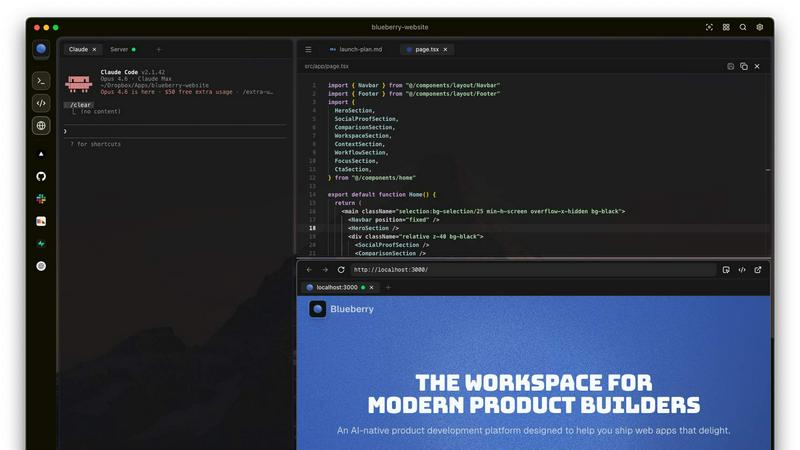
Blueberry offers a unique integrated workspace that combines a code editor, terminal, and preview browser into one cohesive environment. This eliminates the need to switch between multiple applications, saving you time and enhancing focus.
AI Context Awareness
The powerful MCP server allows your chosen AI models to have full context of your project. This means your AI can see your code and running applications in real time, helping you get more accurate and relevant responses without losing context.
Pinned Apps
Keep essential tools like GitHub, Linear, Figma, and PostHog docked within your workspace. These pinned apps load seamlessly with your project, enabling your AI to interact with them and provide you with live contextual information.
Multi-Device Preview
Blueberry includes built-in previews for desktop, tablet, and mobile views. This feature allows you to see exactly how your web applications will appear on different devices, ensuring that you deliver a flawless user experience.
Kling Motion
Motion Extraction
Kling Motion utilizes an advanced AI algorithm to extract precise motion data from any video. By simply selecting a reference video, creators can capture intricate movements and transfer them directly to their character images, ensuring high fidelity in motion reproduction.
Full Body Motion
This feature enables users to capture and reproduce entire body movements, complete with facial expressions and hand gestures. This level of detail enhances the storytelling capability of videos, making the characters more relatable and engaging for viewers.
Hand Gesture Recognition
Kling Motion's hand gesture recognition technology allows for accurate tracking of hand and finger movements. This ensures that subtle gestures are not lost in translation, adding a layer of realism that is critical for performance-driven videos.
Prompt-Guided Creation
With the prompt-guided creation feature, users can customize their motion control outputs through natural language prompts. This flexibility allows creators to specify background elements, lighting, and visual styles, creating a tailored video experience that aligns with their vision.
Use Cases
Blueberry
Streamlined Development
Developers can leverage Blueberry's integrated environment to streamline their development processes, making it easier to write, test, and deploy code without the need for constant app-switching.
Enhanced Collaboration
With real-time context sharing through pinned apps and AI integration, teams can collaborate more effectively, ensuring everyone is on the same page and can access the same tools and information instantly.
Learning and Experimentation
Blueberry serves as an excellent platform for new developers to learn coding and AI integration. The user-friendly workspace encourages experimentation and hands-on learning without overwhelming distractions.
Rapid Prototyping
Product teams can use Blueberry to rapidly prototype web applications, utilizing the AI's contextual awareness to quickly iterate on their ideas and receive instant feedback on their code and design choices.
Kling Motion
Social Media Content Creation
Kling Motion is ideal for social media influencers and marketers looking to create engaging content quickly. By turning static character images into dynamic videos, users can improve audience engagement and increase shares across platforms like TikTok and Instagram.
Animation for Ads
Advertisers can leverage Kling Motion to create eye-catching animated ads without the need for extensive animation skills. By copying motion from reference clips, they can produce high-quality promotional content that stands out in crowded digital spaces.
Educational Materials
Educators and content creators can use Kling Motion to develop animated educational videos. By using character images that demonstrate concepts through motion, learners can grasp complex ideas more easily and retain information better.
Entertainment and Performance Art
Musicians, dancers, and performers can enhance their online presence by using Kling Motion to create visually stunning performance videos. By animating their character images with realistic movements, they can attract more viewers and showcase their talents effectively.
Overview
About Blueberry
Blueberry is a revolutionary macOS application designed specifically for modern product builders who demand efficiency and clarity in their workflow. By consolidating your editor, terminal, and browser into one focused workspace, Blueberry eliminates the frustration of juggling multiple windows and applications. With Blueberry, developers can seamlessly connect to AI models like Claude, Codex, and Gemini through its built-in MCP server, enabling the AI to access your files, terminal output, and live project previews simultaneously. This innovative platform enhances productivity and reduces the need for tedious copy-pasting, allowing you to focus on what truly matters: building exceptional web applications. Whether you are a seasoned developer or just starting, Blueberry is designed to cater to your needs, providing a streamlined environment that fosters creativity and efficiency. Experience the future of product development with Blueberry—100% free during its beta phase.
About Kling Motion
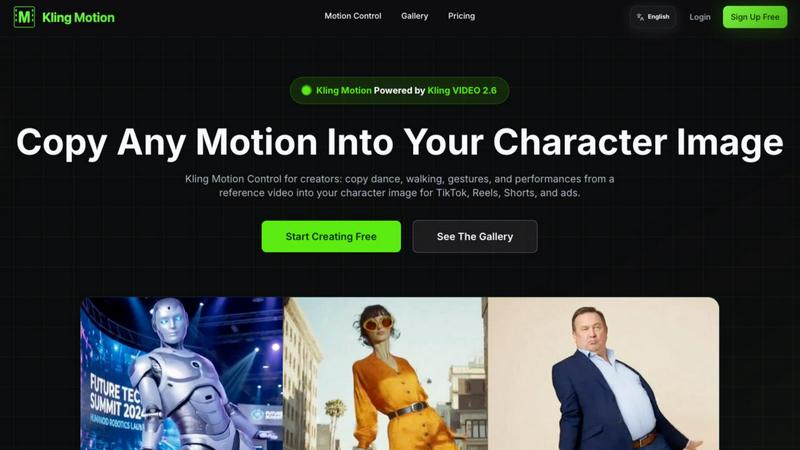
Kling Motion is a cutting-edge AI-powered motion transfer tool that leverages the capabilities of Kling VIDEO 2.6 to revolutionize video creation. Specifically designed to transform static character images into vibrant, motion-driven videos, it enables creators to seamlessly copy dynamic movements from reference videos. Whether it's dancing, walking, or performing gestures, Kling Motion allows users to generate professional-looking content for platforms like TikTok, Instagram Reels, YouTube Shorts, and ad campaigns without the need for complex manual animation. This makes it an invaluable tool for content creators, marketers, and anyone looking to add life to their visual projects. With Kling Motion, users can save time and enhance creativity, bringing their characters to life with just a few clicks.
Frequently Asked Questions
Blueberry FAQ
Is Blueberry really free during the beta phase?
Yes, Blueberry is completely free to use during its beta phase, allowing users to explore all its features without any cost.
Which AI models can I connect to Blueberry?
You can connect various AI models to Blueberry, including Claude, Codex, and Gemini, through its integrated MCP server for enhanced productivity.
Can I use Blueberry for team collaboration?
Absolutely! Blueberry’s workspace allows teams to collaborate effectively by keeping all necessary tools and context within a single environment.
What operating system is required to run Blueberry?
Blueberry is exclusively available for macOS, ensuring a seamless experience for Apple users looking to enhance their development workflow.
Kling Motion FAQ
What is Kling Motion? How is it different from typical AI Video Generation?
Kling Motion is an AI-based tool that specifically focuses on motion transfer, allowing users to copy movements from reference videos to character images. Unlike typical AI video generation tools that may focus solely on creating videos from scratch, Kling Motion emphasizes dynamic motion replication for enhanced realism.
What is Kling Motion Control? Who is it for?
Kling Motion Control is the feature within Kling Motion that enables users to precisely transfer movements to character images. It is designed for creators, marketers, educators, and anyone who wants to produce high-quality motion videos without manual animation skills.
What's the relationship between Kling VIDEO 2.6 and Kling Motion Control?
Kling Motion is powered by Kling VIDEO 2.6, which provides the underlying technology for motion transfer. This relationship ensures that users benefit from the latest advancements in AI video processing while creating motion-driven content effortlessly.
What materials do I need to use Kling Motion Control?
To use Kling Motion Control, users need a motion reference video (3-30 seconds) and a character image. The tool allows for flexibility in sourcing motion references, whether from the provided library or personal uploads.
Alternatives
Blueberry Alternatives
Blueberry is an innovative macOS application designed for developers, combining an editor, terminal, and browser into a singular, focused workspace. This product builder's workspace eliminates the hassle of juggling multiple windows, streamlining the development process and boosting productivity. Users often seek alternatives to Blueberry for various reasons, including pricing considerations, the desire for specific features, or compatibility with different operating systems. When searching for an alternative, look for an application that offers similar functionality, a user-friendly interface, and robust integration capabilities with other tools. Additionally, consider the responsiveness of the support team, the community surrounding the product, and the overall performance to ensure it meets your development needs effectively.
Kling Motion Alternatives
Kling Motion is an advanced AI-powered motion transfer tool that belongs to the realm of digital animation and video production. It is specifically designed to enhance static character images by infusing them with dynamic motion, allowing users to create engaging videos effortlessly. However, many users often seek alternatives to Kling Motion for various reasons, such as pricing concerns, feature sets, or compatibility with different platforms and workflows. The pursuit of the ideal tool can be driven by specific project requirements or the desire for unique features that better suit individual creative visions. When searching for alternatives to Kling Motion, it's essential to consider several factors to ensure you find the right fit. Key aspects include pricing structures that align with your budget, the range of features offered, ease of use, and compatibility with your preferred operating systems or software environments. Additionally, evaluating customer support and community resources can significantly enhance your overall experience with any motion transfer tool.