LoadTester

LoadTester gives your team infra-free load testing with real-time analytics and battle-tested reliability against any competitor.

0 upvotes
Visit
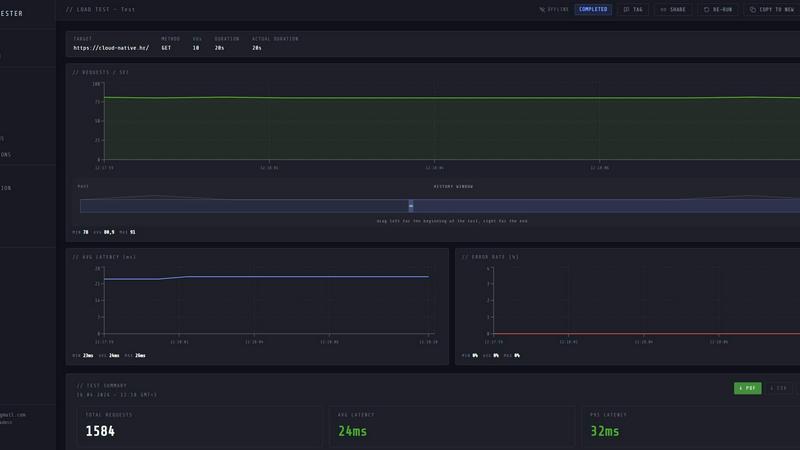
LoadTester application interface and features

About LoadTester

LoadTester is a modern, cloud-native HTTP and API load testing tool engineered by Cloud Native d.o.o. for engineering teams that demand repeatable, battle-tested performance checks without the overhead of managing infrastructure. Unlike traditional tools that require complex setup, worker orchestration, and dedicated servers, LoadTester delivers instant distributed load tests directly from your browser or CI/CD pipeline. It allows developers and QA teams to create a test, choose virtual users or requests per second, and monitor live latency and error rates in real time. With support for up to 10,000 virtual users and 10,000 requests per second, a cold start time of under 3 seconds, and auto-stop thresholds, it is built for scale, performance, and reliability. The platform includes live analytics, p95 and error-rate thresholds, scheduled baselines, run-to-run comparisons, exports, and workflow integrations. It is designed for teams that want simple, repeatable performance checks to catch regressions before users notice, all while eliminating the need to provision any infrastructure.

Features of LoadTester

Instant Distributed Execution

Start distributed load tests in seconds with zero infrastructure setup. LoadTester automatically scales workers, handles orchestration, and manages execution flow, allowing your team to focus on results rather than configuration. With a cold start time of under 3 seconds and the ability to dispatch up to 8 workers instantly, you can launch tests from the dashboard or CI/CD pipeline without any scheduling headaches or queue delays.

Live Real-Time Analytics

Watch requests, latency, failures, throughput, and bottlenecks update live during the run. The console displays critical metrics including RPS, P50, P95, and P99 latency, error counts, and active virtual users, all streaming in real time. This gives you immediate visibility into how your application performs under load, enabling quick decisions and instant identification of performance degradation.

Smart Auto-Stop Thresholds

Set failure or latency thresholds and automatically stop tests when things go sideways. LoadTester allows you to define guardrails for P95 latency, error rates, and regression baselines. When a threshold is breached, the test auto-stops, preventing wasted resources and alerting your team immediately via Slack, email, or webhook. This ensures you never accidentally overload your systems or miss critical performance issues.

CI/CD Ready Integrations

Run tests on every deploy with seamless CI/CD integration. LoadTester supports webhooks, Slack and email alerts, and API access for automated workflows. You can schedule tests to run daily, trigger them from release bots, and export results in PDF, CSV, or JSON formats. This makes it easy to incorporate performance checks into your development pipeline and catch regressions before they reach production.

Use Cases of LoadTester

Pre-Release Performance Validation

Before launching a new feature or deployment, engineering teams can run load tests against staging or production endpoints to validate performance. By setting P95 latency and error rate thresholds, teams can automatically stop tests and receive alerts if performance degrades beyond acceptable limits. This ensures that only performant code reaches users, preventing negative experiences and revenue loss.

Continuous Regression Monitoring

Schedule daily or nightly baseline tests to continuously monitor application performance over time. LoadTester compares run-to-run results, automatically flagging regressions when latency increases by more than 15% or error rates spike. This proactive approach catches performance degradation early, allowing teams to investigate and fix issues before they impact customers.

Capacity Planning and Scaling Validation

When planning infrastructure upgrades or scaling events, teams can use LoadTester to simulate high traffic loads of up to 10,000 virtual users or 10,000 requests per second. The live analytics show exactly how your system behaves under stress, identifying bottlenecks and validating that your infrastructure can handle projected growth. This data-driven approach eliminates guesswork from capacity planning.

API Gateway and Endpoint Testing

Developers can test individual API endpoints, such as checkout flows, authentication services, or search queries, with specific HTTP methods and target URLs. LoadTester supports GET, POST, PUT, and DELETE requests, allowing granular testing of critical paths. The live charts and summary reports provide clear, shareable data that teams can act on, ensuring each endpoint meets performance SLAs.

Frequently Asked Questions

What infrastructure do I need to run LoadTester?

None. LoadTester is a fully managed, cloud-native service that requires zero infrastructure setup. You simply create a test in the browser or via API, and LoadTester automatically provisions and scales workers to execute the load test. There is no need to manage servers, configure load generators, or handle worker orchestration.

How fast can I start a load test?

You can start a load test in under 3 seconds. LoadTester's cold start time from test creation to first request is less than 3 seconds, with zero queue delay. This allows you to quickly spin up tests on demand, whether from the dashboard or directly from your CI/CD pipeline.

What metrics are available during a live run?

During a live run, LoadTester streams real-time metrics including requests per second (RPS), P50, P95, and P99 latency, total requests, error count and rate, active virtual users, and data sent/received. These metrics are displayed on live charts that update continuously, giving you full visibility into test performance as it happens.

Can I compare results between different test runs?

Yes. LoadTester supports run-to-run comparisons, allowing you to compare current test results against baselines or previous runs. This feature automatically flags performance regressions when latency increases by more than 15% or error rates exceed set thresholds, making it easy to track performance trends over time and catch issues early.

Pricing of LoadTester

LoadTester offers a Free plan that allows you to run tests immediately without any upfront cost. For detailed pricing information on higher tiers, including limits on virtual users, requests per second, and additional features like scheduled tests and API access, please visit the LoadTester pricing page on their website.

Top Alternatives to LoadTester

Nick Launches

Builders: Get found, get a link.

Headless Domains

Definitive identity standard.

ul0

ul0 shortens links for free with no signup and lets you track clicks and split expenses using UPI QR codes.

Self-Healing Integrations

Plumbed.io delivers self-healing integrations that automate maintenance, ensuring your enterprise connections are fast, reliable, and cost-effective.

Woz

Woz is an AI mobile app builder that empowers entrepreneurs to create apps faster, cheaper, and more efficiently than ever before.

Seedance 2.0 Web & API

Seedance 2.0 delivers crisp short-form AI videos from text or images, up to 1080p at 15 seconds, with generous daily credits.
ProcessSpy

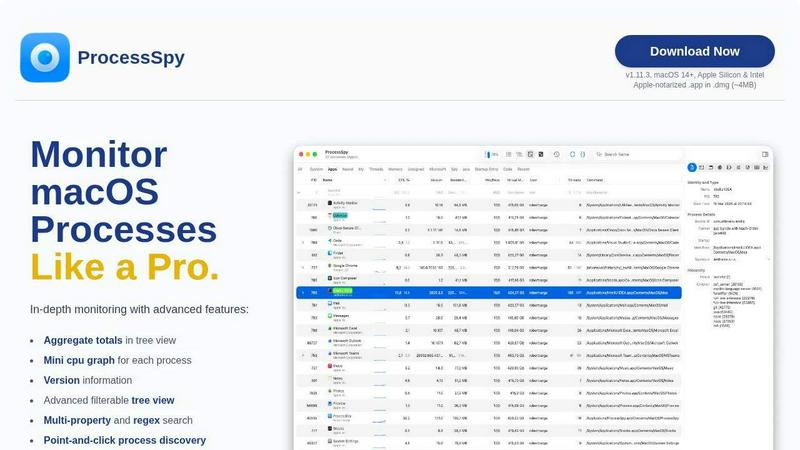
ProcessSpy is an advanced macOS tool for in-depth process monitoring, offering powerful filters, real-time insights, and seamless integration.
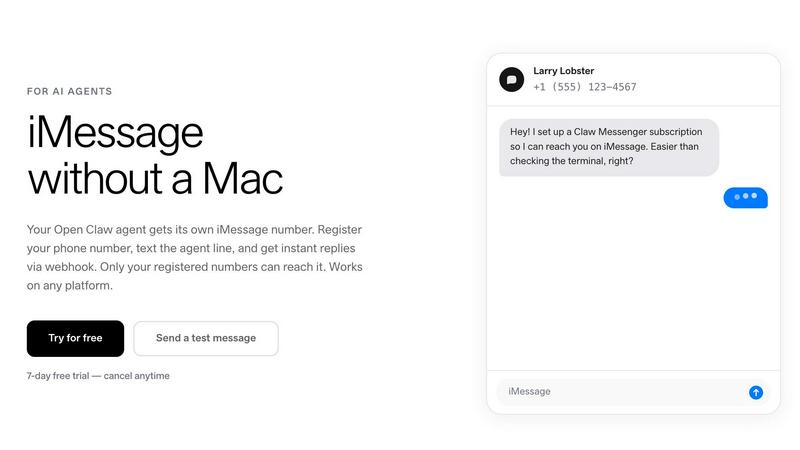
Claw Messenger

Give your AI agent its own iMessage number to communicate directly and securely from any device.